
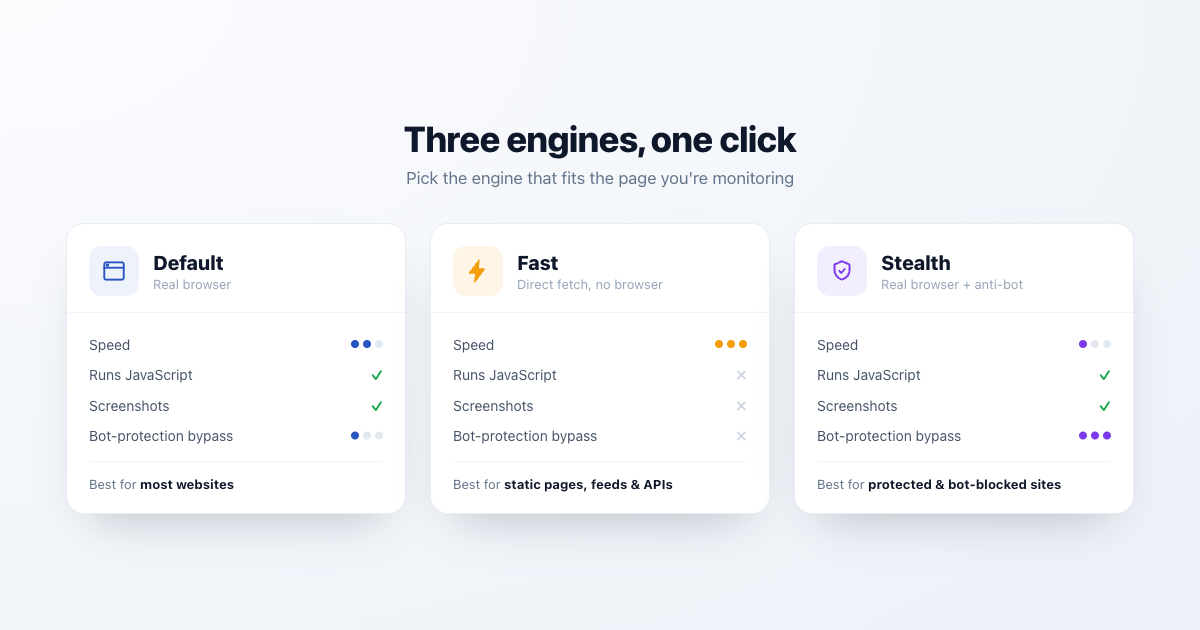
PageCrawl renders web pages using a real browser, executing JavaScript and loading dynamic content exactly as a visitor would see it. You can choose between three engine modes depending on the page you are monitoring.
Available Engines
| Engine | Best For | How It Works |
|---|---|---|
| Default | Most websites | Full browser with JavaScript rendering |
| Stealth | Bot-protected pages | Enhanced mode for reliably accessing protected pages |
| Fast | Static pages, speed | Optimized for speed when JavaScript rendering is not needed |
Default Engine
The default engine loads pages using a real browser. It processes JavaScript, waits for dynamic content, handles cookies, and renders the page as a real user would see it. This works for the majority of websites.
Stealth Mode
Some websites use bot protection services that block automated access. Stealth mode is designed to reliably access these pages.
PageCrawl can automatically switch to Stealth mode in several situations: on the first check of a new monitor, when workspace auto-stealth is enabled, or for price and availability monitors. It also activates when a page is blocked (timeout, 403 Forbidden, or 401 Unauthorized). You can also enable it manually per page.
Fast Mode
Fast mode is optimized for speed when JavaScript rendering is not needed, making it significantly faster and more resource-efficient. Use this for:
- Static HTML pages that do not rely on JavaScript
- API responses and JSON endpoints
- Pages where you only need text or HTML content
- High-frequency monitoring where speed matters
- Very dynamic, JavaScript-heavy pages that change constantly (rotating banners, injected ads, live counters, A/B-tested widgets). Because Fast fetches the raw HTML without executing JavaScript, it skips all that script-driven churn and only reports changes in the underlying source. Switching a noisy page from Default to Fast can dramatically cut false positives.
Fast mode supports Full Page, Full Page (iframe), Text, Text (all matches), Text (all matches sorted), Number, Price, Rating, Reviews, HTML, HTML (all matches), Boolean/Text Presence, Availability, Links, Feed, and SEO Tags element types. It does not support Visual comparison, screenshots, or actions (click, scroll, type).
Choosing the Right Engine
| Scenario | Recommended Engine |
|---|---|
| Standard website | Default |
| JavaScript-heavy SPA | Default |
| Bot-protected page | Stealth |
| Page returning 403 or timeouts | Stealth |
| Static HTML page | Fast |
| Noisy page with constant JavaScript-driven changes | Fast (ignores the JS churn) |
| API or JSON endpoint | Fast |
| Need screenshots or visual diff | Default or Stealth |
| High-frequency checks (every 5 min) | Fast (if page allows) |
Configuration
Set the engine per page in the page editor under Power User settings, or apply it in bulk via Bulk Edit.
Related Articles
- Monitoring Pages Behind Bot Protection - Handling bot-protected pages
- Custom Proxies - Use your own proxy servers
- Advanced Configuration - Power User mode and engine selection