
You can see exactly how many checks you've used, your tracked-page count, and when your usage resets on the Usage page (Settings → Usage):
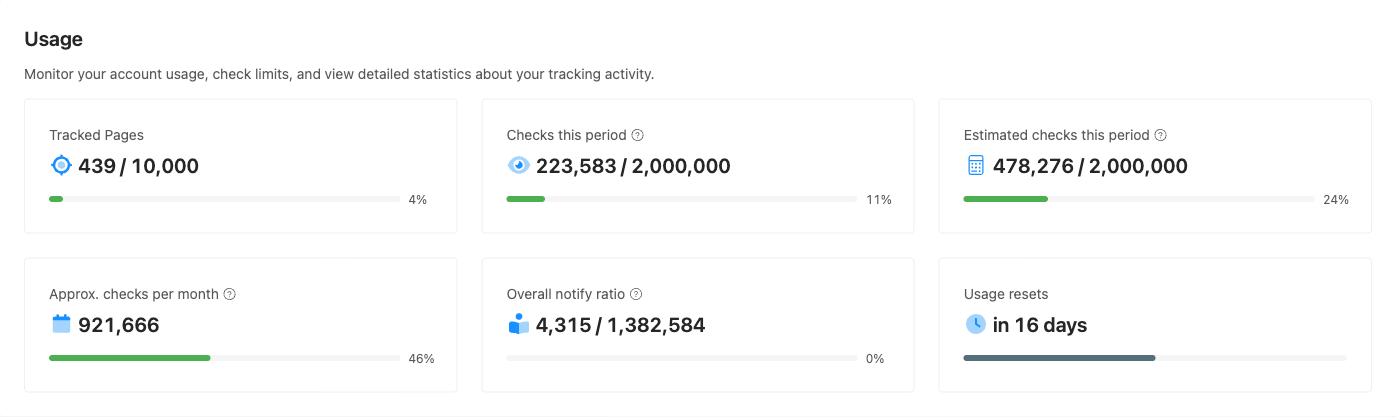
Checks, Tracked Pages and archive storage count the whole team, because they are measured against your plan. If you have not been added to every workspace in the team, the other figures on the page, such as changes and notifications, cover only the workspaces you have been added to.
Standard includes 15,000 check credits per month. Enterprise and Ultimate each include 100,000. A browser check uses 1 credit; a Fast check uses 1/5th of a check credit. Fast works on suitable pages without screenshots or page actions. AI credits are separate. Larger plan quantities add monitoring capacity.
Free includes 6 monitored pages and 220 monthly check credits, enough for up to 1,100 Fast checks. One page checked hourly for 30 days makes 720 checks and uses 144 Fast credits, leaving 76. Fast is available on every plan; the one-minute frequency requires Ultimate.
How many checks I need?
It all depends on how many pages you want to track and how frequently. Also, adjusting your schedule may reduce the number of checks needed. You may start with the Standard plan and upgrade if you notice that you need more.
For one page checked throughout a 30-day period:
| Frequency | Page checks | Browser check credits | Fast check credits |
|---|---|---|---|
| Daily | 30 | 30 | 6 |
| Every hour | 720 | 720 | 144 |
| Every 5 minutes | 8,640 | 8,640 | 1,728 |
Ultimate also supports every-minute checks with Fast. One page checked every minute makes 43,200 checks over 30 days and uses 8,640 Fast credits. Browser checks on Ultimate can run as often as every 2 minutes.
Multiply these totals by your number of pages. Allow for other monitors, extra checks and the actual number of days in your billing period. If a monitor uses a different engine, its credit cost changes too. The fastest available frequency does not mean the plan includes enough credits to run every page that often.
Estimating based on current usage
If your estimated number of checks for this period will be over the limit, you will see an alert. You can check your usage statistics to find out your current estimate.