
PageCrawl provides three ways to integrate page monitoring into your own applications and workflows: a REST API to manage monitors programmatically, webhooks that send change data to your server, and RSS feeds for lightweight consumption.
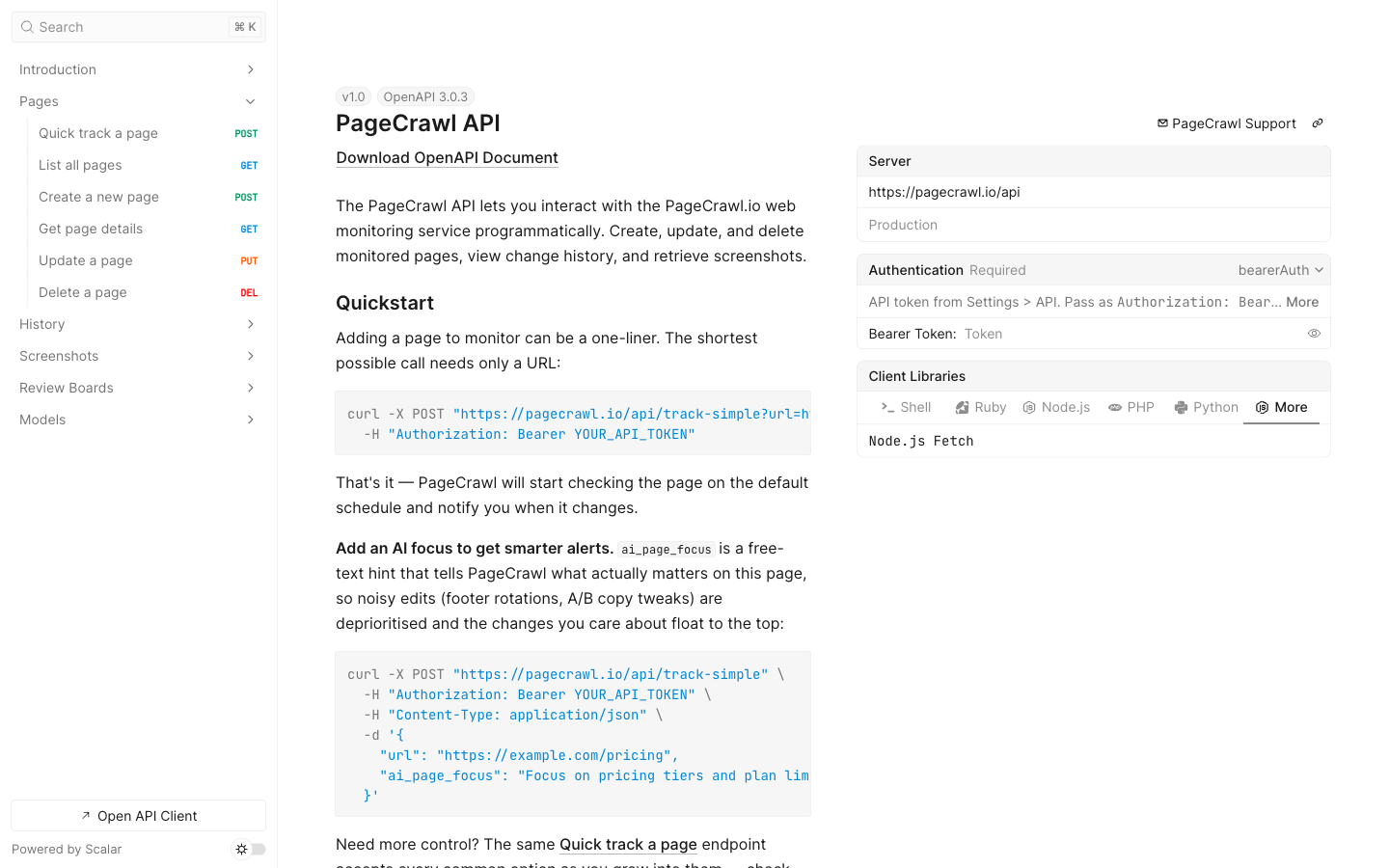
Authentication
All API requests require a Bearer token. Go to Settings > API access and, in the API Tokens card, click Create Token, then copy the token right away (it is not shown again).
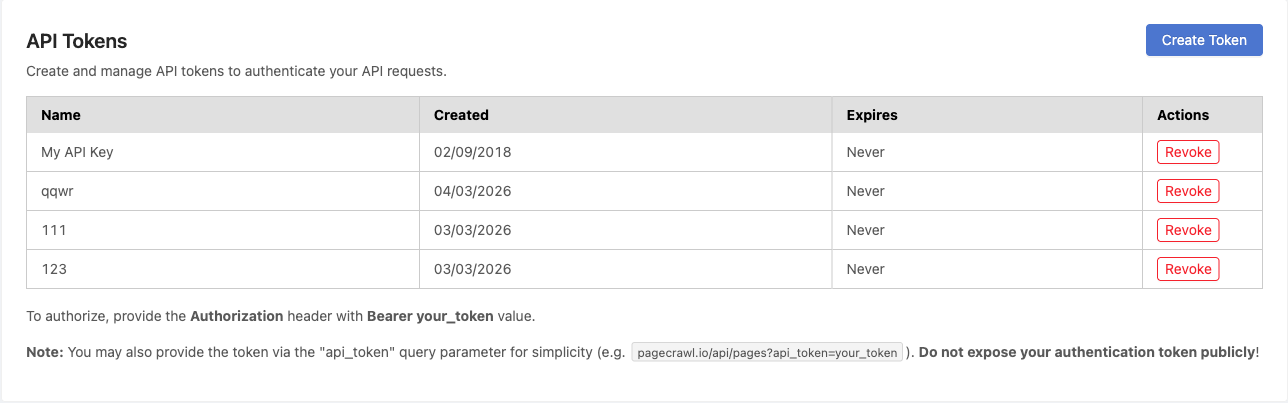
Include the token in the Authorization header on every request:
Authorization: Bearer YOUR_API_TOKENErrors come back as JSON with a message field (plus errors on a 422 validation error), and a 429 carries a Retry-After header with the seconds to wait. For the full reference with every endpoint, parameter, and response schema, see pagecrawl.io/developers.
Quick Start
Step 1: Create a monitor
The simplest way to start monitoring is the /api/track-simple endpoint. It only requires a URL.
curl -X POST "https://pagecrawl.io/api/track-simple" \
  -H "Authorization: Bearer YOUR_API_TOKEN" \
  -H "Content-Type: application/json" \
  -d '{
    "url": "https://example.com/pricing",
    "tracking_mode": "fullpage",
    "ai_page_focus": "Alert me if the price drops or the item goes out of stock; skip header, footer, and cookie-banner changes"
  }'
import requests
response = requests.post(
"https://pagecrawl.io/api/track-simple",
headers={"Authorization": "Bearer YOUR_API_TOKEN"},
json={"url": "https://example.com/pricing", "tracking_mode": "fullpage", "ai_page_focus": "Alert me if the price drops or the item goes out of stock; skip header, footer, and cookie-banner changes"},
)
page = response.json()
print(f"Monitoring: {page['url']} (ID: {page['id']})")const response = await fetch("https://pagecrawl.io/api/track-simple", {
method: "POST",
headers: {
"Authorization": "Bearer YOUR_API_TOKEN",
"Content-Type": "application/json",
},
body: JSON.stringify({ url: "https://example.com/pricing", tracking_mode: "fullpage", ai_page_focus: "Alert me if the price drops or the item goes out of stock; skip header, footer, and cookie-banner changes" }),
});
const page = await response.json();
console.log(`Monitoring: ${page.url} (ID: ${page.id})`);Defaults: with only a URL, the new monitor is checked daily, alerts by email, has screenshots on, removes cookie banners and overlays before each capture, and picks its location automatically. Send notifications to choose the channels (mail, slack, discord, telegram, teams; chat channels that are not set up in the workspace are dropped), or [] to turn every alert off, phone alerts included. Leaving it out, or sending null, means email. Send actions to replace the default page steps, or [] for none. If your team is at its active page limit, the monitor is created paused.
Tracking modes: fullpage (all visible text, default), content_only (text without navigation/headers/footers), reader (reader-mode content), price (auto-detect prices), specific_text (requires selector), specific_number (requires selector). Other modes, such as feed, json_path (requires selector) and ai_extract (requires prompt), are listed in the API reference.
ai_page_focus (optional) is free text telling the AI what matters most on this page, for example "Alert me if the price drops or the item goes out of stock; skip header, footer, and cookie-banner changes". It sharpens change summaries and importance scores.
Frequency: an optional frequency field (in minutes) sets how often the page is checked, from the fixed intervals the API reference lists, for example 1440 for daily, 60 for hourly or 15 for every 15 minutes. The fastest interval depends on your plan. When omitted, it defaults to daily.
Step 2: Set up a webhook
curl -X POST "https://pagecrawl.io/api/hooks" \
  -H "Authorization: Bearer YOUR_API_TOKEN" \
  -H "Content-Type: application/json" \
  -d '{
    "target_url": "https://your-server.com/webhook",
    "match_type": "all",
    "events": ["change_detected"]
  }'
The response includes the webhook's signing_secret, which you need to verify deliveries.
Match types: all (every monitor in the workspace), monitors (with change_ids), tags (with tag_ids), folders (with folder_ids, subfolders included) and domains (with websites in domains, matched against the exact host name). Every type except all needs at least one entry in its list; an empty list is refused.
Events: change_detected (the default) and error.
target_url must start with https://, and Slack, Discord and Microsoft Teams addresses are refused (connect those apps under Settings > Integrations, in Notification Channels). Creating a webhook does not check for an existing one with the same address, so list them with GET /api/hooks first. Change a webhook with PUT /api/hooks/{id}, which needs target_url on every call (send the current one to keep it); "is_active": true turns a switched-off webhook back on. PUT /api/hooks/{id}/test sends a test delivery, and DELETE /api/hooks/{id} removes a webhook you created, or any webhook in a workspace you were added to. Creating, changing, testing and removing webhooks needs the Owner, Administrator or Standard User role.
Step 3: Handle webhook payloads
PageCrawl POSTs a JSON payload to your endpoint for every change it saves, including a monitor's first capture and changes that sent no alert, and for failed checks when the error event is on. Skip what you do not want to act on:
from flask import Flask, request

app = Flask(__name__)

@app.route("/webhook", methods=["POST"])
def handle_change():
    data = request.get_json()
    if data.get("status") != "ok":
        return "", 200  # a failed check: the values repeat the last saved check
    if "previous_check" in data and data["previous_check"] is None:
        return "", 200  # the monitor's first capture: a starting value, not a change
    print(f"Change detected: {data['title']}")
    print(f"Difference: {data['human_difference']}")
    if data.get("ai_summary"):
        print(f"AI Summary: {data['ai_summary']}")
    return "", 200
Verify the X-PageCrawl-Signature header before trusting a delivery. The reference implementations show how in Python, Node.js and PHP.
Key payload fields: title, contents (the current value of the main tracked element), difference (a whole-number percentage: the share of text that changed, or the signed move of a number), human_difference, ai_summary, ai_priority_score (0 to 100 as a decimal string, or null), markdown_difference, page_screenshot_image, previous_check (null on a first capture).
API Endpoints
| Method | Endpoint | Description |
|---|---|---|
GET |
/api/pages |
List monitored pages (add folder=* to list every active page, including pages in folders) |
POST |
/api/pages |
Create a new monitored page |
GET |
/api/pages/{slug} |
Get page details and latest values |
PUT |
/api/pages/{id} |
Update page settings (fields you leave out keep their values) |
DELETE |
/api/pages/{id} |
Delete a monitored page |
PUT |
/api/pages/{id}/check |
Queue a check outside the schedule |
PUT |
/api/pages/{id}/status |
Pause a page, or resume a paused one (each call switches it) |
GET |
/api/pages/{id}/history |
Get check history for a page |
GET |
/api/pages/{id}/checks/{checkId}/diff.markdown |
Get a text diff as markdown |
GET |
/api/pages/{id}/checks/{checkId}/before-after.jpg |
Get the page before and after a change, side by side |
POST /api/pages takes the full configuration. Left out, notifications means email alerts; [] or null means no alerts. For the complete endpoint list with parameters and schemas, see pagecrawl.io/developers.
Webhooks
Webhooks send an HTTP POST request with a JSON body to your endpoint for every change a check saves and, if you turn on the Error event, for failed checks. Set them up under Settings > Integrations > Webhooks, or with POST /api/hooks as shown above.
| Setting | Description |
|---|---|
| Webhook URL | The HTTPS endpoint that receives the POST request |
| Send for | All monitors, or monitors by tag, folder, website, or a hand-picked list |
| Events | Change Detected, Error, or both |
| Payload Fields | Essential (11 fields, the default for webhooks created in the app), All fields, or Custom |
Available payload fields include page ID, title, change summary, diff data (markdown and HTML), screenshots, AI summary, AI priority score, and per-element values. Webhooks created through the API without payload_fields send every field. See the Webhook Integration guide for the full field reference, which checks are delivered, and example payloads.
Deliveries include each monitor's first capture and changes that sent no alert, and ai_priority_score is null for changes where only a price, number, stock or availability value moved. Filter on status, previous_check and the values before raising alerts of your own.
Delivery and retries: Return a 2xx status within 60 seconds; any other response, or a timeout, counts as a failure. A failed delivery is attempted up to 15 times in total, with a growing delay. A retry is dropped once the monitor has a newer check, so after downtime on your side, read GET /api/pages/{id}/history to catch up on the changes you missed. A 410 Gone answer deletes the webhook, and a 403 or 404 on the fifth attempt switches it off.
RSS Feeds
Prefer to consume changes in an RSS reader or automation tool? PageCrawl can generate an Atom feed of detected changes scoped to all pages, tags, folders, a domain, or specific monitors. See the RSS Feeds guide for setup.
Download the OpenAPI Spec
The full specification is available as an OpenAPI 3.0 file you can import into Postman, Insomnia, or any API client:
https://pagecrawl.io/api/openapi.yamlCommon Use Cases
- Custom dashboards - Pull change data into your own monitoring dashboard via API
- Automation workflows - Trigger actions in n8n, Make, Zapier, or custom scripts via webhooks
- Database logging - Store detected changes in your own database
- Alerting systems - Forward important changes to PagerDuty, Opsgenie, or similar
- Coding agents - Add PageCrawl's
pagecrawl-apiskill so Claude Code, Codex or Cursor writes integrations that use these endpoints and verify webhooks correctly
Related Articles
- Full API Reference - Interactive OpenAPI reference with every endpoint and schema
- Webhook Integration - Detailed webhook setup, payload reference, and testing
- Advanced Integrations - Copy-paste polling and webhook code in Python, Node.js, and PHP
- PageCrawl Skills for AI Agents - Skills that teach AI agents to use PageCrawl and its API
- Zapier Integration - Connect PageCrawl to 5,000+ apps
- n8n Integration - Open-source workflow automation
- RSS Feeds - Subscribe to changes via RSS