
Webhooks let PageCrawl send an HTTP POST request to your own URL each time a check saves a change and, if you choose, when a check fails. Use them to connect PageCrawl with custom applications, automation platforms, databases, or any service that accepts HTTP requests.
Setting Up a Webhook
- Go to Settings > Integrations and open Webhooks under More Integrations (the API access page links there too, through Manage Webhooks)
- Click + New webhook
- Enter the Webhook URL and configure the options below
- Click Create webhook
Creating, changing or testing a webhook needs the Owner, Administrator or Standard User role. Viewers can see a workspace's webhooks but cannot change them.
Configuration Options
Webhook URL: The endpoint that receives the POST request. It must start with https://. Slack, Discord and Microsoft Teams addresses are refused here: connect those apps under Settings > Integrations, in Notification Channels, which formats messages for them.
Send for: Which monitors trigger the webhook. A webhook only covers monitors in its own workspace.
- All monitors (default)
- By tag
- By folder (monitors in subfolders are included)
- By website: monitors whose address is on exactly that host, so
example.comdoes not coverwww.example.com - Specific monitors
Events:
- Change Detected (on by default): sent for each change a check saves
- Error: sent when a check fails to load the page
Active: When editing a webhook, switch it off to stop deliveries without deleting it.
Which Checks Are Delivered
A Change Detected delivery is sent every time PageCrawl saves a change, whether or not that change sent an alert. A check that finds no change sends nothing. Deliveries include:
- A monitor's first capture, the first value pushed to a data source, and the first check after a monitor's history is cleared.
previous_checkisnullbecause there is nothing to compare yet, so treat these as starting values rather than changes. - Changes that sent no alert: changes scored below the monitor's Minimum importance, changes like ones marked as not useful, the first change after a monitor was saved with Skip first notification, and values saved without meeting the monitor's alert conditions.
A check where only a stock level moved, without reaching a Stock Alert, is not delivered.
An Error delivery is sent for each failed check, apart from short-lived server errors, once the monitor has saved at least one check. It carries the monitor's latest saved check, so its id, values and differences repeat a check you may already have, and status names the error.
Each saved check has its own id. Because Error deliveries repeat an earlier id, and retries, Test Webhook and Sync History can send a check again, store the ids you have processed and treat a delivery as a new change only when its id is new to you and previous_check is not null. status and event_type describe the monitor when the delivery is sent: usually ok and change_detected, but a saved change can arrive with an error status when, for example, the new capture holds no readable price.
The payload does not say whether PageCrawl alerted. ai_priority_score is null for first captures, for changes where only a price, number, stock or availability value moved, for changes like ones marked as not useful, and while AI analysis is off, so a missing score does not mean a change is unimportant.
Payload Fields
Webhooks created in the app start with Essential, 11 fields: id, title, changed_at, status, difference, human_difference, short_summary, markdown_difference, page, ai_summary and ai_priority_score. Under Payload Fields, choose All fields to receive everything, or Custom to pick fields one by one. Essential leaves out previous_check, event_type, contents and page_elements, so add the ones your receiver reads. A webhook created through the API without payload_fields sends every field, event_type included.
| Group | Fields |
|---|---|
| Basic | id (the check ID), title, changed_at, visual_diff (how much of the screenshot changed, in percent), difference, human_difference, short_summary (a shortened AI summary when there is one, otherwise a short description of the change) |
| Differences | markdown_difference, html_difference (can be large) |
| Images | text_difference_image, page_screenshot_image (signed links; the screenshot only while screenshots are on) |
| Page | page (id, name, url, url_tld, slug, link, folder), page_elements (one entry per tracked element) |
| Content | contents (the main tracked element's value), original (the text a number or price was read from), elements (how many page elements the main tracked element matched; sent with All fields) |
| Metadata | content_type (the page's HTTP Content-Type, such as text/html, not the tracking mode), status, event_type (change_detected or error) |
| Comparison | previous_check (the previous check's values and differences; null on a first capture) |
| JSON | json, json_patch (for monitors whose value is JSON) |
| AI | ai_summary, ai_priority_score (0 to 100 as a decimal string such as "45.00", or null) |
difference is a percentage, as a whole number. For text it is the share of characters that changed; for numbers and prices it is the signed move from the previous value, negative for a drop. human_difference says the same in a sentence, such as "The value has decreased by -10% from the last check (14th Jan)".
Testing a Webhook
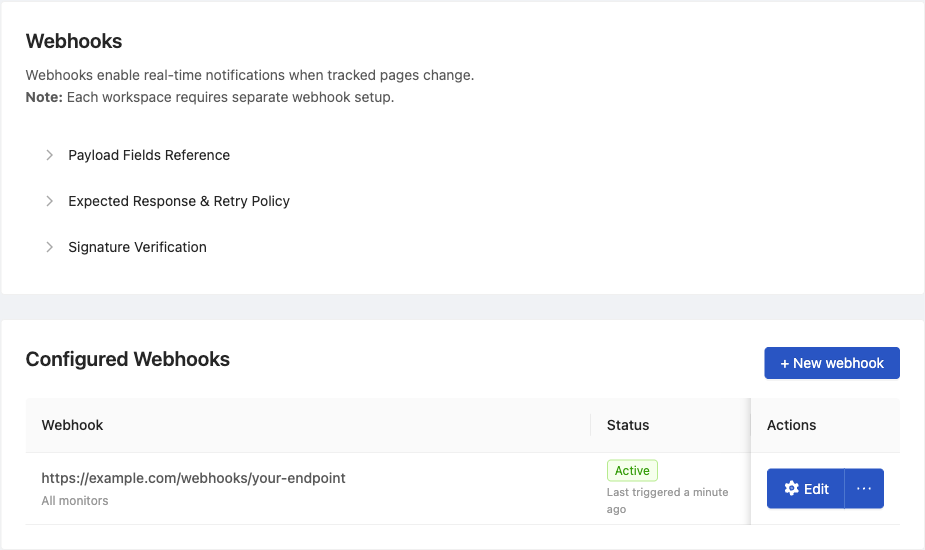
In the Configured Webhooks list, open the menu next to the webhook's Edit button:
- Test Webhook sends one real delivery built from the latest check of a monitor the webhook covers (the covered monitor checked most recently), then shows PageCrawl's answer, which names that monitor. Nothing is sent when none of them has a check yet, or when the webhook is switched off.
- View Log shows each delivery attempt and how your endpoint answered.
- Sync History sends the changes already saved for the covered monitors, oldest first: up to 100 per monitor and 1,000 in total.
Test Webhook, Sync History and Remove work for any Owner, Administrator or Standard User, on webhooks a teammate created too. Members who cannot edit see only View Log, and a View button instead of Edit.
Through the API, PUT /api/hooks/{id}/test sends the same test delivery and takes an optional monitor_id (the ID or slug of a monitor the webhook covers).
Responses and Retries
Answer with a 2xx status within 60 seconds, and do slow work after responding. When a delivery fails:
- It is attempted up to 15 times in total, waiting longer each time (the attempt number squared, in minutes).
- A retry is dropped once the monitor has a newer check, so after your endpoint has been down, catch up from the check history (
GET /api/pages/{id}/history). - A
410 Goneanswer deletes the webhook. - A
403or404on the fifth attempt switches the webhook off. Turn it back on with the Active switch once the endpoint is fixed. - A webhook whose deliveries run out of retries 20 times in a row is switched off.
- Redirects are followed only to
httpsaddresses, and a301,302or303redirect turns the POST into a GET without the body, so point the webhook at the final address.
The workspace's members get an in-app notification when deliveries keep failing and when a webhook is switched off or deleted. Requests are sent with the User-Agent header PageCrawl.io Webhook Sender/1.0.
Example Payload
A text change on a pricing page, with some fields left out:
{
  "id": 12345,
  "title": "Pricing - Example.com",
  "status": "ok",
  "event_type": "change_detected",
  "content_type": "text/html; charset=utf-8",
  "changed_at": "2026-01-15T10:30:00.000000Z",
  "visual_diff": 3,
  "difference": 2,
  "human_difference": "The value has increased by 2% from the last check (14th Jan)",
  "short_summary": "The Starter plan now includes 5 projects instead of 3.",
  "ai_summary": "The Starter plan now includes 5 projects instead of 3.",
  "ai_priority_score": "45.00",
  "page": {
    "id": 987,
    "name": "Pricing - Example.com",
    "url": "https://example.com/pricing",
    "url_tld": "example.com",
    "slug": "pricing-example-com",
    "link": "https://pagecrawl.io/app/pages/pricing-example-com",
    "folder": null
  }
}
The page_elements Array
The page_elements array (in All fields, or picked under Custom) has one entry per tracked element on the monitor. Each entry includes two identifiers:
element_id- the stable id of the tracked element. This id stays the same across every check, so use it to match a value to a specific tracked element in your own system.id- the id of this particular reading (the per-check record). This changes on every check, so do not use it as a stable key.
{
  "id": 12345,
  "title": "Product Page - Example.com",
  "page_elements": [
    {
      "id": 998877,
      "element_id": 4012,
      "label": "Price",
      "type": "price",
      "contents": "89.00",
      "elements": 1,
      "original": "Price: $89.00",
      "difference": -10,
      "human_difference": "The value has decreased by -10% from the last check (14th Jan)",
      "hash": "5f0c2b1e9d7a4c3b8e6f1a2d3c4b5a69",
      "changed": 1,
      "short_summary": "$99.00 ↓ $89.00 (10% less)"
    }
  ]
}
The previous_check.page_elements array (when included) uses the same shape, so you can pair an element's current and prior values by element_id.
Use Cases
- Custom dashboards - Feed change data into your own monitoring dashboard
- Database logging - Store detected changes in your own database
- Automation workflows - Trigger actions in tools like n8n, Make, or custom scripts
- Alerting systems - Forward important changes to PagerDuty, Opsgenie, or similar tools, filtering as described under "Which Checks Are Delivered"
Notes
- Webhooks send data as HTTP POST with a JSON body, signed with the webhook's signing secret in the
X-PageCrawl-SignatureandX-PageCrawl-Timestampheaders. The reference implementations show how to verify them against the raw request body - Deliveries that carry whole-page text can run to several megabytes, so make sure your server accepts large request bodies
- Coding agents such as Claude Code, Codex or Cursor can load PageCrawl's
pagecrawl-apiskill to write a receiver that verifies every delivery - If you need Slack, Discord, or Teams notifications, use the dedicated integrations instead, as they format messages correctly for those platforms
- Webhooks are available on every plan
Related Articles
- Full API Reference - Interactive OpenAPI reference for the complete webhook payload schema and all related API endpoints
- API and Webhooks for Custom Integrations - Authentication and endpoint overview