
All PageCrawl.io plans include AI credits that work automatically with no setup required. This guide is for users who want to go beyond their included credits by connecting their own API key for unlimited AI usage, full model choice, and advanced features like Deep Analysis.
Note: The models named in this guide were current in September 2026. AI providers release new models every few weeks, so by the time you read this there may be newer ones, and some listed here may have been retired or renamed. The model picker in Settings > Integrations > AI always shows the models available right now, with the recommended model for each provider marked with a star. If a provider retires the model you picked, PageCrawl moves your workspace to its successor and shows you a notification in the app. The advice in this guide (start with a fast, affordable model and move up a tier only for complex pages) holds regardless of model names.
When to Use BYOK
Most users won't need BYOK since all plans include AI credits. Consider BYOK if you:
- Run out of credits regularly and need unlimited AI analyses
- Want to choose a specific AI model for different page types
- Need Deep Analysis mode (sends full page content for better context)
- Want to use the most capable models (for example GPT-6 Astra or Claude Opus 5.5) for critical pages
- Monitor sensitive content and need a specific provider's data policies
You can switch between credits and BYOK at any time in your settings.
Supported Providers and Models
| Provider | Recommended Model | Best For | Get API Key |
|---|---|---|---|
| OpenAI | GPT-5.6 Luna | Best value for most users | platform.openai.com |
| Google Gemini | Gemini 3.8 Flash | Balance of quality and cost | ai.google.dev |
| Anthropic | Claude Haiku 4.5 | Fast and accurate | console.anthropic.com |
OpenAI Models
| Model | Use Case | Notes |
|---|---|---|
| GPT-5.6 Luna | Most users | Best balance of cost and quality (recommended) |
| GPT-6 Luna | Most users | Newest generation, lowest cost |
| GPT-6 Sol | Complex analysis | Stronger reasoning at a moderate cost |
| GPT-6 Astra | Critical pages | Most capable, highest cost |
| GPT-5.4 Nano | High volume | Fast and inexpensive |
GPT-5.6 Sol and Terra stay in the picker, and older models such as GPT-5.5 and GPT-5 Mini remain selectable for existing setups.
Google Gemini Models
| Model | Use Case | Notes |
|---|---|---|
| Gemini 3.8 Flash | General use | Good balance (recommended) |
| Gemini 3.1 Pro | Complex tasks | Premium quality |
| Gemini 3.1 Flash Lite | Budget monitoring | Most affordable option |
Older models such as Gemini 3 Flash and the Gemini 2.5 family remain selectable for existing setups.
Anthropic Claude Models
| Model | Use Case | Notes |
|---|---|---|
| Claude Haiku 4.5 | Most users | Fast and cost-effective (recommended) |
| Claude Sonnet 5 | Complex tasks | Better quality, higher cost |
| Claude Opus 5.5 | Critical pages | Highest accuracy, highest cost |
Older models such as Claude Opus 5, Claude Opus 4.8 and Claude Sonnet 4.6 remain selectable for existing setups.
Step-by-Step Setup
Step 1: Get Your API Key
| Provider | Steps |
|---|---|
| OpenAI | Visit platform.openai.com > Create account > API Keys > Create new secret key > Add billing |
| Google Gemini | Visit ai.google.dev > Sign in with Google > Create project > Enable Gemini API > Generate API key |
| Anthropic | Visit console.anthropic.com > Create account > API Keys > Create new key > Add credits |
Step 2: Configure in PageCrawl.io
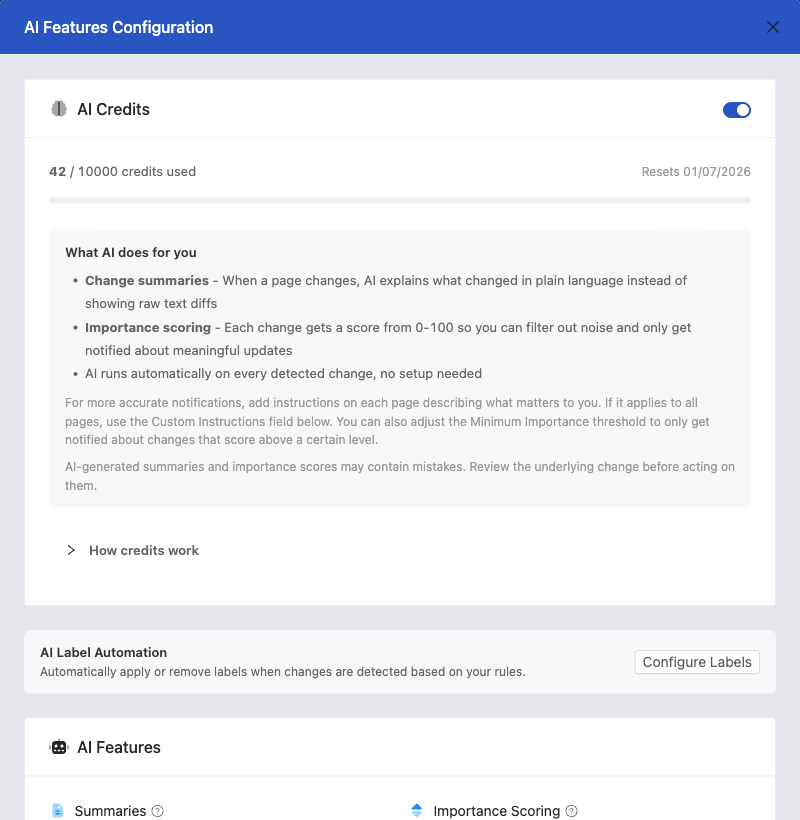
- Go to Settings > Integrations > AI
- Select your AI provider
- Paste your API key
- Choose your preferred model
- Click Test Key to verify
- Save your configuration
Your workspace will automatically switch to BYOK mode and AI credits will no longer be consumed.
Step 3: Enable AI Features
Toggle the features you want:
| Feature | Description |
|---|---|
| AI Summarization | Get intelligent summaries of page changes |
| Importance Scoring | AI scores each change from 0-100, filtering out low-priority noise |
| Custom Instructions | Add context for better analysis |
| Deep Analysis | Send full page content for better context (BYOK only) |
| Run on First Check | Get AI analysis on initial page check (BYOK only) |
Switching Back to Credits
If you want to stop using your own key and return to included credits:
- Go to Settings > Workspace > Integrations > AI
- Click Switch to included credits
- Your API key configuration is preserved in case you want to switch back later
Page-Level Configuration
You can customize AI settings at three levels:
| Level | Applies To | Best For |
|---|---|---|
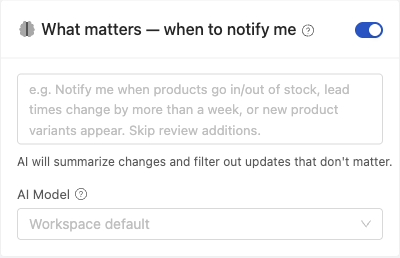
| Workspace default | All pages | General settings |
| Template override | Pages using that template | Grouped pages (e.g., all product pages) |
| Page override | Individual pages | Critical or special pages |
Example strategy (examples include, not requirements):
- Workspace default: a low-cost general-purpose model (for example, a Gemini Flash Lite-class model)
- E-commerce template: a balanced cost/quality model (for example, a GPT Luna-class model)
- Legal and ToS templates: a fast, accurate model like a Claude Haiku-class model is a good default
- Critical contracts: for cases where accuracy matters most, use a higher-end Sonnet- or Opus-class model
Model Selection Guidelines
By Priority
| Priority | Model tier (examples include) |
|---|---|
| Cost optimization | Flash Lite-class or Nano-class models (e.g., Gemini 3.1 Flash Lite, GPT-5.4 Nano) |
| Accuracy | Premium models (e.g., GPT-6 Astra, Claude Opus 5.5) |
| Speed | Fast small models (e.g., Claude Haiku 4.5, GPT-5.6 Luna) |
| Complex content | Higher-end reasoning models (e.g., Claude Sonnet 5, GPT-6 Sol) |
By Page Complexity
For most pages, a general-purpose model provides excellent results at a lower cost:
| Model | Provider | Best For |
|---|---|---|
| Gemini 3.8 Flash | General monitoring, good balance of speed and quality | |
| GPT-5.6 Luna | OpenAI | Reliable all-around performance |
For complex pages that require deeper analysis or more reasoning (e.g., dense legal documents, technical specifications, multi-section reports), choose a more powerful model:
| Model | Provider | Best For |
|---|---|---|
| Gemini 3.1 Pro | Complex documents requiring extended reasoning | |
| GPT-6 Sol | OpenAI | Nuanced analysis and detailed comparisons |
| Claude Opus 5.5 | Anthropic | Critical documents requiring highest accuracy |
Note: Start with a general-purpose model and upgrade to a more powerful one if you notice the AI missing important changes or providing superficial summaries.
Related Articles
- AI-Powered Change Detection and Smart Filtering - Learn how AI summarization and Importance Scoring work
- Choosing the Right AI Model for Website Monitoring - Compare models and pricing to find the best fit