
Workspaces let you organize your monitored pages into separate environments, each with its own settings, notifications, and team member access. Use workspaces to separate monitoring by project, client, department, or any other grouping that makes sense for your workflow.
What Each Workspace Gets
Every workspace has independent settings for:
- Monitored pages - Each workspace contains its own set of tracked pages
- Notification preferences - Separate email frequency, Slack/Discord/Teams/Telegram channels
- AI configuration - Different AI provider, model, and focus areas per workspace
- Check scheduling - Custom active hours and days for monitoring
- Timezone - Each workspace can use a different timezone
- Labels and tags - Workspace-specific labels for organizing pages
- Templates - Page discovery templates tied to each workspace
Creating a Workspace
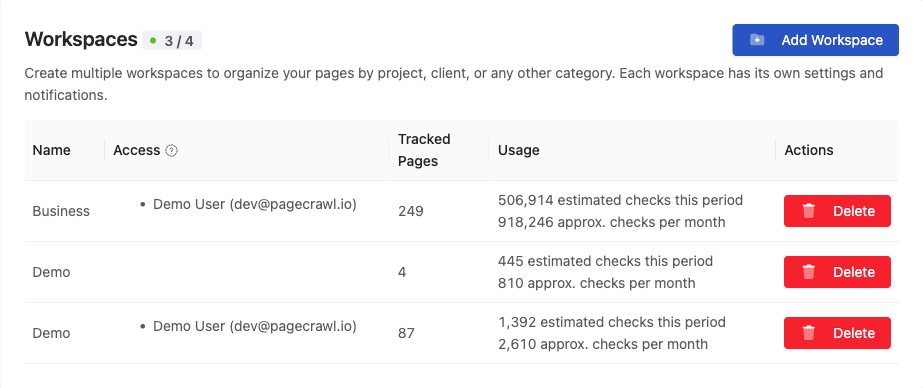
- Go to Settings > Team > Workspaces
- Click Add Workspace
- Enter a name for the workspace
- Configure the workspace settings
Switching Between Workspaces
Use the workspace selector dropdown in the sidebar to switch between your workspaces. Each workspace shows its own set of pages, changes, and settings.
Managing Access
Administrators can control which team members have access to each workspace:
- Go to Settings > Team > Workspaces
- Find the workspace in the list
- Click Update in the Access column
- Add or remove team members
Members only see workspaces they've been assigned to. This lets you give client-facing teams access to client workspaces without exposing internal monitoring.
See User Roles & Permissions for details on what each role can do.
Common Setups
By client: One workspace per client, each with its own notification channels and team access.
By department: Marketing monitors competitor pages, Legal monitors compliance pages, Product monitors feature pages, each in their own workspace.
By priority: A "Critical" workspace with immediate notifications and frequent checks, and a "Background" workspace with weekly reports and less frequent checks.
By region: Separate workspaces for different geographic regions, each with region-specific proxy settings and timezones.