
Actions are tasks that PageCrawl executes in the browser before taking a page snapshot. They let you automate interactions like dismissing cookie banners, clicking tabs, scrolling to load content, or waiting for dynamic elements to appear.
Actions belong to the monitor and run in order, top to bottom, before each capture.
Where to Configure Actions
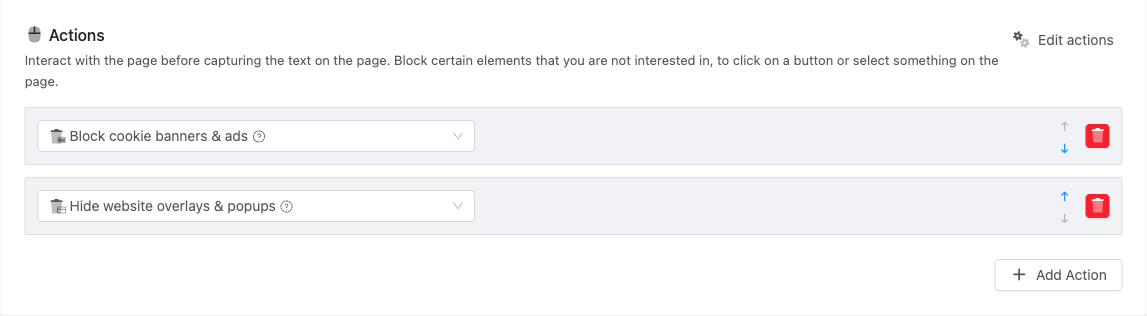
Open any monitored page and click Edit. In the page configuration form, find the Actions section. Click Add Action to add a new action, then select the action type from the dropdown. Edit actions opens a visual editor where you can set up the steps while seeing the page.
Available Actions
The API type column is the type to send when you set actions through the API (see Setting Actions Through the API or an AI Assistant).
Error Handling
| Action | API type | What It Does |
|---|---|---|
| Mark Check as Failed When | mark_failed |
Mark the check as failed when a condition is met (the title or text contains or lacks some words, or an element exists), so no change is recorded and the check gets your own error label |
Block and Hide
| Action | API type | What It Does |
|---|---|---|
| Block cookie banners & ads | remove_cookies_v2 |
Automatically hide cookie consent banners and block ads |
| Hide website overlays & popups | remove_overlays |
Hide website overlays and popups |
| Remove dates (deprecated) | remove_dates |
Replaces dates with "[DATE REMOVED]" before the page is saved. Use the Ignore dates filter under Conditions & Filters instead: it leaves the page text intact and works on every engine. A new monitor that asks for this step gets the Ignore dates filter instead |
| Remove page element | remove_element |
Remove a specific element by CSS or XPath selector |
| Remove elements containing text | remove_text |
Remove every element on the page that contains the text you enter, so choose distinctive wording |
Wait
| Action | API type | What It Does |
|---|---|---|
| Wait for Text to appear | wait_text |
Wait up to 15 seconds for specific text to appear on the page |
| Wait for Text to disappear | wait_text_disappears |
Wait up to 15 seconds for specific text to disappear |
| Wait for page element to appear | wait_element |
Wait up to 15 seconds for an element (by XPath or CSS selector) to appear |
| Wait for Redirect | wait_for_redirect |
Wait for the page to redirect to a new URL |
| Wait for Seconds | wait |
Pause for a specified number of seconds |
How many wait steps a monitor can have depends on your plan.
Interact
| Action | API type | What It Does |
|---|---|---|
| Click on Text | click_button |
Click an element containing specific text |
| Click | click |
Click any element by CSS or XPath selector |
| Click on X,Y | click_xy |
Click at specific X/Y pixel coordinates |
| Hover | hover |
Hover over an element |
| Type text | type |
Type text into an input field |
| Select Dropdown Option On Form | select |
Select an option from a dropdown |
| Submit form | submit_form |
Submit a form |
| Scroll to bottom | scroll_to_bottom |
Scroll the page to the bottom (useful for lazy-loaded content) |
| Go back | back |
Navigate back in browser history |
| Reveal hidden text | display_hidden |
Make hidden text visible. Has two modes: "Expandable Sections Only" (expands collapsible sections and accordions) and "All invisible text" (reveals all hidden text on the page) |
Advanced
| Action | API type | What It Does |
|---|---|---|
| Disable JavaScript execution | disable_javascript |
Disable JavaScript before the page loads |
| Set Cookie | cookie |
Set a browser cookie with a name, value and domain |
| Custom JavaScript | javascript |
Run custom JavaScript code on the page |
| Store Contents for Tracked Element | retrieve_tracked_element |
Store a tracked element's value at this point in the action sequence, useful when the element is only visible after a specific interaction |
| Handle CAPTCHA | captcha |
Interact with CAPTCHA challenges that appear after an earlier step, using your own 2Captcha key from Settings > Integrations (Enterprise and Ultimate plans). See Monitoring Pages That Show CAPTCHA |
Setting Actions Through the API or an AI Assistant
REST API: send actions on POST /api/pages, PUT /api/pages/{id} or POST /api/track-simple as a list of steps that run in order, each with a type from the tables above and the selector, value and value_2 that step needs. The API accepts every step in this article. A list replaces the monitor's actions, [] removes them, and on PUT leaving actions out keeps them. track-simple gives a new monitor Block cookie banners & ads and Hide website overlays & popups when you send no actions. See the API reference for each field.
AI assistants (the PageCrawl MCP server) can add a smaller set of steps when they create a monitor: remove_cookies_v2, remove_overlays, remove_element, remove_text, display_hidden, click, click_button, type, select, hover, submit_form, wait, wait_text, wait_element, scroll_to_bottom and javascript. They cannot change the actions of an existing monitor. Add the other steps (such as Mark Check as Failed When, Wait for Text to disappear, Wait for Redirect, Click on X,Y, Go back, Disable JavaScript execution, Set Cookie, Store Contents for Tracked Element or the CAPTCHA step) in the app with Edit.
Common Use Cases
Dismiss cookie banners: Add a "Block cookie banners & ads" action to automatically hide consent popups and ads that can trigger false change notifications.
Load lazy content: Add "Scroll to bottom" followed by "Wait for Seconds" (2-3 seconds) to load content that only appears when scrolling.
Navigate to a tab or section: Add a "Click" action with the CSS selector of the tab you want to monitor.
Pages behind a sign-in: Save the login once under Settings > Website Logins and choose it on the monitor, rather than typing a username and password into Type text actions. See Monitoring Password-Protected Websites.
Wait for dynamic content: Add "Wait for Text to appear" with the text that appears after the page finishes loading (e.g., "Showing results").