
Most websites maintain an XML sitemap listing every page on the site. They do this for SEO: a sitemap tells Google, Bing, and other search engines exactly which URLs exist, when each one was last modified, and how often it changes. Without a sitemap, search engines have to discover pages by crawling links one by one, which is slow and often misses freshly published or deeply nested content. Because Google rewards indexable content, almost every CMS (WordPress, Shopify, Squarespace, Wix, etc.) generates and publishes a sitemap automatically.
For change monitoring, that same sitemap is a goldmine - it is the website's own up-to-date list of every page that matters, maintained by the site itself. PageCrawl can monitor these sitemaps to detect new pages, removed URLs, and structural changes automatically.
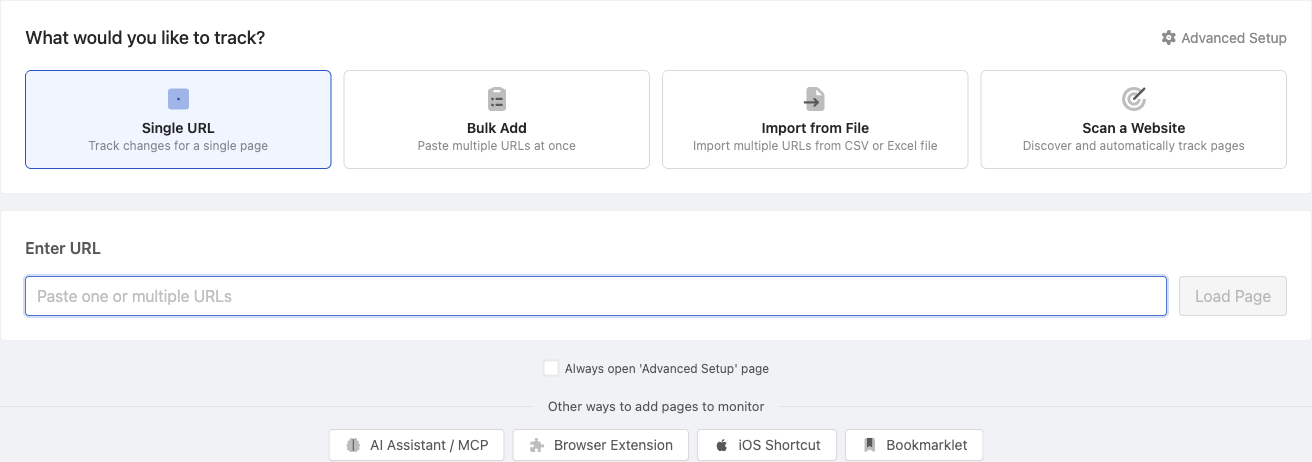
PageCrawl supports two distinct ways to monitor a sitemap, and you should pick the one that fits your goal:
- Page Discovery (Scan a Website): turns each new URL into its own tracked page with full change history, screenshots, content alerts, and AI summaries. Best for deep monitoring of individual pages.
- Feed tracking mode: treats the sitemap URL as a single tracked element and emits item-level alerts when URLs are added or removed. Best for lightweight new-URL alerts when you do not need per-page content tracking.
Most teams pick one or the other for a given site depending on whether they need deep per-page tracking or just new-URL alerts.
Approach 1: Page Discovery (Scan a Website)
This is the heavy-duty approach. Each new URL discovered in the sitemap becomes its own tracked page in your workspace, with full change history, screenshots, content alerts, and AI summaries.
How it works
- PageCrawl downloads the website's XML sitemap on your configured schedule
- New URLs are compared against the previous scan
- Newly discovered pages are matched against your filters
- You receive a notification listing the new pages
- Optionally, matched pages are auto-monitored for content changes
Setting it up
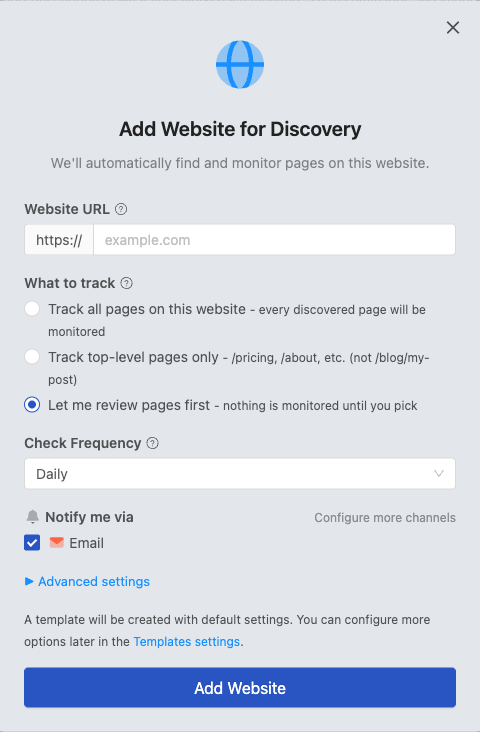
- Click Track New Page and select Scan a Website
- Enter the website URL (e.g.,
allbirds.com) - PageCrawl automatically detects the sitemap
- Set your check frequency and add filters
- Enable notifications and optionally enable auto-monitoring
Filtering discovered pages
Large websites may add many pages between checks. Filters help you focus on what matters:
- URL filters - Match by path patterns (e.g.,
/products/,/blog/2026/*) - Exclude filters - Skip irrelevant sections (e.g.,
/products/accessories/) - Title/content filters - Match against page title or body text after fetching
Exclude filters always take priority over include filters. You can combine multiple filter types.
Auto-monitoring
When auto-monitoring is enabled, pages matching your filters are automatically added to your monitoring workspace. For example:
- A competitor publishes a new product page on Monday
- Sitemap monitoring discovers the URL the same day
- From Tuesday onward, PageCrawl tracks that page for price and content changes
No manual setup required. Combined with templates, auto-monitored pages inherit your preferred check frequency, notification channels, and tracking settings.
Beyond sitemaps
Not all websites have complete sitemaps. PageCrawl supplements sitemap monitoring with additional discovery methods:
- Base URL Link Discovery - Extracts all links from a specific page
- Deep Scan - Follows links multiple levels deep with JavaScript rendering
- Automatic Mode - Runs all discovery methods together and deduplicates results
See Page Discovery for full details on all discovery methods.
Plan limits
Sitemap monitoring via Page Discovery is available on all plans:
| Plan | Pages per Website |
|---|---|
| Free | Up to 2,000 |
| Standard | Up to 20,000 |
| Enterprise | Up to 100,000 |
| Ultimate | Up to 100,000 |
All plans include filters, notifications, and auto-monitoring.
Approach 2: Feed Tracking Mode
This is the lightweight approach. Instead of creating one tracked page per URL, the entire sitemap becomes a single tracked element. You get an alert when URLs are added or removed, but PageCrawl does not fetch or track the content of each page.
How it works
- PageCrawl fetches the sitemap XML on your configured schedule
- The XML is parsed into a list of items - one per
<url>entry - Each item is identified by its
<loc>URL (the stable key) - The new list is compared against the previous check using the keys
- You receive a notification listing the URLs that were added or removed
There is only one Change record in your workspace - the sitemap monitor itself - regardless of how many URLs the sitemap contains.
Setting it up
- Click Track New Page
- Paste the sitemap URL directly (e.g.,
allbirds.com/sitemap.xml) and click Load Page - PageCrawl parses the XML, shows an XML Sitemap detected badge, and adds a Feed option under What to Track. Select Feed.
- Confirm the detected list shows the URLs you expect
- Adjust the Track first N items cap and pick what to alert on (items added, removed, content or order changes)
- Choose your notification channels and save
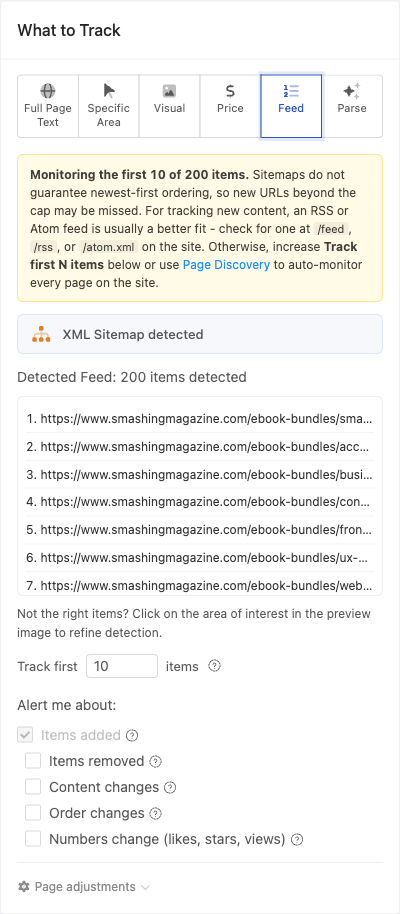
When a sitemap holds more URLs than your plan's per-feed cap, PageCrawl shows a notice (for example, Monitoring the first 10 of 200 items) and reminds you that sitemaps are not guaranteed to be newest-first. If you need every page tracked, use Page Discovery instead.
The item limit
Feeds are capped at a per-plan number of items so a 50,000-URL sitemap does not produce 50,000-item JSON blobs on every check:
| Plan | Maximum Items Per Feed |
|---|---|
| Free | 10 |
| Standard | 100 |
| Enterprise | 1,000 |
| Ultimate | 10,000 |
Items are returned in document order. For RSS and Atom feeds this is fine because the newest items are conventionally at the top, but sitemaps do not guarantee that. If your sitemap has more URLs than your plan cap, the UI shows a notice and suggests either raising the cap or using Page Discovery instead, which has no per-feed cap (it uses your monitor quota).
For sites with both a sitemap and an RSS or Atom feed, the RSS/Atom feed is usually a better choice for Feed mode because new content is guaranteed to appear at the top. Try /feed, /rss, or /atom.xml on the site.
When to choose Feed mode
- You only need new-URL alerts, not per-page change tracking
- The site has a small or medium sitemap that fits inside your plan's item cap
- You do not want each URL consuming a monitor slot from your plan
For fully-fledged monitoring with per-page change history, screenshots, content alerts, AI summaries, and proper handling of large sitemaps, use Page Discovery (Scan a Website) instead. Feed mode is intentionally minimal - it is a fast way to get new-URL notifications without the overhead of tracking each page, but it cannot replace Page Discovery for serious change monitoring.
Sitemap vs RSS coverage (important)
If you are choosing between monitoring a site's sitemap and its RSS or Atom feed, the two are not equivalent:
- A sitemap lists every indexable URL on the site. A WordPress blog with 500 posts will have all 500 in
sitemap.xml. New posts appear there as soon as the CMS regenerates the sitemap. - An RSS or Atom feed is typically a rolling window of the most recent 10 to 20 posts. Older entries fall off the end as new ones arrive. The feed is designed for "what is new", not "what exists".
For tracking new content, both work - the RSS feed is usually more reliable because new posts are guaranteed to appear at the top, but you cannot use the RSS feed to discover the site's full back catalog. Use the sitemap when you need complete URL coverage and the RSS feed when you only care about new content.
Related Articles
- Feed tracking mode - lightweight alternative that treats the sitemap as a single tracked feed instead of auto-creating per-page monitors
- Page Discovery - other discovery methods (URL Scanning, Deep Crawl, Automatic Mode)
- Organized page monitoring - templates and folders for keeping auto-monitored pages tidy