
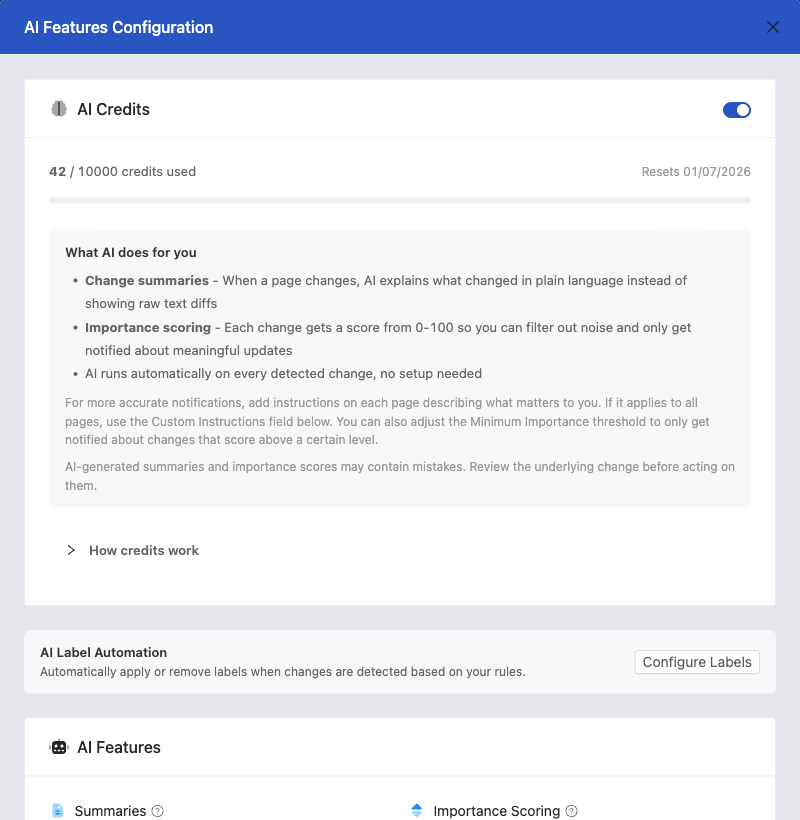
Every PageCrawl.io plan includes AI credits that work automatically with no setup. For most users, the included credits are all you need. This guide is primarily for users who want to bring their own API key (BYOK) and choose a specific model, covering budget options to premium models with cost comparisons based on 2026 pricing.
Using included credits? You don't need to choose a model. PageCrawl automatically uses optimized models on your behalf. Each 4,000-token block costs 1 credit (Basic tier) or 10 credits (Pro tier, Ultimate plan only). See AI-Powered Change Detection for details on how credits work.
Pricing updates frequently. Verify current rates at: OpenAI, Gemini, Anthropic, OpenRouter
Why AI Models Matter
AI models enhance website monitoring by automatically summarizing changes, assigning priority scores, and distinguishing meaningful updates from noise.
PageCrawl.io supports four AI providers:
- OpenAI - GPT-5 family, reliable and fast
- Google Gemini - Gemini 3 family with competitive pricing
- Anthropic Claude - Claude 4.x series, high accuracy and premium quality
- OpenRouter - A marketplace that gives you access to 200+ AI models from different providers, all through a single account and API key
Understanding Tokens and Costs
What is a Token?
A token is roughly 4 characters or about 3/4 of a word. AI providers charge based on tokens processed:
- "Hello world" = ~3 tokens
- A typical paragraph = ~100 tokens
- A blog post (1,000 words) = ~1,300 tokens
- A full webpage = ~2,000-10,000 tokens
How PageCrawl Uses Tokens
PageCrawl's AI costs are dominated by input tokens (the page content sent to AI). Output tokens are minimal because summaries are typically just 1-2 paragraphs (~100-200 tokens).
Typical token usage per check:
- Simple page (blog post, article): ~1,000-2,000 tokens
- Medium page (product page, news): ~2,000-5,000 tokens
- Large page (documentation, e-commerce): ~5,000-10,000 tokens
Example cost calculation (Gemini 3 Flash at ~$0.40/M input):
- 2,000 token page = $0.0008 per check (~1,250 checks per dollar)
- 5,000 token page = $0.002 per check (~500 checks per dollar)
Example cost calculation (Claude Opus 4.8 at ~$5/M input):
- 2,000 token page = $0.03 per check (~33 checks per dollar)
- 5,000 token page = $0.075 per check (~13 checks per dollar)
Since output is just a short summary (~150 tokens), output costs add less than 10% to the total. Additionally, AI only runs when a meaningful change is detected on the page. PageCrawl's advanced change detection infrastructure filters out tiny, insignificant changes before they ever reach AI, so you only spend tokens on changes that actually matter.
Available Models by Provider
Below are the models currently available in PageCrawl.io. Models marked with a star are the recommended defaults for each provider.
OpenAI Models
| Model | Notes |
|---|---|
| GPT-5.4 Mini ⭐ | Default. Great balance of speed, quality, and cost. |
| GPT-5.5 | Most capable OpenAI model. Best for complex pages. |
| GPT-5.4 | Latest generation full model. |
| GPT-5.4 Nano | Fastest and cheapest. Good for simple pages. |
| GPT-5.2 | Recent generation balanced option. |
| GPT-5.1 | Recent generation option. |
| GPT-5 | Full GPT-5 model. |
| GPT-5 Mini | Earlier GPT-5 balanced option. |
| GPT-5 Nano | Earlier GPT-5 budget option. |
| GPT-4.1 | Previous generation, good for complex tasks. |
| GPT-4.1 Mini | Previous generation, still reliable. |
| GPT-4.1 Nano | Previous generation budget option. |
Google Gemini Models
| Model | Notes |
|---|---|
| Gemini 3.1 Flash ⭐ | Default. Latest generation with great speed and quality. |
| Gemini 3.1 Pro | Premium model, Google's most capable. |
| Gemini 3.1 Flash Lite | Budget option in the latest generation. |
| Gemini 3 Flash | Recent generation balanced option. |
| Gemini 2.5 Flash | Reliable previous generation model. |
| Gemini 2.5 Flash Lite | Very affordable previous generation option. |
| Gemini 2.5 Pro | Previous generation premium model. |
Anthropic Claude Models
| Model | Notes |
|---|---|
| Claude Haiku 4.5 ⭐ | Default. Fast, affordable, and accurate. |
| Claude Opus 4.8 | Most capable Anthropic model. Premium pricing. |
| Claude Opus 4.7 | Previous flagship, still excellent. |
| Claude Sonnet 4.6 | Strong all-rounder with excellent accuracy. |
| Claude Opus 4.6 | Previous generation premium model. |
| Claude Sonnet 4.5 | Previous generation, strong all-rounder. |
Recommended Models by Use Case
PageCrawl.io only calls AI when a page actually changes. If you monitor 1,000 pages and only 150 change, you pay for 150 AI requests, not 1,000.
The PageCrawl.io settings page provides three Quick Select tiers to help you choose:
Best / Most Capable
For complex pages where accuracy matters most (legal documents, terms of service, compliance monitoring).
| Provider | Model |
|---|---|
| OpenAI | GPT-5.5 |
| Anthropic | Claude Opus 4.8 |
| Google Gemini | Gemini 3.1 Pro |
| OpenRouter | Claude Opus 4.8 |
These models deliver the most accurate results but cost significantly more. Only use them for pages where precision is critical.
Good Quality (Recommended for Most Users)
Best balance of quality and cost for everyday monitoring.
| Provider | Model |
|---|---|
| OpenAI | GPT-5.4 Mini |
| Anthropic | Claude Haiku 4.5 |
| Google Gemini | Gemini 3.1 Flash |
| OpenRouter | Gemini 2.5 Flash |
This tier is the sweet spot for most BYOK users. These models handle the vast majority of monitoring tasks reliably and affordably.
Budget
Lowest cost for high-volume monitoring where some accuracy trade-off is acceptable.
| Provider | Model |
|---|---|
| OpenAI | GPT-5.4 Nano |
| Anthropic | Claude Haiku 4.5 |
| Google Gemini | Gemini 2.5 Flash Lite |
| OpenRouter | DeepSeek V3.2 |
Good for simple page monitoring (blog posts, news, documentation) where you want to keep costs as low as possible.
Best Models by Content Type
| Content Type | Budget Option | Recommended | Premium |
|---|---|---|---|
| Blogs, News, Docs | GPT-5.4 Nano | GPT-5.4 Mini | - |
| E-commerce, Pricing | Gemini 2.5 Flash Lite | Gemini 3.1 Flash | Claude Haiku 4.5 |
| Legal, ToS, Compliance | Claude Haiku 4.5 | Claude Sonnet 4.6 | Claude Opus 4.8 |
| Competitor Monitoring | Gemini 2.5 Flash Lite | GPT-5.4 Mini | Claude Haiku 4.5 |
| API Docs, Changelogs | GPT-5.4 Nano | Gemini 3.1 Flash | - |
Real-World Cost Examples
Costs can vary significantly. These are estimates only. Your actual costs depend on:
- Page complexity and content length
- How often pages change
- Deep Analysis setting (on = full page, off = changes only)
- Max token settings
Token usage by page type:
- Simple pages (blogs, docs): ~500 tokens
- Average pages: ~2,000 tokens
- Content-heavy pages: ~5,000-10,000 tokens
- Complex pages (e-commerce, SPAs): 10,000-25,000+ tokens
Recommendation: Start with budget-friendly models like GPT-5.4 Nano or Gemini 2.5 Flash Lite and set strict monthly limits to avoid unexpected bills.
Controlling Token Usage
You can reduce token usage in PageCrawl.io settings:
- Deep Analysis off: Only send changed text to AI (lower tokens, less context)
- Deep Analysis on: Send entire page for better understanding (higher tokens)
- Max tokens limit: Set a maximum per request (falls back to diff if exceeded)
- Monthly request limits: Set max AI requests per month to cap costs
- Per-page daily limit: Prevent noisy pages from consuming all your AI budget
Note: Check your actual token usage in PageCrawl.io's AI statistics to estimate your costs accurately.
OpenRouter: Access 200+ Models
OpenRouter provides unified access to AI models from multiple providers through a single API key. PageCrawl.io recommends OpenRouter as the default BYOK option because of its flexibility.
Benefits: Unified billing, automatic fallbacks, access to models from OpenAI, Anthropic, Google, xAI, DeepSeek, Meta, Mistral, Qwen, and Cohere
Best for: Users who want a single API key with access to many models, easy billing budgets, and the ability to switch models without changing keys
Privacy Mode: When enabled in PageCrawl.io settings, your data is only routed through AI providers that don't use it for training
The model dropdown in PageCrawl.io groups OpenRouter models by price tier (Premium, Recommended, Standard, Budget) and only shows models that support the structured output format required for PageCrawl's AI features.
How to Set Up BYOK in PageCrawl.io
Step 1: Get Your API Key
| Provider | Get Key At |
|---|---|
| OpenRouter | openrouter.ai > Settings > API Key |
| OpenAI | platform.openai.com > API Keys |
| Google Gemini | ai.google.dev > Get API Key |
| Anthropic | console.anthropic.com > API Keys |
Step 2: Configure in PageCrawl.io
- Go to Settings > Workspace > Integrations
- Click Manage or Setup on the AI Features card
- Scroll down to the Bring Your Own Key section
- Select your AI provider (OpenRouter is pre-selected and recommended)
- Choose a model from the dropdown
- Click Add API Key, paste your key, and use Test Key to verify it works
- Click Save Configuration
Step 3: Use Quick Select for Easy Model Choices
After adding your API key, the settings page shows three Quick Select cards:
- Best / Most Capable - Most accurate results, higher cost
- Good Quality - Recommended for most users
- Budget - Lowest cost, good for simple monitoring
Click any card to instantly switch to that model. You can also choose from the full model dropdown for more options.
Step 4: Optimize with Model Overrides
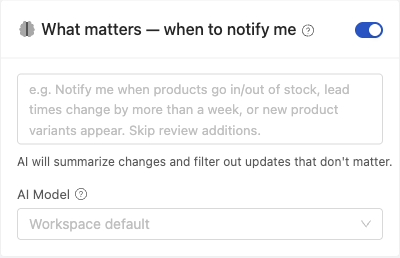
You can customize AI models at three levels:
- Workspace default - applies to all pages
- Template override - applies to pages using that template
- Page override - applies to individual pages
Example strategy:
- Workspace default: Gemini 2.5 Flash Lite (cheapest)
- E-commerce template: GPT-5.4 Mini (good balance)
- Legal template: Claude Sonnet 4.6 (high accuracy)
- Critical page: Claude Opus 4.8 (most capable)
Tips for Optimizing Costs
- Start with the Good Quality tier - GPT-5.4 Mini, Gemini 3.1 Flash, or Claude Haiku 4.5 offer excellent quality at reasonable prices
- Use templates - Group similar pages with the same model to optimize costs by content type
- Check frequency doesn't affect AI costs - AI only runs when changes occur, not on every check
- Set monthly limits - Use the "AI Requests Per Month" setting to cap spending
- Monitor token usage - Check the token statistics in your AI settings to understand your actual costs
- Use per-page daily limits - Prevent frequently updating pages from consuming all your budget
Privacy and Data Security Considerations
| Provider | Data Usage | Best For |
|---|---|---|
| OpenAI/Anthropic | API data not used for training | Confidential content, legal docs |
| Google Gemini | Review Google's data policies | General monitoring |
| OpenRouter | Varies by underlying model. Enable Privacy Mode to restrict to non-training providers. | Flexible choice |
When using included AI credits, content is processed through PageCrawl's managed AI infrastructure. When using BYOK, content is sent directly to your chosen provider.
Data protection policies: OpenAI, Anthropic, Google
Privacy note: Free tier models (including some OpenRouter models) may use your data for training. Use paid tiers for sensitive content.
FAQ
Do I need BYOK to use AI? No. All plans include AI credits that work automatically. BYOK is optional for users who want unlimited usage or specific model control.
What happens when my credits run out? Page monitoring continues normally, but AI summaries pause until credits reset next month. You can also switch to BYOK for unlimited usage.
Can I switch between credits and BYOK? Yes, at any time in Settings > Workspace > Integrations > AI.
Can I switch models after starting? Yes. Changes apply immediately to new checks. Historical data remains intact.
Do I pay for checks that don't find changes? No. AI only runs when pages actually change.
Can I use different models for different pages? Yes, via workspace defaults, template overrides, and page-level overrides.
Why is OpenRouter recommended as the default BYOK provider? OpenRouter gives you access to models from all major providers with a single API key. You can switch models anytime without changing keys, set spending limits in the OpenRouter dashboard, and enable Privacy Mode to control data handling.
Related Articles
- AI-Powered Change Detection and Smart Filtering - Learn how AI summarization and Importance Scoring work
- AI Integration Setup Guide (BYOK) - Step-by-step guide to configure your API keys