
PageCrawl can automatically create a full web archive of your monitored pages every time a change is detected. Archives capture the complete page (HTML, CSS, images, scripts) so you can replay it exactly as it appeared at that moment.
Archives are saved in the WACZ (Web Archive Collection Zipped) format, an open standard for web archiving used by libraries, governments, and legal teams worldwide.
How It Works
- PageCrawl detects a change on a monitored page
- A full WACZ archive is created capturing the complete page state
- The archive is stored securely in the cloud
- You can replay the archived page at any time from the change history
If WACZ generation fails (e.g., due to complex page structure), PageCrawl falls back to creating a self-contained HTML archive instead.
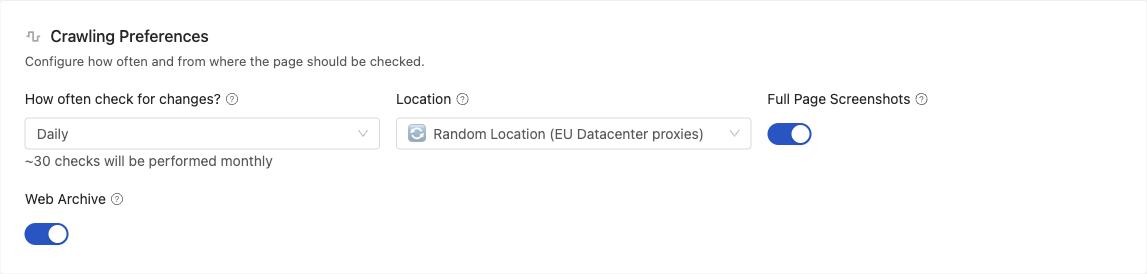
Turn archiving on for a monitor with the Web archive setting in the page editor's Crawling Preferences. Choose Archive, or leave it empty to follow the monitor's template or workspace. Web archiving needs a check frequency of every 6 hours or less often:
How Archives Differ from Screenshots
PageCrawl offers both screenshots and web archives, but they serve different purposes:
| Screenshot | Web Archive (WACZ) | |
|---|---|---|
| What it captures | A flat image of the visible page | The complete page: HTML, CSS, JavaScript, images, fonts |
| Interactivity | None (static image) | Fully interactive: scroll, click links, hover over elements |
| Content further down the page | Only if full-page screenshot is enabled | Always included, the entire page is preserved |
| Dynamic content | Shows one visual state | Preserves interactive elements, dropdowns, tabs |
| File size | Small (typically under 1 MB) | Larger (includes all page assets) |
| Best for | Quick visual reference, visual diff comparison | Legal evidence, compliance records, full preservation |
Screenshots are great for a quick visual snapshot and for visual change detection (highlighting pixel differences). Web archives go further by preserving the entire page so you can interact with it later exactly as it appeared.
How Do I Prove an Archive Has Not Been Edited?
Every archive is sealed and date-stamped as it is created, so you can show that the copy you hold is the copy we captured and that nothing has been altered since. Two things happen automatically:
- A signature is embedded in the archive. It follows the open WACZ Auth specification, so any compliant tool can verify it, not only PageCrawl.
- The archive is date-stamped by independent third parties. More than one of them stamps every archive, and none are connected to PageCrawl, so the date does not rest on our word alone. Each stamp is saved as a separate file alongside the archive and can be checked on its own.
Because the stamps cover a cryptographic fingerprint of the archive, changing even a single byte breaks verification. That is what makes an archive usable as evidence in a way a screenshot is not: a screenshot has nothing to check it against.
Note: if you have eIDAS requirements, archives can additionally be stamped by a qualified trust service provider. Contact support to enable it.
How PageCrawl Archives Differ from Archive.org
The Internet Archive (archive.org) and PageCrawl both preserve web pages, but they work very differently:
Archive.org (Wayback Machine):
- Public, community-driven project that crawls the open web
- Snapshots are taken on their own schedule (often weeks or months apart)
- No control over when or how often pages are archived
- Pages behind logins, paywalls, or bot protection are usually not captured
- Anyone can view the archived pages
- No change detection or notifications
PageCrawl Web Archiving:
- Private to your account, stored securely in the cloud
- Archives are created automatically every time a change is detected
- You control the check frequency (every 6 hours or less often for monitors that archive)
- Works with pages behind logins using browser actions (click, type, wait)
- Works with pages behind bot protection
- Archives are paired with change detection, so you know exactly what changed and when
- Download WACZ files for offline storage or legal use
In short, archive.org is best for general public web preservation. PageCrawl archiving is designed for active monitoring where you need precise, private, frequent snapshots tied to detected changes.
Can PageCrawl save changes to the Wayback Machine?
Yes. The Internet Archive integration submits each detected change to the Internet Archive, so the Wayback Machine records a public snapshot alongside your private WACZ archive. It is on by default for monitors that archive their detected changes, and you can switch it off for a workspace from Settings, then Integrations. Recordings of checks that found no change are not sent to the Internet Archive.
This gives every archived change multiple layers of preservation:
- Full page screenshot of the page when the change was detected
- Private WACZ archive, sealed and timestamped by independent trust providers
- Public Wayback Machine snapshot, held by the Internet Archive, an institution unrelated to you or PageCrawl
When a Wayback snapshot is available, the archive viewer and the verification page show a "View on archive.org" link next to your own archive, so anyone reviewing your evidence can cross-check it against the public record.
Viewing Archives
To view an archived page:
- Open a monitored page and go to its change history
- Click on any check that has an archive (indicated by an archive icon)
- The archive viewer opens, showing the page exactly as it appeared
- Use the previous/next arrows to browse between archived versions
The viewer uses ReplayWeb.page to render WACZ archives interactively in your browser. You can scroll, click links, and interact with the page as if you were browsing it live at that point in time.
Downloading Archives
You can download any archive file directly:
- Open the archive viewer for the check you want
- Click the download button to save the WACZ file
- Open it with any WACZ-compatible viewer (ReplayWeb.page, Webrecorder, etc.)
Downloaded archives can be used for legal evidence, compliance records, or offline browsing.
Use Cases
- Legal and compliance - Preserve evidence of website content at specific dates for disputes, contracts, or regulatory compliance
- Competitive intelligence - Keep a historical record of competitor pages, pricing, and product offerings
- Content auditing - Track how your own website evolves over time with complete snapshots
- Journalism - Archive source pages to preserve evidence that may be modified or removed
How do I turn on web archiving?
Web archiving is available on the Ultimate plan. Turn on Web Archiving under Active Features in Settings, then choose which monitors archive their detected changes: set Web archive to Archive on a monitor or a template, or archive a whole workspace from the Record every check card in Settings > Workspace > General.
The card's Web archiving of detected changes row decides what happens to monitors that have no choice of their own:
- Selected monitors and templates (the default) archives only the monitors and templates set to Archive.
- All monitors archives every monitor checked every 6 hours or less often, unless it is set to Don't archive.
- Off archives nothing in the workspace, even monitors set to Archive.
Team owners and administrators see the card. A monitor that follows its template or workspace shows what it resolves to in the empty Web archive field, for example "Workspace: Archive".
How do I keep a record of every check?
Turn on Record every check to keep a screenshot, a web archive or both from every check, including checks that found no change. It is available on the Ultimate plan. Team owners and administrators set it in Settings > Workspace > General, for every monitor in the workspace or only for the monitors and templates you choose.
The Record every check card has a Screenshots row and a Web archives row, each set to Off, All monitors or Selected monitors and templates. With Selected monitors and templates, pick monitors with Record screenshots of every check and Record web archives of every check in the page editor's Crawling Preferences, or set them on a template so every monitor using it follows. A monitor's own choice comes first, then its template's, then the workspace row, and Off stops that kind of recording for the whole workspace. Before recording starts, the card estimates how many checks a day it will record and how much storage that uses.
A few rules decide what can be recorded:
- Screenshots keep the full page screenshot the monitor already takes, so the monitor needs Full Page Screenshots on and your team needs Screenshots on in Active Features.
- Web archives of every check are kept only for monitors checked every 6 hours or less often. They are kept even when the monitor's own Web archive setting is Don't archive, and they need Web Archiving on in Active Features.
- Only checks that open the page in a browser can be recorded, so file monitors and data sources have nothing to record, and the page editor does not offer the recording settings for them. For other monitors that cannot be recorded, such as screenshots of a monitor with Full Page Screenshots off, or web archives of a monitor checked more often than every 6 hours, the page editor explains why under the setting.
Recordings never send alerts and are not counted as changes. To see them in a monitor's change history, open the status filter and tick Unchanged recordings under "Between changes". They appear between changes as collapsed rows, such as "37 unchanged checks recorded", which expand to show each capture. In Time Travel, pick a day in the calendar and use the time picker to step through every capture of that day. Recorded web archives open in the same archive viewer as the archives of detected changes and can be downloaded the same way.
How much archive storage do I have?
Each Ultimate unit includes 500 GB of archive storage. It is one standing pool for your team, not a monthly allowance, shared by the web archives of detected changes and the recordings of unchanged checks. The Usage page in Settings shows how much you store, how fast recordings grow and when the pool is forecast to fill.
- What counts: web archives of detected changes, and the screenshots and web archives recorded from unchanged checks. Screenshots of detected changes do not use archive storage.
- More units, more storage: a subscription with two Ultimate units has 1,000 GB. When the pool is close to full, or forecast to fill within 60 days, the Usage page offers to add 500 GB with another unit.
- Retention: recordings of unchanged checks are kept forever by default. On the Usage page, Keep recordings of unchanged checks can be set to 1 month, 3 months, 6 months, 1 year, 2 years or 3 years, and older recordings are then removed every day. Captures of detected changes are not affected by this setting. A shorter change history retention period for your team removes older recordings too.
- When storage is full: new web archives and recordings pause and nothing is deleted. Checks and alerts carry on as usual. The team owner gets an email when the pool reaches 80% and again when it is full. To make room, set a retention period for unchanged recordings, clear the history of pages you no longer need, or add a unit.