

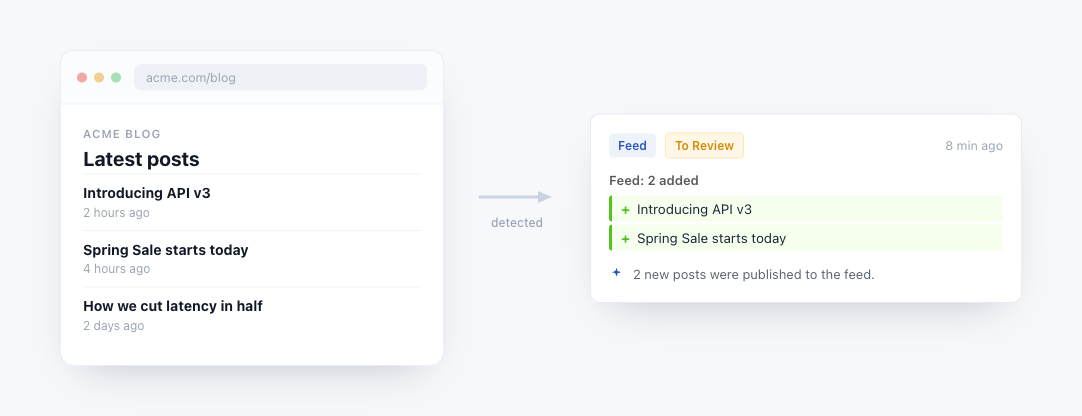
Feed tracking mode treats an RSS feed, Atom feed, or XML sitemap as a list of individual items rather than a single blob of text. Instead of "the page changed", you get "2 new posts added: [titles and links]". This matches how you actually want to consume a feed: item by item.
Looking to publish your monitored page changes as an RSS feed instead? See Monitor Page Changes via RSS Feeds, which generates a feed URL of detected changes you can plug into any RSS reader or automation tool.
When to Use Feed Tracking Mode
Pick Feed mode when the URL you are monitoring is a structured list that updates over time:
- RSS and Atom feeds (
/feed,/rss.xml,/atom.xml,/feeds/posts/default,/index.xml) - XML sitemaps (
/sitemap.xml,/sitemap_index.xml) - GitHub and GitLab repository feeds for releases, tags and commits (
github.com/{owner}/{repo}/releases.atom,gitlab.com/{group}/{project}/-/releases.atom), plus GitLab issue and merge request lists. See How to Monitor GitHub and GitLab Repositories for every address. - Reddit subreddit feeds (
reddit.com/r/subreddit/.rss) - Podcast feeds
- Inventory grids and card-based HTML pages (detected via DOM pattern matching)
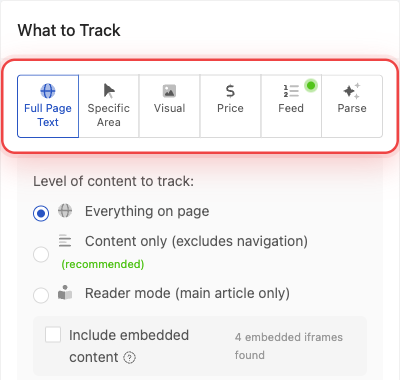
PageCrawl auto-detects the feed format when you paste the URL and switches to Feed mode automatically. You can also pick it manually from the tracking mode selector.
What You Get With Feed Mode
Compared to Full Page Text tracking, Feed mode gives you:
| Feature | Full Page Text | Feed Mode |
|---|---|---|
| Compares raw content | Yes | No (parses items) |
| Reports which items changed | No | Yes, with titles and links |
| Ignores reordering | No (false alerts) | Yes |
| Deduplicates by stable key | No | Yes (guid, id, link) |
| Caps item count | No | Yes (configurable limit) |
| Runs without a browser | Only if page is plain text | Yes, for XML feeds |
| Handles "No exact matches" fallbacks | No | Yes |
The end result: fewer false alerts, clearer notifications, and lower monitoring cost per check.
Supported Formats
Feed tracking mode parses:
- RSS 2.0 including
<guid>,<enclosure>,<media:content>, and<content:encoded> - RSS 1.0 / RDF including
rdf:aboutidentifiers - Atom 1.0 including
<link rel="alternate">and<media:thumbnail> - XML Sitemap (
<urlset>) and sitemap index (<sitemapindex>) - Generic repeating XML when an XML file has a list-like structure
For HTML pages like product grids, inventory lists, or news listings, Feed mode falls back to DOM pattern detection, which identifies repeated card-like elements on the page and tracks them as items.
How Detection Works
When you paste a URL into Track New Page, PageCrawl performs a content-based check:
- Fetches the URL
- Looks at the content type and first few bytes of the body
- If it looks like XML, parses it with a namespace-aware XML parser
- Identifies the feed format (RSS / Atom / Sitemap / etc.) by root element
- Returns the detected format to the interface, which auto-switches to Feed mode
If the detection cannot classify the URL as an XML feed, the tracking mode stays at Full Page Text and you can switch to Feed manually if you want to use DOM pattern detection on an HTML page.
Item Limit
Every feed tracking element has a Track first N items cap. The default is 10 for new monitors. You can raise it up to your plan's maximum.
The limit exists for three reasons:
- Avoid noise from variable-count pages. Some pages show a different number of items between checks (inventory pages, infinite-scroll feeds). Capping at a fixed count prevents fluctuations from triggering false change alerts.
- Keep storage manageable. A sitemap with 50,000 URLs would create a 50,000-item JSON blob per check. The cap prevents this.
- Focus on fresh content. Most of the time you care about the newest items. Tracking the first 10-20 entries is almost always enough.
How "First N" Is Decided
For RSS and Atom feeds, "first N" means the first N items in document order, which is the convention these formats use to put the newest items at the top. Reading position 0 through N-1 gives you the N most recent posts.
XML sitemaps are different. There is no convention requiring sitemaps to list new URLs first. New pages can appear anywhere in the file, including appended at the bottom. To handle this, PageCrawl sorts sitemap entries by their <lastmod> date (newest first) before applying the cap, so the most recently modified URLs always win.
For sitemaps that do not include <lastmod> on every URL, the dated entries are sorted first and the dateless entries fall to the bottom of the sort in their original document order. If you need to track every page on a very large sitemap regardless of modification date, use Page Discovery instead - it auto-monitors new pages as they appear without depending on the position-based cap.
| Plan | Maximum Items Per Feed |
|---|---|
| Free | 10 |
| Standard | 100 |
| Enterprise | 1,000 |
| Ultimate | 10,000 |
The default is 10 across all plans. You can raise it from the tracking mode panel any time after the monitor is created.
What Triggers a Change Alert
By default, Feed mode notifies you when items are added to the feed: Items added under Alert me about: is always on. You can also opt into:
- Items removed - something disappeared from the feed
- Content changes - an item's title or body was edited after publication
- Price changes - an item's price updated (for product feeds)
- Order changes - items were reordered (off by default since most feeds reorder as new items arrive)
In a feed monitor set up in Track New Page, every new item sends an alert, because Items added is always on. What matters and the minimum importance do not hold a new item back there, though What matters still shapes the AI summary of the change.
Each item is identified by a stable key in this order: GUID → link → title. That means content changes on the same item are correctly recognized as updates, not as a new item.
Monitoring Frequency
Feed mode runs via a lightweight HTTP fetch without a browser, so you can check feeds frequently without burning through plan limits:
| Feed Type | Recommended Frequency |
|---|---|
| Security advisories | Every 15 minutes |
| News and competitor blogs | Every 30 to 60 minutes |
| GitHub and GitLab release feeds | Every 1 to 2 hours |
| Podcast feeds | Every 6 to 12 hours |
| Sitemaps for large sites | Every 1 to 4 hours |
| Low-volume blogs | Daily |
Note: if you raise the frequency below 30 minutes on a browser-only feed (an HTML inventory page rather than an XML feed), PageCrawl will use the browser engine for reliability.
Common Examples
GitHub releases, tags and commits:
https://github.com/{owner}/{repo}/releases.atom
https://github.com/{owner}/{repo}/tags.atom
https://github.com/{owner}/{repo}/commits.atom
https://github.com/{owner}/{repo}/commits/main/CHANGELOG.md.atom
Replace {owner} and {repo} with the names in the repository's address. The last address follows only the commits that touch one file, here CHANGELOG.md on the main branch.
GitLab releases, tags, commits, issues and merge requests:
https://gitlab.com/{group}/{project}/-/releases.atom
https://gitlab.com/{group}/{project}/-/tags?format=atom
https://gitlab.com/{group}/{project}/-/commits/HEAD?format=atom
https://gitlab.com/{group}/{project}/-/issues.atom
https://gitlab.com/{group}/{project}/-/merge_requests.atom
Replace {group}/{project} with the project's path, nested groups included. GitLab tags need ?format=atom, because /-/tags.atom redirects to the sign-in page.
WordPress blog:
https://example.com/feed/Reddit subreddit:
https://www.reddit.com/r/webdev/.rssSite sitemap:
https://example.com/sitemap.xmlFor each of these, paste the URL into Track New Page and click Load Page. PageCrawl detects the format, switches to Feed mode, and lists the items it found so you can check them before you save. You can also paste a GitHub or GitLab.com repository's Releases, Tags or Commits page: PageCrawl follows the same feed.
Related Articles
- Monitor RSS feeds and get alerts for new content - broader guide comparing RSS monitoring approaches
- How to Monitor GitHub and GitLab Repositories - the feed and raw file addresses for releases, tags, commits, files, issues and merge requests
- Publish change alerts as an RSS feed - the inverse: generate a feed URL of detected changes for RSS readers and automation tools
- Sitemap monitoring - automatically discover new pages across a website
- Webhook integrations - route feed alerts to Slack, Discord, or custom automations
- Reduce false positives - tune your monitors for cleaner alerts