
PageCrawl uses AI to help you choose what to monitor, extract values from pages, and make detected changes easier to act on. This page explains what each AI feature produces and how to interpret it.
Where AI is used
- Change summaries - When a monitored page changes, AI describes what changed in plain language instead of leaving you to read a raw text diff.
- Importance scoring - Each change is scored so you can filter out noise and be notified only about meaningful updates.
- Report digests - Periodic digests can include an AI-written overview of the changes in the period, grouped by importance.
- Setup assistance - When setting up a monitor, AI can suggest what to track on a page.
- Parse AI - Describe a value in plain English, and AI extracts it from the page so PageCrawl can track changes to that value.
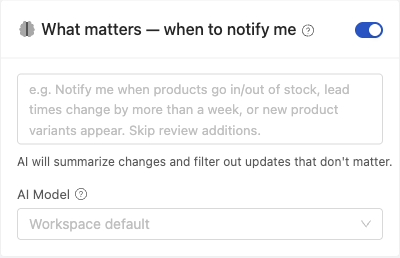
AI is optional and configured per workspace under Settings. You can turn it off, adjust the minimum importance threshold, and add instructions describing what matters to you for more accurate results.
How Parse AI works
Parse AI uses your instructions to extract a specific value from a monitored page, such as a delivery date, a product status, or a version number mentioned in release notes. PageCrawl compares the extracted value with its previous value, records changes in the monitor's history, and sends alerts according to your settings.
To set it up:
- Choose Parse AI under What to track when creating or editing a monitor.
- Under What should PageCrawl find?, describe the value and the format you want. For example: "The next event date in YYYY-MM-DD format. If no date is shown, return UNKNOWN."
- Use + Add another field if you want to track several separate values from the same page, then save the monitor.
Parse AI checks the requested value during monitoring. It can extract an initial value or refresh it when the page content or your instructions change, even if the extracted value stays the same. Unchanged content and instructions do not require a new AI extraction.
Parse AI requires AI to be enabled and uses your available AI credits or your own configured provider key. Pages that change frequently can use more AI credits. For straightforward price, text, or availability tracking, the dedicated tracking modes work without AI. Turning AI off stops new Parse AI extraction.
For more examples and prompt-writing guidance, see Parse AI: Monitor Any Value with Plain English.
AI-generated content may contain mistakes
Summaries, importance scores, digest overviews, and Parse AI values are generated by AI. Summaries and scores help you triage changes quickly, while Parse AI supplies the value being tracked.
AI can occasionally misread a change, summarize it imprecisely, score it higher or lower than you would, or extract an incorrect value. Before acting, review the recorded change and the source page. For Parse AI, confirm that the extracted value matches what the page actually says.
Your data and AI training
When you use an AI feature, the content needed to produce its result is sent to an AI provider. This can produce an extracted value, a setup suggestion, a change summary, an importance score, or a report overview. We keep this deliberately narrow:
- We do not train AI models on your content. PageCrawl does not use your monitored pages, change data, or AI settings to train any model.
- Managed AI runs under business API terms. When you use the AI credits included with your plan, content is processed through PageCrawl's managed AI infrastructure, which runs on commercial provider APIs operated under business terms that prohibit using your content to train their models.
- Only what is needed is sent. Change summaries and importance scores use changes that have already been detected. Parse AI uses page content to extract the value being monitored, setup assistance uses it to suggest what to track, and report overviews use the changes in the selected period. Only the content required for the requested feature is sent. Your recorded history, diffs, and screenshots remain readable with AI turned off.
For more control over where your content goes:
- Bring your own key (BYOK). Connect your own AI provider key and content is sent directly to your provider instead of through PageCrawl's managed infrastructure. See the BYOK setup guide.
- Privacy Mode. With BYOK via OpenRouter, enabling Privacy Mode restricts routing to providers that do not use your data for training. See choosing the best AI model for the per-provider data-usage breakdown.
- Turn AI off. AI is optional per workspace. With it disabled, no page content is sent to any AI provider. Monitoring and diffs continue for tracking types that do not require AI, such as text, price, and availability. Parse AI stops extracting new values.
If you monitor confidential or regulated content, PageCrawl does not train on it either way. For maximum control you can additionally use BYOK with a provider whose API terms exclude training, or leave AI disabled for that workspace.
Where AI labels appear
AI-generated content is labeled where it is shown:
- In report digests (web and shared links), an AI-written overview is marked as an AI Summary, and a note indicates that summaries and priority scores are AI-generated.
- In the workspace AI settings, a note describes what AI produces and that its output may contain mistakes.
The labelling follows the content, not the setting. When a digest summary was generated from the change data rather than by a model, it is headed simply Summary and carries no AI disclaimer, and the same applies to the summary block on a page's history.
If you prefer to work only from the raw change data, you can leave AI disabled for the workspace and continue to receive the underlying change detection and diffs. See Monitoring Without AI for the switches and what changes.
Related Articles
- Monitoring Without AI - Turn AI off at team, workspace, or page level and keep monitoring
- AI-Powered Change Detection and Smart Filtering - How AI summarization and importance scoring filter out noise
- Parse AI: Monitor Any Value with Plain English - Extract and track values using plain-English instructions
- AI Integration Setup Guide (BYOK) - Connect your own AI provider key
- Choosing the Right AI Model for Website Monitoring - Compare models and pricing for BYOK users