If you are buying a Mac to run models on your own hardware, you are not really shopping for a computer. You are shopping for a number: how much unified memory you can put on the desk. Everything else about the machine is negotiable, and that one figure decides which models you can load at all.
That number is also what makes the purchase awkward. The configurations with the most memory are built to order, they carry their own delivery estimates, and those estimates are the part nobody watches. A page can go from "arrives next week" to "arrives next month" without ever saying sold out.
This guide covers what Apple actually offers today, how to work backwards from the models you want to run to the machine that holds them, and how to watch one exact configuration so its availability and delivery window reach you instead of you refreshing the store. Written 2026-09-09, and the specifications below are quoted from Apple's own pages on that date.
Why is unified memory the constraint when you run models locally?
Because the whole model has to sit in memory the GPU can reach. On Apple silicon there is a single pool shared by the CPU and GPU, so the memory you order is a hard ceiling on what you can load. You cannot add more later, and no amount of storage substitutes for it.
Apple's own machine learning framework is built around this. The MLX README puts it plainly: "A notable difference from MLX and other frameworks is the unified memory model. Arrays in MLX live in shared memory." There is no separate video memory to copy into, which is the whole reason these machines are interesting for inference.
The practical arithmetic is simple enough to do yourself. A model's weights need roughly one byte per parameter at 8-bit quantization, and about half that at 4-bit, before you add the working memory a long context needs on top. Projects like llama.cpp exist largely to make that trade, and quantization is the main lever you have for fitting a larger model into a smaller machine. Work out the tier you need before you look at prices, because the tier is what you are buying.
How much unified memory can you order on a Mac today?
Apple's Mac Studio tech specs list 36GB as standard on M5 Max, configurable to 48GB, 64GB or 128GB, and 96GB as standard on M5 Ultra, configurable to 256GB or 512GB. Mac mini starts at 16GB on M6 and reaches 64GB only on its top M5 Pro model. iMac tops out at 32GB.
| Machine | Chip | Standard | Configurable to |
|---|---|---|---|
| Mac mini | M6 | 16GB | 24GB or 32GB |
| Mac mini | M5 Pro | 24GB | 32GB, or 48GB / 64GB on the 18-core CPU, 20-core GPU model |
| Mac Studio | M5 Max | 36GB | 48GB, 64GB or 128GB |
| Mac Studio | M5 Ultra | 96GB | 256GB or 512GB |
| iMac | not verified here | 16GB | 24GB, or 32GB on four-port models |
Every figure above is read from Apple's Mac Studio tech specs and Mac mini tech specs. Note that the ceilings are tied to specific chip configurations rather than to the model name: 128GB requires the M5 Max with the 18-core CPU and 40-core GPU, and 64GB on the mini requires the top M5 Pro. Picking the machine is not enough, you have to pick the build.
Apple no longer lists a Mac Pro on apple.com, and its former product and store URLs redirect to the Mac pages, so it is not part of this comparison.
Which Mac fits the models you actually run?
Work backwards from the memory tier rather than from the machine, because every jump in tier crosses a product line. Under 32GB the Mac mini covers it. Up to 64GB means the top M5 Pro mini. Above that the answer is Mac Studio, and above 128GB it is specifically M5 Ultra.
- Up to 32GB. Mac mini with M6, from $899. Comfortable for small and mid-size quantized models, and the cheapest way onto Apple silicon.
- Up to 64GB. Mac mini with the top M5 Pro, at $3,199 for the 18-core CPU, 20-core GPU build with 64GB and 1TB. This is the ceiling of the mini line.
- Up to 128GB. Mac Studio with M5 Max. The line starts at $2,499 for the 36GB build, and 128GB requires the 40-core GPU configuration.
- 256GB or 512GB. Mac Studio with M5 Ultra, which starts at $5,499 for the 96GB build. These are the only configurations Apple offers above 128GB.
All prices are U.S. dollars taken from Apple's store on 2026-09-09 and refer to the specific builds named. Apple prices each memory upgrade separately in the configurator, so treat these as the floor of each tier rather than the cost of the build you want.
What has Apple actually said about availability?
Apple opened pre-orders for both machines on August 25, 2026 and says deliveries begin September 22. One option is called out separately: Apple's own footnote states that the 512GB Mac Studio configuration is coming in late October. Apple has published no separate ship date for any other individual memory tier.
The Mac Studio announcement is the primary source and worth reading directly. It says the machines will "begin arriving to customers, and in Apple Store locations and Apple Authorized Resellers, starting September 22", and that "Mac Studio with 512GB of unified memory is coming in late October."
It is also the clearest statement of who these machines are for. Apple describes the M5 Ultra as scaling to "a staggering 512GB of unified memory, enabling users to run enormous LLMs entirely on device", and says the M5 Pro Mac mini "supports up to 64GB of unified memory with 307GB/s of memory bandwidth, enabling users to run even larger local AI models". The local inference use case is the pitch, not a side effect.
Note: everything in this section is dated. If you are reading it well after September 2026, treat it as history and check the store for what your configuration says today.
Why does a slipping ship estimate matter as much as a sellout?
A sellout is loud and binary. A delivery estimate is a quiet number that decides whether the machine reaches your desk this quarter or next, and on built-to-order hardware that estimate moves without the page ever saying sold out. If you only watch for stock, you miss most of the signal.
This is a general property of built-to-order retail rather than a claim about any particular product. The delivery window shown against a configuration is live, it reflects supply for that specific build, and it moves in both directions. A window pulling in is as useful to know as one pushing out, because that is when an order becomes worth placing.
The asymmetry matters for expensive machines. A configuration you can order today with a distant delivery date is a different purchase from the same configuration arriving next week, and the price is identical in both cases. The page is the only place that difference is visible.
How do you monitor one exact configuration instead of the whole product family?
Point the monitor at the configurator URL for the exact build, not the product overview page. Apple gives each configuration its own address, so a monitor on the M5 Ultra with 96GB and 1TB follows that build alone. Run one monitor per configuration you would genuinely buy.
The configuration is encoded in the path, which is what makes this work:
https://www.apple.com/shop/buy-mac/mac-studio/m5-ultra-chip-30-core-cpu-64-core-gpu-96gb-memory-1tb-storage
https://www.apple.com/shop/buy-mac/mac-mini/m5-pro-chip-18-core-cpu-20-core-gpu-64gb-memory-1tb-storage
Build the machine you want in Apple's store, then copy the URL from the address bar once your choices are in it. That address is the thing to watch. The marketing page at apple.com/mac-studio is a different URL and tells you nothing about your build, which is the most common mistake here.
Two configurations means two monitors. That sounds like duplication until the first time one of them moves and the other does not, which is the entire point of watching builds rather than products.
Setting up the monitor in PageCrawl
Setup takes a couple of minutes per configuration, and the only fiddly part is getting the right URL, which the store hands you once you have picked your build.

- Configure the build in Apple's store and copy the URL once your chip, memory and storage choices are in it.
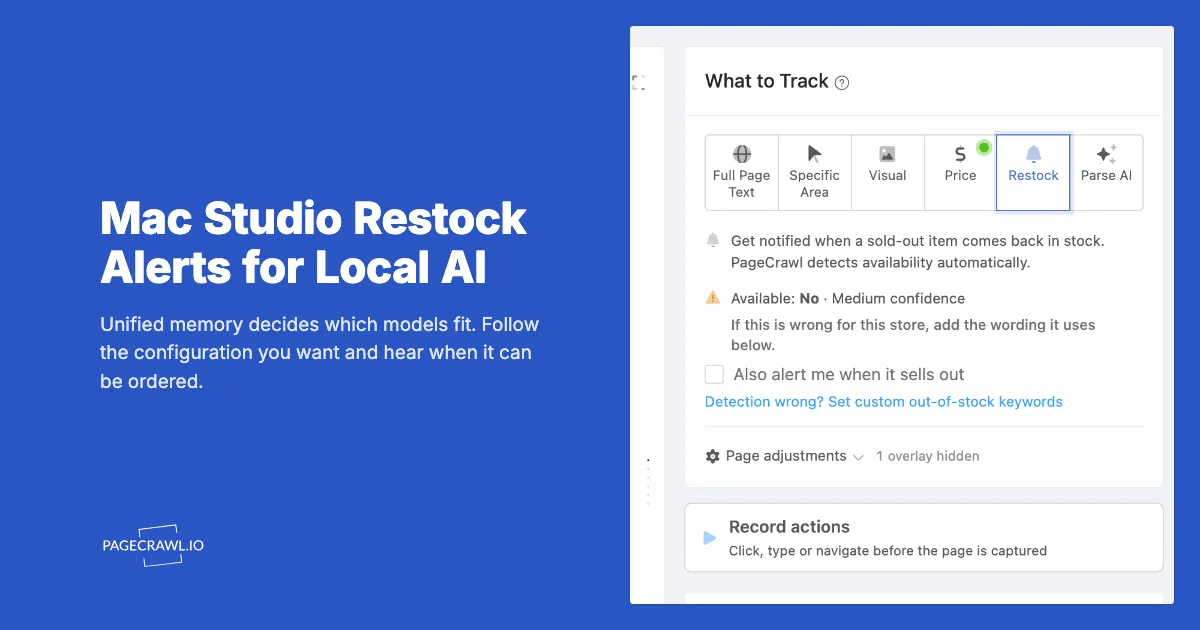
- Paste it into Track New Page. Apple Store links are recognised automatically, so price and availability tracking are set up for you without any configuration.
- Name the monitor after the build, not the product. "Mac Studio M5 Ultra 256GB" tells you what fired at a glance; "Mac Studio" does not, once you are watching three of them.
- Pick a check frequency you can act on. A machine you would buy the day it becomes orderable justifies a tight interval; a purchase you are planning for next quarter does not.
- Route it somewhere you read. Email is a fine record, and a push channel reaches you away from the desk.
Note: if the availability reading looks wrong for a page, the setup screen shows how confident it is and lets you correct it before you save, which is worth a glance on a purchase this size.
How do I teach PageCrawl what matters on this page?
Write the rule in plain English. The "What matters: when to notify me" box takes a sentence like "Notify me when this configuration becomes orderable or its delivery date changes. Ignore trade-in offers and financing banners." Each detected change is checked against that rule, and you hear about the ones that match.
A retail page this busy is the case the rule exists for. Apple's own page carries promotional cards, financing copy and a rotating image gallery, none of which mean anything to someone waiting on a build. Naming the two things you care about is faster than trying to describe everything you do not.
The pattern that works best is the one the field suggests: say what to notify on, then say what to ignore. "Notify me when X. Ignore Y." Keep it to the specifics of your purchase rather than writing a general description of the page.
Correcting it after the fact
Every recorded change carries a thumbs up and thumbs down. Marking one as important, or as not worth an alert, teaches the scoring for similar changes on that page, so the monitor gets quieter over the weeks you are waiting rather than louder. The same controls appear in the change history and on a shared digest, so anyone you send the digest to can weigh in too.
This matters more than it sounds for a purchase you are watching for a month. The first week tells you what this particular page does when nothing important has happened, and two or three corrections in that week are usually enough to leave only the changes worth opening.
How do you catch a configuration Apple has not announced?
You do not predict it, you watch for it. Nobody outside Apple knows the next chip, memory tier or price, and a guess published as fact is simply wrong in public. A tech specs page gaining a new memory option is the announcement, so monitor the page and let Apple tell you.
This post deliberately makes no forecast about future Apple hardware, and the reason is the same reason the method works: the page is the source of truth, and it updates itself. The pages that would move first are the two tech specs pages, where a new memory option appears in the Memory section, and the shop model list, where a new machine gets a tile.
That reframing is worth internalising beyond this purchase. Any question of the form "when will X be available" is usually better answered by watching the page that would change than by reading speculation about it.
Which other Apple pages belong on the watchlist?
Four beyond the buy page itself. The Mac Studio and Mac mini tech specs pages, where a new memory or chip option surfaces first. The shop model list, where a new machine appears. Apple Newsroom, where the press release lands. And the Certified Refurbished Mac storefront, if budget matters more to you than being first.
Authorized resellers are worth a monitor too, since they hold their own inventory and their pages move independently of Apple's. The Best Buy restock guide covers that pattern, and the Costco guide covers a retailer with no waitlist to fall back on.
For Apple products generally rather than desktops specifically, the Apple in-stock alerts guide covers iPhone, Watch and AirPods launches.
How do you keep the alerts worth reading?
Beyond the rule and the thumbs, two settings do the rest. Narrow what each monitor tracks so an unrelated banner is not a change, and add conditions so an alert fires on the transition you care about rather than on any edit at all.
Notification conditions cover that last part. If you end up with a shelf of configurations, conditional alert rules let you add a ceiling so a build that reappears above your budget stays quiet. The guide to reducing false positives covers the rest, and check frequency explains what each interval costs you.
What else does a local AI build put on the watchlist?
The machine is one purchase inside a longer loop. People buying a Mac for local inference usually track what they can run alongside what they can buy, because the model landscape moves faster than the hardware does.
For what to run: AI model release monitoring for the frontier labs, Hugging Face Hub release monitoring for open weights, and LLM benchmark leaderboard tracking for whether a smaller model has caught up with one you cannot fit.
For the alternative hardware path: NVIDIA GPU stock alerts and GPU price tracking, since a discrete card is the other way to buy memory. Framework laptop stock alerts covers a similar built-to-order pattern.
And for the general method, the back in stock alerts guide and the out-of-stock monitoring guide cover watching availability on anything.
Choosing your PageCrawl plan
PageCrawl's Free plan lets you monitor 6 pages with 220 checks per month, which is enough to validate the approach on your most critical pages. Most teams graduate to a paid plan once they see the value.
| Plan | Price | Pages | Checks / month | Frequency |
|---|---|---|---|---|
| Free | $0 | 6 | 220 | every 60 min |
| Standard | $8/mo or $80/yr | 100 | 15,000 | every 15 min |
| Enterprise | $30/mo or $300/yr | 500 | 100,000 | every 5 min |
| Ultimate | $99/mo or $999/yr | 1,000 | 100,000 | every 2 min |
Annual billing saves two months across every paid tier. Enterprise and Ultimate scale up to 100x if you need thousands of pages or multi-team access.
If monitoring helps you land one sold-out concert ticket pair, one limited sneaker drop, or one in-demand product at retail instead of resale, Standard at $80/year is already paid for. 100 monitored pages covers every major retailer you care about, and the 15-minute check frequency catches most drops the moment they go live.
Getting Started
Decide the memory tier first, because that is the decision you cannot revise after the box arrives. Then configure that exact build in Apple's store, copy the URL once your choices are in it, and put a monitor on that address.
From there the delivery estimate and availability for your configuration come to you. That is the whole trick: not predicting when a machine will be orderable, but watching the one page that knows.
The specifications and prices here were read from Apple's own pages on 2026-09-09. If you are arriving later, check the store for what your configuration says today, and let the monitor tell you when it changes.