You have been watching an RTX 5080 for six weeks. The card launched at $999 MSRP, but every retailer lists it at $1,149 or higher. One Thursday afternoon, Best Buy quietly drops to $1,029. By Friday morning, the price is back to $1,149. You find out Saturday when you happen to check. That $120 window came and went without you.
Graphics cards are among the most volatile consumer electronics products. GPU prices fluctuate based on mining demand cycles, new generation launches, tariff changes, seasonal promotions, and retailer-specific inventory pressures. A card that sits at one price for weeks can drop suddenly when a competitor undercuts, a new SKU launches, or a retailer needs to clear stock before a refresh. The price swings are large enough to matter. A $100-300 difference on a $500-1500 product is significant, and the best prices rarely last more than a day or two.
This guide covers how GPU pricing works, which cards and retailers to track, the tools available for price monitoring and drop alerts, and how to set up automated alerts that catch a price drop as soon as the next check sees it.
How does GPU pricing actually work?
Street price, not MSRP, is what you pay, and it moves with supply, generation timing, mining demand, trade policy, and seasonal promotions. Understanding those five forces helps you set realistic targets and recognize a genuine deal from marketing noise.
MSRP vs Street Price
Every GPU launches with a Manufacturer's Suggested Retail Price. The MSRP is the price NVIDIA or AMD recommends for their reference designs. Board partners like ASUS, MSI, Gigabyte, and Zotac set their own prices for custom models, which usually start at MSRP and climb from there depending on the cooler design, factory overclock, and brand positioning.
In practice, street prices often diverge from MSRP. During periods of high demand, cards sell well above suggested pricing. During oversupply or end-of-lifecycle periods, prices drop below MSRP as retailers clear inventory. The gap between MSRP and actual street price is the key metric for timing your purchase.
New Generation Launch Cycles
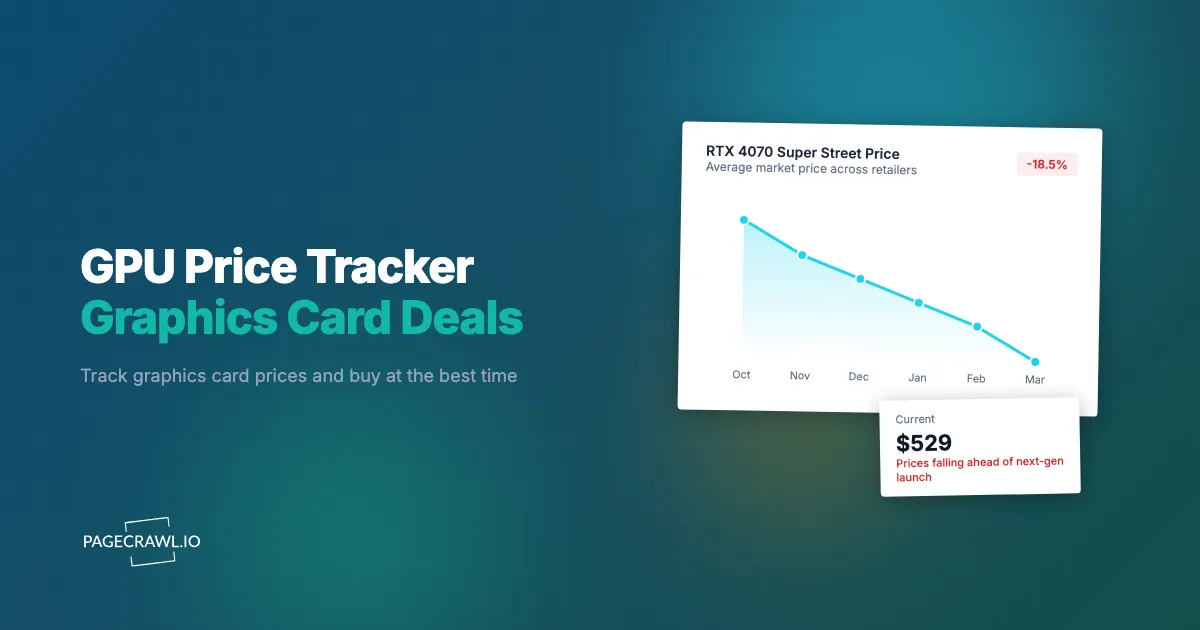
GPU pricing follows a predictable lifecycle pattern. At launch, demand exceeds supply and prices run high. Over the following months, production ramps up and prices gradually decline toward MSRP. As the next generation approaches, current-generation prices drop further as retailers clear stock.
The best deals on any GPU generation typically come in two windows: the first is 6-9 months after launch when supply has stabilized and competition between board partners intensifies. The second is immediately before or after the next generation launches, when retailers aggressively discount remaining inventory.
Tracking prices through these windows helps you identify when a card has reached its pricing floor versus when further drops are likely.
Mining Demand Waves
Cryptocurrency mining has historically caused dramatic GPU price swings. During mining booms, certain GPU models become scarce as miners buy in bulk, pushing prices far above MSRP. During mining busts, used mining cards flood the market and new card demand drops, creating buyer-friendly conditions.
While the GPU mining wave peaked in 2021-2022, smaller waves still occur when new coins become profitable to mine with consumer GPUs. Monitoring mining profitability alongside GPU prices gives you context for why prices are moving in a particular direction.
Tariff and Supply Chain Impacts
International trade policies directly affect GPU pricing. Tariffs on electronics imported from specific countries raise landed costs, which manufacturers and retailers pass on to consumers. These changes often arrive suddenly, with prices jumping overnight when new tariffs take effect.
Supply chain disruptions (component shortages, shipping delays, factory shutdowns) create temporary scarcity that pushes prices higher. Monitoring catches both the price increases and the eventual corrections when supply normalizes.
Seasonal Promotions
GPUs see predictable promotional pricing during Black Friday/Cyber Monday (November), Prime Day (July), back-to-school season (August), and around major game releases when NVIDIA and AMD run bundle promotions. These seasonal drops often represent the absolute lowest prices a card will reach during its lifecycle.
What to Track: Choosing the Right GPU Models
Not every GPU model is worth monitoring. Focus your tracking on cards that match your actual needs and budget.
Identifying Your Target Cards
Start with your use case. Gaming at 1080p, 1440p, or 4K requires different GPU tiers. Content creation, machine learning, and professional workloads have their own requirements. Identify 2-3 GPU models that meet your needs, then track all board partner variants of those models.
For example, if you need an RTX 5070 Ti for 1440p gaming, track the ASUS TUF, MSI Gaming X, Gigabyte Gaming OC, and Founders Edition variants. Each has independent pricing because they come from different manufacturers with different cost structures and sales strategies. The cheapest variant on any given day might be any one of them.
NVIDIA RTX Series
NVIDIA's current lineup spans from the budget RTX 5060 through the flagship RTX 5090. Key models to track by use case:
- Budget gaming (1080p/1440p): RTX 5060, RTX 5060 Ti
- Mainstream gaming (1440p/4K): RTX 5070, RTX 5070 Ti
- Enthusiast gaming (4K): RTX 5080, RTX 5090
- Content creation: RTX 5080, RTX 5090 (high VRAM models)
Previous generation RTX 4000 series cards remain excellent values, especially as retailers clear inventory. An RTX 4070 Ti Super at a clearance price often outperforms a new-generation card at the same price point.
AMD Radeon Series
AMD's Radeon RX series competes at most price points. AMD cards often offer better price-per-frame ratios, particularly in the mid-range:
- Budget: RX 9060, RX 9060 XT
- Mainstream/Enthusiast: RX 9070, RX 9070 XT
AMD cards tend to see larger percentage price drops than NVIDIA equivalents because AMD is more aggressive with promotional pricing to gain market share.
Previous Generation Opportunities
Do not ignore previous generation cards. A clearance-priced RTX 4080 Super can deliver most of the performance of a current RTX 5080 for meaningfully less money. Price tracking on outgoing models catches the clearance deals that represent the best value in the GPU market.
Where should you track GPU prices?
Track the card on the retailer pages where you would actually buy it, and use aggregators only for research. Comparison sites lag, miss coupon stacks, and refresh on their own schedule, so the retailer's own product page is the source of truth for a time-sensitive deal.
Dedicated Price Comparison Tools
PCPartPicker aggregates pricing across major retailers and shows price history charts. It is the standard starting point for GPU price research. However, PCPartPicker has limitations: it only tracks listed prices (not promotional bundles or coupon stacks), updates on its own schedule (not real-time), and only sends basic email alerts.
Other comparison tools like Pangoly and GPU Benchmark provide similar aggregation with different strengths. These tools are useful for initial research but insufficient for catching time-sensitive deals.
Major Retailers to Monitor
Each retailer has different pricing patterns and promotional strategies:
Best Buy: Often matches or beats other retailers on popular SKUs. Runs member-exclusive pricing and occasional flash deals. Best Buy Founders Edition exclusives for NVIDIA cards are particularly worth tracking. See our guide to Best Buy price tracking for retailer-specific setup.
Amazon: Dynamic pricing means prices change multiple times daily. Lightning Deals on GPUs are rare but represent deep discounts. Third-party sellers sometimes undercut Amazon's own pricing. Our Amazon price tracking guide covers the nuances of monitoring Amazon's multi-seller structure.
Newegg: Shell Shocker deals, combo discounts, and promo codes create layered savings that comparison tools often miss. Newegg is particularly strong for mid-range and budget GPUs. Open Box listings offer additional savings on returned cards.
B&H Photo: Competitive pricing and no sales tax for many states. B&H runs its own promotions independently of other retailers.
Micro Center: In-store only pricing that frequently undercuts the online retailers. If you live near a Micro Center, tracking their online listings catches in-store deals as they appear.
Manufacturer Direct: NVIDIA's own store and AMD's direct sales channel occasionally offer exclusive pricing or bundle deals not available elsewhere.
International Retailers
For buyers outside the US, retailers like Scan and Overclockers (UK), Alternate and Mindfactory (Germany), and Memory Express (Canada) have independent pricing. Cross-border shopping can yield savings when exchange rates are favorable, though shipping and import duties add complexity.
Setting Up GPU Price Monitoring with PageCrawl
Automated monitoring solves the core problem the same way it does for furniture and other home goods: GPU deals appear and disappear too quickly for manual checking to catch reliably.
Basic Price Tracking Setup
Setting up a GPU price monitor takes about two minutes per card:
Step 1: Find the specific GPU variant on the retailer's website and copy the product page URL. Use the exact product page, not a search results or category page, because product page monitoring tracks the price, specs, and availability of that one listing.
Step 2: Add the URL to PageCrawl and select "Price" as the tracking mode. PageCrawl automatically identifies the price element on the page.
Step 3: Verify the detected price matches what you see on the retailer's page. Confirm the extracted price is the actual selling price, not a crossed-out MSRP or "was" price.
Step 4: Set your check frequency. For actively hunted cards, use 1-2 hour checks to catch flash deals and promotional pricing before they expire. For general price trend monitoring, 6-12 hour checks provide solid coverage.
Step 5: Configure notifications. For time-sensitive GPU deals, use Telegram or Discord push so the alert reaches your phone as soon as a check finds the new price. Slack works well for team purchasing decisions. Email is fine for long-term price trend tracking where speed matters less.
Monitoring Multiple Retailers for the Same Card
The most effective GPU price tracking strategy monitors the same card across every retailer that carries it. An RTX 5070 Ti from ASUS might be $749 at Best Buy, $779 at Amazon, $729 at Newegg (with a promo code), and $739 at B&H Photo on any given day.
Create a PageCrawl folder for each GPU model you are tracking. Inside the folder, add monitors for each retailer that carries the card, or use the product comparison view that lines up one product across retailers. This gives you a complete price picture across the market. For a detailed walkthrough of this approach, see our guide to cross-retailer price comparison.
When any retailer drops its price, the next check picks it up and the alert lands. You can then check whether other retailers have matched the price or whether one retailer is offering a uniquely good deal.
Tracking MSRP Announcements and Price Cuts
Manufacturers sometimes announce official price cuts or new MSRP tiers. These announcements typically appear on NVIDIA's or AMD's blog/newsroom pages before retailers update their listings. Monitoring these pages with PageCrawl's content tracking gives you advance warning of incoming price reductions.
When a manufacturer announces a price cut, retailers typically take hours to days to update their listings. Knowing about the cut early lets you decide whether to buy at the current price or wait for retailers to adjust.
Combining Price and Stock Monitoring
For highly sought-after GPUs (new launches, limited editions), availability matters as much as price. A card that is technically $699 but perpetually out of stock is not a deal you can act on.
Set up two monitors for critical cards: one tracking price and one tracking availability. When a card comes back in stock, the next check catches it and you receive an alert. When the price drops, you receive a separate alert. For comprehensive stock monitoring techniques, see our guide to NVIDIA GPU stock alerts.
PageCrawl's availability tracking mode detects whether a product shows as "In Stock," "Out of Stock," "Add to Cart," or similar indicators. Combined with price tracking, you know both when a card is available and at what price.
Historical Price Analysis for Timing Purchases
Price tracking is most valuable when you accumulate enough history to identify patterns.

Recognizing Price Floors
After monitoring a GPU for several weeks, you develop a sense of its price range. The RTX 5070 Ti might fluctuate between $729 and $799 across retailers. When you see $729 again, you know it is at the bottom of its recent range, and you can buy with confidence that you are getting a strong price.
Without historical data, every price looks like it might drop further. With data, you can make informed decisions.
Identifying Promotional Patterns
Retailers follow patterns. Best Buy often drops GPU prices on Thursday evenings. Amazon runs Lightning Deals during specific promotional windows. Newegg's Shell Shocker deals appear daily but feature GPUs only occasionally. Tracking captures these patterns so you can anticipate when the next deal might appear.
Setting Target Prices
Use your accumulated price data to set realistic target prices. If an RTX 5080 has never dropped below $929 across all retailers, setting a $849 alert probably will not trigger. But setting a $949 alert catches every promotional dip below the typical selling price.
Unrealistic target prices mean you never get alerted. Realistic targets based on observed price ranges mean you catch every genuine deal.
Advanced GPU Monitoring Strategies
Webhook Integration for Price Dashboards
For power users tracking multiple GPU models across many retailers, webhook integrations send price data to external systems. Pipe PageCrawl alerts into a Google Sheet to build a live price comparison dashboard for your target cards. See our guide to webhook automation for setup details.
Monitoring Review and Benchmark Pages
New GPU reviews and benchmark results can influence pricing. When a major tech publication reviews a card favorably, demand and prices often increase. When benchmarks show disappointing performance, prices soften. Monitoring review sites with PageCrawl's content tracking gives you early intelligence on factors that move GPU prices.
Tracking Used GPU Markets
For budget-conscious buyers, the used GPU market offers significant savings. While PageCrawl is designed for web page monitoring rather than marketplace listings, you can monitor eBay search results pages or r/hardwareswap Reddit pages for mentions of specific GPU models. New listings trigger alerts, giving you early access to used deals.
What makes GPU price tracking tricky?
Three things trip people up: a single model ships as a dozen board-partner SKUs with independent prices, bundles change the effective price without changing the listed one, and tax and region differences mean the cheapest sticker is not always the cheapest card.
Multiple SKUs and Variants
A single GPU model like the RTX 5070 Ti might have 15+ variants from different board partners, each with a unique URL and independent pricing. You need to decide whether to track all variants or focus on the 2-3 you would actually buy. Tracking all of them provides the most complete picture but uses more monitors.
PageCrawl's bulk editing feature makes managing large numbers of GPU monitors practical. Select all monitors in a folder and change the check frequency, notification channel, or tracking mode in a single action. When a new GPU generation launches and you want to shift all your monitors from 12-hour checks to 2-hour checks, bulk editing applies the change across every monitor at once instead of requiring you to update them one by one.
For PageCrawl's free tier (6 monitors), focus on your top-choice variant across 2-3 retailers. The Standard plan at $80/year gives you 100 monitors, enough to track multiple GPU models across all major retailers comprehensively.
Bundle and Combo Pricing
Retailers sometimes bundle GPUs with games, power supplies, or other components. These bundles change the effective GPU price but may not show as a base price change. Fullpage content monitoring (rather than price-only tracking) catches bundle changes and promotional additions that affect total value.
Regional and Tax Variations
GPU prices differ by region. A card that appears cheaper at one retailer might cost more after tax. PageCrawl monitors the displayed price, so factor in your local tax rate when comparing alerts from different retailers.
Choosing your PageCrawl plan
PageCrawl's Free plan lets you monitor 6 pages with 220 checks per month, which is enough to validate the approach on your most critical pages. Most teams graduate to a paid plan once they see the value.
| Plan | Price | Pages | Checks / month | Frequency |
|---|---|---|---|---|
| Free | $0 | 6 | 220 | every 60 min |
| Standard | $8/mo or $80/yr | 100 | 15,000 | every 15 min |
| Enterprise | $30/mo or $300/yr | 500 | 100,000 | every 5 min |
| Ultimate | $99/mo or $999/yr | 1,000 | 100,000 | every 2 min |
Annual billing saves two months across every paid tier. Enterprise and Ultimate scale up to 100x if you need thousands of pages or multi-team access.
GPU prices can swing $50 to $200 in a single week, and catching one meaningful drop easily covers the cost of a full year of monitoring. Standard at $80/year gives you 100 monitors, enough to track every card you are considering across every major retailer, with 15-minute frequency so you hear about a price cut or restock before it sells out. Enterprise at $300/year scales to 500 pages if you are tracking a wide range of SKUs across GPU generations, or running price data for a build shop or resale operation.
Getting Started
Pick the GPU model you are most interested in right now. Find it at two or three retailers and set up price monitors in PageCrawl. Configure Telegram or Discord notifications so you hear about drops as soon as a check detects them. Run the monitors for two weeks to see how prices move on the card you want.
Once you see the pricing patterns, expand your monitoring. Add more variants, more retailers, and stock monitoring alongside price tracking. Use folders to organize monitors by GPU model for easy comparison.
PageCrawl's free tier includes 6 monitors, enough to track one GPU model across several retailers. The Standard plan at $80/year gives you 100 monitors for comprehensive multi-card, multi-retailer tracking. The Enterprise plan at $300/year covers 500 monitors for resellers and businesses managing large hardware inventories.
Stop guessing at GPU prices. Set up automated monitoring and let the alerts come to you.