At 6:52 on a Tuesday morning, a pricing analyst at a mid-size electronics brand opened her laptop to nineteen browser tabs left over from the night before. Each one held the same wireless headset listed on a different store: Amazon, Walmart, Best Buy, Target, two specialty audio shops, and a handful of marketplace sellers. By the time she had refreshed all of them and copied the numbers into a spreadsheet, fifteen minutes had passed and one of the prices had already changed again. The product was identical on every page. The only thing that differed was the number, and that number was a moving target.
That scene plays out for shoppers waiting on a deal and for businesses defending their margin. Amazon, Walmart, Target, Best Buy, Home Depot, and independent stores all use different URLs, layouts, and ways of showing a price. Tracking one product across all of them by hand means dozens of tabs and a fading memory of which store was cheapest last week. It does not scale past a few products, and it never gives you the full picture at one moment.
This guide covers two layers of a better approach. First, the dependable everyday method: put a price monitor on each retailer's product page and review them in one place. Second, PageCrawl's Product Comparison capability, a custom capability we enable on request that groups the monitors for the same product across every retailer into a single comparison, with alerts that watch the whole group and exports that flatten it into a spreadsheet.
How do you track the same product across multiple stores?
The reliable everyday method is to set up a separate price monitor on each retailer's product page, then review them together in one dashboard. PageCrawl checks every page on a schedule, extracts the current price, and alerts you when it moves. No open tabs, no manual refresh, just one place that shows every seller's latest number.
Setting this up takes a few minutes per product. You add the Amazon listing, the Walmart listing, the Best Buy listing, and any specialty stores you care about, each as its own monitor set up for tracking numeric values like prices. PageCrawl identifies the price on each page, records it, and rechecks on whatever frequency your plan allows. When a price drops on any of those pages, you find out without lifting a finger.
Because each retailer is a normal product page monitor, you keep the per-page controls you would expect: tag related listings, filter your dashboard to one product family, and attach notification rules to any single page. PageCrawl also handles the awkward parts of each store, so a page that hides its price behind a button, loads it after the rest of the content, or shifts its layout week to week still resolves to a clean, comparable number.
For walkthroughs of individual stores, see the guides for Amazon price drop alerts, Walmart price tracking, and the Best Buy price tracker. This per-page foundation is available on every PageCrawl plan, including the free tier, and it is genuinely enough for most people: each store's current price and history, plus alerts on drops. What it does not do on its own is treat those separate pages as one product and tell you, at a glance, which seller is cheapest right now. That is the gap the next layer closes.
What is PageCrawl's Product Comparison capability?
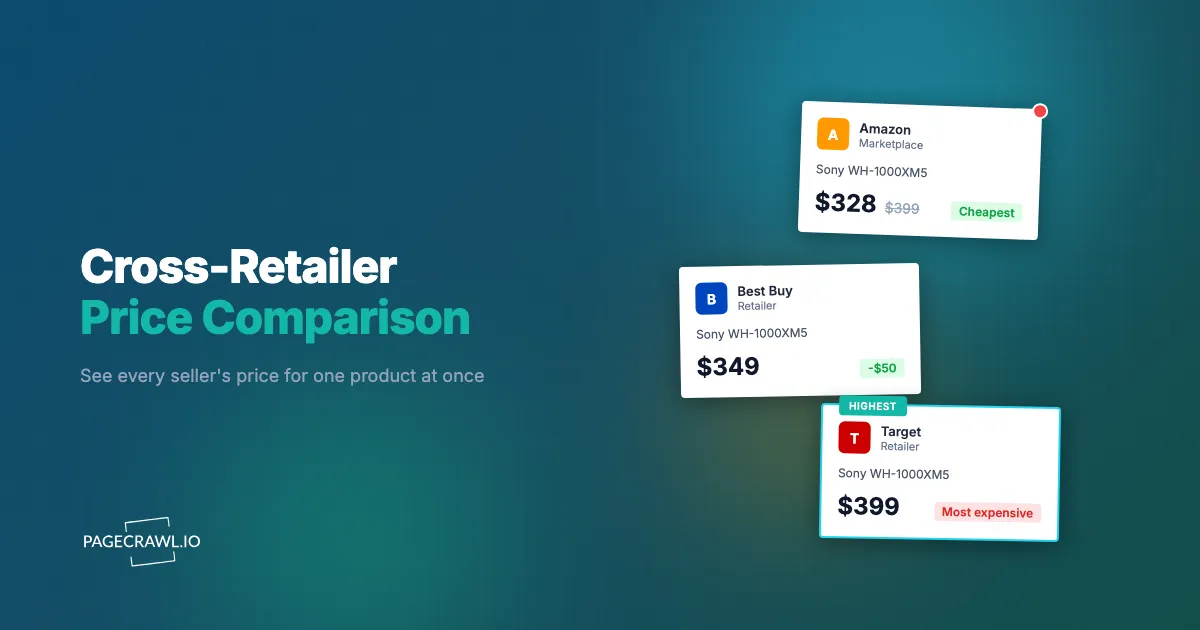
Product Comparison is a custom capability we enable on request that groups the monitors for one product across many retailers into a single comparison. Instead of watching each page in isolation, you see every seller's current price side by side and track the spread between the cheapest and most expensive in one view. It turns separate monitors into one picture of a product's market.

The shift is subtle but it changes how you work. Without it, you have nine monitors for nine stores and you mentally stitch them together every time you check. With it, those nine monitors are one comparison. The cheapest seller is obvious, the most expensive is flagged, and the gap between them is a live number you can act on. If you sell the product yourself, your own listing sits in the same lineup, so you always know where you rank.
The spread, the difference between the lowest and highest price in the group, is the single most useful figure Product Comparison surfaces. A tight spread tells you the market is stable. A widening spread is a signal: a flash sale at one store, a pricing error, a stockout pushing one seller's price up, or an arbitrage gap opening between where you can buy and where you can sell. Watching the spread is easier and more informative than watching nine prices one at a time, and it builds directly on the per-page monitors above.
Product Comparison is a custom capability we enable for select customers and teams. It is covered in detail in the Shopify competitor monitoring guide and fits naturally alongside a broader e-commerce price monitoring program. How to turn it on for your account is covered further down.
How does PageCrawl match the same product across different retailers?
PageCrawl matches a product across stores using product identifiers, such as a GTIN or UPC, or a SKU combined with the brand name. You can also supply your own reference tags when the public identifiers differ or are missing. Once it recognizes that two pages carry the same item, it groups those monitors into one comparison with no manual linking.
Identifiers do the heavy lifting because they are designed to be universal. A GTIN or UPC, maintained by the GS1 standards body, points to one specific product regardless of which store sells it, so when the same code appears on an Amazon page and a Walmart page, those listings belong together. Where a clean barcode is not available, the combination of a SKU and a brand name is usually enough to tie listings to the same item with confidence.
Sometimes retailers describe the same product differently enough that automatic matching needs a hand: a bundle, a regional variant, or a renamed edition. For those cases you assign your own reference tag to the monitors that should be grouped, and PageCrawl treats them as one product. The benefit, not the mechanism, is the point: you add the product pages you care about, PageCrawl recognizes the matches, and the comparison assembles itself. As you add more retailers for the same item, they join the existing group rather than starting a new one.
What does the cross-retailer comparison view show you?
The comparison view lines up every retailer carrying the same product with its current price in one place, cheapest first. You read the whole market top to bottom, so one glance answers the only question that matters: who has the best price on this product now, and by how much.

Each retailer shows its latest extracted price next to the store it came from, so you read the market top to bottom without switching pages. Because every price in the lineup was captured on the same monitoring schedule, you are comparing current numbers against current numbers, not last week's screenshot against today's.
Alongside the live lineup, you keep the full history for each retailer, so a comparison is never just a snapshot. You can see that one store held steady while another cut its price three times this month, or that the cheapest seller in the group changes hands every few days. That history is what turns a price list into intelligence about how each seller actually behaves, and it makes the comparison a shared source of truth instead of nine tabs that never agree.
What comparison-aware alerts can you set?
Comparison-aware alerts watch the whole group, not just one page. You can be notified when a retailer becomes the cheapest, when your own listing turns into the most expensive, or when the price spread crosses a threshold you set. Each alert fires once when its condition becomes true, so you are told about the change, not nagged on every recheck.
These three conditions map cleanly onto real decisions:
A retailer becomes the cheapest. For a shopper, this means your preferred store finally has the best deal, and the alert reaches you as soon as a check confirms it. For a pricing team, it is an early warning that a specific competitor has just undercut the field, often before it shows up anywhere else you would look.
Your own listing becomes the most expensive. If you sell the product, this is the alert that protects your conversion rate. When a check finds your price sitting at the top of the group, you find out while there is still time to respond, rather than discovering it from a sales dip a week later.
The price spread crosses a threshold. Set a percentage that counts as unusual for your products. A 5% spread on a $50 item is normal noise. A 30% spread might be a pricing error, a flash sale, a stockout, or a genuine arbitrage gap. Because the alert keys off the whole group, you catch the anomaly without watching every price yourself.
Alerts reach you through email, Slack, Discord, Teams, Telegram, and webhooks, so the signal lands wherever your team works. They are state-aware: you are notified once when a condition turns true and again only when it changes, not on a loop. For finer control, the broader conditional alert rules add keyword, price, and threshold logic on top.
Can you export and chart cross-retailer prices?
Yes. You can export any cross-retailer comparison as a spreadsheet, with one row per product and one column per retailer, ready to share or analyze. PageCrawl also offers smart chart suggestions, so you can visualize price movement across every seller at once instead of assembling graphs by hand. Both turn live monitoring into something you can hand to a team.
The export is built for breadth. When you track many products across many stores, the spreadsheet flattens the whole matrix into one grid: each product on its own line, each retailer in its own column, the current price in every cell. At a glance you can see which store wins each product, spot a competitor that is consistently cheapest across a category, or hand the file to a colleague who lives in spreadsheets.
The chart suggestions handle the time dimension. Rather than deciding which series to plot, you get a recommended view of how prices have moved across all sellers at once, so trends that are invisible in a single number become obvious: a competitor steadily walking its price down, a seasonal pattern, or the day the spread blew open. Visualizing the whole group together is far more revealing than reading each retailer's chart one at a time.
Who uses cross-retailer price comparison?
Cross-retailer price comparison helps anyone who needs either the best price or the full competitive picture: deal-hunting shoppers, e-commerce and retail pricing teams, brands enforcing MAP agreements, resellers chasing arbitrage gaps, and procurement teams comparing suppliers. Each group uses the same grouped view and the same alerts to reach a different outcome.
Shoppers tracking deals
You have a wishlist of products you only want at the right price. Add each item from three or four retailers, set an alert for when any store becomes the cheapest, and forget about it. It works best for electronics, appliances, furniture, or anything expensive enough that the gap between stores is worth catching. Check daily, hourly, or every few minutes depending on how time-sensitive the deal is.
E-commerce and retail teams
Track your top products across competitor stores and let the comparison tell you as soon as a check catches someone undercutting you on a high-margin item. The grouped view is your live standing in the market, and the weekly export gives your pricing team a clean snapshot of where you rank on every product. It pairs naturally with a full competitive pricing program rather than replacing it.
Brands monitoring retailer pricing
Brands with MAP (Minimum Advertised Price) agreements can monitor their authorized retailers for compliance. The FTC's guide to the antitrust laws explains how US law treats manufacturer-imposed pricing policies, so structure your program with that in mind. Group each product, set a spread alert, and you find out when one retailer drops below the floor while others hold the line. The comparison view makes a violation obvious, and the export gives you a dated record to take to the offending seller. The MAP enforcement guide covers how to structure this end to end.
Resellers and arbitrage
Compare the same product across marketplaces and specialty stores, then let the spread alert tell you when a profitable gap opens between where you can buy and where you can sell. The whole reseller game is the spread, and watching it across the full group is far more efficient than refreshing two marketplaces and doing the math in your head.
Procurement teams
Track prices across multiple suppliers for items your company buys regularly. The comparison view shows which supplier is cheapest right now, and the export keeps a running record so you negotiate from data instead of memory. When a supplier you rely on quietly becomes the most expensive in the group, the alert catches it before the next purchase order goes out.
How do you enable Product Comparison for your account?
Product Comparison is a custom capability we enable for select customers and teams, not a switch on the self-serve plans. If grouped cross-retailer tracking sounds like what you need, reach out and we will turn it on for your account. The per-page price monitoring it builds on is available to everyone today, so you can start the foundation immediately.
We keep it custom on purpose. As the guide to comparing product prices across multiple retailers describes, Product Comparison works best when it is configured around your actual products, retailers, and the identifiers your catalog uses, so we would rather set it up with you than ship a generic toggle that half-fits. When you contact us, it helps to mention roughly how many products and retailers you want to track and whether you are watching competitors, enforcing MAP, or hunting deals. Once it is on, the matching and grouping happen for the monitors in your workspace, including any per-page price monitors you have already created, and your existing history carries straight into the comparison view.
Choosing your PageCrawl plan
PageCrawl's Free plan lets you monitor 6 pages with 220 checks per month, which is enough to validate the approach on your most critical pages. Most teams graduate to a paid plan once they see the value.
| Plan | Price | Pages | Checks / month | Frequency |
|---|---|---|---|---|
| Free | $0 | 6 | 220 | every 60 min |
| Standard | $8/mo or $80/yr | 100 | 15,000 | every 15 min |
| Enterprise | $30/mo or $300/yr | 500 | 100,000 | every 5 min |
| Ultimate | $99/mo or $999/yr | 1,000 | 100,000 | every 2 min |
Annual billing saves two months across every paid tier. Enterprise and Ultimate scale up to 100x if you need thousands of pages or multi-team access.
For per-page price monitoring, Standard at $80 a year covers 100 product pages across as many retailers as you track, and catching one price gap on a single high-value item often saves more than the full annual cost. Enterprise at $300 a year extends to 500 pages and 5-minute checks, the right scale for tracking a full product category across every significant competitor at once. Product Comparison is enabled as a custom capability on top of a plan, so reach out and we will fit it to your account.
Getting Started
You can start the foundation in minutes and add the grouped comparison whenever you are ready:
- Create a free account and add a product page from each retailer you care about using price tracking mode.
- Wait for the first check to run, usually a minute or two, so PageCrawl captures the current price on each page.
- Set price alerts on the individual monitors so you are notified when the next check catches a store dropping its price.
- Review everything in one dashboard and tag related listings so a product family is easy to find.
- Reach out to enable Product Comparison when you want those separate monitors grouped into one cross-retailer view, with comparison-aware alerts, spreadsheet export, and chart suggestions.
Per-page price monitoring is free to start and covers most needs on its own. When you are ready to see every seller's price in a single comparison and track the spread across the whole market, contact us about Product Comparison and we will turn it on for your account.