The most reliable way to track a Walmart price is an automated monitor like PageCrawl: paste the product URL, choose Price tracking, and pick your alert channel. When the next scheduled check detects a drop, you get notified, and checks can run as often as every 2 minutes depending on plan.
Walmart changes prices quietly. A TV that costs $398 today drops to $348 tomorrow during a Rollback, then snaps back by the weekend with no announcement. This guide covers every realistic way to track Walmart prices, from browser extensions to automated monitoring, and how to catch Rollbacks before they end.
How does Walmart pricing work?
Walmart mixes three main pricing mechanisms: Everyday Low Price (a stable baseline that rarely moves), Rollbacks (temporary reductions lasting days to weeks), and clearance (staged permanent markdowns). Unlike Amazon's algorithmic pricing that shifts many times per day, Walmart's changes are less frequent but bigger, which makes each one worth catching.
Everyday Low Price (EDLP)
EDLP is Walmart's baseline strategy: consistently priced items where Walmart commits to being among the lowest-priced retailers at all times. Tracking EDLP items usually shows flat price history.
Rollbacks
Rollbacks are temporary price reductions that Walmart features prominently. A Rollback can last days or weeks, and Walmart typically shows the original price alongside the reduced price. When a Rollback ends, the price returns to normal with no announcement. These are the most valuable changes to track because they represent genuine savings with a time limit.
Clearance
Clearance items are being permanently discontinued. Prices drop in stages (typically 25%, 50%, 75%, then 90% off) and items sell out for good once stock is gone. Clearance markdowns are often deeper in-store than online.
Can browser extensions track Walmart prices?
Yes. Extensions like Honey and Capital One Shopping show Walmart price history and send drop alerts on saved items, and both are free. The trade-offs are alert speed (they can lag well behind the actual change), spotty history for less popular items, and limited or missing custom threshold alerts.
Note: CamelCamelCamel, the best-known price tracker, only covers Amazon. If you use it for Amazon, you need a separate tool for Walmart.
Honey (PayPal)
Honey shows recent price history for Walmart products, applies coupon codes at checkout, and its "Droplist" notifies you when saved products drop. The downsides: alerts can arrive well after the change, there are no custom thresholds ("alert me below $50"), and PayPal collects your shopping data.
Capital One Shopping (formerly Wikibuy)
Capital One Shopping tracks Walmart prices, shows comparisons across retailers, and alerts you when saved items drop. It is free, but alerts can be slow, some features require a Capital One account, and it collects detailed shopping behavior data.
Which websites track Walmart prices?
Dedicated tracking sites maintain databases of Walmart product prices with search, history charts, and alert features. BrickSeek is the standout for Walmart because it covers in-store inventory and clearance pricing at specific stores, something no browser extension or page monitor can see.
BrickSeek
BrickSeek specializes in Walmart and Target inventory and pricing, showing in-store inventory levels, SKU lookups, and clearance prices at specific locations. That is uniquely valuable for Walmart clearance, which is often only marked down in certain stores. The limits: inventory data can lag, in-store prices are estimates, coverage is US-only, and the most useful lookups sit behind a paid membership.
Pricecharting / PriceHistory
These sites maintain historical price data across retailers including Walmart. They are useful for research but not for timely alerts.
How do you track Walmart prices with a web monitoring tool?
Web monitoring tools give you the most control over Walmart price tracking, and price and stock alert monitoring is the category built for exactly this job. Instead of relying on a third-party database, you monitor the actual product page and get alerted when the next check detects a change: price, availability, seller, or anything else on the page you choose to watch.

How PageCrawl Monitors Walmart Prices
PageCrawl loads each Walmart product page in a real browser on a schedule, extracts the price, and alerts you when anything changes. Because the rendering is a real browser, the price in the alert is the price you would see visiting the page yourself. The help centre guide to monitoring numeric values with the number tracker explains the charts and statistics you get alongside each price change.
Setting up a Walmart price monitor:
- Copy the product URL from Walmart.com (e.g.,
walmart.com/ip/Samsung-65-Class-4K-Crystal-UHD/123456789). - Paste it into PageCrawl. It selects Price tracking and turns on availability tracking for Walmart product pages.
- Set the check frequency (every 1-2 hours covers most products; tighten during major sale events).
- Configure alerts (email, Slack, Discord, Telegram, or webhook).
- Optionally set a target price so you only get pinged below your threshold.
What you get out of the box:
- A price history chart with exact timestamps for every change
- Alerts that go out as soon as the next check detects the change (checks can run as often as every 2 minutes depending on plan)
- Threshold alerts ("notify me only if it drops under $349")
- Availability tracking so you also catch restocks, not just price drops
- Screenshots archived with every check, plus AI summaries like "Price decreased from $398 to $348, a 12.6% drop"
- Webhook output for custom automations
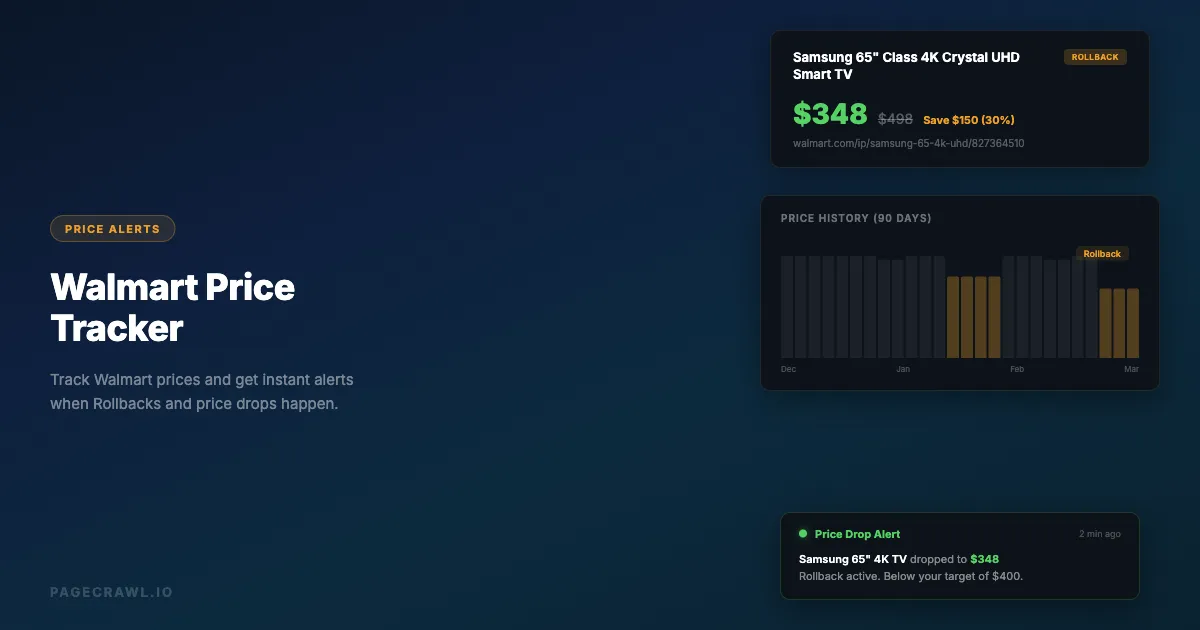
Here is what that price history looks like in PageCrawl for a Walmart TV over three months: the flat $398 Everyday Low Price baseline, two temporary Rollbacks ($348 in May, $328 in June) that each snapped back within days, and the current $298 drop.

What to Track on a Walmart Product Page
The price element is the obvious one, but a Walmart product page contains several signals worth tracking, which is what product page monitoring covers: descriptions, specs, seller, and availability alongside price. Most are exposed via CSS selectors or auto-detected by tracking modes.
| Element | Why it matters | Tracking mode |
|---|---|---|
| Current price | Catches Rollbacks and clearance markdowns | Price |
| "Was" price | Tells you whether a deal is genuinely new or just rebranded | Price (separate element) |
| Availability ("Add to cart" vs "Out of stock") | Restock signal for high-demand items | Availability |
| Seller name | Walmart sometimes hands the listing to a third-party seller at a different price | Element |
| Pickup vs Shipping availability | Managed separately; a product can be in stock for pickup but not shipping | Element |
| Variant pricing (size, color) | Different variants often Rollback at different times | Element per variant |
For most consumers, Price plus Availability is enough. For tracking many products, use tags and folders to organize monitors by category, bulk actions to pause or re-schedule groups, and workspace sharing for family or team members.
How do Walmart price tracking tools compare?
Browser extensions are the fastest to set up but the slowest to alert. Tracking sites add in-store data that nothing else has. Web monitoring gives the most configurable alerts, tied to your check frequency. Custom scripts offer full control at a high maintenance cost. The table below compares the four approaches.
| Feature | Browser Extensions (Honey) | Tracking Sites (BrickSeek) | Web Monitoring (PageCrawl) | Custom Scripts |
|---|---|---|---|---|
| Setup time | 2 minutes | 5 minutes | 5 minutes | Hours |
| Price history | Limited (30-90 days) | Limited | Unlimited | Custom |
| Alert speed | Hours | Varies | Next check (as often as every 2 min) | Custom |
| Custom thresholds | No | Limited | Yes | Yes |
| In-store prices | No | Yes | No | No |
| Availability alerts | No | Yes | Yes | Custom |
| Works while browser is closed | No | Yes (email) | Yes | Yes (if hosted) |
| Cost | Free | Free / $9.99 per month | Free tier available | Free (self-hosted) |
| Maintenance | None | None | None | High |
| Multi-channel alerts | Email only | Email only | Email, Slack, Discord, webhook | Custom |
Should you build a custom Walmart price scraper?
For most people, no. Custom scripts that scrape Walmart product pages break whenever the page structure shifts, and they need constant maintenance to keep pace with Walmart's aggressive blocking of automated requests. Unless you have very specific extraction needs and dedicated engineering time, a managed monitor is cheaper and far less fragile.
Does Walmart have built-in price alerts?
Not really. The Walmart app lets you save items to a list and sends occasional notifications about price changes, but they are inconsistent and often delayed. The website shows the current price and Rollback savings, but there is no price history and no way to set a threshold alert.
Walmart+ (Walmart's paid membership) includes free shipping, fuel discounts, and early access to some deals, but no price tracking.
How do you build a Walmart price alert system?
Combine tools by strength: use PageCrawl for high-priority items with threshold alerts, a browser extension for casual browsing, and BrickSeek for in-store clearance checks. Focus your monitors on high-value electronics, seasonal items, and staples you buy regularly, then set target prices based on recent lows.
Step 1: Identify What to Track
Focus on high-value electronics (where the swings are largest in dollar terms), seasonal items that get deep discounts at season changes, grocery staples with Rollback patterns, and older products that might enter clearance.
Step 2: Set Up Monitoring
For a family tracking 15-20 products: PageCrawl on the high-priority items (every 1-2 hours with Slack or email alerts), Honey for casual browsing history, and BrickSeek for in-store clearance checks.
Step 3: Set Target Prices
Check the recent price history to understand the typical range, look for seasonal patterns (Black Friday, back-to-school, end-of-model-year), and set your target at or below the recent low. Electronics see their deepest cuts during major sale events, so your own chart, not a rule of thumb, should set the target.
Step 4: Act on Alerts
When an alert arrives, verify the price on the product page, check whether it is a temporary Rollback or a permanent reduction, compare with other retailers, and buy confidently, since Walmart does not typically offer price adjustments after purchase.
How do you track Walmart Rollbacks?
Set up a price monitor on the product page and let it watch for the drop, because Walmart publishes no schedule for when Rollbacks start or end. Rollbacks typically last 2-4 weeks, so an automated alert leaves you time to act, while manual checking often catches them just before they end.
Rollbacks are triggered by seasonal transitions, competitive pressure (when Amazon or Target drops a price, Walmart responds), overstock that needs to move, and themed promotional events. The deepest and most frequent Rollbacks land in electronics, home goods, toys in January and late summer, end-of-season apparel, and rotating grocery categories.
How does Walmart price tracking differ from Amazon?
Amazon prices change multiple times per day in small algorithmic increments, while Walmart prices change less often but in bigger jumps (Rollback starts and ends, clearance markdowns). In practice that means checking every 1-2 hours for Amazon and every 2-4 hours for Walmart, since Walmart's changes last longer. Our Amazon price tracker guide covers the Amazon side in detail.
The most effective approach monitors both retailers for the same product, since when one drops a price the other often follows: set up one PageCrawl monitor per retailer page and view them together. PageCrawl's cross-retailer comparison, which groups the same product across stores, is a custom capability you can ask us to enable.
Common Walmart Price Tracking Scenarios
Scenario 1: Waiting for a TV to Go on Sale
You want a Samsung 65" TV currently at $498, and you have seen it hit $398 during a Walmart Black Friday sale. Monitor the product page with "Price" tracking every 2 hours and a threshold alert at $420. When a spring Rollback drops it to $398, you get the alert and buy before the Rollback ends.
Scenario 2: Tracking Baby Formula Availability
A specific baby formula keeps selling out. Create a monitor with "Availability" tracking mode (our Walmart in-stock alerts guide walks through this setup in detail) checking every 30 minutes with Slack alerts. You get alerted within 30 minutes of a restock and order before it sells out again.
Scenario 3: Monitoring Clearance Electronics
You suspect a laptop is heading to clearance. Monitor the price every 4 hours and watch for the stair-step pattern (25% off, then 50%, then 75%). When the $599 laptop hits $449 and then $299, you buy at 50% off before stock runs out.
Tips for Better Walmart Price Tracking
1. Track the Walmart.com Price, Not the App Price
Walmart occasionally shows different prices on the website vs. the app. Monitor the desktop version (walmart.com), which is the most consistent and represents the price you will pay online.
2. Monitor During Key Sale Periods
Walmart's biggest drops happen during Black Friday and Cyber Monday (November), Walmart+ Week (typically June), back-to-school (July-August), after-Christmas clearance (January), and quarterly end-of-season transitions. Increase your check frequency during these windows, for example from every 4 hours to every hour.
3. Watch for Walmart.com vs In-Store Price Differences
Online and in-store prices can differ, especially for clearance. If a product is full price online, check BrickSeek for in-store pricing at your local Walmart, where clearance is often deeper.
4. Track Competitor Pages Too
Walmart often matches competitor prices within hours. If you are tracking a product at Walmart, also monitor it at Amazon, Best Buy, and Target. A price drop at one retailer frequently triggers a matching drop at Walmart.
5. Use Webhooks for Advanced Automation
PageCrawl's webhook output lets you push a price drop into anything: a family group chat, a shared shopping list, a spreadsheet for historical analysis, or a purchase automation. See the help centre walkthrough on sending change data to any external service with webhooks for the payload format and retry behaviour.
Choosing your PageCrawl plan
PageCrawl's Free plan checks hourly and covers enough monitors to validate the approach on your most-wanted products. Most shoppers graduate to a paid plan once they see the value.
| Plan | Price | Pages | Checks / month | Frequency |
|---|---|---|---|---|
| Standard | $8/mo or $80/yr | 100 | 15,000 | every 15 min |
| Enterprise | $30/mo or $300/yr | 500 | 100,000 | every 5 min |
| Ultimate | $99/mo or $999/yr | 1,000 | 100,000 | every 2 min |
Annual billing saves two months on every paid tier. The math works fast: Standard at $80/year covers 100 product pages, and one caught Rollback on a $400 TV pays for the plan several times over. Enterprise adds 500 pages and every 5-minute checks for competitive pricing across a full category.
How long do Walmart Rollbacks last?
Rollbacks typically last 2-4 weeks, though some run for only a few days and others stretch past a month. Walmart publishes no schedule and gives no warning when a Rollback ends, the price simply returns to normal, which is why automated monitoring catches savings that manual checking misses.
Does Walmart price match?
No. Walmart retired its ad-matching policy years ago and does not match other retailers or its own in-store vs online prices; the current terms are published on Walmart.com. However, Walmart does adjust online prices to stay competitive, so when Amazon drops the price on a popular item, Walmart often follows within hours.
How fast are Walmart price drop alerts?
It depends on the tool. Browser extensions often alert 12-24 hours after a change. A web monitoring tool like PageCrawl alerts you when the next scheduled check detects the change, and checks can run as often as every 2 minutes depending on plan, so a drop rarely goes unnoticed for long.
Getting Started
Pick one product you have been wanting to buy from Walmart, set up a PageCrawl monitor with "Price" tracking mode, and configure email alerts. Within a few days you will have a price history showing exactly how the price moves, and when it drops to your target, the next check catches it.
PageCrawl's free plan is enough to track your most-wanted Walmart products alongside items from other retailers. Serious deal hunters who track dozens of products can step up to paid plans for more monitors and faster checks.