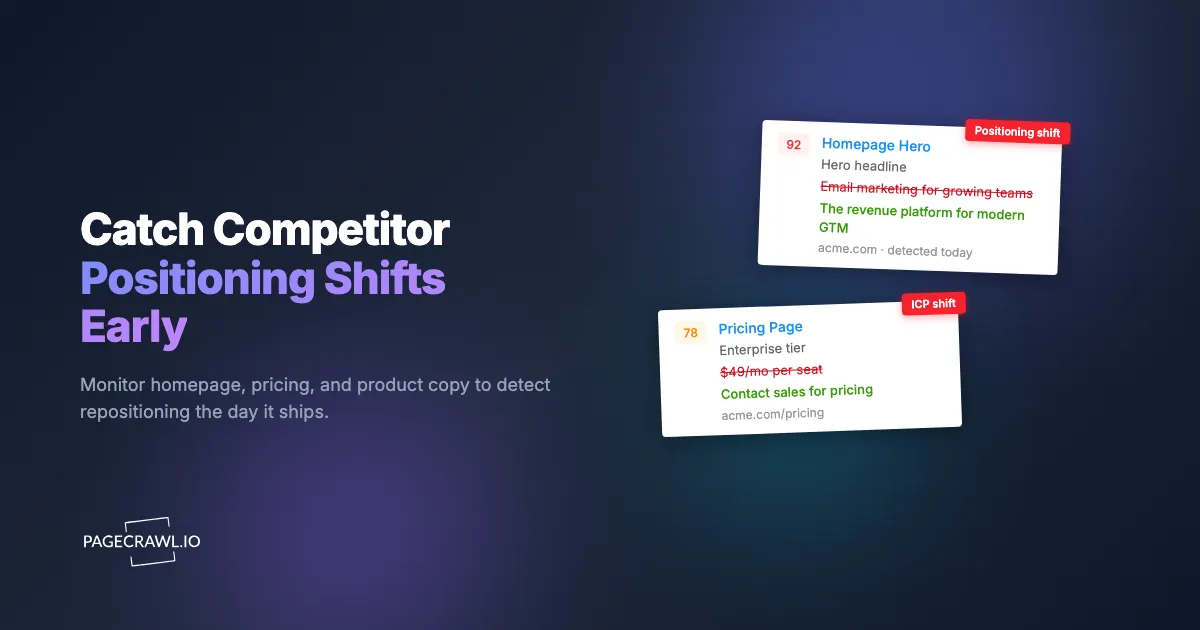
On a Tuesday morning, a competitor quietly swapped the headline on their homepage. The old hero read "Email marketing for growing teams." The new one read "The revenue platform for modern go-to-market." Nothing was announced. No blog post, no press release, no LinkedIn fanfare. But that single line was the visible tip of a months-long repositioning: a move upmarket, a broader product story, and a direct play for the enterprise buyers you both want.
Three weeks later, your sales team started losing deals to that competitor on "platform breadth" objections they had never heard before. Marketing was still running ads against the old "email tool" positioning. By the time anyone connected the dots, the competitor had a head start on the narrative, and you were reacting instead of anticipating.
This is the quiet risk in competitive intelligence monitoring. Feature launches get announced. Funding rounds get covered. But messaging shifts, the changes to how a competitor describes who they are and who they serve, happen silently on the pages prospects actually read. Competitor messaging tracking catches those shifts the day they ship. This guide covers what a messaging shift actually looks like, which pages to watch, how to set up diff-based monitoring in PageCrawl, and how to turn a detected change into a decision your team acts on.
What counts as a competitor messaging shift?
A competitor messaging shift is any change to the words a company uses to describe its value, audience, or positioning, not its features. It shows up as a rewritten homepage hero, a new value proposition, a changed tagline, a different "who it's for" line, or repriced and renamed plans. These edits signal strategic intent before any formal announcement does.
Messaging changes fall into a few recognizable buckets, and each tells you something different.
Positioning and category shifts
The biggest signal. When a competitor moves from "email marketing tool" to "revenue platform," or from "project management" to "work operating system," they are changing the category they compete in. Category shifts usually precede pricing changes, new product lines, and a different sales motion. They are the highest-value thing to catch early because they reshape the entire competitive frame.
ICP and audience changes
Watch for changes to the "who it's for" language. A homepage that used to say "for freelancers and small teams" and now says "for enterprises and IT leaders" is telling you the company is moving upmarket. The reverse, a move from enterprise language toward self-serve and "get started free," signals a push downmarket into your SMB base.
Value proposition and benefit reframing
The same product, described differently. A security vendor that pivots its hero from "stop breaches" to "prove compliance faster" has decided compliance is the wedge that sells. Tracking which benefit a competitor leads with reveals what is resonating in their sales calls, because companies put the message that closes deals at the top of the page.
Pricing and packaging language
Plan names, tier structure, and the words around price are messaging too. "Contact us" replacing a public price means a move upmarket. A new "free forever" tier means a land-and-expand play. These overlap heavily with pricing intelligence, covered in depth in our guide to monitoring SaaS pricing pages for competitor changes.
Why do positioning changes matter more than feature changes?
Positioning changes matter more than feature changes because they redirect a company's entire go-to-market motion, not a single screen. A new feature affects one comparison checkbox. A repositioning changes which buyers a competitor pursues, which objections your reps hear, which keywords they bid on, and which narrative wins the category. Catching it early is the difference between leading and reacting.
Features are easy to track and easy to match. If a competitor ships a feature you lack, you add it to the roadmap and the gap closes. Messaging is harder, because it is a bet on what the market wants to hear, and those bets compound. A competitor that repositions around "AI-native" six months before you do owns that story in the minds of analysts, prospects, and the press, even if your underlying product is comparable.
There is also a timing asymmetry. Feature launches are loud by design, because the company wants credit for them. Messaging changes are deliberately quiet, often A/B tested and rolled out without announcement, precisely because the company is still validating the new story. That quietness is exactly why ad hoc checking misses them and why systematic monitoring wins. For the broader discipline this fits into, see our competitive marketing intelligence guide and the foundational overview of what competitive intelligence is.
Which competitor pages reveal messaging shifts?
The pages that reveal messaging shifts are the ones a prospect reads while deciding, and the ones marketing controls most tightly: the homepage hero, the pricing page, the main product or "platform" page, the about page, and the customer or use-case pages. These surfaces carry the load-bearing positioning copy, so a change there is almost always intentional.
Prioritize these surfaces in roughly this order.
The homepage hero and tagline
The single most concentrated piece of positioning a company owns. The hero headline, subheadline, and primary call to action are rewritten only when the strategy changes, and they are usually the first place a repositioning appears. Track the hero copy specifically, not just "the homepage," so a footer link edit does not bury the signal you care about.
The pricing page
Pricing pages encode positioning in plan names, tier order, feature gating, and the words around price. A renamed "Pro" tier, a removed free plan, a new "Enterprise: Contact us" row, or a shift from per-seat to usage-based language all reveal strategic direction. Pricing pages also change more often than people assume, which is why they reward continuous monitoring over occasional checks.
The product or platform page
Where the "what we are" story lives in detail. When a competitor adds a new product pillar, reorders the navigation, or reframes the headline benefits, the product page shows it before the homepage catches up. This is also where category shifts (tool to platform) become concrete through new section headers and capability groupings.
The about, customers, and use-case pages
The about page reveals mission and audience reframing. Customer logos and case-study headlines reveal which segment a competitor is winning and wants to be seen winning. A wall of SMB logos replaced by three enterprise names is an ICP shift you can see. For a complete page-by-page playbook, read how to track competitor websites and our companion piece on how to analyze competitor websites.
How do you set up competitor messaging tracking in PageCrawl?
You set up competitor messaging tracking in PageCrawl by creating a monitor for each high-signal competitor page, choosing a tracking mode that captures the text you care about, and routing detected changes to a channel your team actually reads. The whole setup takes a few minutes per competitor and runs continuously after that. Here is the step-by-step.

Step 1: List your messaging surfaces. For each Tier 1 competitor, write down five URLs: homepage, pricing page, main product or platform page, about page, and a representative customer or use-case page. Three competitors at five pages each is 15 monitors. The PageCrawl free tier covers 6 monitors and 220 checks per month, which is enough to track one competitor's full surface or the homepages and pricing pages of three.
Step 2: Create a monitor and pick the right tracking mode. Add each URL as a new monitor, then pick from the tracked element types PageCrawl supports. For long-form copy (homepage, product, about pages), choose the reader or text mode so PageCrawl extracts the meaningful body content and ignores nav and footer boilerplate. For pricing pages, use the price or text mode depending on whether you want to track the numbers, the plan structure, or both.
Step 3: Narrow to the hero with a CSS selector. To track only the headline and subheadline rather than the whole page, target the hero element with a CSS selector. This turns "the homepage changed" into "the positioning changed" and cuts out noise from blog teasers and rotating banners. Our CSS selector guide for targeting elements walks through finding the right selector.
Step 4: Set the check frequency. Messaging changes are not minute-to-minute events, so daily checks are plenty for most pages. Pricing pages and the homepages of fast-moving competitors justify more frequent checks. Match frequency to how aggressive the competitor is, not to how anxious you feel.
Step 5: Add keyword and threshold rules to cut noise. Configure notification conditions and filters so you are alerted on meaningful copy, not every whitespace edit. You can require that an alert fire only when specific words appear or disappear (for example, "enterprise," "AI," "free," or a competitor's old category term). See conditional alerts with price and keyword rules and our guide to reducing monitoring false positives.
Step 6: Route alerts to where your team works. Send detected changes to a dedicated Slack channel, an email distribution list, or your automation stack. A shared channel turns competitor monitoring into a team habit instead of one analyst's private feed. Setup details are in sending website change alerts to Slack and webhook automation for website changes.
Step 7: Capture screenshots for visual proof. Enable screenshots on each monitor so every change comes with a before-and-after image. Positioning copy often pairs with a redesigned hero section, and a side-by-side screenshot makes the shift obvious in a way a text diff alone does not.
Step 8: Review weekly and annotate. Once a week, scan the captured changes, mark the meaningful ones, and note what each one implies. Over a quarter this becomes a timeline of your competitor's narrative evolution, the raw material for battle cards and positioning reviews. For history that predates your monitoring, the Wayback Machine can fill in earlier snapshots of a competitor's homepage.
How do you separate a real repositioning from routine copy edits?
You separate a real repositioning from routine edits by looking at scope, location, and pattern. A repositioning touches load-bearing copy (the hero headline, the value proposition, the "who it's for" line) and usually appears on more than one page at once. A typo fix, a rotated testimonial, or a swapped blog teaser touches peripheral copy on a single surface and means nothing.
Three filters keep your signal clean.
Filter by location, not just by change
A change in the hero headline outranks a hundred changes in the footer. By targeting specific elements with selectors (Step 3 above), you make location part of the alert itself, so a footer or cookie-banner edit never reaches you. Most monitoring noise comes from watching whole pages instead of the few elements that carry positioning.
Look for correlated changes across pages
A single edited line is interesting. The same new phrase appearing on the homepage, the product page, and the about page within the same week is a coordinated repositioning, and it is unmistakable. This is why monitoring a competitor's full surface, not just one page, pays off: the pattern across pages is the strongest possible confirmation that a strategy changed.
Confirm with adjacent signals
Messaging rarely moves alone. A repositioning usually coincides with new ad creative, hiring for new roles, and updated descriptions on review sites like G2. Cross-check a suspected shift against the competitor's ad library creative (Meta's Ad Library is publicly searchable) and their G2 and software-comparison pages. When three independent surfaces tell the same story, you are not guessing.
How should you act on a detected positioning shift?
You act on a detected positioning shift by triaging it, assessing its impact on your deals, and distributing a clear "so what" to the teams it affects, fast. The goal is not to log that a competitor changed their homepage. The goal is to give sales, marketing, and product the language and decisions they need before the shift starts costing you deals.
A repeatable response loop looks like this.
Triage and classify within a day
When an alert lands, decide in one pass: is this a category shift, an ICP move, a value-prop reframe, a pricing change, or noise? Classification routes the intelligence. A pricing change goes to revenue and product. An ICP move upmarket goes to sales leadership, because it means new objections are coming. Speed matters here: the value of the signal decays as the competitor's new narrative spreads.
Translate the change into impact
Move from "what changed" to "what it means for us." "Competitor X repositioned from email tool to revenue platform" becomes "Competitor X is now selling to RevOps buyers in mid-market, our core segment, and will frame us as a point solution. We need a platform-breadth response in the next sales cycle." That translation is the actual product of competitive intelligence, as detailed in our competitive intelligence program guide.
Update battle cards and brief the team
Push the implication into your sales battle cards and a short note to the affected teams the same week. A repositioning that your reps can name and counter on a live call is neutralized. A repositioning nobody hears about until the quarterly review has already cost you deals. For pricing-driven shifts specifically, pair this with the tactics in our competitive pricing analysis guide.
Choosing your PageCrawl plan
PageCrawl's Free plan lets you monitor 6 pages with 220 checks per month, which is enough to track one competitor's full messaging surface or the homepages and pricing pages of three. Most teams move to a paid plan once they are tracking a real competitive set.
| Plan | Price | Pages | Checks / month | Frequency |
|---|---|---|---|---|
| Free | $0 | 6 | 220 | every 60 min |
| Standard | $8/mo or $80/yr | 100 | 15,000 | every 15 min |
| Enterprise | $30/mo or $300/yr | 500 | 100,000 | every 5 min |
| Ultimate | $99/mo or $999/yr | 1,000 | 100,000 | every 2 min |
Annual billing saves two months across every paid tier. Enterprise and Ultimate scale up to 100x if you need thousands of pages or multi-team access.
Standard at $80 per year is the natural home for messaging tracking. With five high-signal pages per competitor, 100 monitors covers roughly 15 to 20 competitors across their homepage, pricing, product, about, and customer surfaces, with room for ad libraries and review pages. The 15-minute check interval turns time-to-awareness from "we noticed weeks later" into "we knew the day it shipped." Enterprise at $300 per year adds the headroom for an extended competitive set, SSO for cross-functional access, and the API for feeding change data into competitive dashboards.
All plans include the PageCrawl MCP Server, which lets product marketers and sales teams ask Claude to pull a competitor's messaging-change history over any time window directly from the monitoring archive. Instead of manually rebuilding a competitor's positioning timeline, you ask for it in plain language and get an answer drawn from the changes PageCrawl has already captured. AI assistants can create monitors through conversation on every plan, including Free.
Getting Started
Start with one competitor and five pages. Open PageCrawl, add their homepage, pricing page, product page, about page, and a customer page as monitors, target the hero copy with a selector, and route alerts to a Slack channel your marketing and sales leads already watch. That is a complete messaging-tracking system, and it fits inside the free tier.
Within a few weeks you will catch the first edit that matters: a reworded hero, a renamed plan, a new "who it's for" line. That is the moment a repositioning becomes visible to you before it becomes a lost deal. Stop discovering your competitor's new strategy from your own sales calls. Watch the pages where it ships, and see it first.