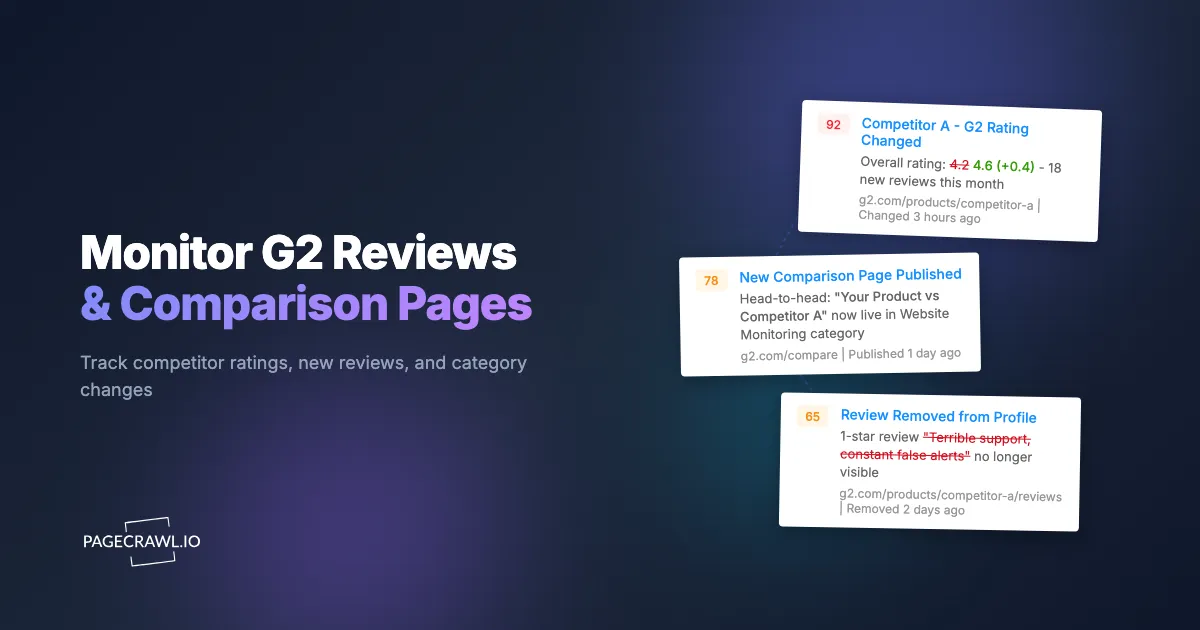
Your competitor's G2 rating jumped from 4.2 to 4.6 in a single quarter. A new comparison page appeared ranking them above you in your primary category. A review you submitted three months ago still has not been published. Meanwhile, prospects keep telling your sales team they "checked G2 first" before booking a demo.
B2B software buyers treat G2 the way consumers treat Amazon reviews. It is often the first stop in a purchase evaluation, and the information on those pages directly influences whether a prospect even reaches your website. When something changes on a G2 profile, a comparison page, or a category ranking, it affects your pipeline right away, and nobody tells you when it happens.
This guide covers what to monitor on G2 and similar B2B review platforms, how to set up automated tracking, and why you cannot rely on review platforms alone for an accurate competitive picture.
Why do software review sites matter for your business?
Review sites shape the shortlist before a buyer ever visits your website. According to the buyer behavior research G2 publishes, review sites are now the second most influential source for vendor shortlists, behind only AI chatbots, and public review sites are the most consulted information source for 31% of B2B buyers planning a purchase, up from 13% in 2021. For many B2B categories, G2 profiles rank on the first page of Google for "[product name] reviews" queries. That means your G2 profile is not just a listing on a third-party site. It is a search result that prospects see before they visit your own website.
And since G2 acquired Capterra, Software Advice, and GetApp from Gartner in early 2026, the combined ecosystem reaches over 200 million annual software buyers and holds nearly 6 million verified reviews, according to the figures G2 publishes about its own network. Understanding what happens on these platforms is no longer optional.
The business impact is direct:
Rating changes affect conversion. A half-star rating increase on G2 measurably improves click-through rates from comparison pages and category grids. Conversely, a rating drop pushes you lower in category rankings and reduces visibility to buyers who filter by minimum rating.
New reviews shape perception. A single detailed negative review on your profile can dominate the "most recent" section for weeks, creating a first impression that is hard to counteract. On the flip side, a negative review appearing on a competitor's profile is competitive intelligence your sales team can use.
Comparison pages influence decisions. G2 generates head-to-head comparison pages (e.g., "Product A vs Product B") that rank in search engines for comparison queries. These pages update automatically based on review data, but vendors can also influence the feature comparison tables. If a competitor updates their comparison positioning, you want to know.
Category rankings drive discovery. G2's Grid reports and "Best Of" lists determine which products buyers see first when browsing a category. Ranking changes happen quarterly and are not always announced.
None of these changes come with notifications to you. If you are not actively monitoring, you find out from your sales team after the damage is done.
What should you monitor on G2?
Monitor three surfaces: your own product profile (rating, review count, feature sub-ratings, new reviews), your competitors' profiles (rating moves, review velocity, badges, feature claims), and the category and comparison pages buyers land on. Together those cover almost every G2 change that can move a deal.
Your Own Product Profile
Your G2 profile is a living page that changes as reviews come in and G2 updates its algorithms. Monitor these elements:
- Overall rating and review count. A sudden drop in rating or an unexpected spike in review volume needs immediate attention. Use specific element monitoring with CSS selectors to track just the rating number without noise from layout changes.
- Recent reviews section. New reviews appearing on your profile, both positive and negative. Set up full page monitoring on your reviews page to catch every new entry.
- Feature ratings breakdown. G2 breaks ratings into categories like "Ease of Use," "Quality of Support," and "Ease of Setup." Shifts in these sub-ratings reveal emerging sentiment trends before they affect your overall score.
- Comparison pages where you appear. G2 auto-generates comparison pages for every pair of products in the same category. Monitor the ones that get search traffic (check Google Search Console for "vs" queries).
Competitor Profiles
Competitor G2 profiles are a rich source of competitive intelligence:
- Rating changes and review velocity. A competitor suddenly receiving 20 reviews in a month likely indicates an organized review campaign. Tracking review counts over time reveals these patterns.
- New negative reviews. Competitor weaknesses surface in their reviews before anywhere else. Reviews mentioning specific pain points, feature gaps, or support issues give your sales and product teams actionable intelligence.
- Feature comparison tables. G2 allows vendors to claim and update their own feature data. When a competitor adds new features to their profile or changes how they describe existing ones, it signals a positioning shift.
- Category badges and awards. G2 assigns badges like "Leader," "High Performer," and "Momentum Leader" quarterly. Monitor your competitors' badge pages to know when their status changes.
Category and Comparison Pages
These are the pages buyers land on when searching for a solution in your category:
- G2 Grid reports. The quadrant-style reports that position products based on satisfaction and market presence, the G2 equivalent of analyst quadrant reports like the Gartner Magic Quadrant and Forrester Wave. Your position relative to competitors shifts each quarter.
- "Best Of" lists. G2's curated lists like "Best Software in [Category]" or "Top 20 [Category] Tools" drive significant traffic and buyer attention.
- Head-to-head comparisons. The auto-generated "[Your Product] vs [Competitor]" pages. These include side-by-side feature tables, rating breakdowns, and review highlights.
- New entrants. New products appearing in your category. A startup you have never heard of might be accumulating reviews and climbing the grid while you are focused on established competitors.
How does G2's business model affect review visibility?
G2 earns most of its revenue from the vendors it reviews, so the platform is a marketplace rather than a neutral directory. That funding model shapes which reviews get published and how quickly, which is why you should read G2 data as one biased sample of your market rather than as ground truth.
G2 is a marketplace, not a neutral directory. The platform generates revenue primarily from vendor subscriptions. Paying vendors get enhanced profiles, priority placement in category grids, access to buyer intent data showing which companies are researching their category, and lead generation features that route interested buyers to their sales teams. G2's revenue depends on keeping these paying vendors happy.
This creates a structural conflict of interest when it comes to review moderation.
G2 states that all reviews go through a moderation process to verify authenticity. In theory, this protects against fake reviews. In practice, the moderation process is opaque, and the outcomes do not always align with the stated guidelines.
We have experienced this firsthand. Legitimate reviews we submitted about a competitor in our category were never published. The reviews were detailed, honest, written by real users, and met all of G2's published review guidelines. They simply never appeared. The competitor in question is a paying G2 customer. We have no way to prove a direct connection, but the pattern is difficult to ignore: reviews of paying vendors' competitors can sit in moderation indefinitely or never get published at all.
We are not alone in this experience. Search for "G2 review not published" or "G2 review moderation" and you will find similar accounts from other software vendors. The common thread is that reviews critical of paying vendors, or favorable toward their non-paying competitors, face a higher bar for publication.
With G2's 2026 acquisition of Capterra, Software Advice, and GetApp, the same moderation dynamics now potentially apply across four major platforms. Fewer independent review sites means fewer places where the unfiltered picture of your market is visible.
This does not mean every review on G2 is unreliable. Many reviews are genuine and useful. But it does mean you cannot treat G2 as an unbiased source of truth about your market.
What this means for monitoring:
- Track what is actually published on G2, not what you expect to see. If you submitted reviews that never appeared, that absence is itself a data point.
- Monitor review counts over time. If a competitor's review count is growing at an unusual rate relative to their market share, it may indicate an incentivized review campaign that the platform is not filtering.
- Compare the picture on G2 with other review platforms. Discrepancies between a vendor's G2 rating and their TrustRadius or Capterra rating can reveal platform-specific bias.
- Archive everything with screenshots. Pages change, reviews disappear, and ratings get recalculated. Timestamped screenshots and signed web archives give you an objective record that does not depend on any platform's version of events.
Beyond G2: Other Review Platforms to Monitor
G2's acquisition of Capterra, Software Advice, and GetApp from Gartner in early 2026 consolidated four of the largest B2B software review platforms under a single company. This makes it more important than ever to monitor platforms outside the G2 ecosystem for an independent picture.
| Platform | Ownership | Revenue Model | Review Authentication | Best For |
|---|---|---|---|---|
| G2 | G2 (independent) | Vendor subscriptions, buyer intent data | Email verification, LinkedIn check | Software category research, comparison shopping |
| Capterra | G2 (acquired from Gartner, Feb 2026) | Vendor PPC ads | Email verification | SMB software discovery, price-focused buyers |
| Software Advice | G2 (acquired from Gartner, Feb 2026) | Vendor PPC ads, lead gen | Email verification | Guided software recommendations |
| TrustRadius | HG Insights (acquired June 2025) | Vendor subscriptions, buyer intent | Multi-step verification, no anonymous reviews | Enterprise software evaluation, detailed reviews |
| Trustpilot | Independent (public company) | Freemium vendor tools | Open submission, some verification | Consumer and SMB SaaS, volume of reviews |
| Product Hunt | Independent | Sponsorship, job listings | Community accounts | New product launches, early-stage visibility |
| Reddit Inc. | Advertising (not vendor-specific) | Pseudonymous community accounts | Unfiltered user opinions, technical discussions |
The G2 consolidation matters. With G2, Capterra, Software Advice, and GetApp all under one roof, the same company now controls the review experience across the platforms that most B2B buyers check. If a vendor has a paying relationship with G2, that relationship now potentially spans four platforms rather than one. Monitor your Capterra and Software Advice profiles alongside G2, but understand they are no longer independent sources.
TrustRadius (now owned by HG Insights) remains the strongest independent alternative, requiring multi-step review verification and prohibiting anonymous reviews. Their vendor influence model is different from G2's, which often means the ratings and review content tell a different story. If your G2 rating is significantly different from your TrustRadius rating, that discrepancy itself is worth investigating.
Reddit and community forums deserve special attention. They are the one place where vendor influence is effectively zero. Monitor subreddits relevant to your category for threads comparing products, asking for recommendations, or sharing experiences. These unmoderated discussions often reveal the real competitive landscape that curated review platforms obscure. See our online reputation monitoring guide for strategies on tracking brand mentions across multiple platforms.
Setting Up Review Site Monitoring with PageCrawl
Here is a step-by-step approach to monitoring G2 and other review platforms using PageCrawl.

Step 1: Identify Your Monitoring Targets
Start with the specific URLs you need to track:
- Your own G2 profile page (e.g.,
g2.com/products/your-product/reviews) - Your top 3-5 competitors' G2 profile pages
- The G2 category page for your primary category
- Key head-to-head comparison pages (e.g.,
g2.com/compare/your-product-vs-competitor) - Equivalent pages on Capterra (G2-owned, but still a separate review base) and TrustRadius
- Relevant Reddit threads or subreddits for your category
For most B2B software companies, this is 15-25 pages covering the most important review surfaces.
Step 2: Choose the Right Monitoring Mode per Page
Different review pages need different monitoring approaches:
Full page monitoring for review profile pages. This catches any content change: new reviews, rating shifts, profile edits, and badge updates. Best for your own profile where every change matters.
Reader mode monitoring for individual review pages and category reports. Reader mode strips navigation and layout elements, reducing false alerts from minor G2 UI changes while catching actual content changes. This works well for competitor website analysis across review platforms.
Specific element monitoring for tracking a single metric. Use CSS selectors to target just the overall rating number, review count, or category ranking. This is the lowest-noise option when you only care about one data point, and the help centre lists every tracked element type you can choose from, including the number tracker that charts a rating over time. Our CSS selector guide covers how to find the right selectors.
Visual monitoring for comparison pages and Grid reports. These pages rely heavily on visual layout (quadrant positioning, side-by-side tables) that text monitoring might not fully capture. Screenshot comparison catches positioning changes that text alone might miss.
Step 3: Configure AI Summaries
G2 profile pages contain a lot of content. When a change is detected, an AI-powered summary tells you exactly what changed without reading the full diff. A summary like "New 2-star review added criticizing onboarding complexity and support response times" is actionable on its own. This saves your team from opening every alert to determine relevance. The help centre explains where PageCrawl uses AI and how to read the generated summaries.
Step 4: Route Alerts to the Right Teams
Not every review change needs the same response. Route alerts to the right people:
- New reviews on your profile (positive or negative): Marketing or Customer Success team, via Slack or email
- Rating changes: Leadership and Product team
- Competitor review changes: Sales and Product team, via a dedicated competitive intelligence channel
- Category ranking changes: Marketing and Executive team
- Comparison page updates: Product Marketing
Use webhook integration to push G2 monitoring data into your CRM, competitive intelligence tools, or custom dashboards.
Step 5: Set Check Frequency
G2 profiles do not change every hour, but they do change more often than you might expect. Recommended frequencies:
- Your own profile: every 4-6 hours (catch new reviews same-day)
- Competitor profiles: daily
- Category and comparison pages: daily
- Grid reports and "Best Of" lists: daily (these update quarterly but the exact date varies)
What to Do When You Detect Changes
Monitoring is only valuable if it triggers action. Here is how to respond to common changes:
New negative review on your profile. Respond promptly and professionally on the platform. Address specific concerns raised in the review. If the review contains factual inaccuracies, use G2's response feature to correct them publicly. Speed matters: a review sitting unanswered for weeks signals to future readers that you do not care about customer feedback.
Rating drop. Investigate the cause. Is it one very negative review pulling down the average, or a trend of declining scores? If it is a trend, the reviews themselves will tell you what needs fixing. Share the specific feedback with your product team.
Competitor rating spike. Check the timing and volume of new reviews. A sudden burst of positive reviews may indicate a review campaign. Look at the reviewer profiles: are they all from the same company size, industry, or region? This context helps you decide whether the rating change reflects genuine market sentiment or an organized effort.
Comparison page changes. G2 comparison pages update when either vendor's data changes. If a competitor updated their feature claims, review your own feature data on G2 and ensure it is current and accurate. Update your own comparison materials and brief your sales team on the new competitive positioning.
Reviews disappearing. This happens more often than you would expect. Reviews get removed for various reasons: the reviewer's company changes, G2's moderation re-evaluates old reviews, or vendors flag reviews for removal. This is exactly why monitoring with screenshots matters. PageCrawl's screenshot history gives you a timestamped record of what was published and when it disappeared.
Common Challenges
G2 Pages Require JavaScript Rendering
G2 loads review content dynamically with JavaScript. Simple HTTP-based monitoring tools that only read the initial HTML will miss most of the page content. PageCrawl renders pages in a full browser environment, capturing all dynamically loaded content including reviews, ratings, and interactive comparison tables.
Login Walls on Some Pages
G2 gates certain content behind login walls, particularly detailed review pages and some comparison reports. For monitoring these pages, you may need to configure cookie-based authentication in your monitors. The publicly accessible profile and category pages still provide substantial intelligence without authentication.
Noise from Layout Changes
G2 regularly updates its page layouts, navigation, and UI elements. Full page monitoring on a G2 profile will occasionally trigger alerts for cosmetic changes that have nothing to do with reviews or ratings. Mitigate this by using reader mode for pages where you care about content, and specific element monitoring when you only need one data point like the overall rating.
Platform Bias
As covered earlier, no single review platform gives you the complete picture. Since G2 now owns Capterra, Software Advice, and GetApp, monitoring across those four platforms alone is not true diversification. Include at least one platform outside the G2 ecosystem (TrustRadius, Trustpilot, or Reddit) for each competitor. When ratings diverge significantly between G2-owned and independent platforms, the discrepancy itself is useful intelligence. It may reveal that a competitor is investing heavily in one platform's ecosystem, or that moderation dynamics are skewing the picture.
Choosing your PageCrawl plan
PageCrawl's Free plan lets you monitor 6 pages with 220 checks per month, which is enough to validate the approach on your most critical pages. Most teams graduate to a paid plan once they see the value.
| Plan | Price | Pages | Checks / month | Frequency |
|---|---|---|---|---|
| Free | $0 | 6 | 220 | every 60 min |
| Standard | $8/mo or $80/yr | 100 | 15,000 | every 15 min |
| Enterprise | $30/mo or $300/yr | 500 | 100,000 | every 5 min |
| Ultimate | $99/mo or $999/yr | 1,000 | 100,000 | every 2 min |
Annual billing saves two months across every paid tier. Enterprise and Ultimate scale up to 100x if you need thousands of pages or multi-team access.
One competitive signal caught early can swing a deal worth more than a decade of Enterprise. If you win one additional deal per year because you spotted a pricing change, a product launch, or a messaging shift before your competitors did, $300/year is a rounding error. Standard at $80/year handles 100 monitored pages, enough for a Tier 1 and Tier 2 competitor program. Enterprise adds 500 pages and SSO. All plans include the PageCrawl MCP Server for AI assistants like Claude and Cursor. Your sales and product teams can ask "summarize every change to Competitor X's pricing page over the last quarter" and get an answer pulled straight from your own archive. AI assistants can create monitors through conversation on every plan, including Free, turning the tracked pages into a living competitor database, not just an alert feed.
Getting Started
Start with your own G2 profile and the profiles of your top three competitors. Add the main category page for your primary G2 category. That gives you five monitors covering the highest-value review surfaces.
Run the monitoring for two weeks. You will likely discover changes you had no idea were happening: new reviews appearing (or not appearing), rating fluctuations, comparison page updates, and category positioning shifts.
Once you see the value, expand to Capterra profiles (now G2-owned, but still a separate site with its own review base), TrustRadius, and Reddit threads for your category. Layer in the head-to-head comparison pages that get the most search traffic. Having monitors on both G2-owned platforms and independent sources like TrustRadius gives you a cross-reference that reveals when platform dynamics are skewing the picture.
PageCrawl's free tier includes 6 monitors, enough to cover your own G2 profile, three competitor profiles, a category page, and a key comparison page. For comprehensive review platform monitoring across multiple competitors and platforms, paid plans start at $80/year for 100 monitors.