On a quiet Tuesday morning, a target account republishes its pricing page and adds a new "Enterprise" tier. Two days later, nine sales engineering roles appear on its careers page. The following week, the CRO's bio vanishes from the team page. Each of those edits is a buying signal, a timing signal, or a competitive signal. Your CRM knows about none of them.
Clay is the spreadsheet-shaped enrichment and orchestration layer that GTM teams now build their motions on top of. It is extraordinary at taking a row and fattening it: find the decision makers, append firmographics, score the account, route it to a sequencer. But enrichment is only half a system. The richest waterfall in the world is wasted if it fires on a stale list pulled six months ago. The missing half is a fresh, high-signal trigger that says "act on this account, today, because something just changed."
Website changes are the cheapest, freshest intent signals available, and they sit in plain sight on pages you already care about: pricing, careers, product, leadership, security, and changelog pages. This guide shows you how to pipe those change signals into Clay with webhooks and the API, which changes are actually worth wiring up, and the specific plays each signal should trigger. PageCrawl is the dedicated change-detection layer; Clay is the brain that decides what to do about it.
What are website change signals, and why do they belong in Clay?
A website change signal is a structured event fired when a check detects that a tracked page changed: which page, what changed, the old value, the new value, and a timestamp. It belongs in Clay because Clay is built to enrich and act on rows, but it has no native way to watch hundreds of pages on a reliable schedule and notice the diff.
Think of the division of labor cleanly. Clay excels at the "who" and the "what next": who are the buyers at this account, what is their headcount, which CRM record does this map to, which sequence should it enter. It is weak at the "when," because detecting that a specific paragraph on a specific page changed at 7:14am requires scheduled fetching, rendering, content extraction, and diffing across many URLs over time. That is exactly what a dedicated monitor does well.
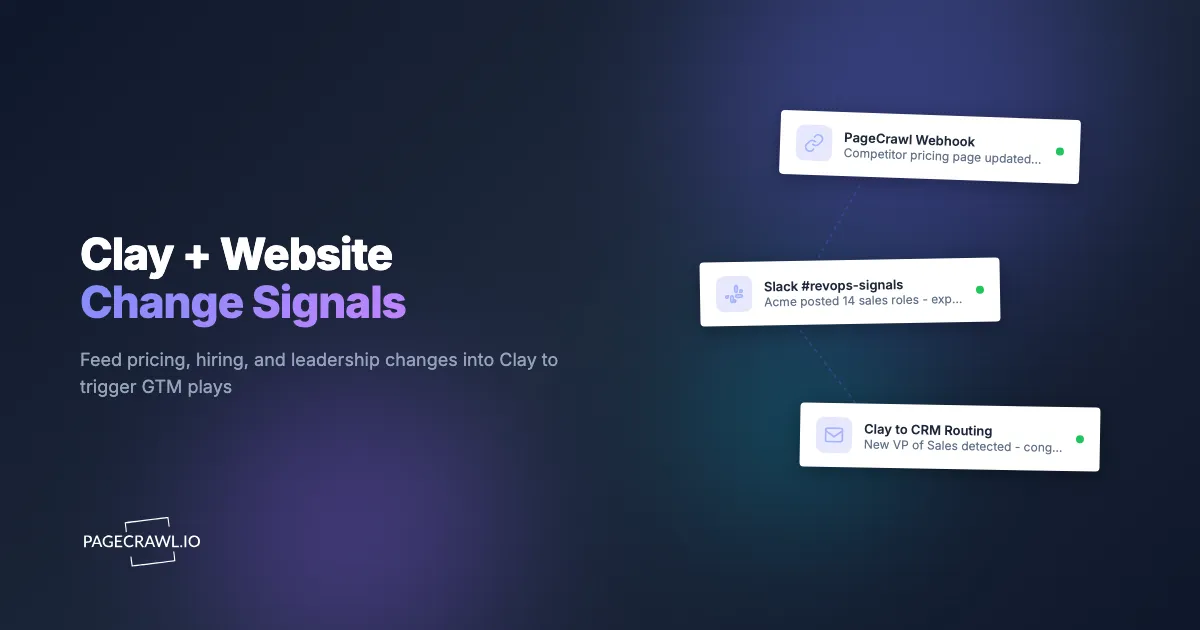
So the pattern is: PageCrawl watches the pages and emits a clean event when something meaningful changes. That event lands in a Clay table as a new row. From there, Clay does what Clay does best: enriches the account, finds the right contacts, applies your scoring, and pushes the row into your CRM, your sequencer, or a Slack channel where a human can pounce. The signal is the spark; Clay is the engine.
This is the same architecture behind any reactive GTM stack, and it generalizes well beyond Clay. If you want the underlying mechanics, our guide on how AI agents and automations react to website changes via webhooks walks through the event-driven pattern in detail.
Which website changes are the highest-value GTM signals?
The highest-value signals cluster on six page types: pricing, careers, product and feature pages, leadership and team pages, security and trust pages, and changelogs or release notes. Each maps to a distinct revenue motion, from competitive displacement to expansion timing, and each is a page your prospects and competitors update on their own schedule, not yours.
Here is how the most useful signals break down and what they tell you:
- Pricing page edits. A new tier, a price increase, a removed free plan, or a "Contact sales" gate appearing where self-serve used to be. These are the strongest competitive-displacement and win-back triggers in B2B. Tracking competitor pricing is its own discipline, covered in depth in our guide to monitoring competitor SaaS pricing pages.
- Careers and job postings. A burst of sales, RevOps, or "head of" roles signals expansion, a new go-to-market motion, or budget. New engineering roles in a specific stack hint at what they are building, which is why job listing and career page monitoring sits close to the top of most signal stacks. Hiring is one of the most reliable timing signals in outbound, which is why we wrote a full guide on monitoring competitor job postings as hiring signals.
- Product and feature pages. A new integration, a new product line, or a removed feature tells you the roadmap shifted. That is both an input for competitive intelligence monitoring and a reason to re-engage accounts that churned over a missing capability.
- Leadership and team pages. A new VP of Sales, a departed champion, or a fresh executive bio is a classic "new decision maker" trigger. New leaders rebuild stacks in their first ninety days.
- Security, trust, and subprocessor pages. A new SOC 2 badge, a changed subprocessor list, or a new compliance certification can unblock a stalled enterprise deal or signal a vendor switch in progress.
- Changelog and status pages. Velocity of shipping, deprecations, and outages all read as health and momentum signals for competitive accounts.
The point is not to monitor everything. Pick the two or three signal types that map to a play your team will actually run, then wire those into Clay first.
How does the Clay + PageCrawl architecture actually work?
The architecture is a four-stage pipeline: PageCrawl detects a change and fires a webhook, the payload lands as a row in a Clay table, Clay enriches and scores that row, and Clay routes the result to your CRM, sequencer, or Slack. No page scraping lives inside Clay, and no enrichment logic lives inside the monitor. Each tool does one job.
Walk the stages end to end:
- Detection. PageCrawl checks each tracked page on a schedule, extracts the content or specific element you chose, compares it to the previous version, and decides whether a meaningful change occurred. Noise filtering and thresholds happen here so Clay only ever sees real changes.
- Delivery. On a confirmed change, PageCrawl fires a webhook: an HTTP POST carrying a JSON payload (the page URL, monitor name, what changed, old and new values, a diff, and a timestamp). Webhooks are the universal connector for this; our webhook automation guide for website changes covers payloads, retries, and security.
- Ingestion. Clay tables can ingest rows from an incoming webhook source. You point PageCrawl's webhook at the Clay table's import URL, and each change becomes a new row keyed by domain. If the payload shape needs reshaping (flattening fields, mapping a URL to a company domain, deduping), route it through a thin middleware step first. Both n8n and Make are ideal for this transform-and-forward role and add retry and logging for free.
- Enrichment and action. Inside Clay, the new row triggers your normal columns: domain-to-company, find contacts in the buying committee, append firmographics, run a scoring formula, and write the qualified result to Salesforce or HubSpot, push it into Outreach, Salesloft, Smartlead, or Instantly, or drop a card in a Slack channel for an AE.
A note on direction. Most teams run this push-based (PageCrawl pushes changes into Clay), which is the lowest-latency option. If you would rather have Clay pull, PageCrawl exposes a full API so a scheduled Clay HTTP enrichment column can ask "what changed since I last checked?" That pull pattern, plus building your own reporting on top, is covered in building custom monitoring dashboards on the PageCrawl API.
How do you send website change signals to Clay, step by step?
Wiring the first signal into Clay takes about fifteen minutes and costs nothing to validate. The free tier gives you 6 monitors and 220 checks per month, which is plenty to prove the pattern on your top competitor's pricing page or a target account's careers page before you scale to hundreds of monitors. Here is the full walkthrough.

Step 1: Pick one signal and one page
Resist the urge to wire up everything at once. Choose a single high-value page that maps to a play you will run this week. A competitor's pricing page for a displacement play, or a named account's careers page for a hiring-signal play, are the two best starting points.
Step 2: Create the monitor in PageCrawl
Add the URL in PageCrawl. For a pricing or product page, use full-page text or content-only tracking so you capture every wording and tier change. For a careers page, full-page text works well because new postings appear as added lines. For a single number like a headline price, use price or number tracking so you get a clean numeric value instead of a prose diff.
Step 3: Tune the monitor to fire only on real changes
Configure noise filters so Clay never sees a false positive. Ignore dates and timestamps, hide cookie banners, and set a change threshold so a one-word tweak does not trigger a play. For pages where only certain words matter (think "Enterprise," "deprecated," "SOC 2," or "Head of Sales"), add keyword triggers. Our guide on conditional alerts with price, keyword, and threshold rules covers exactly how to make a monitor fire only when it counts.
Step 4: Create the Clay ingestion table
In Clay, create a new table sourced from a webhook (an "import from webhook" or incoming-webhook source). Clay gives you a unique URL for that table. Anything POSTed to that URL becomes a new row. Add the columns you will need downstream: domain, page type, what changed, old value, new value, detected at.
Step 5: Point PageCrawl's webhook at Clay
In the monitor's notification settings, add a webhook channel and paste the Clay table's import URL. Trigger a test check so a real payload flows end to end. Confirm a row appears in Clay with the fields populated. If the raw payload does not line up with your columns, insert an n8n, Make, or Zapier step between PageCrawl and Clay to reshape it, then point the webhook at that middleware instead.
Step 6: Build the enrichment and routing in Clay
Now let Clay do its job. Add a column to resolve the page URL to a company domain, then enrich: find decision makers in the relevant function, append firmographics, and run a scoring formula that weighs the signal type. Add a conditional that routes high-score rows to your CRM and sequencer, and everything else to a Slack channel for human review.
Step 7: Run it for a week, then scale
Let real changes flow for several days. Watch for two failure modes: too many low-value rows (tighten filters or narrow the tracked element) or missed changes (loosen the threshold or check more often). Once one signal type is clean and trusted, clone the setup across more accounts and add the next signal type. This calibration week is the difference between a signal source reps trust and one they mute.
What GTM plays can you trigger from each signal?
Each signal type maps to a specific, runnable play, and the value comes from pairing the right enrichment and routing with the right trigger. A pricing change should not enter the same workflow as a leadership change. Below are the highest-leverage plays teams run once signals land in Clay.
Competitor pricing change to a displacement play
When a competitor raises prices, removes a free tier, or gates a feature behind "Contact sales," that is a window. Clay enriches your at-risk accounts on that competitor, finds the economic buyer, and fires a tailored sequence referencing the exact change. Reaching out the day a price hike lands beats a generic "switch to us" email every time.
Hiring burst to an expansion or champion play
A spike in sales or RevOps roles means budget and a maturing motion. Clay scores the hiring velocity, identifies the hiring manager and likely new-team leaders, and routes the account to an AE with a play built around "you are scaling your revenue team, here is how we help teams at this stage." New engineering roles in your category signal a build-vs-buy decision you can influence.
New decision maker to a fresh-relationship play
When a team page adds a VP or director in your buyer persona, Clay enriches the new leader, finds their background, and triggers a "congrats on the new role" sequence within their first ninety days, the window when leaders re-evaluate vendors. Pair this with monitoring of professional profiles; our guide on monitoring LinkedIn pages for changes complements team-page tracking.
Security or compliance update to a deal-unblock play
A new SOC 2 badge or a changed subprocessor list can unblock a stalled enterprise deal or flag a vendor evaluation in progress. Clay routes these to the deal owner with context so they can re-engage at exactly the right moment.
The common thread across every play: the signal sets the timing, Clay sets the targeting, and your team acts while the change is still warm. This is the operational core of a modern intent program, covered from the strategy side in our competitive intelligence strategy and program guide.
How do you keep signal volume from drowning your team?
Control volume at the source, not in Clay. The most common way these pipelines fail is firing too often on changes nobody cares about, which trains reps to ignore the channel. Solve it with element targeting, change thresholds, keyword gates, and scoring inside Clay so only the rows worth a human's time ever reach a person.
Three layers of defense, applied in order:
- Filter at the monitor. Target the specific element (the pricing table, the careers list, the leadership grid) instead of the whole page, so banners, blog teasers, and footer edits never trigger. Add the Ignore dates filter and ignore dynamic counters, using the techniques in the guide to reducing false positive notifications. Set a threshold so trivial edits are ignored. Add keyword triggers when only certain words matter.
- Score in Clay. Not every real change deserves a sequence. Use a scoring column that weighs signal type, account fit, and recency, then branch: high scores go straight to a sequencer or CRM task, medium scores go to Slack for a human call, low scores just log to the table for trend analysis.
- Batch the low-priority stuff. Route routine changes into a daily or weekly digest rather than one alert per change. Reserve per-change pings for the signals that demand same-day action, like a competitor price hike or a champion's departure.
Done right, a rep only sees changes that are real, relevant, and scored worth acting on. Everything else accumulates quietly in Clay as enrichment context. If false positives are your main pain, our dedicated guide on reducing website monitoring false positives goes deeper on each filter.
Choosing your PageCrawl plan
PageCrawl's Free plan lets you monitor 6 pages with 220 checks per month, which is enough to validate the Clay signal pipeline on your most important competitor or account before you commit. Most GTM teams graduate to a paid plan as soon as the pattern proves out, because real intent programs watch hundreds of pages.
| Plan | Price | Pages | Checks / month | Frequency |
|---|---|---|---|---|
| Free | $0 | 6 | 220 | every 60 min |
| Standard | $8/mo or $80/yr | 100 | 15,000 | every 15 min |
| Enterprise | $30/mo or $300/yr | 500 | 100,000 | every 5 min |
| Ultimate | $99/mo or $999/yr | 1,000 | 100,000 | every 2 min |
Annual billing saves two months across every paid tier. Enterprise and Ultimate scale up to 100x if you need thousands of pages or multi-team access.
Standard at $80/year covers a focused signal program: a set of competitor pricing and product pages, a list of target-account careers and leadership pages, and a few compliance or changelog pages, all checked every 15 minutes so signals reach Clay while they are fresh. Enterprise at $300/year is the sweet spot for a real RevOps motion, with 500 pages, 5-minute checks, and the full API so Clay can pull on a schedule as well as receive pushes. Ultimate adds 1,000 pages and 2-minute checks for teams running signals at scale across many accounts. Every plan, including Free, includes the PageCrawl MCP Server and webhook delivery, so the Clay integration works from day one.
Getting Started
The fastest way to feel the value is to wire up a single signal end to end. Pick one competitor's pricing page or one target account's careers page, create the monitor, point its webhook at a Clay table, and watch the first real change flow through to an enriched, routed row. That loop reshapes how your team thinks about timing.
Sign up for a free PageCrawl account, connect your first signal to Clay, and stop letting buying signals expire on pages nobody watches. Your next best play already happened on someone's pricing page this morning. Catch it.