LinkedIn is where companies announce new hires, publish job postings that reveal strategic direction, update their company descriptions, and share content that signals market positioning. For competitive intelligence, recruiting, sales, and market research, knowing when a LinkedIn page changes is valuable information.
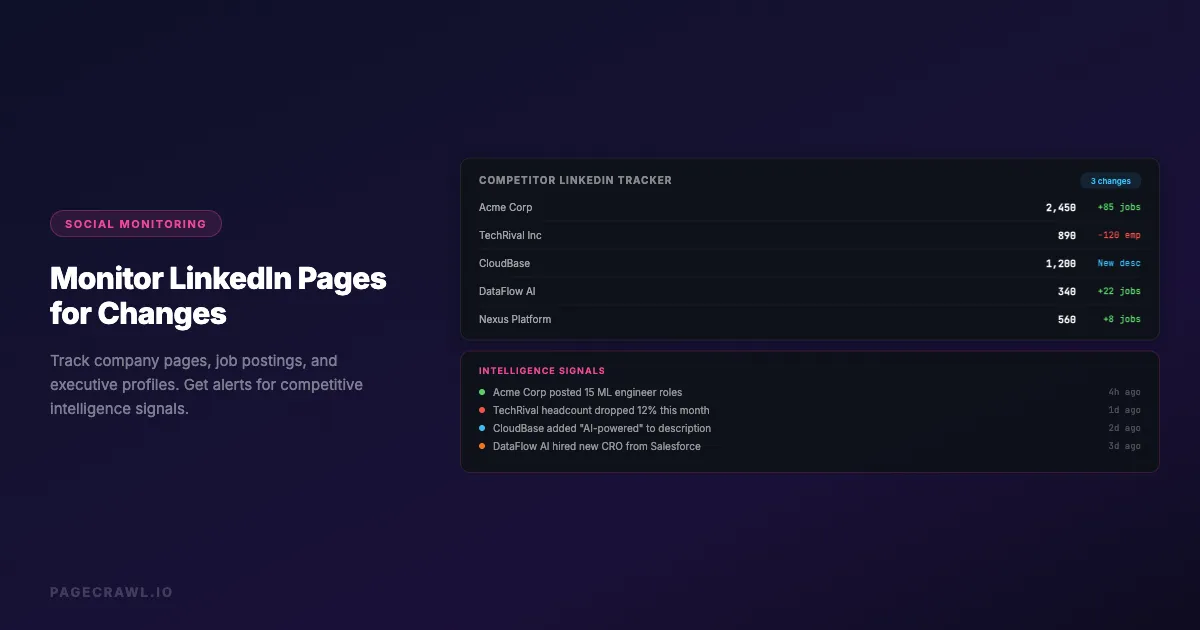
A competitor posts 15 new engineering job listings in a week, signaling a product push. A prospect company updates their "About" section to mention a new focus area. A key executive changes their job title, suggesting a reorganization. These are all signals that become actionable intelligence if you catch them quickly.
This guide covers what LinkedIn pages to monitor, practical approaches for tracking changes, and strategies for turning LinkedIn monitoring into competitive advantage.
Why should you monitor LinkedIn pages?
Because companies publish their intentions on LinkedIn before they announce them anywhere else. Job postings expose the roadmap, About sections expose repositioning, and executive title changes expose reorganizations. Those three signals feed competitive intelligence, sales prospecting, and recruiting at the same time.
Competitive Intelligence Signals
LinkedIn pages are rich sources of competitive intelligence that companies often overlook. LinkedIn monitoring is one component of a broader competitor tracking strategy:
Job postings reveal strategy. When a competitor starts hiring machine learning engineers, they are building AI capabilities. When they post 20 sales roles in a new region, they are expanding geographically. Job postings are the most reliable public signal of a company's near-term strategy because companies do not hire for capabilities they do not plan to build.
Company page updates signal positioning changes. When a competitor rewrites their company description, tagline, or specialties, they are repositioning in the market. These changes often precede new product launches or pivots.
Employee count trends indicate growth or contraction. A company's employee count on LinkedIn, tracked over time, reveals hiring velocity, layoffs, or stagnation. This is harder to fake than press releases about growth.
Executive changes reveal organizational shifts. New C-suite hires, title changes, and departures signal strategic changes. A new Chief Revenue Officer suggests a sales-led growth pivot. A new VP of Engineering might mean a technology platform rebuild.
Sales Intelligence
For B2B sales teams, LinkedIn changes provide buying signals:
Company expansion signals. When a target account starts posting jobs for roles that match your product category (hiring a "data analytics manager" when you sell analytics software), that is a buying signal.
Leadership changes. New executives often bring new vendor relationships and are more open to evaluating solutions. Monitoring for leadership changes at target accounts lets your sales team reach out at the right moment.
Company news. LinkedIn company pages often share funding announcements, partnerships, and expansion plans before they appear elsewhere. These events create sales opportunities.
Recruiting Intelligence
For recruiting teams, monitoring competitor LinkedIn pages provides:
Hiring pattern awareness. Know when competitors are hiring for the same roles you are, which affects candidate availability and compensation expectations.
Talent pool identification. When a competitor lays off staff (visible through reduced employee counts and updated profiles), the affected employees become potential recruits.
Employer brand benchmarking. Track how competitors position their employer brand, what benefits they highlight in job postings, and how their company culture messaging evolves. Employer branding on LinkedIn is also an important part of online reputation monitoring.
Which LinkedIn pages should you monitor?
Three page types carry the signal: company pages (About section, specialties, employee count, updates feed), job listing pages (new and removed postings, and the total count), and a short list of individual profiles for executives and key employees. Start with competitors, then add target accounts.
Company Pages
Company "About" section. This contains the company description, specialties, industry, company size, and headquarters. Changes here indicate repositioning or updated messaging.
Company updates feed. Posts shared on the company page reveal content strategy, product announcements, partnership news, and thought leadership direction.
Life tab. If the company has a Life tab, it shows employee testimonials, culture content, and company values. Changes indicate employer branding shifts.
Job Listings Pages
Company jobs page. The full list of open positions at a company. Monitor for new postings, removed postings, and changes to existing postings.
Specific job postings. Individual job listings with detailed requirements. Changes to a job posting (updated requirements, changed salary range, modified title) can be significant.
Job posting volume. The total number of open positions is itself a metric worth tracking. A sudden spike or drop in job postings signals hiring surges or freezes.
Individual Profiles
Executive profiles. Profiles of key executives at competitors, partners, or target accounts. Monitor for title changes, new job announcements, and updated summaries.
Key employees. Technical leads, product managers, and other influential employees whose profile changes might signal product direction or organizational changes.
Setting Up LinkedIn Monitoring

Understanding LinkedIn's Structure
LinkedIn pages are dynamic, JavaScript-rendered web applications. This affects how you monitor them:
Public pages. Company pages, job listings, and public profiles can be accessed without logging in. However, LinkedIn may limit the content shown to non-authenticated visitors.
Authentication considerations. Some LinkedIn content requires being logged in to view fully. LinkedIn also uses anti-scraping measures that can block automated access.
Rate limiting. LinkedIn actively detects and blocks automated access patterns. Monitoring tools need to behave like regular users to avoid blocks.
Monitoring Approaches
Browser-based monitoring. Use a monitoring tool that renders pages in a real browser. This is essential for LinkedIn because the content is loaded dynamically via JavaScript. Simple HTTP requests will not capture the rendered page content.
Reader mode monitoring. LinkedIn pages have extensive navigation, sidebars, and promotional elements. Reader mode extracts the main content and reduces false alerts from UI changes that do not affect the actual content you care about.
Specific element monitoring. For targeted monitoring (like just the "About" section or the job count), use CSS selectors to monitor only the specific element you care about. This dramatically reduces noise from unrelated page changes.
Visual monitoring. For detecting layout changes, new sections, or redesigns of LinkedIn pages, visual monitoring captures screenshots and compares them over time.
Check Frequency
LinkedIn pages typically do not change minute by minute, so aggressive polling is unnecessary and counterproductive (it increases the risk of being rate-limited):
Company pages: Daily checks are sufficient for most monitoring needs. Company descriptions and page content change infrequently.
Job listings pages: Daily to twice-daily checks catch new job postings within 12-24 hours of publication.
Executive profiles: Weekly checks for routine monitoring. Daily checks during periods of organizational change.
Monitoring Strategies by Use Case
Competitor Intelligence Monitoring
What to monitor:
- Competitor company pages (About section, employee count, specialties)
- Competitor job listings pages (total open roles, new postings)
- Key competitor executive profiles (title changes, job moves)
What changes look like:
- Updated company description mentions a new product or capability
- 20 new job postings appear in a department that previously had 3
- The VP of Product changes their title to SVP, suggesting a promotion
- Specialties list adds "artificial intelligence" where it was not before
How to act on changes:
- Share competitor hiring analysis with product and strategy teams
- Update competitive intelligence reports when positioning changes
- Alert sales teams when competitor reorganizations create opportunities
- Brief executives on competitor strategic shifts revealed by LinkedIn changes
Sales Prospecting Monitoring
What to monitor:
- Target account company pages (growth, news, positioning changes)
- Target account job listings (roles that suggest buying intent)
- Key contacts at target accounts (title changes, new roles)
What changes look like:
- Target account posts about expansion into your product category
- New job posting for "Marketing Operations Manager" (if you sell marketing software)
- Your main contact changes titles from "Director" to "VP" (now has more budget authority)
- Company page shows employee count jumped from 200 to 300 (rapid growth phase)
How to act on changes:
- Route buying signal alerts to account owners the same day
- Trigger sales outreach sequences when leadership changes occur
- Update CRM records when contact titles or roles change
- Prioritize accounts showing growth and hiring signals
Recruiting and Talent Monitoring
What to monitor:
- Competitor company pages (employee count trends)
- Competitor job postings (roles, locations, compensation signals)
- Former employee profiles (new positions, availability)
What changes look like:
- Competitor employee count drops by 50 in a month (layoffs)
- Competitor posts job listings with salary ranges 20% above market
- Key engineer at competitor updates profile to "Open to work"
- Competitor changes employer branding language on their Life tab
How to act on changes:
- Alert recruiting team when competitor layoffs create talent availability
- Adjust compensation packages when competitor salaries shift
- Reach out to candidates who signal availability
- Update employer branding when competitors make positioning changes
Investor and Market Research
What to monitor:
- Portfolio company pages and job listings
- Industry leader company pages
- Executive profiles of founders and C-suite
What changes look like:
- Portfolio company starts hiring aggressively (growth signal)
- Industry leader adds new specialties (market trend signal)
- Startup founder updates bio to mention "Series B" before official announcement
- Company page updates reflect a pivot in business model
What makes LinkedIn pages hard to monitor?
Four things: recommendation panels and ads that change on every load, automated-access limits that punish aggressive polling, content gated behind a login, and frequent layout redesigns that break fixed selectors. Each has a practical workaround, and daily checks avoid most of the trouble.
Dealing with Dynamic Content
LinkedIn pages contain dynamic elements that change on every page load: recommended content, ad placements, "people also viewed" sections, and personalized suggestions. These create false alerts.
Solution: Use specific element monitoring to target only the content you care about. For a company page, target the "About" section or employee count element specifically. For job listings, target the job list container. This ignores all the surrounding dynamic content.
Alternative: Use reader mode to extract the main content and strip away navigation and recommendations. This reduces noise significantly, though some dynamic elements may still appear in the extracted content.
Handling Anti-Automation Measures
LinkedIn actively detects and limits automated access. Too many requests from the same source can result in CAPTCHAs, temporary blocks, or content limitations.
Solution: PageCrawl reliably monitors sites that block simpler tools, rendering each page in a real browser and managing the session like a regular visitor. For heavily protected pages, Enterprise plans add premium options. Daily checks are still a sensible cadence for LinkedIn pages, which rarely change minute by minute, and a modest cadence also keeps you comfortably inside the LinkedIn User Agreement, which is worth reading before you automate anything against the platform.
Content Visible Only to Logged-In Users
Some LinkedIn content is gated behind authentication. Non-logged-in visitors may see limited company information, restricted job details, or no profile content at all.
Solution: PageCrawl supports authenticated logins that access the full page content. You provide the login URL and credentials once, and the signed-in session is saved and reused for future checks, as described in the guide to monitoring password-protected pages. Alternatively, focus on the public content that is available without authentication, which still includes significant intelligence value from company pages and job listings.
LinkedIn Page Structure Changes
LinkedIn frequently updates their page layouts and URL structures. A monitoring setup that works today might break if LinkedIn redesigns their job listings page.
Solution: Use text-based monitoring instead of relying on specific CSS selectors when possible. Text monitoring catches content changes regardless of layout changes. When using selectors, check and update them periodically.
Building a LinkedIn Monitoring System
Organize Your Monitors
Create a structured folder system, using labels, folders, and workspaces to keep each programme separate:
By purpose:
- Folder: "Competitor LinkedIn" (company pages and job listings for each competitor)
- Folder: "Target Accounts" (company pages and key contacts for sales targets)
- Folder: "Talent Market" (competitor hiring pages, key candidate profiles)
- Folder: "Industry Leaders" (company pages of major industry players)
By urgency:
- Tag "immediate" for changes that need same-day response (executive departures, layoff signals)
- Tag "weekly-review" for changes that feed into regular analysis (positioning updates, gradual hiring trends)
Route Alerts Effectively
Different LinkedIn changes matter to different teams:
Competitive intelligence team: Company page updates, positioning changes, new specialties, executive moves.
Sales team: Target account job postings, leadership changes, growth signals, company news.
Recruiting team: Competitor hiring patterns, salary changes, layoff signals, talent availability.
Executive team: Major competitor moves, industry leader changes, market trend signals.
Use separate notification channels for each team so they receive only the LinkedIn changes relevant to their work.
Common LinkedIn Monitoring Scenarios
Catching a Competitor's Product Pivot
The scenario: Your main competitor updates their LinkedIn company page description. The previous description focused on "cloud infrastructure management." The new description emphasizes "AI-powered cloud optimization."
With monitoring: Your daily company page monitor detects the description change. The AI summary notes the shift from "management" to "AI-powered optimization." Your product team is briefed within 24 hours. They review the competitor's recent job postings (which had shown increased AI/ML hiring you also detected) and confirm the pivot. Your marketing team updates competitive positioning, and your product roadmap discussion includes responding to this competitive move.
Without monitoring: You discover the competitor's AI pivot months later when they announce a new product. By then, they have already positioned themselves as the AI leader in the space, and your response feels reactive.
Identifying Sales Opportunities Through Job Postings
The scenario: A target account that has been in your pipeline for months suddenly posts 5 job listings for "Digital Transformation Analyst," "Marketing Automation Specialist," and similar roles that directly relate to your product.
With monitoring: Your job listings monitor catches the new postings within 24 hours. The alert reaches the account owner, who calls their contact at the company. The contact confirms the company just got budget approval for a digital transformation initiative. Your sales team gets an early meeting and is considered from the start of the evaluation process.
Without monitoring: You learn about the initiative three months later when the company issues a formal RFP. By then, two competitors who noticed the job postings earlier have already built relationships with the evaluation team.
Detecting Talent Availability After Layoffs
The scenario: A well-funded competitor's LinkedIn page shows their employee count dropping from 800 to 650 over two weeks. Simultaneously, several engineer profiles at that company update their status to "Open to work."
With monitoring: Your recruiting team is alerted within days. They identify 15 engineers whose skills match your open positions. Outreach begins while these professionals are still processing the transition and open to new opportunities. You hire 4 of them, significantly strengthening your engineering team.
Without monitoring: You hear about the layoffs through industry news a week later. By then, the most talented engineers have already been contacted by faster-moving companies.
Choosing your PageCrawl plan
PageCrawl's Free plan lets you monitor 6 pages with 220 checks per month, which is enough to validate the approach on your most critical pages. Most teams graduate to a paid plan once they see the value.
| Plan | Price | Pages | Checks / month | Frequency |
|---|---|---|---|---|
| Free | $0 | 6 | 220 | every 60 min |
| Standard | $8/mo or $80/yr | 100 | 15,000 | every 15 min |
| Enterprise | $30/mo or $300/yr | 500 | 100,000 | every 5 min |
| Ultimate | $99/mo or $999/yr | 1,000 | 100,000 | every 2 min |
Annual billing saves two months across every paid tier. Enterprise and Ultimate scale up to 100x if you need thousands of pages or multi-team access.
Knowing about a competitor's hiring surge or positioning change a week before it is obvious in the market is easily worth the $80/year Standard cost. With 100 monitors you can cover competitor company pages, job listing pages, and target account pages across your entire go-to-market list. Enterprise at $300/year fits sales and recruiting teams running structured LinkedIn intelligence programs across hundreds of accounts, with 500 pages, 5-minute checks, and multi-team access.
All plans include the PageCrawl MCP Server, so you can ask "which of our target accounts posted new engineering jobs this week?" and get an answer drawn from your monitoring history without opening a single spreadsheet. AI assistants can create monitors through conversation on every plan, including Free.
Getting Started
Set up LinkedIn monitoring in three steps:
Monitor your top 3 competitors. Set up daily monitors on each competitor's LinkedIn company page and their job listings page. Use reader mode or specific element monitoring to focus on the content that matters (About section, employee count, job listings) and ignore dynamic recommendations. Route alerts to your competitive intelligence or strategy team.
Monitor your top 10 target accounts. Set up daily monitors on the job listings pages of your highest-priority sales targets. When they post jobs related to your product category, alert the account owner. Also monitor their company pages for growth signals and leadership changes.
Monitor key executives and talent. Set up weekly monitors on executive profiles at your top competitors and target accounts. When someone changes their title, leaves a company, or signals availability, route the alert to the appropriate team (sales for prospect contacts, recruiting for talent candidates).
This system ensures your teams know about relevant LinkedIn changes within 24 hours, turning public information into competitive advantage before your competitors do.