Most AI agents are reactive. They answer questions, process requests, and follow instructions. But the most useful agents are proactive. They watch for changes in the world and take action before anyone asks.
Website changes are one of the richest signals an AI agent can monitor. A competitor changes their pricing. A regulatory body publishes new guidance. A documentation page gets updated. A product goes back in stock. Each of these events could trigger an agent to update a knowledge base, alert a team, adjust a strategy, or take automated action.
This tutorial shows how to build AI agents that react to website changes using PageCrawl webhooks. We will cover three practical patterns: keeping a RAG knowledge base fresh, competitive intelligence alerts, and compliance monitoring.
How does an AI agent react to website changes?
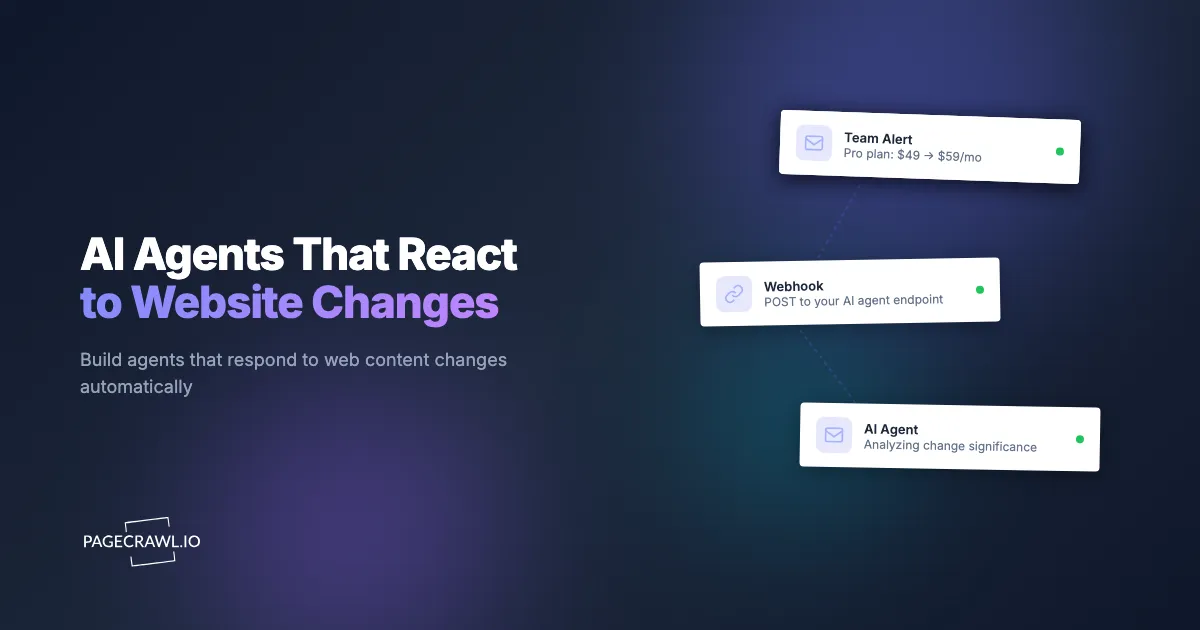
An AI agent reacts to website changes by receiving a webhook from a monitoring service whenever a tracked page changes, then acting on the structured change data in the payload. PageCrawl handles the scraping, comparison, and scheduling; your agent only needs an HTTP endpoint. The flow looks like this:
- PageCrawl monitors web pages on a schedule you configure (as often as every 2 minutes on paid plans, up to weekly)
- When content changes, PageCrawl detects the difference, generates an AI summary, and fires a webhook
- Your agent receives the webhook with structured change data (what changed, AI summary, diff, screenshots)
- Your agent takes action based on the change (update a database, send an alert, trigger a workflow)
You do not need to build any scraping, comparison, or scheduling logic. Everything up to step 3 is managed for you, so the code you write is limited to the part that is unique to your agent: deciding what to do with each change event.
Setting Up Monitors via API
First, create monitors for the pages your agent should watch. You can do this via the PageCrawl API or the MCP server.

import requests

API_TOKEN = "your_api_token"
BASE_URL = "https://pagecrawl.io/api"
HEADERS = {"Authorization": f"Bearer {API_TOKEN}"}

# Monitor a documentation page
response = requests.post(
    f"{BASE_URL}/track-simple",
    headers=HEADERS,
    json={
        "url": "https://docs.stripe.com/api",
        "tracking_mode": "content_only",
        "frequency": 60,  # hourly
    },
)
print(f"Monitor created: {response.json()['id']}")
Setting Up Webhooks
Create a webhook that PageCrawl will call when changes are detected:
response = requests.post(
    f"{BASE_URL}/hooks",
    headers=HEADERS,
    json={
        "target_url": "https://your-agent.example.com/webhook",
        "match_type": "all",
        "events": ["change_detected"],
        "payload_fields": [
            "title",
            "contents",
            "markdown_difference",
            "ai_summary",
            "ai_priority_score",
            "page",
        ],
    },
)
print(f"Webhook created: {response.json()['id']}")
The payload_fields parameter controls exactly what data your agent receives, and the webhook integration guide documents every trigger event and delivery option available. Only request the fields you need to keep payloads lean.
Pattern 1: Keeping a RAG Knowledge Base Fresh
The most common problem with RAG pipelines is stale data. You ingest documentation once, and within weeks the source material has changed but your vector database still has the old content. Your AI gives wrong answers because it is working with outdated information.
PageCrawl webhooks solve this by triggering re-ingestion only when content actually changes.
Python Implementation
This example uses Flask for the endpoint, the OpenAI embeddings API for vectorization, and Chroma as the vector store:
from flask import Flask, request
import openai
import chromadb

app = Flask(__name__)
chroma = chromadb.HttpClient()
collection = chroma.get_or_create_collection("docs")

@app.route("/webhook", methods=["POST"])
def handle_change():
    data = request.json

    page_url = data["page"]["url"]
    new_content = data["contents"]
    ai_summary = data.get("ai_summary", "")

    # Generate embedding for the updated content
    embedding = openai.embeddings.create(
        model="text-embedding-3-small",
        input=new_content,
    )

    # Upsert into vector database
    collection.upsert(
        ids=[page_url],
        documents=[new_content],
        embeddings=[embedding.data[0].embedding],
        metadatas=[{
            "url": page_url,
            "title": data["title"],
            "last_updated": data["page"].get("last_checked_at", ""),
            "change_summary": ai_summary,
        }],
    )

    print(f"Updated RAG entry: {data['title']}")
    print(f"Change: {ai_summary}")

    return "", 200
Node.js Implementation
The same handler in Express:
import express from "express";
import { OpenAI } from "openai";
import { ChromaClient } from "chromadb";

const app = express();
app.use(express.json());

const openai = new OpenAI();
const chroma = new ChromaClient();

app.post("/webhook", async (req, res) => {
  const data = req.body;
  const pageUrl = data.page.url;
  const newContent = data.contents;

  const embedding = await openai.embeddings.create({
    model: "text-embedding-3-small",
    input: newContent,
  });

  const collection = await chroma.getOrCreateCollection({ name: "docs" });
  await collection.upsert({
    ids: [pageUrl],
    documents: [newContent],
    embeddings: [embedding.data[0].embedding],
    metadatas: [{
      url: pageUrl,
      title: data.title,
      changeSummary: data.ai_summary || "",
    }],
  });

  console.log(`Updated: ${data.title}`);
  res.sendStatus(200);
});

app.listen(3000);
This agent only processes pages that actually changed. If you monitor 500 API documentation and changelog pages and only 3 change in a week, you re-embed 3 documents, not 500.
Pattern 2: Competitive Intelligence Agent
An agent that monitors competitor websites and generates structured intelligence reports when changes are detected.
from flask import Flask, request
from openai import OpenAI

app = Flask(__name__)
llm = OpenAI()  # Or any LLM provider of your choice

@app.route("/webhook", methods=["POST"])
def handle_change():
    data = request.json

    # Use the AI summary and diff to generate intelligence
    analysis = llm.chat.completions.create(
        model="gpt-4o",  # Use any model you prefer
        messages=[{
            "role": "user",
            "content": f"""Analyze this competitor website change and provide a structured intelligence brief.

Page: {data['title']} ({data['page']['url']})
AI Summary of Change: {data.get('ai_summary', 'N/A')}
Priority Score: {data.get('ai_priority_score', 'N/A')}/100
Diff: {data.get('markdown_difference', 'N/A')}

Provide:
1. What changed (one sentence)
2. Strategic significance (low/medium/high and why)
3. Recommended action for our team
4. Which internal team should be notified (sales, product, marketing, legal)"""
        }],
    )

    brief = analysis.choices[0].message.content

    # Send to Slack, email, or your internal tool
    send_to_slack(
        channel="#competitive-intel",
        text=f"*Competitor Change Detected*\n"
             f"*Page:* {data['title']}\n"
             f"*URL:* {data['page']['url']}\n\n"
             f"{brief}",
    )

    return "", 200
This agent adds a layer of strategic analysis on top of PageCrawl's website change signals. PageCrawl tells you what changed, the agent tells you what it means.
Pattern 3: Compliance Monitoring Agent
An agent that watches regulatory and policy pages, extracts specific changes to compliance-relevant sections, and creates structured audit records.
from flask import Flask, request
from openai import OpenAI
import datetime

app = Flask(__name__)
llm = OpenAI()  # Or any LLM provider of your choice

@app.route("/webhook", methods=["POST"])
def handle_change():
    data = request.json

    # Only process changes above a priority threshold
    priority = data.get("ai_priority_score", 0)
    if priority < 30:
        return "", 200  # Skip low-priority noise

    # Extract compliance-relevant changes
    extraction = llm.chat.completions.create(
        model="gpt-4o",  # Use any model you prefer
        messages=[{
            "role": "user",
            "content": f"""Review this regulatory page change for compliance impact.

Page: {data['title']} ({data['page']['url']})
Change Summary: {data.get('ai_summary', 'N/A')}
Full Diff: {data.get('markdown_difference', 'N/A')}

Extract:
1. Which specific sections or clauses changed
2. Whether any deadlines, requirements, or obligations were added, modified, or removed
3. Compliance impact assessment (none/low/medium/high/critical)
4. Whether this requires immediate action or can be reviewed in the next cycle
5. Affected business areas

Return as JSON."""
        }],
    )

    # Store in compliance audit log
    save_audit_record({
        "timestamp": datetime.datetime.utcnow().isoformat(),
        "source_url": data["page"]["url"],
        "source_title": data["title"],
        "change_summary": data.get("ai_summary"),
        "priority_score": priority,
        "compliance_analysis": extraction.choices[0].message.content,
    })

    return "", 200
Can AI assistants manage monitors through conversation?
Yes. If you use Claude, ChatGPT, or Cursor, you can manage monitors directly through conversation instead of writing API calls. The PageCrawl MCP server implements the open Model Context Protocol and exposes tools that AI assistants can call on your behalf.
For example, in Claude:
- "Monitor slack.com/pricing and check every hour"
- "What changed on my monitored pages today?"
- "Show me the diff for the last change on the competitor pricing page"
The get-changes-since tool is particularly useful for agents that need a cross-monitor view of all recent changes, and the MCP server overview covers connecting Claude, ChatGPT, or Cursor to your monitors. PageCrawl's free skills make those conversations sharper, and the pagecrawl-api skill helps a coding agent write webhook receivers like the ones above, including signature verification.
What data does the webhook payload include?
The webhook payload includes the current content of the tracked element, a markdown diff of what changed, an AI-generated summary, a 0-100 priority score, monitor metadata, and optional screenshots. You choose which fields are sent, so payloads stay as lean as your agent needs. Key fields:
| Field | Description |
|---|---|
title |
Monitor name |
contents |
Current value of the tracked element |
markdown_difference |
Diff in markdown format (additions/removals) |
ai_summary |
AI-generated plain-language summary |
ai_priority_score |
0-100 importance score |
page |
Monitor metadata (id, name, url, slug, folder) |
page_elements |
All tracked elements with current values |
previous_check |
Full data from the previous check for comparison |
page_screenshot_image |
Signed URL to the page screenshot |
Customize which fields are included when creating webhooks via the payload_fields parameter. See the full API reference for all options.
Getting Started
Start with one pattern. Pick the 5 pages that matter most to your use case, set up monitors, and build a simple webhook handler from the copy-paste reference implementations in Python, Node.js, and PHP. Run it for a week and observe what changes come through.
Most teams find that the combination of PageCrawl's change detection and a lightweight AI agent creates more value than either tool alone. The monitoring catches every change automatically, and the agent adds context, analysis, and automated action.
PageCrawl was built with developers in mind from day one. The REST API, webhooks, and MCP server are first-class features, not add-ons, and they are available on every plan, including Free, so you can prototype your agent without any upfront cost.