A UK central government department posted an above-threshold procurement on Find a Tender mid-morning on a Tuesday with a 30-day response window. The official portal's daily email digest landed in inboxes the next morning, the best part of a day later. Three competing bidders who were monitoring the search URL directly had already pulled the documents, flagged the opportunity to their bid teams, and started teaming conversations by Tuesday lunchtime. By the time most of the market saw the notice, the early movers had locked in their teaming partners and started shaping their response.
UK public sector procurement is published across two portals: Find a Tender, the post-Brexit replacement for the OJEU portal that handles above-threshold opportunities, and Contracts Finder, which covers below-threshold notices and contract award announcements. Both portals support saved searches with email alerts, but the email frequency is daily and the alerts often arrive after competing bidders have already started preparing. For UK bidders working short-cycle procurements or operating in competitive frameworks, that delay translates directly into win-rate erosion.
This guide covers how the two portals publish opportunities, the patterns worth watching for, and how to set up a continuous monitor that surfaces matching tenders into your bid channel within the hour they post.
Quick Setup
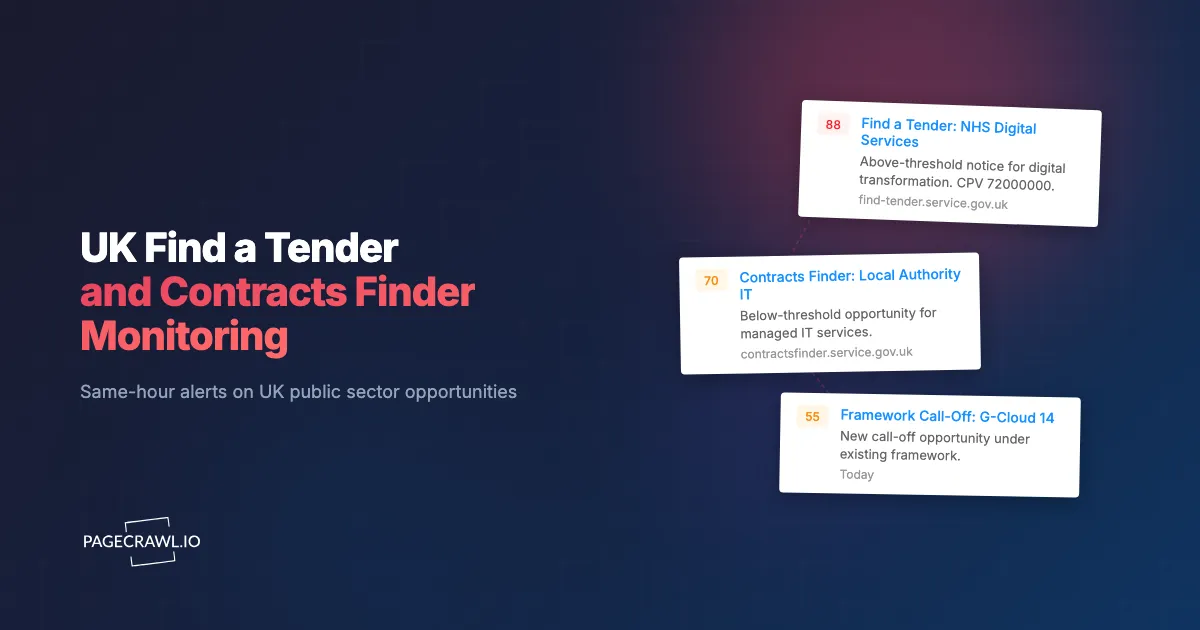
Enter a CPV code or sector keyword, pick the buyer types you care about (NHS, MOD, local authorities), and PageCrawl will watch Find a Tender or Contracts Finder for matching notices.
Why monitor UK procurement portals directly?
Because the official digests from Find a Tender and Contracts Finder are daily, and a notice published mid-morning can sit unseen until the next day. A monitor on the search URL closes that gap and reports matching notices on the next check instead.
Above-Threshold Notices on Find a Tender Drive Major Wins
Find a Tender holds the above-threshold (formerly OJEU) opportunities that anchor most bid teams' pipelines. Same-morning awareness on these notices is the difference between a measured bid process and a rushed one.
Below-Threshold Contracts Finder Notices Are Often Shorter-Cycle
Contracts Finder covers below-threshold procurements that frequently run on tighter clocks. The competitive field is often smaller but the time pressure is greater. Same-day awareness is essentially table stakes for bidders pursuing this work.
Pre-Procurement Market Engagement Notices Shape Future RFPs
Both portals publish prior information notices, pipeline notices, and pre-market engagement opportunities. Responding to these shapes the eventual procurement specification and dramatically improves win probability at full RFP.
Award Notices Reveal Pricing and Incumbent Strategy
Award notices publish the winner, contract value, and key terms. Aggregated over time, award data is the foundation of competitive pricing intelligence and recompete strategy.
How do Find a Tender and Contracts Finder search URLs work?
Both portals put the full filter state into the address bar, so a search by CPV code, buyer organisation, location, contract value, and notice type becomes a reproducible URL you can monitor:
https://www.find-tender.service.gov.uk/Search
https://www.contractsfinder.service.gov.uk/Search
Build the search you want in either portal's UI by adding CPV codes, geography, value thresholds, and notice types, then copy the URL. The URL is now reproducible and monitorable. New opportunities matching the filter appear as new rows in the results, sorted by publication date.
Individual opportunities also have stable URLs that can be monitored independently once you are pursuing a specific procurement, to catch amendments and clarifications.
How do UK tender monitoring approaches compare?
The official portal emails are free but daily, commercial aggregators are fast but priced for larger bid teams, and manual refreshing does not survive contact with a busy week. Monitoring the search URL itself gives you the alert speed of an aggregator against the filters you already built in the portal.
| Approach | Cost | Latency | Coverage | Best For |
|---|---|---|---|---|
| Find a Tender / Contracts Finder email | Free | Daily | Saved filters | Light awareness |
| Tenders Direct / TendersOnTime | $$$ | Hours | UK + EU | Mid-market bid teams |
| Bloomberg Government UK | $5K+/year | Hours | Comprehensive | Large prime contractors |
| Manual portal refresh | Free | Hours to days | Per-search | Casual checking |
| PageCrawl on UK portal URLs | Free tier to $80/year | 15-60 minutes | Any search URL | Bid teams wanting same-morning alerts |
The commercial UK procurement aggregators offer rich features but at price points that often don't make sense for SME bidders. PageCrawl delivers the core "alert me on matching opportunities" capability at a fraction of the cost and works with whatever search URL you can build in the official portal UI.
Setting Up UK Procurement Monitoring in PageCrawl
Step 1: Build targeted searches on each portal
In Find a Tender, filter by your relevant CPV codes, location (England/Wales/Scotland/NI), and contract value range. In Contracts Finder, filter for below-threshold opportunities in your capability area. Narrower filters produce fewer false positives.
Step 2: Copy each search URL
After applying filters, copy the URL from the address bar. Both portals preserve filter state in the URL.
Step 3: Add each search URL as a content monitor
Sign in to PageCrawl, click Track New Page, and paste each URL. Use content monitoring so new rows in the results are detected.
Step 4: Pick a check frequency
UK portals publish during UK business hours, mostly mid-morning. Reasonable defaults:
- Awareness only: 60-minute checks (Free plan). Same-morning awareness. You can also confine checks to UK working hours using check scheduling.
- Active bid team: 15-minute checks (Standard plan). Maximum lead time on short-cycle work.
- Framework call-off heavy: 5-minute checks (Enterprise plan). Useful when call-offs are routine and time-critical.
Step 5: Wire alerts to bid channel
A #bid-pipeline Slack or Teams channel keeps the bid team in one place. PageCrawl's AI change summaries describe the new opportunity in one line so bid managers can triage at a glance. See the Slack alerts guide for setup.
Step 6: Tag by capability and buyer
Use labels, folders, and workspaces to organize by capability area, buyer organisation, or framework. Each bid manager subscribes only to relevant folders.
Worked Example: A UK Mid-Sized Bidder's Procurement Watch
A 30-person UK technology services bidder with three capability areas typically sets up:

- Build 3 CPV-based searches on Find a Tender for above-threshold opportunities (3 monitors).
- Build 3 CPV-based searches on Contracts Finder for below-threshold work (3 monitors).
- Add framework-specific call-off pages for 2 active frameworks (2 monitors).
- Add specific opportunity URLs for 5-10 active pursuits (rolling).
- Set frequency to 15 minutes on searches.
- Route alerts to
#bid-pipelineTeams channel with tags by capability.
Total: 13-23 monitors. Total cost: $80/year. Setup time: under an hour. The bid team gets continuous awareness across both portals with a single chat channel.
Patterns Worth Watching For
Short-cycle below-threshold notices. Contracts Finder notices with 10-14 day response windows are common and competitive. These are the highest-value alerts for SME bidders.
Pipeline notices. Pipeline notices reveal planned procurements months ahead. Monitor for pipeline notices in your CPV codes to position early.
Amendments and clarifications. Active procurements often issue amendments that change scope, timeline, or evaluation criteria. Monitor individual opportunity URLs once you are pursuing.
Framework call-offs. Call-offs under your existing frameworks have shorter cycles and narrower competitive fields. Real-time awareness materially improves win rate.
Award notices in your CPV. Award data reveals pricing benchmarks and incumbent positioning, informing your next pursuit.
Combining UK Monitoring With Other Procurement Signals
UK procurement is most actionable in the broader public sector context.
Combine with US federal procurement. For dual-market vendors, pair with our SAM.gov federal contract opportunity monitoring guide for cross-Atlantic coverage. Teams bidding into the EU can extend the same playbook with our EU TED tender monitoring guide, Canadian suppliers have the equivalent for CanadaBuys and provincial portals, and Australian and New Zealand suppliers for AusTender and GETS.
Combine with EU TED. EU Tenders Electronic Daily (TED) covers EU member state procurements. Add TED search URLs as siblings for full European coverage.
Combine with devolved nation portals. Scotland's Public Contracts Scotland, the Welsh Sell2Wales, and Northern Ireland's eSourcing NI publish on their own portals in addition to Find a Tender. Monitor these for devolved nation opportunities.
Combine with local authority direct portals. Some local authorities publish on their own portals before pushing to Contracts Finder. Add direct local authority procurement pages for your priority customers alongside the rest of your government and public records monitoring.
Combine with framework operator pages. Framework operators (CCS, ESPO, YPO) publish framework-specific news and call-offs on their own sites.
Who uses UK tender monitoring?
UK public sector bidders and their bid teams, framework holders watching for call-offs, procurement consultants covering several clients, SME suppliers without a dedicated bid function, market analysts mining award notices, and trade associations issuing member alerts.
UK public sector bidders. Bid teams get same-hour alerts on matching opportunities, materially improving response time on short-cycle procurements and increasing win rate over a year.
Framework holders. Real-time call-off awareness across multiple buyer organisations is operationally critical for holders of in-demand frameworks.
Procurement consultants. Continuous monitoring across multiple client capability areas allows consultants to provide proactive alerts on new funding, grant, and RFP opportunities as a differentiator.
Market intelligence and competitor analysis. Award notices feed competitor analysis and pricing benchmarks for recompete strategy.
SME suppliers. Small suppliers without dedicated bid teams use continuous monitoring as their primary opportunity-discovery mechanism.
Trade associations. UK trade associations monitor procurement to issue member alerts on sector-relevant opportunities.
Frequently Asked Questions
How quickly do new tenders appear on Find a Tender after publication? Within minutes of contracting authority publication. PageCrawl picks up the change on the next check.
Can I monitor multiple CPV codes in a single search? Yes. Both portals support multi-CPV searches and the URL preserves the selection. Build the multi-code search in the UI and monitor the resulting URL.
What about devolved nation procurement? Scotland, Wales, and Northern Ireland have their own procurement portals in addition to Find a Tender. Monitor those separately for full devolved coverage.
Do I need separate searches for Find a Tender vs Contracts Finder? Yes, they are separate portals with separate URLs. Most bidders run parallel searches on both.
Can I get alerts only when contract value exceeds a threshold? Both portals support value-range filters in the search URL. Build the search with your value floor and monitor that URL.
Do I need a paid plan for UK procurement monitoring? The free plan supports 6 monitors, enough for a small bidder with a focused capability. Standard at $80/year supports a full multi-capability, multi-portal watch with active opportunity tracking.
Choosing your PageCrawl plan
PageCrawl's Free plan lets you monitor 6 pages with 220 checks per month, which is enough to validate the approach on your most critical pages. Most teams graduate to a paid plan once they see the value.
| Plan | Price | Pages | Checks / month | Frequency |
|---|---|---|---|---|
| Free | $0 | 6 | 220 | every 60 min |
| Standard | $8/mo or $80/yr | 100 | 15,000 | every 15 min |
| Enterprise | $30/mo or $300/yr | 500 | 100,000 | every 5 min |
| Ultimate | $99/mo or $999/yr | 1,000 | 100,000 | every 2 min |
Annual billing saves two months across every paid tier. Enterprise and Ultimate scale up to 100x if you need thousands of pages or multi-team access.
Compliance monitoring is the cheapest insurance you can buy. A single missed regulatory change can trigger fines in the tens or hundreds of thousands, not to mention the audit overhead of proving you did not see it coming. Enterprise at $300/year covers 500 regulatory pages with unlimited history and timestamped screenshots, which is usually exactly what an assessor wants to see. All plans include the PageCrawl MCP Server, so your compliance team can ask Claude to summarize every change to a specific regulation over the last quarter and pull the exact diff, turning your monitoring history into a queryable audit trail. AI assistants can create monitors through conversation on every plan, including Free. Standard at $80/year is enough to cover 100 pages across your primary regulatory bodies if your program is smaller.
Getting Started
Build saved searches on Find a Tender and Contracts Finder by CPV code, copy the URLs, and add to PageCrawl on hourly checks. Create a free account and the next matching opportunity reaches your bid channel on the first check after it publishes, within the hour on the free plan.