A growth marketer at a B2B software company opened the analytics dashboard on a Monday morning and watched organic traffic to the highest-converting landing page fall off a cliff. The page still loaded. The content looked perfect. Nothing in the deploy log mentioned that URL. It took most of the day to find the cause: a routine CMS update had quietly rewritten a 301 redirect from /pricing to /plans into a temporary 302, and search engines had begun treating the consolidated authority as provisional. Rankings slid, the redirect leaked link equity for two weeks, and nobody knew until the traffic was already gone.
Redirects are the plumbing of a website. When they work, nobody thinks about them. When a single rule breaks, gets downgraded, points somewhere new, or is hijacked by a compromised plugin or expired domain, the damage is invisible on the surface and expensive underneath. A redirect that used to send buyers to your checkout can start bouncing them to an affiliate link. A canonical 301 that consolidated a decade of backlinks can vanish in a deploy and strand a high-authority URL on a 404. None of this shows up unless you are watching the redirect itself, not just the page.
This guide covers what redirect and URL-change monitoring actually means, the specific failure modes that hurt SEO and revenue, which URLs are worth watching, and a concrete walkthrough for setting up automated redirect monitoring with PageCrawl so a broken or hijacked redirect reaches you in minutes instead of weeks.
What does it mean to monitor redirects and URL changes?
Monitoring redirects means watching what happens when a browser requests a URL: which status code comes back (301, 302, 307, 308), where the request finally lands, and whether that destination or status has changed since the last check. URL-change monitoring extends this to the canonical tags, internal links, and final resolved address a page settles on.
A redirect monitor answers three questions on every check. First, does requesting /old-url still return the status code you expect (a permanent 301 versus a temporary 302 changes how search engines pass authority, and both are defined in the HTTP semantics specification, RFC 9110)? Second, does it still land on the correct final destination, byte for byte, rather than a new path, a different domain, or an error page? Third, has the redirect chain grown, so a single hop became three, adding latency and bleeding link equity at each step?
This is different from ordinary page monitoring. You are not only asking "did the content of this page change," you are asking "did the route to this page change." A page can be flawless while the redirect feeding it is silently broken. Treating the redirect as the thing you monitor, separate from the page it points to, is the entire point.
Why do redirects break or get hijacked?
Redirects break for mundane operational reasons and get hijacked for deliberate ones. The common causes are CMS and plugin updates that overwrite redirect rules, deploys that drop a rule from the config, expired or transferred domains, compromised third-party scripts that inject client-side redirects, and affiliate or SEO hijacks that quietly reroute traffic to a different destination.
Here are the failure modes worth naming, because each one needs catching:
301 to 302 downgrades. A permanent redirect gets rewritten as temporary during an update. Visitors notice nothing, but search engines stop consolidating authority to the destination and may keep indexing the old URL. This is the single most common silent SEO leak.
Redirect chains and loops. A clean one-hop redirect grows into /a to /b to /c as new rules pile on. Each hop adds latency, dilutes passed authority, and risks a loop that returns an error. Some chains end in a redirect that points back to the start.
Vanished redirects and new 404s. A deploy or migration drops a redirect rule entirely. The old URL, which may have years of backlinks pointing at it, suddenly returns a 404 or a soft-404 homepage bounce. The link equity strands instantly.
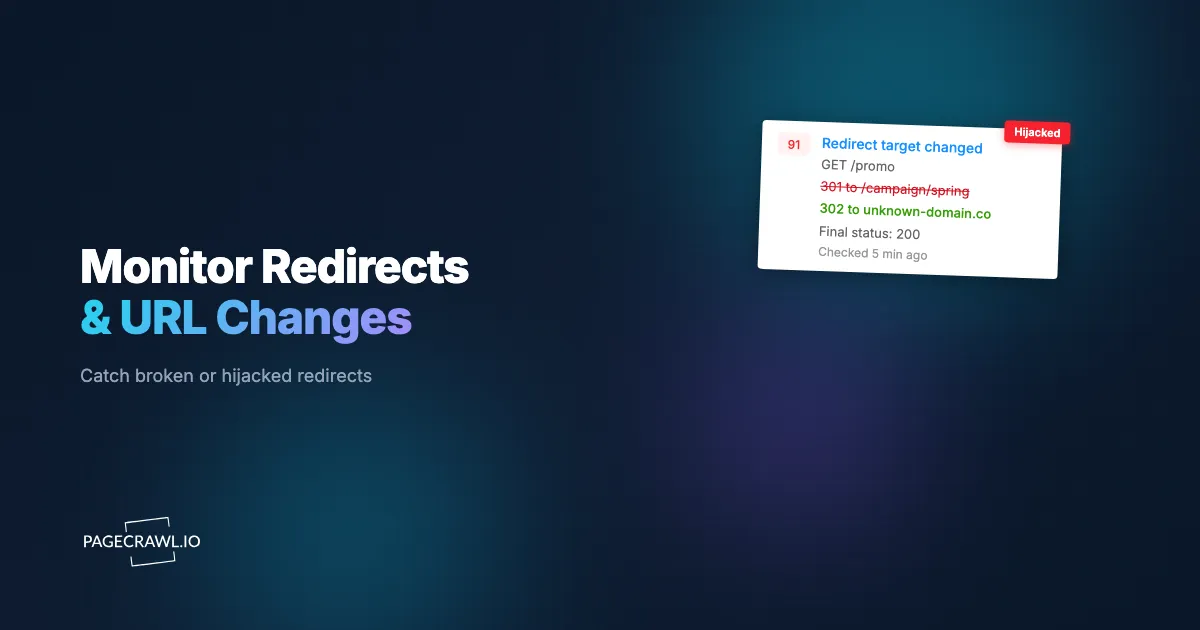
Target swaps. The redirect still fires, but the destination changed. /promo used to land on this quarter's campaign page and now lands on last year's expired offer, or a staging URL, or someone else's site.
Injected and hijacked redirects. A compromised CMS plugin, ad tag, or third-party script injects a client-side redirect that sends a slice of your visitors to spam, malware, or an affiliate page. These often fire only for certain user agents or geographies, which is exactly why they evade manual spot-checks. This overlaps heavily with website defacement detection and broader brand and domain fraud monitoring.
Protocol and host changes. An http to https upgrade misfires, a www to non-www canonical flips, or a redirect that should stay on your domain starts pointing off-site. Any of these can split indexing or confuse analytics.
How do broken redirects hurt your SEO and revenue?
Broken redirects hurt in two currencies at once: lost search authority, which is exactly what SEO monitoring and change detection exists to protect, and lost conversions. A downgraded or missing redirect strands the backlinks pointing at the old URL, so rankings for the destination slip. A swapped or hijacked redirect sends paying visitors somewhere you did not intend, turning paid and organic traffic you already bought into revenue for someone else.
On the SEO side, the mechanics are unforgiving. Search engines pass a link's authority through a 301 but treat a 302 as a signal to keep the original URL indexed, which is why Google Search Central documents redirect type as a deliberate choice rather than an implementation detail. When a 301 silently becomes a 302, the destination stops accumulating the authority it was promised, and recovery after you fix it is slow because the engines have to recrawl and re-trust the consolidation. A redirect that disappears entirely is worse: every external backlink to the old URL now points at a 404, and that equity is simply lost until the redirect returns. If you already track backlinks and link tampering or run a broader SEO monitoring program, redirect health is the missing layer that ties them together.
On the revenue side, a hijacked or swapped redirect is a direct leak. Affiliate hijacks rewrite outbound product links so commissions route to an attacker. Injected redirects on a checkout or pricing path send a percentage of buyers off-site before they ever convert. Because these often trigger conditionally, your own manual checks from the office almost never reproduce them, and the loss compounds quietly until someone reports being sent to a strange page. Catching the shift on the next scheduled check, rather than in next month's revenue report, is the only reliable defense.
Which URLs and redirects should you monitor?
Monitor the URLs where a broken redirect costs the most: money pages, migrated URLs with backlink history, branded short links and campaign URLs, and any redirect that crosses to a third-party or affiliate destination. You cannot watch every rule in a large redirect map, so prioritize by revenue impact and link authority, then expand.
A practical priority order looks like this:
- Revenue paths. Checkout, pricing, signup, demo-request, and "buy now" links. A swapped redirect here is an immediate conversion leak.
- High-authority migrated URLs. Any old URL you 301'd during a site migration or rebrand that still earns backlinks. These are the ones whose lost equity is hardest to recover.
- Branded short links and campaign URLs.
yourbrand.com/go/..., QR-code destinations, and links printed in ads or email. They live a long time and are easy to forget after launch. - Outbound and affiliate redirects. Any redirect that sends users to a partner, store, or affiliate network is a hijack target. Watch the destination domain specifically.
- Canonical and protocol redirects. Your
httptohttpsandwwwnormalization rules. A flip here can split your entire index.
For sites where new URLs appear constantly, pair redirect monitoring with sitemap monitoring so you also catch new pages that should have redirects but do not. And if you manage redirects tied to domains you own, layer in WHOIS and domain-change monitoring so an expiring or transferred domain in a redirect chain never surprises you, since the registrar transfer and expiry rules published by ICANN leave a domain in a redirect chain vulnerable for a surprisingly long window.
How do you monitor redirects with PageCrawl?
PageCrawl monitors a URL by requesting it on a schedule, following where it goes, and alerting you when the response or destination changes. To watch a redirect specifically, you point a monitor at the source URL, capture the final resolved address and status, and let PageCrawl tell you as soon as a check finds either one differs from the baseline. Here is the full setup.

Step 1: List the URLs that redirect. Pull your priority redirects into a simple list: the source URL you want people to use, plus the destination it should resolve to today. Start with your revenue paths and migrated high-authority URLs from the section above. You do not need the whole redirect map, just the ones that hurt when they break.
Step 2: Create a free account and add the source URL. Sign up and add the redirecting URL (for example yourbrand.com/go/checkout) as a new monitor. PageCrawl requests the URL, follows the redirect, and records where it lands along with the response it received. That resolved destination and status become your baseline. The free tier gives you 6 monitors and 220 checks per month, which is enough to watch your most critical redirects before scaling up.
Step 3: Capture the destination and status as the tracked value. Configure the monitor to track the final resolved URL and the response code rather than the rendered page design. The reference list of tracked element types, including redirect and HTTP status tracking, shows which one to pick. This way a 301-to-302 downgrade, a target swap, or a new 404 each register as a change even when the page a user eventually sees looks identical. For redirects you expect to be permanent, the status code is the early-warning signal.
Step 4: Add a content fingerprint on the destination. For target-swap and hijack detection, also track a small, stable piece of the destination page, such as the page title or a unique heading. If a redirect silently starts landing on a different page that happens to return the same status, the content fingerprint catches it. This is your defense against the redirect that "works" but points somewhere new.
Step 5: Enable screenshots. Turn on screenshots so every check stores a timestamped image of where the redirect actually landed. When you need to prove a hijack to a vendor, a registrar, or your security team, a dated screenshot of the off-site destination is far harder to dispute than a log line.
Step 6: Set the check frequency to match the risk. For revenue paths and known hijack targets, check often (the free tier runs hourly; paid tiers go as frequent as every 2 to 5 minutes). The window between a redirect breaking and you finding out should be measured in minutes for checkout and pricing URLs, and at most a day for lower-priority links.
Step 7: Organize with folders and tags. Group monitors into folders like "Revenue redirects," "Migrated URLs," and "Outbound affiliate links," and tag the ones that have broken before. When an alert fires, the tag tells you at a glance whether this is a recurring rule or a brand-new failure.
Step 8: Wire up alerts. Connect the channels your team actually watches so a redirect change reaches a human quickly. Covered in detail below.
This same pattern works whether you have five critical redirects on one site or five hundred spread across every site in an agency's client roster. Start with the handful that would hurt most, confirm the alerts fire correctly with a deliberate test, then widen coverage.
How do you catch a hijacked or injected redirect specifically?
To catch a hijack, watch the destination domain, not just the status code. A hijacked redirect usually still returns a normal response while quietly changing where it sends people, so the signal you want is "the final URL now points to a host I did not approve." Track the resolved destination and alert on any change to its domain.
Hijacks and injections are sneakier than operational breakage because they are designed to avoid notice. Several patterns matter:
Conditional redirects. Injected redirects often fire only for mobile user agents, only for visitors from search engines, or only outside business hours, precisely so the team's own checks from office desktops never reproduce them. Automated monitoring that runs continuously, on a schedule you do not control by hand, is what surfaces a redirect that only misbehaves at 3 a.m. or only for certain visitors.
Off-site destinations. The clearest hijack signal is a redirect that used to stay on your domain and now resolves to an external host. Track the destination domain as a value and treat any change from your own domain to another as high priority. This pairs naturally with domain and brand-fraud monitoring, which watches for lookalike domains and impersonation around the same threat.
Compromised third-party scripts. Many injected redirects come in through an ad tag, analytics snippet, or CMS plugin rather than your own code. A change in where a page resolves, or a new redirect appearing where there was none, is often the first visible symptom of a supply-chain compromise. Combine redirect monitoring with defacement detection to cover both the visible and the routing layers of an attack.
When a hijack alert fires, the timestamped screenshot from Step 5 plus the recorded destination give you ready-made evidence to escalate, whether that means rolling back a plugin, revoking a script, or contacting a registrar.
How should you set up alerts and automation?
Route redirect alerts to the channel your team reacts to fastest, and reserve automated escalation for the highest-stakes URLs. A redirect change on a checkout path should hit chat and email as soon as a check detects it; a change on a low-priority campaign link can wait for a daily digest. The goal is fast human eyes on real breakage without drowning anyone in noise.
Start with direct notifications. PageCrawl sends Slack alerts as soon as a check detects that a redirect's status or destination has changed, alongside email, and other team channels. For redirect monitoring specifically, the alert should say what changed: old destination versus new, old status versus new. That context lets whoever is on call decide in seconds whether it is a planned migration or an incident.
Use conditions to keep alerts meaningful. With conditional alert rules, you can alert only when the status code stops being a 301, or only when the destination domain stops matching your own. This filters out the harmless churn (a tracking parameter appended to a destination) and surfaces the changes that actually matter (a permanent redirect going temporary, or a destination leaving your domain). The help centre guide to notification conditions and filters covers the keyword, threshold, and per-page rules available.
For larger operations, automate the first response with webhook automation. When a redirect change is detected, a webhook can open a ticket in your incident tracker, post the old-and-new destination to your security channel, trigger a re-deploy of the correct redirect config, or kick off a workflow in your automation platform. Automated first-response means a broken or hijacked redirect is logged and routed even when nobody is watching the dashboard, which is exactly when the silent 3 a.m. hijack tends to fire.
What redirect monitoring mistakes should you avoid?
The biggest mistake is monitoring the destination page instead of the redirect itself, so a broken route hides behind a healthy-looking page. The next is checking too infrequently on revenue URLs, alerting on every trivial parameter change until people mute the channel, and forgetting branded short links the moment a campaign ends. Each one quietly defeats the purpose.
A few specific pitfalls and their fixes:
Watching the page, not the route. If you only monitor the final destination's content, a 301-to-302 downgrade is invisible because the page looks identical. Always capture the status code and resolved URL as part of the tracked value.
Ignoring redirect chains. A monitor that only reports the final landing spot can miss a clean one-hop redirect growing into a slow three-hop chain. Watch for added latency and a changing number of hops, not just the endpoint.
Set-and-forget campaign links. Branded short links and QR destinations outlive the campaigns that created them. Months later the destination 404s or gets repurposed, and the printed ad now points nowhere. Keep these monitored long after launch.
Over-alerting. If every appended UTM parameter triggers an alert, your team stops reading them. Use conditional rules to alert on the domain and status, not on cosmetic query-string noise.
No baseline before a migration. During a site migration, capture the expected redirect map as monitors before you cut over, so the first round of checks after the switch shows you which of the hundreds of new redirects failed to take, much as website QA and visual regression monitoring catches the other things a deploy quietly breaks. This turns a frantic post-launch scramble into a checklist. Know the correct state first, then watch for drift from it.
It also helps to keep redirect monitoring distinct from uptime checks. A redirect can be perfectly "up" while pointing at the wrong place: uptime tells you the server answered, redirect monitoring tells you it answered with the wrong route.
Choosing your PageCrawl plan
PageCrawl's Free plan lets you monitor 6 pages with 220 checks per month, which is enough to validate the approach on your most critical redirects. Most teams graduate to a paid plan once they see the value.
| Plan | Price | Pages | Checks / month | Frequency |
|---|---|---|---|---|
| Free | $0 | 6 | 220 | every 60 min |
| Standard | $8/mo or $80/yr | 100 | 15,000 | every 15 min |
| Enterprise | $30/mo or $300/yr | 500 | 100,000 | every 5 min |
| Ultimate | $99/mo or $999/yr | 1,000 | 100,000 | every 2 min |
Annual billing saves two months across every paid tier. Enterprise and Ultimate scale up to 100x if you need thousands of pages or multi-team access.
For redirect monitoring, the right tier follows your URL count and how fast you need to know. The free plan covers a handful of revenue redirects with hourly checks, enough to catch a downgraded 301 the same day. Standard at $80/year monitors 100 redirects with 15-minute checks, which suits a typical marketing site's money pages, migrated URLs, and campaign links together. Enterprise at $300/year handles 500 redirects with 5-minute checks, the right fit when a large migration leaves you with hundreds of high-authority rules to guard and a hijack on any one of them is a security incident. If catching a single hijacked checkout redirect before it bleeds a day of conversions matters to you, the monitoring pays for itself the first time it fires.
Getting Started
Start with the five redirects that would cost you the most if they broke: your checkout link, your pricing page redirect, your most-linked migrated URL, and your two highest-traffic campaign short links. Create a free account, add each source URL, capture the destination and status as the tracked value, and turn on Slack or email alerts. Within a single check cycle you will have a baseline, and the next time a deploy downgrades a 301 or a plugin hijacks a destination, you will know in minutes instead of discovering it in a traffic report weeks later.
Your redirects are working right now. Set up monitoring so you find out on the next check after they stop.