Visualping is an established website change monitoring tool with a visual, draw-a-box setup flow. If you have searched for a way to watch a web page for changes, you have probably run into it.
But "recognizable" and "right for your use case" are not the same thing. Visualping's pricing climbs quickly once you move past a handful of pages, its check counts are tighter than they first appear, and several capabilities that teams now expect by default (AI change summaries, broad notification routing, price tracking) are either gated behind higher tiers or absent. If you are evaluating it for a competitive intelligence program, a compliance watchlist, or ecommerce price tracking, the per-page math matters.
This guide is an honest comparison of Visualping and PageCrawl, expanding on the shorter Visualping alternative overview. It covers real pricing billed monthly, free tier limits on both sides, AI summaries, screenshot verification, integrations, and where each tool genuinely fits best, including where Visualping is the better choice.
How does Visualping work?
Visualping checks a page on a schedule and tells you when something changed since the previous check. You give it a URL, optionally select a region of the page to watch, choose a check frequency, and pick how you want to be alerted. It supports visual checks (pixel comparison of a selected area), text checks, and element checks.
The visual selection flow is its signature feature and it is genuinely good for non-technical users. You draw a box around the part of the page you care about and Visualping watches that region. For one-off monitoring (is this product back in stock, did this announcement page update), it is fast to set up and easy to understand.
Where it gets complicated is scale and cost. Visualping prices on a combination of number of pages (jobs) and total checks per month, and the gap between the free tier and a usable paid tier is steep.
How much does Visualping cost?
Billed monthly, Visualping runs from a free 5-page tier to $70/month for Personal and $140 to $350/month for Business, with custom Enterprise plans above that. Plans are priced on a sliding scale of monthly checks and the number of pages (jobs) you can run, and the team features most companies expect start on Business. The prices below are the month-to-month rates, not the discounted annual figures, so you can compare like with like. Paying annually knocks roughly a third off each one.
Personal plans (single user, no team features):
- Free: 5 pages, 150 checks per month. Enough to test the product, not to run a program.
- $14/month: 10 pages, 1,000 checks per month.
- $35/month: 20 pages, 5,000 checks per month.
- $70/month: 40 pages, 10,000 checks per month (the top of the Personal range).
Business plans (team features, up to 11 users and 10 workspaces at the top tier):
- $140/month: 200 pages, 20,000 checks per month (where Business starts).
- $210/month: 300 pages, 30,000 checks per month.
- $280/month: 400 pages, 40,000 checks per month.
- $350/month: 500 pages, 50,000 checks per month.
Above that, custom Enterprise (Solutions) plans start from around $3,000/year. Note that every business feature (team users, advanced notifications like Slack and Teams, API access, bulk import, advanced reports) requires a Business plan, so the real entry point for team use is $140/month, not the $14 Personal tier.
Note: Visualping adjusts its plan names and exact allocations periodically, so confirm the current numbers on Visualping's own site before you buy. The shape of it has stayed consistent though. The free tier is a demo, the Personal tiers cover a handful of pages for individuals, and team-grade coverage with the features most teams expect starts at $140/month and climbs toward $350/month fast.
The thing to watch is the check budget. A single page checked every hour uses about 720 checks per month. Checked every 15 minutes, it uses about 2,880. So a plan advertised as "1,000 checks" is really one page at hourly frequency, or a couple of pages checked a few times a day. If you are monitoring 20 competitor pages at a useful cadence, you are well into the higher tiers.
What should you look for in a website monitoring tool?
Look for cloud checks that run without your browser open, a check budget that supports a useful frequency, AI change summaries, screenshot verification, every notification channel included rather than gated, price and availability tracking, noise filtering, and API access. Those eight criteria decide day-to-day usefulness more than brand familiarity does.
- Cloud monitoring that runs without you: Checks should run on the provider's servers on a schedule, independent of your browser or laptop.
- Honest check budgets: The advertised page count should be usable at a frequency that catches changes in time, not just once a day.
- AI change summaries: Plain-language explanations of what changed and how much it matters, so you are not reading raw diffs for every alert.
- Screenshot verification: Before-and-after images, not just text diffs, so you can confirm what actually happened.
- Notification channels without upcharges: Slack, Discord, Teams, Telegram, and webhooks should not each require a higher plan.
- Price and availability tracking: If you watch product pages, dedicated price mode saves hours of selector setup.
- Noise filtering: Built-in handling for cookie banners, rotating ads, dates, and counters.
- API and automation access: For building dashboards, pipelines, and integrations.
Visualping vs PageCrawl: Feature Comparison
Here is a side-by-side across the features that decide real workflows.
| Feature | Visualping | PageCrawl |
|---|---|---|
| Free pages | 5 | 6 |
| Free checks/month | 150 | 220 |
| Free check frequency | Limited | Every 60 min |
| Cloud-based monitoring | Yes | Yes |
| Visual region selection | Yes (core strength) | Yes |
| AI change summaries | Higher tiers / add-on | Yes, all plans including free |
| AI importance scoring | Limited | Yes, all plans |
| Smart noise filtering | Limited | Yes (AI + rule-based) |
| Screenshot history | Yes | Yes, all plans |
| Visual diff | Yes | Yes |
| Price tracking mode | No dedicated mode | Yes (auto-detection) |
| Reader / content-only mode | Limited | Yes |
| Notification: Email | Yes | Free |
| Notification: Slack | Paid tiers | Free |
| Notification: Discord | Limited | Free |
| Notification: Teams | Paid tiers | Free |
| Notification: Telegram | No | Free |
| Notification: Webhooks | Paid tiers | Free |
| Notification: Web push | Limited | Free |
| Google Sheets logging | Via integrations | Yes, all plans |
| Bulk import / editing | Limited | Yes |
| Automatic page discovery | No | Yes |
| Web archiving (WACZ) | No | Yes (Ultimate) |
| MCP server for AI assistants | No | Yes |
| API access | Higher tiers | Yes, all plans |
| Browser extension | Yes | Yes (optional convenience) |
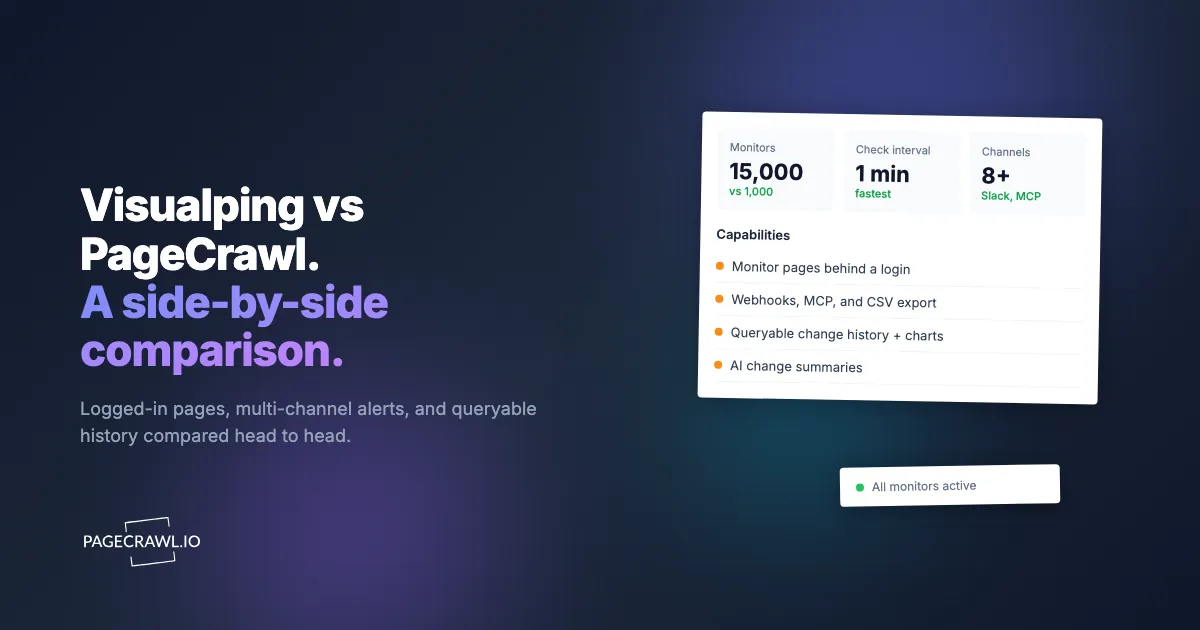
| Paid plans start at (billed monthly) | $14/mo (Personal), $140/mo (Business) | $8/mo |
The headline difference: PageCrawl includes AI summaries, every notification channel, screenshot history, price tracking, and API access on every plan, including free. Visualping leads on the polish of its visual selection flow and brand familiarity, but it meters more aggressively and reserves several modern features for higher tiers. It also has no equivalent of PageCrawl's verifiable WACZ web archives, sealed captures with independent timestamps you can turn on when a detected change needs to hold up as evidence.
Where PageCrawl Pulls Ahead
Per-page economics at scale
This is the practical decider for most teams. Visualping's check budget and Business-only team features mean a serious watchlist pushes you into the $140 to $350 range. PageCrawl's Standard plan is $8/month (or $80/year) for 100 pages at 15-minute frequency with a 15,000-check budget. That is enough headroom to run a full Tier 1 and Tier 2 competitor program without rationing checks. For the math behind building a watchlist, see our competitive intelligence strategy guide.
AI change summaries on every plan
When PageCrawl detects a change, it generates a plain-language summary of what happened along with an importance score from 0 to 100. Instead of opening a diff to discover a competitor moved their entry price from $29 to $39, the summary tells you directly and ranks it for you. This is on the free plan, not gated behind a premium tier. The help centre explains what the model looks at in AI-powered change detection and smart filtering, and for the broader picture see our AI website monitoring tools guide.
Built-in price and availability tracking
Visualping can watch a price region visually or as text, but it has no dedicated price mode. PageCrawl's price tracking auto-detects prices and stock status, builds a price-history chart, and alerts on drops, rises, and restocks with no CSS selectors to configure. For product and competitor pricing work, that removes most of the setup. See our competitor price monitoring guide and the SaaS pricing page monitoring guide.
Every notification channel included
PageCrawl ships email, Slack, Discord, Microsoft Teams, Telegram, webhooks, web push, and Google Sheets logging on every plan, including free, and lets you route different monitors to different channels. With Visualping, channel access depends on your tier. For setup, see website change alerts in Slack and webhook automation for website changes.
Stronger noise filtering
Real pages are noisy: rotating ads, cookie banners, dates, view counters. PageCrawl removes cookie banners and overlays before each check by default, supports global ignore rules across all monitors, offers reader and content-only modes, and uses AI importance scoring to push trivial changes below your threshold. For precise targeting, our CSS selector guide covers the techniques.
An AI-queryable archive
PageCrawl includes a server that speaks the open Model Context Protocol, so AI assistants like Claude and Cursor can read your monitoring history directly. You can ask "summarize every change to Competitor X's pricing page this quarter" and get a structured answer from your own archive instead of skimming alert emails. Visualping has no equivalent. See using the MCP server with AI agents.
Setting Up Competitor Monitoring in PageCrawl
If you are moving a watchlist over from Visualping (or starting fresh), here is the workflow. New monitors come with screenshots on and cookie and overlay removal enabled by default.

Step 1: List the pages that matter. Pick your highest-value targets first: a competitor pricing page, a product page you watch for changes, a regulatory document, a changelog. For a Visualping migration, copy the URLs and the region you were watching on each.
Step 2: Create the monitors. Click "Track new page," paste a URL, and pick a tracking mode. PageCrawl suggests one automatically, or you can choose:
- Fullpage: all visible text, good for general monitoring.
- Content only: strips headers, footers, and navigation, good for articles and docs.
- Reader mode: extracts main content, best for news and blog posts.
- Price mode: auto-detects price and availability, best for product pages.
- Specific element: target a section with a CSS or XPath selector, the closest match to Visualping's region selection.
For larger lists, use the bulk import on the advanced creation page to create many monitors from a spreadsheet at once.
Step 3: Set frequency and channels. Choose a check interval that fits how fast the page moves (pricing pages every 15 minutes, policy pages daily) and route alerts to the channels your team lives in. Alerts go out when the next scheduled check detects the change, so the interval you pick is what sets your worst-case delay. Set workspace-level defaults or override per monitor, and see notification conditions and filters for routing only the changes that matter.
Step 4: Tune the noise. Leave automatic cookie and overlay removal on, add global ignore rules for date strings or counters if you see false positives, and lean on AI importance scoring to keep low-value changes out of your inbox.
Step 5: Run for two weeks alongside Visualping. Compare reliability, alert speed, summary quality, and screenshot usefulness before you cancel anything.
When is Visualping still the right choice?
Visualping is the better pick when you want the smoothest visual region picker, when you are casually watching one or two pages within its free or entry tier, or when your team is already standardized on it and switching costs outweigh the savings. Being honest, it is a good tool:
- You want the smoothest visual region picker. Visualping's draw-a-box flow is polished and the fastest way for a non-technical user to watch a specific area of a page.
- You are monitoring one or two pages, casually. If the free or an entry Personal tier covers your needs and you do not want AI summaries, price tracking, or broad integrations, Visualping is perfectly workable.
- You are already standardized on it. If your team has built around Visualping and switching costs outweigh the savings, staying is reasonable until those workflows need a refresh.
The trade-off shows up when you scale, when you want AI summaries and price tracking included rather than gated, and when the per-page check budget starts forcing you to choose which pages to drop. That is where a cloud-native tool with flat, generous plans changes the math. For a wider field, see our best free website change monitoring tools roundup and the complete guide to website monitoring in 2026.
Choosing your PageCrawl plan
PageCrawl's Free plan lets you monitor 6 pages with 220 checks per month, which is enough to validate the approach on your most critical pages. Most teams graduate to a paid plan once they see the value.
| Plan | Price | Pages | Checks / month | Frequency |
|---|---|---|---|---|
| Free | $0 | 6 | 220 | every 60 min |
| Standard | $8/mo or $80/yr | 100 | 15,000 | every 15 min |
| Enterprise | $30/mo or $300/yr | 500 | 100,000 | every 5 min |
| Ultimate | $99/mo or $999/yr | 1,000 | 100,000 | every 2 min |
Annual billing saves two months across every paid tier. Enterprise and Ultimate scale up to 100x if you need thousands of pages or multi-team access.
One competitive signal caught early can swing a deal worth more than a decade of Enterprise. If you win one additional deal per year because you spotted a pricing change, a product launch, or a messaging shift before your competitors did, $300/year is a rounding error. Standard at $80/year handles 100 monitored pages, enough for a Tier 1 and Tier 2 competitor program. Enterprise adds 500 pages and SSO. All plans include the PageCrawl MCP Server for AI assistants like Claude and Cursor. Your sales and product teams can ask "summarize every change to Competitor X's pricing page over the last quarter" and get an answer pulled straight from your own archive. AI assistants can create monitors through conversation on every plan, including Free, turning the tracked pages into a living competitor database, not just an alert feed.
Getting Started
Start with the three pages you would be most upset to miss a change on. For most teams that is a competitor's pricing page, a key product page, and one policy or regulatory document. Set them up on PageCrawl's free tier (6 monitors, AI summaries, screenshots, and all notification channels included) and run them for two weeks alongside Visualping if you already use it.
After two weeks you will know which tool catches changes faster, which summaries save you the most time, and whether the per-page economics work for the size of program you actually want to run. If you need more than 6 monitors, paid plans start at $8/month for 100 pages at 15-minute frequency. The free tier is enough to make the call without spending anything.
Try it at pagecrawl.io, no credit card required.