Last reviewed: August 20, 2026. Prices and plan details reflect each vendor's public pages at the time of review and can change, so confirm on the vendor's site before buying.
Website monitoring used to mean getting a notification that said "something changed" and then spending ten minutes figuring out what actually happened. You would compare two walls of text, hunt for the one sentence that was different, and try to decide whether it mattered.
AI has fundamentally changed this. The best monitoring tools now use large language models to summarize changes in plain English, filter out noise, classify changes by importance, and even predict whether a change is likely to affect you. Instead of "page changed," you get "the pricing page increased the Pro plan from $29/month to $39/month."
This guide compares every major website monitoring tool that uses AI in a meaningful way, explains what AI actually does in the monitoring workflow, and helps you pick the right tool for your specific needs. If you are new to website monitoring in general, our complete guide to monitoring website changes covers the fundamentals.
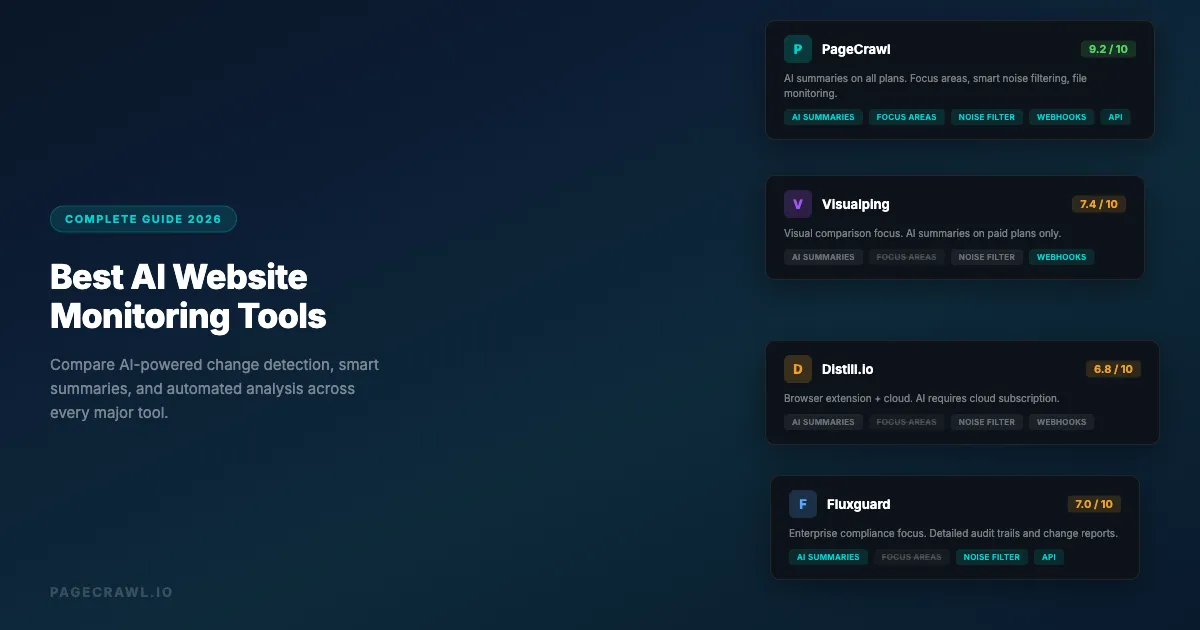
Our top picks at a glance:
- PageCrawl: teams that want AI summaries on every change without complex setup, plus API access and JavaScript-rendered pages.
- Visualping: users who prioritize visual page comparison.
- Distill.io: individuals who want to start with free local monitoring and scale to cloud later.
- Fluxguard: compliance teams that need detailed audit trails of website changes.
What does AI actually do in website monitoring?
In website monitoring, AI summarizes changes in plain English, filters out noise, classifies changes by type, compares content semantically, and applies focus areas so you only hear about relevant updates. Not every tool that claims to be "AI-powered" delivers all of these, so it helps to understand where AI fits into the monitoring pipeline before comparing tools.
Change Summarization
This is the most valuable AI feature. When a monitored page changes, the AI reads the old content and the new content, identifies what is different, and writes a human-readable summary. Instead of viewing a raw text diff, you get a sentence like "the return policy was updated to require returns within 14 days instead of 30 days."
Good summarization saves you from reading the actual diff for every change notification. It is especially valuable when monitoring pages with frequent minor changes (like news sites) where you only care about specific types of updates.
Noise Filtering
Websites change constantly. Cookie banners update, ad slots rotate, timestamps refresh, and layout elements shift. AI can distinguish between meaningful content changes and visual noise, reducing false alerts that waste your time.
Change Classification
Some tools automatically categorize changes: pricing update, policy change, new product, content removal, layout change. This lets you set up different alert rules for different change types, like routing pricing changes straight to Slack while batching editorial updates into a weekly digest.
Semantic Comparison
Raw text diffs treat every character change equally. AI-powered semantic comparison understands that rewording a sentence without changing its meaning is less important than adding a new restriction to a terms of service document. This reduces alerts for cosmetic rewrites.
Focus Areas
Rather than monitoring an entire page and getting alerts about every change, AI focus areas let you tell the tool what you care about. For example, "focus on pricing changes" or "alert me only when product availability changes." The AI then filters changes through this lens and only notifies you about relevant updates.
How did we review these tools?
We compared each tool on the criteria this guide uses to judge AI monitoring: the quality of its AI summaries, noise filtering, how summaries reach you, check frequency, and integration options. Pricing and plan details come from each vendor's public pages, and every profile notes the kind of user the tool fits best.
- Quality of AI summaries
- Noise-to-signal ratio
- Summary delivery inside the notification
- Check frequency
- Integration options (webhooks, API, Slack, Discord, email)
The Best AI Website Monitoring Tools
We've tested every major monitoring platform extensively. Here's an honest look at each.
PageCrawl
PageCrawl recently added AI integration across its monitoring workflow. Every monitored page gets automatic AI-powered change detection and smart filtering, and the platform uses AI to help you understand what changed and why it matters.
AI Features:
- Automatic change summaries for every detected change
- AI focus areas: tell the monitor what you care about (e.g., "focus on price changes and product availability") and get filtered, relevant alerts
- Smart content extraction using "Content Only" mode that strips navigation, ads, and boilerplate before comparing
- AI-powered element detection for automatic tracking of specific page elements
- Change summaries included directly in notifications (email, Slack, Discord, webhook)
Other Strengths:
- Multiple tracking modes: fullpage text, content only, price, specific elements, visual screenshots
- Browser automation with cookie consent removal and overlay handling
- Support for JavaScript-heavy single-page applications
- PDF, Word, and Excel file monitoring
- Multi-channel notifications with webhook integration
- API access for building custom workflows
- Native Home Assistant integration (HACS) plus n8n, Zapier, and Make.com
Pricing: Free tier with 6 monitors. Paid plans start at $8/month for 100 monitors.
Best For: Teams that want AI summaries on every change without complex setup, developers who need API access, and users monitoring dynamic JavaScript-rendered pages.
Visualping
Visualping (visualping.io) is one of the oldest website monitoring services and has added AI features to its platform over time.
AI Features:
- AI change summaries on higher-tier plans
- Smart comparison that attempts to filter out insignificant changes
- Visual change detection with AI-assisted highlighting
Other Strengths:
- Large user base with established reliability
- Visual comparison (side-by-side screenshots)
- Chrome extension for easy monitor setup
- Zapier and Slack integrations
Limitations:
- AI summaries limited to paid plans
- No AI focus areas for filtering changes by topic
- Limited file monitoring capabilities
- Higher pricing for equivalent feature sets
Pricing: Free tier with 5 monitors and ~150 checks/month. Paid plans start at $14/month.
Best For: Users who prioritize visual page comparison and want a well-established tool.
Distill.io
Distill.io (distill.io) offers both a browser extension and cloud-based monitoring with some AI features.
AI Features:
- AI summaries for detected changes (cloud plans)
- Smart extraction for identifying relevant page sections
Other Strengths:
- Browser extension runs monitors locally (free)
- Can monitor specific page sections via CSS selectors
- Desktop and mobile apps
- Supports monitoring behind logins via the extension
Limitations:
- AI features require cloud subscription
- Browser extension monitors only run when your browser is open
- Cloud monitoring pricing can be high for many monitors
- Limited notification channel options on lower tiers
Pricing: Free browser extension with limited cloud checks. Cloud plans start at $15/month.
Best For: Individual users who want to start with free local monitoring and scale to cloud when needed.
Fluxguard
Fluxguard focuses on website change monitoring with AI-powered analysis, aimed at compliance and regulatory use cases.
AI Features:
- AI-powered change reports with categorization
- Content change classification (new content, removed content, modified content)
- Automated impact assessment for detected changes
Other Strengths:
- Strong compliance and audit trail features
- API-first design for integration
- Visual and text comparison
- Team collaboration features
Limitations:
- Smaller user base than competitors
- Higher price point for small teams
- Fewer notification channel options
- Less suitable for casual monitoring
Pricing: Plans start at $49/month.
Best For: Compliance teams and enterprises that need detailed audit trails of website changes.
ChangeTower
ChangeTower provides website monitoring with AI summaries and a focus on business intelligence use cases.
AI Features:
- AI change summaries for monitored pages
- Keyword-based change filtering
- Automated change reports
Other Strengths:
- Good for competitor monitoring
- Website archiving with historical snapshots
- Team sharing features
- Scheduled monitoring reports
Limitations:
- Fewer AI features compared to newer tools
- No AI focus areas or semantic filtering
- Limited integration options
- Higher per-monitor pricing
Pricing: Plans start at $12/month.
Best For: Business users focused on competitor intelligence and website archiving.
Hexowatch
Hexowatch monitors websites for visual, content, technology, and availability changes with some AI-powered features.
AI Features:
- AI-powered change detection across multiple dimensions
- Technology stack monitoring (detects when a website changes its tech stack)
- Automatic categorization of change types
Other Strengths:
- Monitors visual, content, source code, technology, and availability simultaneously
- Sitemap monitoring
- Zapier integration
- Proxy support for geo-specific monitoring
Limitations:
- AI summaries less detailed than dedicated AI monitoring tools
- Interface can be overwhelming with many monitoring dimensions
- Limited webhook/API options
- Slower check frequencies on lower tiers
Pricing: Free tier with limited checks. Paid plans start at $29/month.
Best For: Users who want multi-dimensional monitoring (visual, tech stack, content) in one tool.
Feature Comparison Table
| Feature | PageCrawl | Visualping | Distill.io | Fluxguard | ChangeTower | Hexowatch |
|---|---|---|---|---|---|---|
| AI Change Summaries | All plans | Paid only | Cloud only | Yes | Yes | Basic |
| AI Focus Areas | Yes | No | No | No | No | No |
| Smart Noise Filtering | Yes | Partial | Partial | Yes | No | Partial |
| Visual Monitoring | Yes | Yes | Yes | Yes | Yes | Yes |
| JS-Rendered Pages | Yes | Yes | Partial | Yes | Partial | Yes |
| File Monitoring (PDF, etc.) | Yes | No | No | No | No | No |
| Free Tier Monitors | 6 | 5 | 5 cloud + 20 local | No | No | Limited |
| API Access | Yes | Business+ only | Limited | Yes | No | Limited |
| Slack/Discord | Yes | Business+ only | Yes | Slack | No | Slack |
| Webhook | Yes | Business+ only | Paid | Yes | No | Via Zapier |
| Starting Price | $8/mo | $14/mo | $15/mo | $49/mo | $12/mo | $29/mo |
How does AI monitoring work in practice?
In daily use, AI monitoring turns raw page diffs into short, actionable summaries: it reads what changed, filters out the noise, and tells you whether the change matters. Here is what that looks like across four common scenarios.

Scenario 1: Tracking Competitor Pricing
You monitor your top three competitors' pricing pages. Without AI, you get alerts like "page changed" and have to open each page to see what happened.
With AI monitoring, you get a notification that says: "Competitor X increased their Enterprise plan from $199/month to $249/month. The Basic and Pro plans remain unchanged. A new 'Startup' plan was added at $99/month."
That is actionable intelligence delivered in one sentence instead of a ten-minute investigation.
Scenario 2: Monitoring API Documentation
You depend on a third-party API and monitor their documentation page. The page updates frequently with minor formatting changes, fixed typos, and reorganized sections.
Without AI noise filtering, you get an alert every time they fix a comma. With AI and a focus area like "alert me about breaking changes, deprecations, and new endpoints," you only get notified when the documentation changes in ways that affect your integration.
Scenario 3: Regulatory Compliance
You monitor government regulation pages for changes that affect your business. These pages are long, dense, and change infrequently, but when they do change, the details matter.
AI summarization reads the legal text and tells you: "New reporting requirement added for businesses with over 50 employees, effective January 2027. Penalty for non-compliance increased from $10,000 to $25,000."
Scenario 4: E-commerce Stock Monitoring
You are watching for a product to come back in stock. The product page changes constantly (reviews update, related products rotate, ad placements shift).
AI focus areas filter all of that noise and only alert you when the availability status actually changes from "Out of Stock" to "In Stock."
What should you look for in an AI monitoring tool?
Judge an AI monitoring tool on five things: the quality of its summaries, its noise-to-signal ratio, whether summaries arrive inside the notification itself, how often it checks your pages, and how well it integrates with your existing workflow. Each is worth testing against your own use cases.
Quality of AI Summaries
Not all AI summaries are equal. The best ones provide context, highlight the most important changes first, and avoid generic descriptions. Test a tool's summaries with your actual use cases before committing.
Look for summaries that answer: What changed? Why does it matter? What was the old value vs the new value?
Noise-to-Signal Ratio
The whole point of AI in monitoring is reducing noise. If a tool sends you 50 alerts a day and only 2 are relevant, the AI is not doing its job. Look for tools that offer focus areas, smart filtering, or configurable sensitivity.
Summary Delivery
AI summaries are only useful if they reach you where you work. Check whether summaries are included in the actual notification (Slack message, email, webhook payload) or whether you have to log into the tool to read them. The best tools put the summary right in the alert.
Check Frequency
AI features do not help much if the tool only checks your pages once a day. For time-sensitive monitoring (competitor pricing, stock alerts, security advisories), you need frequent checks combined with AI analysis.
Integration Options
Consider how the tool fits into your existing workflow. Webhook support lets you pipe AI-analyzed changes into any system. API access lets you build custom monitoring logic. Native integrations (Slack, Discord, email) cover the most common use cases.
AI Monitoring for Specific Use Cases
For Developers
Developers typically monitor API documentation, GitHub releases, package registries, and status pages. Key requirements:
- Support for JavaScript-rendered pages (many docs sites are SPAs)
- API access for programmatic monitor management
- Webhook delivery for integration with CI/CD pipelines
- AI summaries that understand technical content
Recommended: PageCrawl for its API and webhooks for custom integrations, JS rendering support, and developer-focused features like webhook payloads with structured change data and the option to connect your own OpenAI, Gemini, Anthropic, or OpenRouter key for unlimited AI usage.
For E-commerce Teams
E-commerce teams monitor competitor prices, product availability, promotional pages, and marketplace listings. Key requirements:
- Price tracking with historical data
- High check frequency for stock monitoring
- Multi-channel alerts for team distribution
- AI that understands pricing context
Recommended: PageCrawl for dedicated price tracking mode, or Hexowatch for multi-dimensional monitoring including technology changes (see how PageCrawl compares to Hexowatch).
For Compliance Teams
Compliance teams monitor regulatory pages, legal documents, terms of service, and policy pages. Key requirements:
- Detailed change history for audit trails
- AI summaries that accurately represent legal/regulatory text
- Low false positive rate (compliance teams cannot miss real changes)
- Export capabilities for documentation
Recommended: Fluxguard for enterprise compliance needs (see how PageCrawl compares to Fluxguard), or PageCrawl for teams that need AI summaries combined with flexible monitoring modes.
For Marketing Teams
Marketing teams monitor competitor websites, industry news, search results, and social media pages. Key requirements:
- Visual monitoring for design changes
- Content monitoring for messaging changes
- Easy setup without technical knowledge
- Shareable reports for stakeholders
Recommended: PageCrawl for AI-powered content analysis and visual change monitoring with team notification support. Visualping is an alternative if you want a well-established visual comparison tool.
Setting Up Your First AI-Powered Monitor
Getting started takes about two minutes:
- Choose the page you want to monitor (start with something that changes frequently enough to test within a day, like a competitor's pricing page or a news site)
- Select a tracking mode based on what you care about: "Content Only" for text changes, "Price" for price tracking, "Fullpage" for comprehensive monitoring
- Set your AI focus area if the tool supports it (e.g., "focus on pricing changes" or "alert me about new product launches")
- Configure your notification channel (Slack, email, Discord, or webhook)
- Set the check frequency based on urgency (hourly for pricing, daily for documentation)
The AI starts working from the very first check. Your first change detection will include a summary that shows you exactly what the AI adds to the monitoring experience.
The Future of AI in Web Monitoring
AI capabilities in monitoring tools are evolving rapidly. Features that are emerging or on the horizon:
- Predictive alerts: AI that detects patterns in website changes and warns you before a price increase or policy change based on historical behavior
- Cross-page correlation: AI that connects changes across multiple monitored pages to identify broader trends (e.g., an industry-wide pricing increase)
- Natural language monitor creation: Describing what you want to monitor in plain English and having AI set up the right monitors, selectors, and focus areas automatically
- Automated response: AI that not only detects and summarizes changes but takes action, like updating your own pricing page when a competitor changes theirs
Choosing your PageCrawl plan
PageCrawl's Free plan lets you monitor 6 pages with 220 checks per month, which is enough to validate the approach on your most critical pages. Most teams graduate to a paid plan once they see the value.
| Plan | Price | Pages | Checks / month | Frequency |
|---|---|---|---|---|
| Free | $0 | 6 | 220 | every 60 min |
| Standard | $8/mo or $80/yr | 100 | 15,000 | every 15 min |
| Enterprise | $30/mo or $300/yr | 500 | 100,000 | every 5 min |
| Ultimate | $99/mo or $999/yr | 1,000 | 100,000 | every 2 min |
Annual billing saves two months across every paid tier. Enterprise and Ultimate scale up to 100x if you need thousands of pages or multi-team access.
Standard at $80/year pays for itself the first time AI summarizes a competitor pricing change before your team has to schedule a meeting to figure out what happened. 100 monitored pages is enough to cover your key competitors, relevant industry publications, and a handful of regulatory sources, all with AI summaries on every change. Enterprise at $300/year brings checks down to every 5 minutes across 500 pages.
All plans include the PageCrawl MCP Server, so you can query your AI-analyzed change history directly from Claude or Cursor, asking things like "what have my competitors changed on their pricing pages in the last 30 days?" without leaving your tool. AI assistants can create monitors through conversation on every plan, including Free.
Getting Started
The difference between traditional monitoring and AI-powered monitoring is the difference between "something changed" and "here is exactly what changed and why it matters to you." Start with a free PageCrawl account, set up a monitor on a page you check manually today, and see how AI summaries transform your monitoring workflow. If budget is a concern, check our roundup of the best free website change monitoring tools to see which free tiers include AI features. A single well-configured AI monitor typically replaces the manual page checking you do today, saving you time every single week.
PageCrawl vs the Alternatives
See how PageCrawl compares to the tools in this article: