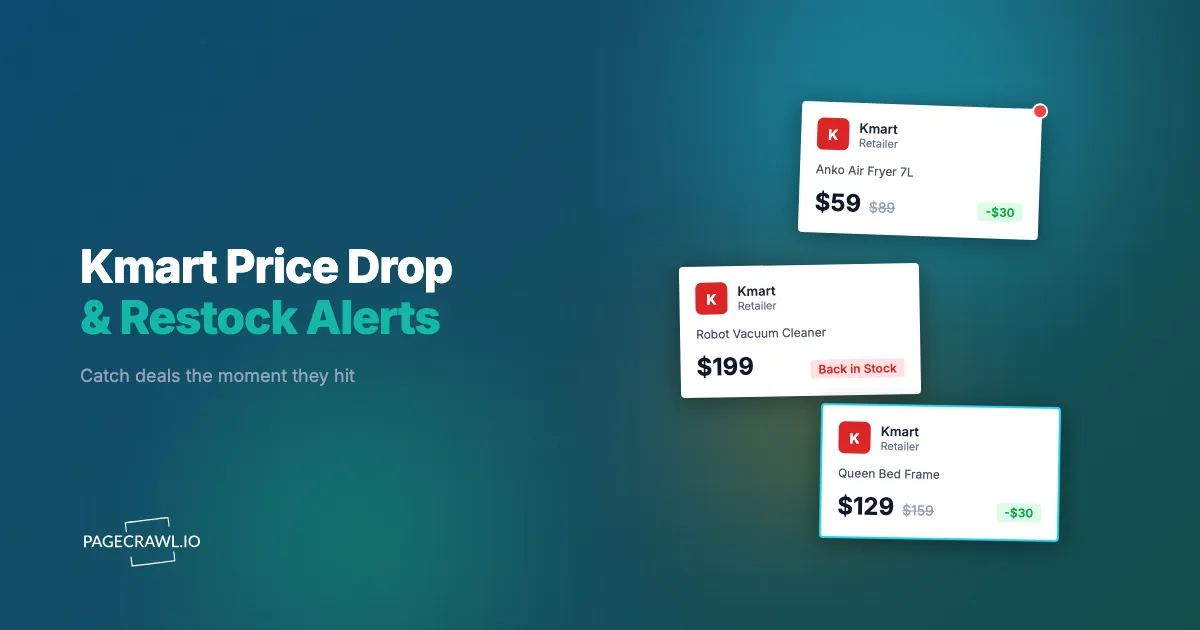
The Kmart velvet bar cart went back online at 7:02am, sold out by 7:40am, and your screenshot of the "Out of stock online" banner is timestamped 8:15am. A Facebook group post told you it was "back this morning" but by the time you opened the app and searched the product code, every nearby store showed unavailable and the online add-to-cart button was greyed out again. This was the second restock you missed in three weeks for a $39 item.
Kmart Australia has quietly become one of the hardest retailers to buy from at the exact moment you want something. Anko homewares go viral on TikTok and in "Kmart hacks" groups overnight, then sell through faster than the supply chain can react. Seasonal ranges (Christmas decor, back-to-school, summer outdoor) arrive in waves and disappear permanently when the season turns. Price drops to clearance happen without warning and the discounted units vanish in hours. The same dynamics apply across Kmart Australia online and the remaining Kmart US catalogue.
This guide covers why Kmart sells out so fast, which products and pages are worth monitoring, where restocks and markdowns actually happen, and how to set up automated alerts that reach your phone as soon as a check finds an item back in stock or marked down.
Why does Kmart sell out so fast?
Kmart sells out fast because viral social demand collides with deliberately lean, low-margin inventory. A single TikTok or "Kmart hacks" post can send tens of thousands of shoppers to one product code in a day, while Anko ranges are produced in finite runs and seasonal stock is never deeply replenished. Demand spikes far faster than restocks arrive.
Viral social demand
Kmart's Anko range is a social media engine. A heated throw, an air fryer, a pie maker, or a $15 homewares piece can trend across TikTok, Instagram, and dedicated Facebook groups within a single evening. Once an item is featured, demand for that exact product code spikes far beyond forecasts, and because the retailer cannot reprint stock overnight, the viral item sells out and shoppers are left refreshing the page. It is the same restock pressure you see with viral collectibles like Labubu blind boxes, where social attention, not the calendar, drives the sellout.
Limited Anko production runs
Many Anko products are made for a defined run and not repeated in the same colour or design. A specific shade of bedding, a seasonal kitchen gadget, or a decorator piece might be produced once and never returned to the range, so when it sells out it may genuinely be gone for good. Other lines do restock, but you cannot tell from the product page which category an item falls into. That uncertainty is what makes monitoring valuable: you need to hear about a restock on the check that finds it, because you cannot assume there will be another chance.
Seasonal ranges arrive in waves
Kmart refreshes large parts of its catalogue seasonally: Christmas decor, back-to-school, summer cooling, winter warmth. These ranges land in waves rather than all at once, and the most popular pieces sell out between waves. When a season ends, leftover stock clears out and is not replenished, so monitoring catches both the new-wave arrivals and the final clearance restocks before a seasonal line disappears.
Thin online stock and unannounced price drops
Kmart's online inventory for a hot item is often a fraction of total stock, with the rest spread across hundreds of physical stores. An item can read "Out of stock online" while sitting on shelves somewhere, because online and per-store availability move independently. On top of that, Kmart moves products to clearance without notice: a $25 homewares piece can drop to $10 as a range is cleared, and the discounted units sell through far faster than at full price. There is no public "sale starts Friday" calendar for most markdowns, so the only way to catch them is to watch the price on the pages you care about, the same logic that applies to setting price-drop alerts on Amazon for a comparison product.
What should you monitor on Kmart?
Monitor four things on Kmart: the specific product pages for items you want (for restocks and price drops), the new-arrivals and category pages for a range (to catch fresh stock), the clearance and specials pages (for markdowns), and where relevant the per-store "find in store" availability. Each answers a different question.
Individual product pages
The most targeted approach watches the exact product page for the item you want, identified by its product code in the URL. When the item restocks, the page content changes from an out-of-stock state to an in-stock, add-to-cart-enabled state, which triggers an alert; that flip is what restock alerts and stock availability monitoring exist to catch. The same page also carries the price, so a single monitor can catch both a restock and a price drop on that product. For the full mechanics of availability tracking across any retailer, see the out-of-stock monitoring guide. Kmart uses a distinct URL per product code, so you monitor exactly the variant you want.
New arrivals and category pages
If you want any new piece in a range (new Christmas decor, new air fryer models, new bedding colours) rather than one specific code, monitor the category or new-arrivals page. When a new product or colour is added, the page content changes and you get alerted before most shoppers know it exists. This is how you catch viral items early, before the social media wave hits and clears the shelves.
Clearance and specials pages
Kmart's clearance and "specials" sections are where price drops surface. New markdowns are added regularly and popular items at clearance prices sell out faster than they ever did at full price. Monitor the clearance category page in content mode to detect when new products appear in the markdown list. This is a broad signal ("something new was clearanced") rather than a per-item price alert, and it pairs well with product-level price monitors on the items you most want.
Per-store "find in store" availability
For items you would rather collect than wait for delivery, per-store availability matters more than the online state. Kmart's product pages can show stock for a selected store, so monitoring that page with your store selected detects when a specific location goes from unavailable to available. This catches the case where an item is unbuyable online but sitting on a shelf near you.
Why isn't Kmart's own "notify me" enough?
Kmart's own back-in-stock email is unreliable for time-sensitive items because it is batched, email-only, and tied to broad product availability rather than your exact store or variant. By the time a batched email lands and you reach the page, a viral item in popular sizes or colours can already be sold out again. It also does nothing for price drops or clearance.
Batched, delayed emails
The notify-me email is not sent as soon as an item restocks. These messages go out on the retailer's own schedule, often in batches, so a popular item can sell through again before the email reaches your inbox. For a $39 viral homewares piece with a 40-minute sellout window, even a 20-minute delay means you miss it. Independent monitoring checks the page on your schedule and alerts you directly, removing the batching layer.
Email only, no fast channels
Kmart's notification is email-only. There is no push notification to your phone, no Slack message, no webhook into an automation. Email is the slowest channel for a restock you need to act on within minutes. PageCrawl lets you route alerts to fast channels instead, including web and mobile push notifications and Telegram, so you hear about a restock while you can still check out.
No price-drop or clearance alerts
The back-in-stock system only addresses out-of-stock items coming back. It does nothing when a product you already could buy quietly drops to clearance pricing. To catch markdowns you have to run your own price monitoring and price drop alerts, which Kmart provides no tool for. Independent price monitoring fills that gap and lets you set a rule like "alert me only if the price falls below my target."
No per-store granularity
The basic notification does not reliably distinguish your local store from national availability. You can be told an item is "back" only to find it available at a store on the other side of the city. Monitoring the product page with your specific store selected gives you alerts that actually reflect where you can collect the item.
How do you set up Kmart monitoring with PageCrawl?
Setting up Kmart monitoring takes a few minutes per item: copy the product URL, add it to PageCrawl in the right tracking mode, set a check frequency that matches how fast the item sells out, and route alerts to a fast channel. PageCrawl checks the live page and notifies you as soon as a check sees availability or price change. The free tier covers a focused list at no cost.

Basic restock and price monitoring
Step 1: Open the Kmart product page for the exact item you want and copy the URL. Confirm the URL contains the product code so you are monitoring that specific variant, not a general listing page.
Step 2: Add the URL to PageCrawl and choose price tracking mode. This auto-detects the product price and tracks availability at the same time, so one monitor covers both a restock and a price drop.
Step 3: Set your check frequency. For viral or trending items (anything featured in Kmart hacks groups, popular Anko kitchen gadgets, seasonal bestsellers), check every 1-2 hours. For lower-demand items, every 4-6 hours is enough. On the free tier (6 monitors, 220 checks per month), reserve frequent checks for your top item or two.
Step 4: Configure notifications. For time-sensitive restocks, push or Telegram alerts land on your phone as soon as a check detects the change. For shared or team tracking, route alerts into Slack instead. Choose the channel you actually watch during the day.
Step 5: Enable screenshot capture. Kmart pages show availability and price visually, so a screenshot in the alert lets you confirm the item is genuinely buyable before you open the site, which saves the seconds that matter during a fast sellout.
Price-drop-only alerts
If you already own the decision and just want a markdown, add a conditional rule so you are not pinged for every minor change. Add the product URL in price mode, then set a threshold so PageCrawl only alerts when the price falls below your target (for example, "notify me only under $20"). This turns a noisy price field into a single, decisive alert. See conditional price and threshold alerts for the full rule setup, and the help centre article on notification conditions and filters for every condition type available.
Clearance and new-arrivals monitoring
Step 1: Open the clearance, specials, or new-arrivals page for the range you care about (homewares, kitchen, Christmas) and copy the URL.
Step 2: Add it to PageCrawl in fullpage content monitoring mode so any change to the product grid is detected.
Step 3: Set check frequency to every 2-4 hours. New clearance items and fresh arrivals appear throughout the week rather than on a fixed schedule.
Step 4: When an alert fires, PageCrawl shows you exactly what changed on the page so you can spot the newly added or newly discounted product and act before it sells through.
When does Kmart restock and drop prices?
Kmart does not publish a fixed restock or markdown calendar, but patterns exist: online stock for hot items is often replenished in the early morning, new seasonal ranges land in waves through the season, and clearance markdowns appear continuously as ranges are cleared. Because there is no public schedule, automated monitoring is the only reliable way to catch these windows.
Early-morning online restocks
Online inventory for sold-out items is frequently topped up in the early hours, when fulfilment systems process returns, cancellations, and new shipments. An item that was unbuyable at midnight can show available at 6am and be gone again by mid-morning. These windows open while most shoppers are asleep, which is exactly where automated monitoring earns its keep: the alert wakes your phone, not you.
Seasonal waves and rolling clearance
Big seasonal ranges arrive in multiple waves over weeks rather than a single launch, and a trending piece often sells out in the first wave and reappears in later ones. Monitoring the category page through the whole season catches the second and third waves that casual shoppers miss because they assumed the range had sold out for good. Clearance follows the same unscheduled rhythm: products move to markdown as ranges are cleared, on no fixed day, and the limited discounted units can go from "just dropped" to "gone" in a single morning. A clearance-page content monitor plus price monitors on your shortlist is the combination that catches them.
How do you build a complete Kmart monitoring strategy?
Build a Kmart strategy in tiers: a small set of must-have product monitors checked frequently with push alerts, a wider set of nice-to-have items checked less often, and a few discovery monitors on clearance and new-arrivals pages. This keeps your most urgent items fast while still catching deals and new releases across the catalogue without burning your check budget.
Tiered monitoring
Tier 1 (must-have): the specific products you want most. Price mode, checked every 1-2 hours, with push or Telegram alerts. This is where your fastest checks go.
Tier 2 (nice-to-have): items you would buy at the right price or when convenient. Checked every 4-6 hours, alerts to your standard channel.
Tier 3 (discovery): clearance, specials, and new-arrivals category pages. Content mode, every 4-6 hours, to surface fresh markdowns and new viral items early.
Group these in a PageCrawl folder named "Kmart" so the whole list is easy to review, prune, and re-prioritise as ranges change.
Combine price and availability
For an item that is in stock but at full price, monitor both its availability and its price, so you are covered whether it sells out and returns or drops to clearance. This pairs naturally with cross-retailer tracking: if you are also watching a similar product elsewhere, an IKEA back-in-stock alert on the comparable item tells you whether Kmart is genuinely the better buy.
Filter out the noise
Kmart product pages carry elements that change constantly without reflecting real stock or price moves: "recently viewed" carousels, recommendation rows, and rotating promotional banners. PageCrawl lets you click any detected change and ignore it in future checks, so after a couple of cycles you only get alerts for genuine availability and price changes. For a deeper walkthrough, see how to reduce monitoring false positives and the help centre's complete guide to reducing false positive notifications.
What problems come up when monitoring Kmart?
The common issues are dynamic page content, online-versus-in-store stock divergence, regional differences between Kmart Australia and Kmart US, and occasional page redesigns. None of these block monitoring; each is cleanly handled in PageCrawl, mostly around choosing the right page, the right tracking mode, and ignoring known noise.
Dynamic content and lazy loading
Kmart product details, price, and availability often load after the initial page render. PageCrawl renders pages with a full browser, so dynamically loaded content appears before the page state is captured. Stock indicators and price values are read after they have loaded, not from an empty initial shell.
Online versus in-store divergence
Because online stock and per-store stock move independently, a single monitor on the default online state will not tell you about your local store. If collection matters, add a second monitor on the same product page with your store selected to track per-location availability separately.
Australia versus US differences
Kmart Australia (Anko homewares, OnePass) and the much smaller Kmart US catalogue are different sites with different product codes, pricing, and stock. Always monitor the specific regional URL for the storefront you actually buy from, and do not assume an Australian product code maps to anything in the US range or vice versa.
Page redesigns
Kmart periodically updates its site layout, which can change how stock and price indicators appear. PageCrawl's content analysis adapts to most layout changes automatically, and if a major redesign ever breaks detection, recreating that monitor on the updated page resolves it in a minute.
Can you compare a Kmart product's price against other retailers in one view?
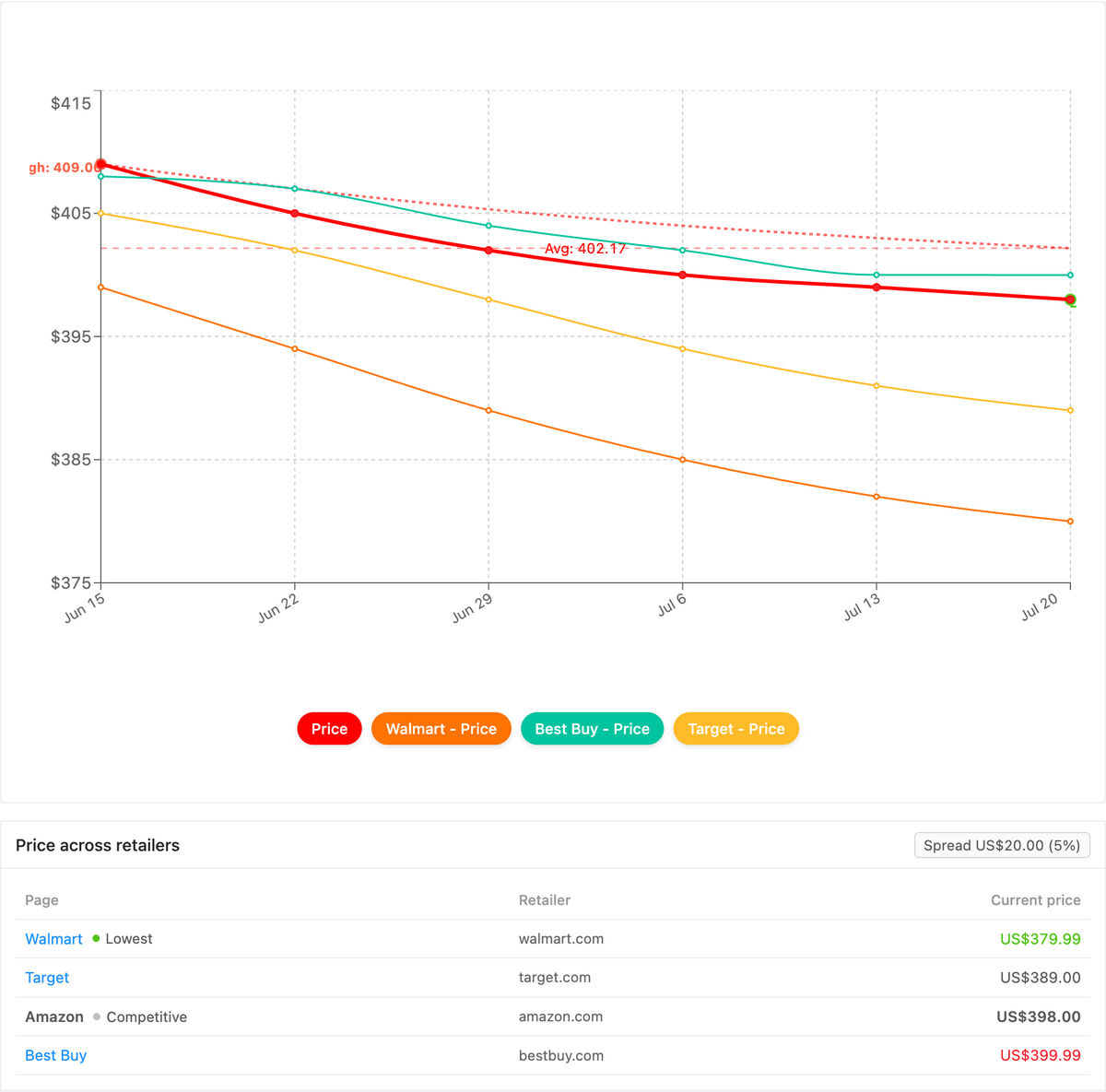
Yes. PageCrawl's Product Comparison capability groups the monitors for one product across every retailer into a single view, highlights the cheapest advertised price, and tracks the spread between the lowest and highest seller. When a viral Anko piece or an air fryer is stocked in more than one place, you see at a glance which storefront is actually the better buy instead of tabbing between pages.
Once your Kmart product monitors are running alongside the comparable listings elsewhere (Amazon, IKEA, or another marketplace carrying the same or a near-identical item), Product Comparison stitches the ones that share a product (by GTIN, UPC, SKU, brand, or your own reference tag) into one grouped comparison. The lowest advertised price is flagged and the gap between cheapest and most expensive is a live figure, so a Kmart clearance drop that undercuts every other seller becomes obvious. Set a comparison-aware alert (cheapest, most-expensive, or a spread threshold) and it surfaces on the next check, routed to email, Slack, or a webhook, and you can export the whole grid as a spreadsheet. The full walkthrough lives in the cross-retailer price comparison guide, and Product Comparison is a custom capability we enable on request.
Choosing your PageCrawl plan
PageCrawl's Free plan lets you monitor 6 pages with 220 checks per month, which is enough to validate the approach on your most critical pages. Most teams graduate to a paid plan once they see the value.
| Plan | Price | Pages | Checks / month | Frequency |
|---|---|---|---|---|
| Free | $0 | 6 | 220 | every 60 min |
| Standard | $8/mo or $80/yr | 100 | 15,000 | every 15 min |
| Enterprise | $30/mo or $300/yr | 500 | 100,000 | every 5 min |
| Ultimate | $99/mo or $999/yr | 1,000 | 100,000 | every 2 min |
Annual billing saves two months across every paid tier. Enterprise and Ultimate scale up to 100x if you need thousands of pages or multi-team access.
Kmart items are inexpensive, but the viral ones do not wait for you to check the site between meetings, and a missed restock often means waiting weeks for the next wave. The Free tier covers a tight shortlist of must-have product codes. Standard at $80/year covers 100 pages with 15-minute checks, enough for a full wishlist alongside clearance, specials, and new-arrivals trackers, and catching one early-morning restock or clearance drop pays for the year. Enterprise at $300/year handles 500 pages with five-minute checks for resellers and deal hunters tracking broad Kmart and cross-retailer catalogues.
Getting Started
Pick the one Kmart item you want most right now. Open its product page, copy the URL, and add it to PageCrawl in price mode so you catch both a restock and a price drop with a single monitor. Turn on push or Telegram notifications so the alert reaches your phone as soon as a check detects the change, and enable screenshots so you can confirm availability at a glance.
Run that monitor for a week. For a trending item you will almost certainly see at least one restock or price move, and watching it happen makes the case better than any guide can: manual checking misses the early-morning window, automated monitoring does not. Then expand. Add your full shortlist, point a content monitor at the clearance page for your favourite range, and add a new-arrivals tracker to catch the next viral piece before the social media wave does.
Stop refreshing the Kmart page at 7am. Let the alerts come to you.