Important website changes don't wait for you to check your inbox. A price drop, a restocked item, a new crypto exchange listing, or a critical policy update can happen at any moment. If you're not actively monitoring, you might miss it.
Desktop browser notifications put an alert on your computer when a scheduled check detects a relevant change. They use the standard Push API, require notification permission, and can arrive with the PageCrawl tab closed when the browser and operating system allow delivery.
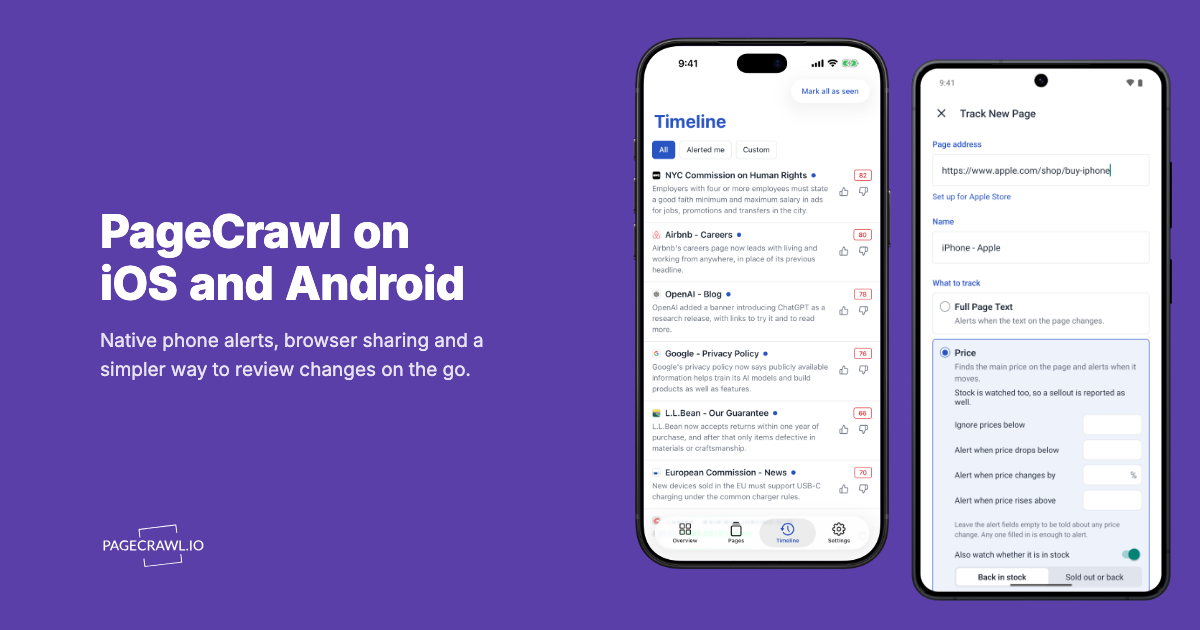
For your phone, use the PageCrawl app for iPhone, iPad, and Android. It combines phone alerts with your monitored pages, summaries, text differences, and change history. Existing mobile browser notifications remain an optional fallback, but the native app is the recommended phone experience.
How do push notifications compare to other alert channels?
App alerts and desktop browser notifications need device permission, while connected channels need their own integration setup. Choose the destination where you want to review or discuss a change. All channels follow the monitor's check schedule and notification rules; a different channel does not make PageCrawl detect the change sooner.
| Channel | Pros | Cons |
|---|---|---|
| PageCrawl app | Phone alerts with change summaries and history in the app | Requires app installation, sign-in, and notification permission |
| Desktop Web Push | Alerts on the computer where you work | Requires a supported browser and notification permission |
| Universal, searchable archive | Delays, spam folders, inbox overload | |
| Slack | Great for teams, threaded discussions | Requires Slack workspace, setup overhead |
| Discord | Good for communities, rich formatting | Requires Discord server, app needed |
| Teams | Enterprise-ready, integrates with Office | Corporate environments only, complex setup |
| Telegram | Fast, works on all devices | Requires Telegram app, bot setup |
For browser alerts, click Turn on alerts on this computer in web notification settings and allow permission. For phone alerts, open Settings > Alerts in the PageCrawl app and tap Turn on alerts. Both offer a test notification so you can check delivery.
Key Features
AI-Powered Change Summaries - When AI summarization is enabled for a page, notifications include an intelligent summary explaining what changed in plain language, so you can decide at a glance whether to investigate further.

Priority Indicators - Important changes are highlighted with priority scores, helping you distinguish significant updates from routine changes.
Multi-Device Support - Use browser notifications on your computers and native app notifications on your phone or tablet. Enable each device separately.
Device Management - View every device you have turned on under Your devices in Settings → Notifications. Remove devices you no longer use, and when AI summaries are on, give each device its own Min Priority so a phone only receives the changes rated as important.
Test delivery - Use Send a test alert in web notification settings or Send a test notification in the native app's Settings > Alerts before relying on that device for important changes.
Choosing your PageCrawl plan
PageCrawl's Free plan lets you monitor 6 pages with 220 checks per month, which is enough to validate the approach on your most critical pages. Most teams graduate to a paid plan once they see the value.
| Plan | Price | Pages | Checks / month | Frequency |
|---|---|---|---|---|
| Free | $0 | 6 | 220 | every 60 min |
| Standard | $8/mo or $80/yr | 100 | 15,000 | every 15 min |
| Enterprise | $30/mo or $300/yr | 500 | 100,000 | every 5 min |
| Ultimate | $99/mo or $999/yr | 1,000 | 100,000 | every 2 min |
Annual billing saves two months across every paid tier. Enterprise and Ultimate scale up to 100x if you need thousands of pages or multi-team access.
Push notifications close the gap between detection and action, and that gap is where value is lost. Standard at $80/year gives you 100 monitored pages with 15-minute check frequency. For personal monitoring, that covers every price drop, restock, betting line move, or time-sensitive deal you care about, with fast push alerts to every device you own. For developers using PageCrawl to track third-party APIs, changelogs and release notes, and status pages, push notifications mean a breaking change or a broken analytics tag surfaces within minutes rather than hours. Enterprise at $300/year adds 500 pages, 5-minute checks, SSO, and multi-team access. All plans include the PageCrawl MCP Server, which lets you ask Claude what changed across all your monitors this week and get a summary without opening a single alert email. AI assistants can create monitors through conversation on every plan, including Free.
How do you turn on desktop browser notifications?
Open notification settings in the web app, click Turn on alerts on this computer, and allow the browser to show notifications. Repeat this on each computer where you want alerts. The PageCrawl tab can be closed afterward, but the browser and operating system still need to permit notification delivery.
- Navigate to Settings → Notifications
- In the Phone and desktop alerts card, click Turn on alerts on this computer
- Choose Allow when your browser asks whether pagecrawl.io may show notifications
Click Send a test alert to confirm delivery. The help centre guide to phone and desktop alerts covers device management and what to do if permission was previously denied.
Supported Browsers
Browser push uses the W3C Push API. PageCrawl supports desktop notifications in compatible versions of Chrome, Firefox, Edge, and Safari. Available notification behavior depends on the browser, operating system, and device settings.
How do you get alerts on iPhone and Android?
Install the native PageCrawl app, sign in, then open Settings > Alerts and tap Turn on alerts. Allow notifications and use Send a test notification to confirm that device is ready. The app uses the same workspace and monitoring schedules as the web, so your existing pages are already there.
Get the PageCrawl app, then share a page from your browser to start another monitor. If you previously enabled mobile browser alerts, PageCrawl uses the app for phone alerts in that workspace once app alerts are enabled. Desktop browser notifications continue separately. You can remove an old Home Screen shortcut if you no longer use it.
Which alert channel should you use?
Use push for personal, time-sensitive monitoring, Slack or Teams when a group has to discuss the change, and email when you need a searchable archive. The deciding questions are who acts on the alert and how quickly they need to see it:
App and desktop notifications - Useful for personal monitoring when you want to open the change from an alert. Use the native app on your phone and browser alerts on your computer for price tracking, premium audio sale alerts, or restock alerts.
Slack or Teams - Choose these when you need team collaboration around changes. Threaded discussions make it easy to coordinate responses with colleagues.
Discord - Works well for community monitoring where multiple people share interest in the same changes.
Telegram - Great if you prefer a dedicated app for notifications and want fast mobile alerts without browser dependency.
Email - Best when you need a searchable archive of all changes, compliance documentation, or prefer checking updates in batches.
Combining Channels
Push notifications don't have to be your only channel. Many users combine multiple notification methods:
- Push for urgent alerts - Get fast notifications for high-priority changes
- Email for the archive - Keep a searchable record of all changes
- Slack for team discussions - Share and discuss changes that need group attention
Configure different pages to use different channels, or send the same alert to multiple destinations for redundancy. To keep the push channel reserved for changes that genuinely matter, add per-page notification conditions and filters so keyword or threshold rules decide what gets pushed.
Where should you start?
Start with the device where you will act on a change. Install the native PageCrawl app for phone alerts or turn on browser notifications on your computer. Send a test, choose the pages and priority you want to hear about, and review the monitor's schedule and notification conditions before relying on it.
Get the PageCrawl mobile app or follow the phone and desktop alerts setup guide.