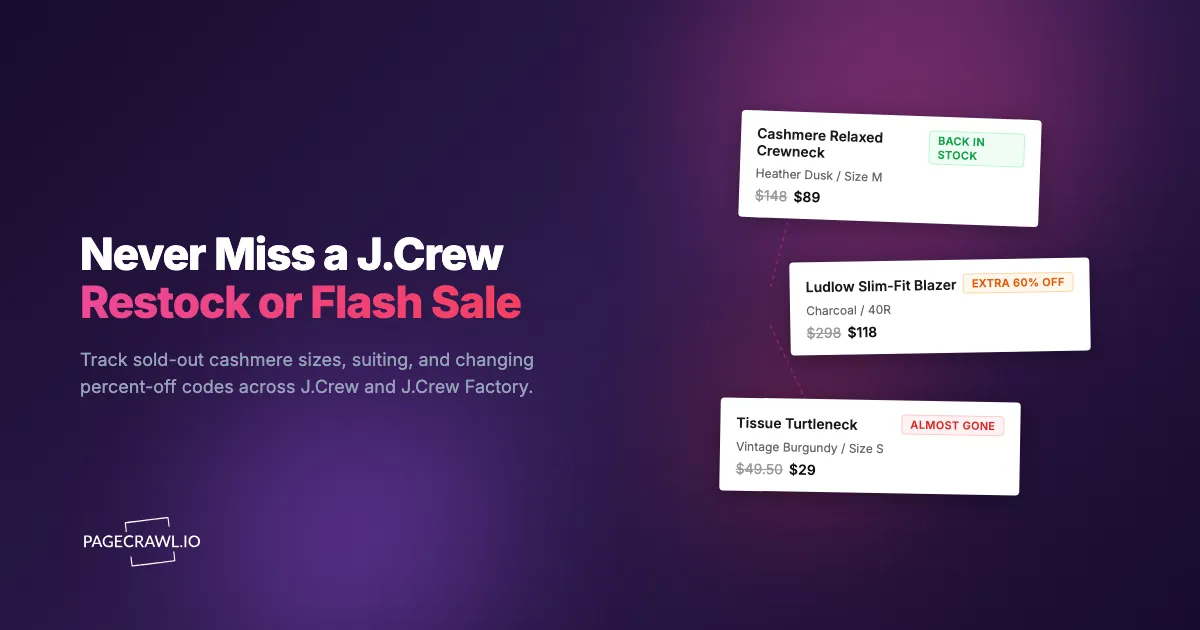
The Cashmere Relaxed Crewneck in Heather Dusk dropped to $89 in Saturday's flash sale. You saw it Saturday morning, told yourself you would decide after lunch, and reopened the tab at 7pm. Size Medium now read "Sold Out." The promo banner had already rolled over to a different code, and the extra-50%-off sale had quietly become extra 40% off. You tapped "Email me when available," again, and waited for a notification that historically never arrives in time. That was the third sale you watched slip past in a single month.
J.Crew runs two storefronts that behave differently. The main site sells seasonal collections, cashmere, and Ludlow suiting at full price with frequent percent-off promotions on top. J.Crew Factory runs a near-constant sitewide sale where the discount moves daily, and the best deals appear when an extra clearance percentage stacks on already-reduced prices. Both share the same problem: limited color runs, deep demand for mid-range sizes, and fast-moving promo codes mean the thing you want is frequently gone, or full price, by the time you look.
This guide covers why J.Crew and J.Crew Factory sell out and re-price so fast, which pages are worth watching, the limits of J.Crew's own restock emails, and how to set up automated alerts that fire as soon as a check detects your size coming back or the sale percentage jumping.
Why does J.Crew sell out and re-price so fast?
J.Crew combines genuine inventory scarcity with a promotional calendar that changes by the day. Limited cashmere color runs and popular suiting sizes sell through quickly, while flash sales and stacking Factory clearance codes change the price on a given item several times a week. Both forces reward fast notification.
Limited cashmere color runs
J.Crew's cashmere program releases a fresh palette every season, and many of the most flattering shades are produced once and never repeated. When a popular color sells through in the high-demand sizes, it often does not return at all. You cannot assume Heather Camel comes back in Medium, so you need to hear about it as soon as a check picks the restock up.
Constant flash sales and changing promo codes
J.Crew almost always has a promotion running, but the terms move constantly. "Extra 50% off sale styles with code" becomes "extra 60% off" for a weekend, then drops back to 40%, then switches to a sitewide code entirely. The item you want does not change, but its effective price does, which is why watching the banner pays off.
Core staples with persistent demand
Certain J.Crew pieces are always in demand regardless of season:
- Cashmere crewneck and v-neck sweaters: The signature category. Popular neutrals sell out in Small through Large within hours of a sale price.
- Ludlow and Thompson suiting: Blazers and trousers in standard sizes (38R-42R, 32-34 waist) move fastest, and slim-fit separates restock unpredictably.
- Tissue turtlenecks and Perfect-Fit tees: Wardrobe basics bought in multiples, so popular colors deplete quickly.
- Cashmere accessories (scarves, beanies, gloves): Holiday-gift demand makes popular colors hard to find from November on.
These staples restock more often than one-off seasonal pieces, but the most-wanted sizes in the most-wanted colors still disappear fast.
Size distribution challenges
J.Crew inventory follows a bell curve. Women's Small through Large and men's medium sizes (Medium tops, 38R-42R jackets, 32-34 waist) carry the most demand and sell out first, while Petite and Tall lines receive thinner stock and restock less predictably. If your size sits in the high-demand middle, you compete with the largest group of buyers for a relatively small allocation, which makes size-specific monitoring essential.
What should you monitor on J.Crew and J.Crew Factory?
The most effective J.Crew strategy combines targeted product-page monitors for the exact size and color you want with broader page monitors for the sale section, the promo banner, and Factory clearance. Targeted monitors catch restocks in your size; page-level monitors catch new markdowns and deeper discounts before they sell through.
Individual product pages by size and color
The most precise approach watches the specific product page for the item, color, and size you want. When your size comes back, the page content changes from unavailable to available and triggers an alert, which is exactly what stock availability monitoring and restock alerts are built for. J.Crew pages show sizes as selectable buttons, and a sold-out size that becomes selectable again is exactly the kind of content change monitoring detects reliably.
J.Crew uses distinct URLs for each color, so you can watch exactly the variant you want rather than the generic style page. For a full overview of availability tracking that applies to any retailer, see our out-of-stock monitoring guide.
The Sale and Final Sale pages
J.Crew's Sale section is where full-price items go when they are marked down, with new products added throughout the week, and the Final Sale subsection holds the deepest, non-returnable markdowns. Both are worth watching, since popular items at sale prices sell out faster than at full price and frequently reappear as returns are processed. Monitor the Sale page for your category (women's sweaters, men's suiting, accessories) using content tracking for a broad "something new appeared" alert.
The promo banner and the percent-off code
The single highest-leverage J.Crew monitor is the promotional banner itself. Because the extra-off percentage and the code change every few days, watching the homepage banner or sale-landing header tells you on the next check that a deal has improved. You can even set a rule so you are only alerted when the discount crosses a threshold, for example when "extra off" reaches 50% or higher. Our guide to conditional price and keyword alerts walks through building exactly that trigger so you ignore weak 30%-off weeks and pounce on the deep ones.
J.Crew Factory clearance
J.Crew Factory deserves its own monitors because its pricing logic differs. Factory runs a near-permanent sitewide sale, and the genuine deals appear when an additional clearance percentage stacks on top. Watch the Factory clearance landing page and its promo banner so you catch the days the extra discount deepens. Sizes in popular fits sell out as fast as the main store, so pair the banner monitor with product-page monitors for the specific items on your list.
Does J.Crew's own "Email when available" actually work?
J.Crew offers an "Email me when available" option on sold-out items and sends promotional emails about sales, but both fall short for time-sensitive shopping. The restock emails arrive late and often ignore your size, and the sale emails do not tell you when an extra discount deepens mid-week. As a primary strategy, neither is reliable.
Delayed notifications
The "Email me when available" message is not sent as soon as an item restocks. These messages are batched and go out on J.Crew's own schedule, so by the time you receive the email, open it, and reach checkout, a popular size may already be gone again. Even a 30-minute delay can mean missing the window entirely.
No size specification
The basic notification often does not distinguish between sizes. You may get an alert that an item is back, rush to the page, and find only the smallest and largest sizes available while your Medium never actually restocked. You received the email anyway, which trains you to ignore the alerts.
Email only, on J.Crew's terms
J.Crew's restock notification is email only, with no push to your phone, no Slack message for a household or styling team, and no webhook into an automation. Email is the slowest channel for something that sells out in minutes, and it never tells you when extra 40% off becomes extra 60% off. With your own monitoring you can route alerts to faster channels, including browser push notifications that reach your lock screen, or Telegram for quick delivery.
How do you set up J.Crew monitoring with PageCrawl?
PageCrawl works around these limits by watching the actual web pages and alerting you through the channel you choose as soon as a check detects a change. You can start on the free tier, which includes 6 monitors and 220 checks per month, enough for a focused J.Crew wishlist.

Basic restock monitoring setup
Step 1: Open the J.Crew product page for the exact item and color you want and copy the URL. Make sure you are on the specific color variant, not the generic style page that shows every color, so the monitor tracks the right inventory.
Step 2: Add the URL to PageCrawl. For a sold-out item where you care about availability, use availability tracking mode, which identifies the stock-status indicators for each size. The help centre lists every option in available tracked element types if you would rather watch the price number or a specific size button instead.
Step 3: Set your check frequency. For high-demand pieces (popular cashmere colors, standard suiting sizes, Final Sale steals), check every 1 to 2 hours, since restocks land any time and sell through fast. For less competitive items, every 4 to 6 hours is plenty.
Step 4: Configure notifications. Push channels deliver the fastest alerts, and you can also route changes to a shared channel for a household or styling team using website change alerts in Slack. Choose whichever channel you actually check within minutes.
Step 5: Enable screenshot capture. J.Crew pages show size availability visually, and a screenshot lets you confirm which sizes are genuinely back as soon as the alert lands, without opening the site first.
Monitoring multiple sizes across multiple products
Most J.Crew shoppers want several pieces in one specific size. A realistic wishlist might look like:
- Cashmere Relaxed Crewneck in Heather Dusk, size Medium
- Ludlow Slim-Fit blazer in charcoal, size 40R
- Tissue Turtleneck in Vintage Burgundy, size Small
Each piece needs its own monitor at the specific color-and-size URL. Group them in a PageCrawl folder named "J.Crew Wishlist" so you can review and adjust them as the seasons change. For a focused list of four to six pieces, the free tier (6 monitors) covers you completely; larger wishlists, or watching the Sale page and promo banner too, fit comfortably on Standard.
Monitoring when the sale percentage changes
The promo banner is its own monitor and arguably the most valuable one. Open the J.Crew homepage or the Sale landing page where the current "extra off" percentage and code are displayed, copy the URL, and add it to PageCrawl using content tracking so any change to the banner text is detected. Optionally add a condition so you are only alerted when the discount crosses your threshold, for example only when "extra off" reaches 50% or more, which keeps the weak promo weeks quiet; the help centre article on notification conditions and filters covers the keyword and threshold rules that make this work. When the alert fires, PageCrawl shows you exactly what changed in the banner, so you can shop before the most popular sizes sell out at the new price.
Tracking new cashmere and seasonal drops
To catch new colors soon after they appear, monitor the category page you care about (women's cashmere sweaters, or the New Arrivals section) with content tracking, set to check every 2 to 4 hours. When J.Crew adds a new color or style, the page content changes and you get an alert. Seasonal launches often appear in the morning, but unannounced additions land throughout the week, so this catches fresh colors before most shoppers know they exist.
When does J.Crew restock and run its biggest sales?
J.Crew follows semi-predictable rhythms. Flash sales refresh at the start and middle of the week, and sold-out items frequently reappear in the early morning as returns are processed. Knowing these patterns helps you set monitor frequency where it pays off.
Flash sale cadence
J.Crew refreshes its promotions frequently, often early in the week and again before the weekend, and the deepest "extra off" stretches cluster around holidays and end-of-month clearance pushes, which is where price monitoring and price drop alerts earn their keep. Keep your banner monitor checking every 2 to 4 hours so you catch the percentage jumping the day it changes, not the day after.
Early morning restocks
Sold-out items often reappear in the early morning hours as overnight returns and warehouse inventory are processed. A size that read "Sold Out" at midnight may quietly show available at 6am and be gone again by mid-morning. Automated monitoring catches the windows that open while you are asleep, exactly when manual checking fails.
End of season final markdowns
When J.Crew transitions between seasons, outgoing items move into deeper Final Sale pricing and see their last restocks as returns settle. These are the lowest prices the items will reach, but stock is thin and non-returnable, so fast notification is the difference between catching your size and reading "Sold Out."
How do you build a complete J.Crew strategy?
A complete approach layers targeted product monitors, sale-page monitors, and a promo-banner monitor, then organizes them by priority. Put your must-have item, color, and size combinations in Tier 1 (checked every 1 to 2 hours with push notifications), nice-to-haves in Tier 2 (every 4 to 6 hours), and discovery pages like the Sale section, promo banner, and Factory clearance in Tier 3 (every 2 to 4 hours). This catches opportunities across both storefronts without burying you in alerts.
Combining price and availability
Some J.Crew pieces are in stock in your size but at full price, and you would rather wait for a sale, the same waiting game behind premium cookware sale alerts on brands that rarely discount. Watch both the product page (for your size) and the promo banner (for when the discount deepens) so you buy at the price you want. The same logic applies anywhere you shop, including tracking a J.Crew piece resold on Amazon when the original sells out, or catching wine allocations and flash sales on the check that spots the drop.
Factory versus main store
Treat J.Crew and J.Crew Factory as separate monitoring projects. Main-store monitors lean on availability tracking and seasonal color drops, while Factory monitors lean on the stacking clearance percentage. For broader fashion coverage, our guides to Zara and H&M restock and sale alerts, ASOS back-in-stock and sale alerts, Uniqlo restock alerts, and the Aritzia, Free People, and Anthropologie sale tracker use the same patterns, so you can run one wishlist across every brand you shop.
What are the common challenges with J.Crew monitoring?
A few quirks of J.Crew's site and pricing can trip up naive monitoring, but each has a straightforward solution. The main issues are dynamically loaded availability, reused color names, final-sale rules, and promotional noise that is not a real change.
Dynamic page content
J.Crew product pages load size availability and pricing after the initial render. PageCrawl renders pages the way your browser does, so size buttons, stock labels, and sale prices are fully present before the page state is captured.
Color name reuse across seasons
J.Crew reuses and lightly renames colors season to season, so "Heather Camel" one year may be a slightly different tone the next. Always monitor by the product URL rather than by color name, since the URL uniquely identifies the exact variant and removes any ambiguity about the shade.
Final Sale is non-returnable
Items in Final Sale cannot be returned, which raises the stakes on getting the size right. When you receive a restock alert on a Final Sale piece, the screenshot capture lets you confirm exact size availability before you commit, instead of guessing from a stale page.
Promotional noise that is not a real change
J.Crew pages include rotating marketing banners, "recently viewed" carousels, and countdown timers that change constantly without reflecting any change to your item. PageCrawl's noise filtering lets you click any detected change and ignore it in future checks, so after a couple of cycles you only get alerts for genuine availability or price changes.
Choosing your PageCrawl plan
PageCrawl's Free plan lets you monitor 6 pages with 220 checks per month, which is enough to validate the approach on your most-wanted J.Crew pieces. Most shoppers graduate to a paid plan once they catch their first sale at the deeper discount.
| Plan | Price | Pages | Checks / month | Frequency |
|---|---|---|---|---|
| Free | $0 | 6 | 220 | every 60 min |
| Standard | $8/mo or $80/yr | 100 | 15,000 | every 15 min |
| Enterprise | $30/mo or $300/yr | 500 | 100,000 | every 5 min |
| Ultimate | $99/mo or $999/yr | 1,000 | 100,000 | every 2 min |
Annual billing saves two months across every paid tier. Enterprise and Ultimate scale up to 100x if you need thousands of pages or multi-team access.
J.Crew cashmere typically runs in the low hundreds at full price and can land well under $100 in a deep flash sale, so a single well-timed alert pays for a year of monitoring. Standard at $80/year covers 100 pages, enough for a full wishlist plus the Sale page, the promo banner, and a Factory clearance monitor at the 15-minute frequency that matters during a fast-moving sale. Enterprise at $300/year handles 500 pages, practical for personal shoppers or resellers tracking broad catalogs across both J.Crew and J.Crew Factory.
Getting Started
Pick the one J.Crew piece you want most right now. Find the product page for your exact color and size, copy the URL, and set up an availability monitor in PageCrawl. Add a second monitor on the promo banner so you also hear on the next check when the extra discount deepens, and route both to a push channel you actually check.
Run it for a week. You will almost certainly see at least one restock or one deeper sale, even on a popular piece, and watching the pattern firsthand shows exactly why automated monitoring beats refreshing the tab. Then expand: add your full wishlist, a Sale-page monitor for your category, and a Factory clearance tracker.
Stop refreshing the J.Crew sale page. Let the alerts come to you.