The allocation email for the 2021 Pinot you have chased for two years landed in your inbox at 9:02am on a Wednesday. You saw it at 11:40am after a meeting. The "Add to Cart" button was already grey, and the page read "Allocation Fully Subscribed." Six bottles, gone in under three hours, while you were on a call.
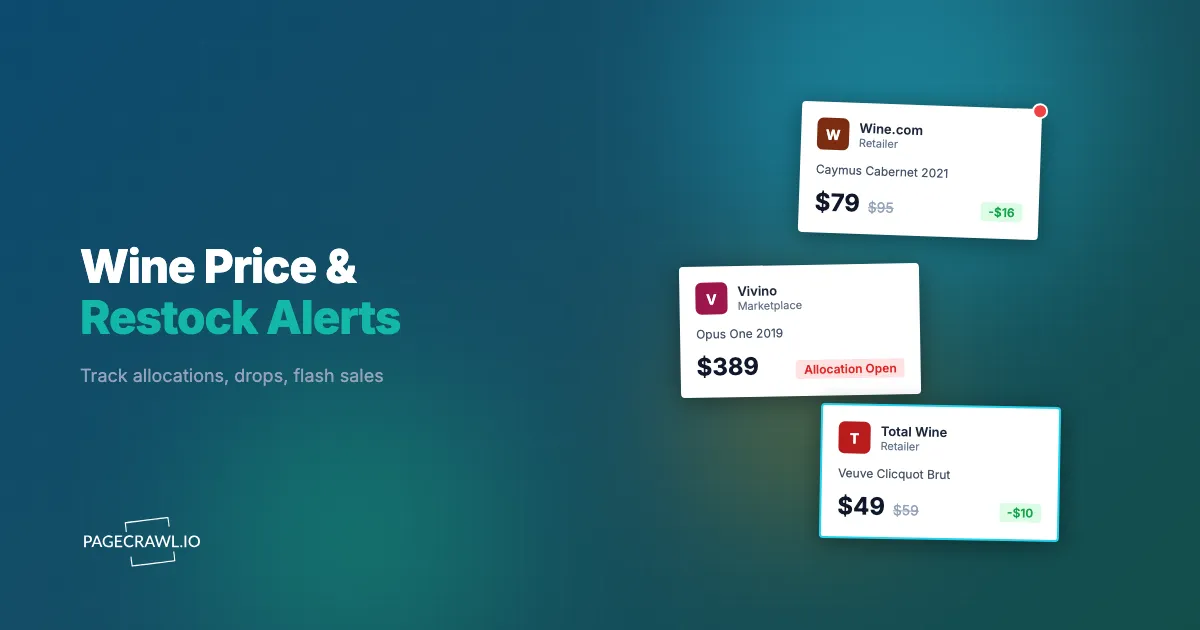
Wine has quietly become one of the hardest categories to buy at the price you want. Cult wineries run allocation lists where demand far outstrips the cases available. Retailers like Wine.com, Total Wine, and K&L Wine Merchants run flash sales that live for hours, not days. A single highly rated vintage can sell through a store's entire allocation in a morning. And the bottle you watched at $59 last week is suddenly $42 in a midweek clearance push you never saw.
This guide covers why allocated wine and flash sales move so fast, what to monitor at each retailer and winery, where the drops happen, and how to set up automated alerts that reach your phone as soon as a check finds a bottle available or a price cut.
Why does allocated wine and flash-sale wine sell out so fast?
Allocated wine and flash-sale wine sell out fast because supply is deliberately fixed while demand is not. A winery makes a set number of cases, a retailer receives a small slice, and the most sought-after vintages are released in narrow windows. When everyone wants the same 200 cases, the page goes from available to sold out in hours.
Allocation lists cap supply on purpose
Cult and small-production wineries (Napa Cabernet houses, Burgundy importers, top-tier Pinot producers) sell through allocation lists rather than open shelves. You sign up, you wait, and you are offered a fixed quantity during an oversubscribed, first-come release window. Miss it and your allocation rolls to the next person waiting. This is why monitoring matters more here than almost anywhere else: the release is not a sale you can come back to, it is a door that opens and closes.
Limited vintage production never repeats
A 2021 vintage exists once. When a retailer's allocation of a 95-point bottle sells through, that exact wine at that exact price is gone for good. Future vintages may come, but they carry different scores, prices, and demand. The scarcity here is real, not manufactured urgency, which is what makes fast notification so valuable.
Flash sales and restocks are quiet and unpredictable
Wine retailers run aggressive, time-boxed promotions ("Today only," "Last call," midweek clearance, end-of-vintage markdowns) that often appear without an email blast, or the email arrives after the best bottles are claimed. Restocks are quieter still: bottles return when a retailer receives a shipment, processes returns, or releases held inventory, none of it announced. A wine that read "Sold Out" at midnight may show six bottles at 7am and be gone by 10am. Tracking prices across stores is the same problem retailers create everywhere, which is why a cross-retailer price comparison approach pays off so quickly with wine.
What should you monitor to catch wine deals and restocks?
Monitor four things: winery allocation and waitlist pages for release windows, individual product pages for restocks and price drops on specific bottles, flash-sale and clearance sections for time-boxed deals, and search or category pages for new vintages. Each answers a different question, so most serious buyers run all four.
Winery allocation and waitlist pages
The allocation list is the front door to cult wineries. Monitor the winery's allocation signup page and your "current offering" page with fullpage content tracking. When a release window opens, the page content changes (a new offer appears, an "Add to Cart" becomes active, or a "Join the list" turns into "Order now"), and catching that on the first check after it happens is the difference between your full allocation and a polite waitlist note. Waitlists behave the same way: the page updates to show your position, and monitoring tells you as soon as a check sees your status move. Even pages behind a login can be monitored, so the alert tells you the window is open and you complete the order while the offer is live. This allocation-and-waitlist pattern is the same one behind concert ticket presale and drop monitoring, where the window, not the catalog, decides who gets in.
Individual product pages for restocks and price drops
For a specific bottle you want, monitor its exact product URL at the retailer. This is the most targeted approach. When the bottle restocks, the availability indicator flips from out of stock to in stock; when the price falls, the displayed price changes. Price and availability often move together for wine, so track both on the same page with price monitoring and stock alerts, since a bottle in stock at full price today may quietly drop into a clearance band next week. For a full walkthrough of availability tracking that applies to any store, see the out-of-stock monitoring guide.
Flash-sale, clearance, and "today only" sections
Retailers concentrate their best short-term deals in dedicated areas: Wine.com's deal rows, Total Wine's "Best Sellers" and clearance, K&L's "Staff Favorites" and closeout pages. Monitor these section URLs as content changes so you get an alert when new bottles are added, not just when a single product changes. This is a broad "something new appeared" signal that catches deals you did not know to look for.
Search and category pages for new vintages
If you want any new release from a region or producer (new-vintage Barolo, the latest Champagne grower release, fresh allocations of a favorite Pinot house), monitor the relevant search results or category page so you hear about a new bottle before it trends. Pairing a threshold so you only fire on meaningful moves is easy with conditional price and keyword rules.
Where do wine drops, restocks, and flash sales actually happen?
They happen across three channels, and the bottles you want often appear in only one of them.
Large online retailers like Wine.com and Total Wine carry the broadest catalogs and run the most frequent promotions. They are where everyday price drops, restocks, and seasonal flash sales happen. Monitor specific product pages for the bottles you want plus the deal and clearance sections for opportunistic finds.
Specialist and flash merchants like K&L, Last Bottle, Garagiste, and Benchmark run on scarcity, sending one or a few offers at a time where the best bottles sell through fast. These pages change frequently and reward fast notification, since the inventory is genuinely limited and not replenished, the same scarcity that makes Dyson outlet and refurbished restock tracking worth running.
Winery-direct allocation lists carry the most coveted bottles, which never reach open retail. Wineries release them to members in timed windows, so monitor your member offering page and the winery's release calendar. Because these windows are short and oversubscribed, this is where monitoring delivers the most value. The pattern mirrors how collectors track luxury watch allocations and waitlists, where the list, not the shelf, controls who gets the piece.
Why do retailer and winery "notify me" buttons fall short?
Built-in "notify me" buttons fall short because they are slow, channel-limited, and often imprecise. Retailers batch these emails and send them on their own schedule, so by the time the message arrives the bottle may be gone. They rarely cover price drops or flash sales, and they almost never push to your phone.
They are delayed. Most "email me when available" systems queue messages and dispatch in batches rather than firing as soon as stock returns. For a flash sale or a small restock, even a 30-minute delay means the popular bottles are already claimed. They are narrow. A notify-me button answers one question, is this exact bottle back in stock, and tells you nothing when the price falls, a bottle moves to clearance, or a flash sale starts, which are the events that save you the most money. They are email-only. There is no push to your phone, no Slack message for a buying group, no webhook into your automation. For something that can sell out in an hour, browser and phone push alerts are the difference between a confirmed order and a sold-out page.
How do you set up wine monitoring with PageCrawl?
Set up wine monitoring by adding the exact product, allocation, or deal-section URL to PageCrawl, choosing price or availability tracking, setting a check frequency that matches how fast the bottle moves, and routing alerts to a fast channel like Telegram or Discord. Here is the walkthrough.

Step 1: Open the page for the bottle, allocation, or deal section you want to track. For a specific wine, navigate to its product page and copy the exact URL (the one for the precise vintage and bottle size, not a general producer page). For an allocation, use your member offering or release page URL.
Step 2: Add the URL to PageCrawl. For a single bottle, choose price tracking mode, which automatically detects the displayed price and follows availability at the same time. For a deal section, allocation page, or category page, choose fullpage content tracking so any new bottle or status change triggers an alert.
Step 3: Set your check frequency to match the wine. For allocation windows, flash sales, and hot restocks, check every 1 to 2 hours so you catch the open of a window; for slower-moving bottles and price watching, every 4 to 6 hours is plenty. On the free tier you can run hourly checks on your most important pages within the monthly check budget.
Step 4: Configure notifications. Telegram or Discord push alerts land on your phone as soon as a check detects the change, which is what allocation drops and flash sales demand. For a buying group or wine club, route alerts into a channel everyone watches, the same way teams use website change alerts in Slack.
Step 5: Enable screenshot capture. A screenshot in your alert lets you confirm the exact vintage and price before you click through, so you are not racing to a page only to find it is the wrong year.
Step 6: Add a price threshold if you only care about a target, so PageCrawl alerts only when the bottle falls below, say, $45, and a $2 fluctuation does not ping you. This keeps your alerts meaningful and your inbox quiet.
Building a wine wishlist of monitors
Most wine buyers want several specific bottles plus a couple of deal sections. A focused list might look like this:
- 2021 Russian River Pinot Noir, 750ml, at Wine.com (price tracking, target under $55)
- Barolo from a favorite producer at K&L (availability tracking)
- Your cult-Cabernet winery allocation offering page (content tracking)
- Total Wine clearance section for your region (content tracking)
Organize these in a PageCrawl folder named "Wine Wishlist" so they stay grouped and easy to review. A list of six monitors fits the free tier completely, and catching one allocation or one mispriced bottle usually pays for a year of a paid plan many times over.
How do you catch wine flash sales and price drops?
Catch flash sales and price drops by monitoring both the specific bottles you want and the retailer's deal and clearance sections, with price tracking on individual products and content tracking on the section pages. Add a price threshold so you only fire on meaningful drops, and check deal sections every few hours since flash windows often last a single business day. Monitoring the product page with a target threshold plus the retailer's "today only" or clearance section as a content change means you also catch a bottle when it lands in a flash promotion you were not watching for, the same outlet-clearance pattern shoppers track for Coach Outlet bag restocks and flash deals.
Pay special attention to end-of-vintage markdowns. Retailers discount outgoing vintages as new ones arrive, and these are some of the best values in wine, rarely advertised heavily. Monitoring the producer's listings or the store's clearance section catches the markdown the day it posts, before the popular sizes sell through at the new low price, the same size-and-discount watch behind J.Crew sold-out size restock alerts. Filtering out the day-to-day noise so you only see real drops is exactly what false-positive reduction is for.
When do wine drops and restocks usually happen?
Wine drops follow semi-predictable rhythms: winery allocations release in spring and fall windows, retailer flash sales cluster midweek, and restocks often process in the early morning. Knowing these patterns lets you raise your check frequency at the right times instead of monitoring everything at maximum intensity all month.
Most cult wineries release new vintages in two main windows, typically spring (March to May) and fall (September to November), when allocation offers oversubscribe fastest, so raise those monitors to hourly during the seasons. Retailers launch "today only" and clearance pushes midweek (Tuesday through Thursday), with the best bottles often claimed by early afternoon. Restocks lean early: stores process new shipments, returns, and released holds overnight, so a bottle unavailable at midnight may show stock at 6 or 7am and sell out by mid-morning, which is exactly the window automated restock and availability monitoring catches while you are asleep. Expect the deepest discounts and fastest sellouts around Thanksgiving, the December holidays, and year-end inventory clearing.
How do you build a complete wine monitoring strategy?
Build a complete strategy by tiering your monitors by urgency and combining automated alerts with the human intelligence of wine communities. The goal is to spend your check budget on the bottles and windows that move fastest, while still catching deals across the wider catalog.
Tier your monitors so your highest-frequency checks land on the wines that genuinely sell out in hours. Tier 1 (must-have) is specific allocations and bottles you want most: price or content tracking, every 1 to 2 hours, push notifications. Tier 2 (nice-to-have) is bottles you would buy at the right price: price tracking with a threshold, every 4 to 6 hours. Tier 3 (discovery) is deal sections, clearance pages, and category pages for new vintages: content tracking, every 4 to 6 hours.
Treat wine communities as a complement, not a replacement. Subreddits, CellarTracker discussions, and merchant mailing-list groups share sightings, but by the time someone posts about a flash sale the best bottles are often claimed. Automated monitoring gives you the signal first; the community gives you the context.
What makes wine pages tricky to monitor, and how do you handle it?
Wine pages are tricky because of dynamic content, vintage confusion, age-gate overlays, and noisy elements like "recently viewed" rows. PageCrawl handles dynamic loading by rendering pages fully, lets you click any irrelevant change to ignore it, and uses the exact product URL so you always track the precise vintage and bottle size you intend.
Retailers load price and availability after the initial page renders, and PageCrawl renders the page completely before capturing it, so the displayed price, score, and stock status are all present when the check runs. Because the same wine exists as multiple vintages and formats on nearly identical pages, always monitor the exact product URL for the variant you want (searching by name alone risks tracking the wrong year), and enable screenshots for visual confirmation. Wine sites also show age-confirmation overlays and rotate "recommended" rows that change on every load, but PageCrawl's noise filtering lets you click any such change to ignore it going forward, so after a check or two you only hear about real price and availability changes. For a wine club or buying group, route confirmed changes into a shared Slack channel so everyone sees them at once.
Choosing your PageCrawl plan
PageCrawl's Free plan lets you monitor 6 pages with 220 checks per month, which is enough to validate the approach on your most critical pages. Most teams graduate to a paid plan once they see the value.
| Plan | Price | Pages | Checks / month | Frequency |
|---|---|---|---|---|
| Free | $0 | 6 | 220 | every 60 min |
| Standard | $8/mo or $80/yr | 100 | 15,000 | every 15 min |
| Enterprise | $30/mo or $300/yr | 500 | 100,000 | every 5 min |
| Ultimate | $99/mo or $999/yr | 1,000 | 100,000 | every 2 min |
Annual billing saves two months across every paid tier. Enterprise and Ultimate scale up to 100x if you need thousands of pages or multi-team access.
Allocated bottles run $60 to $300 and up, and flash-sale windows do not wait for you to check the site after lunch. Standard at $80/year covers 100 pages, enough for a serious wishlist of specific vintages alongside the deal and clearance sections at every store you buy from, and catching one allocation or one underpriced bottle covers the cost for the year. Enterprise at $300/year handles 500 pages, which suits collectors, wine clubs, or buyers tracking broad catalogs across many merchants and wineries at once.
Getting Started
Pick the one bottle or allocation you want most right now. Find its exact page, copy the URL, and set up a price or content monitor in PageCrawl. Turn on Telegram or Discord notifications so a restock or price drop reaches your phone on the next check, not after the bottle is gone.
Run it for a week and watch how often the price and availability actually move. Even for sought-after wine, you will usually see at least one change worth acting on, and seeing the pattern firsthand is what makes the case for monitoring over manual checking. Then expand: add your full wishlist, point a monitor at your winery's allocation page, and watch a couple of deal sections for flash sales. The free tier's 6 monitors cover a focused start, and Standard at $80/year opens up 100 monitors for a complete strategy.
Stop refreshing the allocation page. Let the bottles come to you.