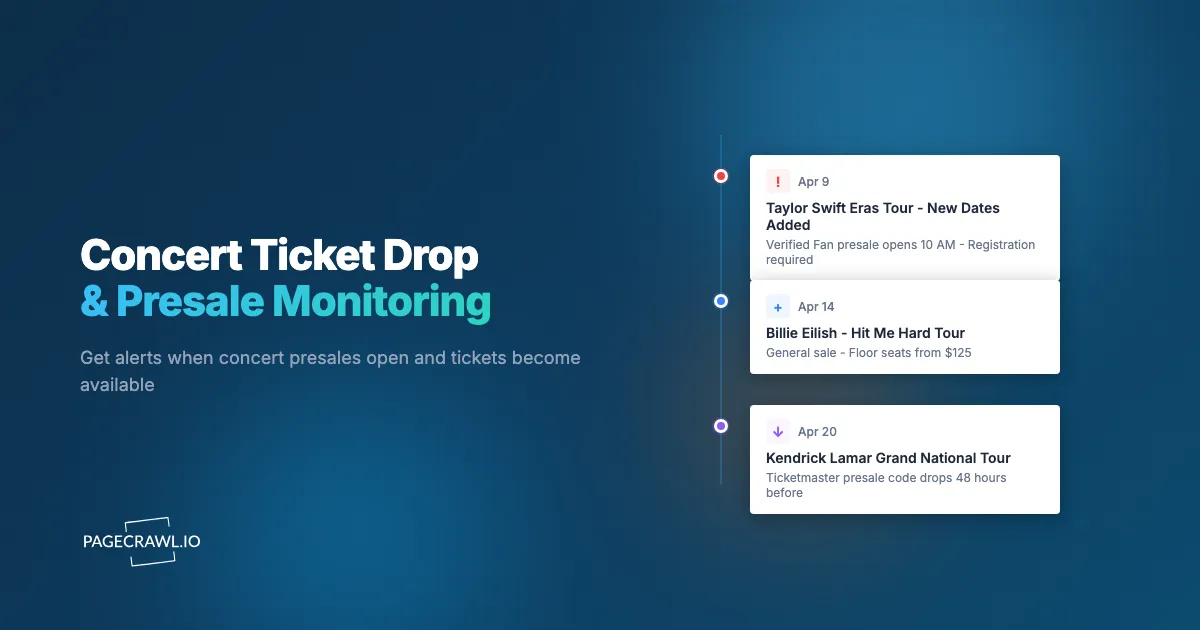
Taylor Swift's Eras Tour presale crashed Ticketmaster. Oasis reunion dates sold out within hours. Beyonce's Renaissance Tour had fans waiting in virtual queues for half a day only to find every seat gone. For high-demand concerts, the window between tickets becoming available and selling out is measured in minutes, not hours.
The problem is not just speed. It is information. Knowing when tickets go on sale, getting presale access codes, and catching the initial listing before dynamic pricing inflates the cost are all advantages that require monitoring. Fans who wait for an email announcement or a social media post are already behind. By the time the average fan hears about an on-sale date, resale prices are often already well above face value.
This guide covers how to set up automated monitoring for concert announcements, presale codes, on-sale dates, and ticket availability across artist websites, venue calendars, and ticketing platforms.
Why does concert ticket monitoring matter?
Concert ticket monitoring matters because high-demand shows sell out within minutes, presale access decides who gets face-value seats, and dynamic pricing punishes anyone who arrives late. Automated alerts on artist, venue, and ticketing pages put you at the front of that information race.
Tickets Sell Out in Seconds
The math is straightforward. A 20,000-seat arena hosting a popular artist might receive 500,000 purchase attempts in the first minute. Only a fraction of those attempts succeed. Verified fan presales, platinum pricing, and bot-prevention queues have made things slightly more orderly, but the fundamental problem remains: demand far exceeds supply for most popular tours.
Being first in line means knowing when the line forms. For most major concerts, the timeline between announcement and on-sale is one to two weeks. Within that window, presale access (typically 24-48 hours before general on-sale) gives you the best shot at face-value tickets with reasonable seat selection.
Presale Access Is the Real Advantage
General on-sale is a lottery. Presale is where fans with the right information get first pick. There are several types of presales:
- Artist/fan club presale: Requires registration on the artist's website or fan club. Codes are distributed via email, but sometimes posted on the artist's site first
- Venue presale: Local venues send codes to their mailing lists. Monitoring the venue website often reveals codes before emails go out
- Credit card presale: Specific to cardholders (Amex, Citi, Chase). These are published on the card issuer's entertainment pages
- Radio/media presale: Local radio stations and media partners receive codes that are often posted on their websites
Each presale type uses a unique code. Monitoring the right sources gives you access to multiple presale windows before general on-sale even begins.
Dynamic Pricing Means Early Is Cheapest
Ticketmaster's "Official Platinum" seats and dynamic pricing algorithms adjust prices based on real-time demand. A floor seat that starts at $150 during presale can be $400 by general on-sale and $600 on resale platforms an hour later. Getting in early, ideally during the first presale window, consistently yields the lowest prices for the best seats.
Tour Announcements Are Scattered
Artists announce tours through different channels. Some use Instagram first. Others update their official website. Some tours leak through venue calendar updates days before the official announcement. A venue accidentally listing a show date before the artist announces it is surprisingly common. Monitoring multiple sources catches these early signals.
What is the concert ticket lifecycle?
Every concert follows a predictable lifecycle from announcement to resale: rumor, official announcement, presale waves, general on-sale, and finally resale or added dates. Understanding each phase helps you know what to monitor and when.
Phase 1: Rumor and Speculation
Before an official announcement, clues appear. Venue calendars might show a "hold" date. Artist websites may update their tour page with a "coming soon" banner. Production companies file permit applications that become public record. This phase can last weeks or months.
What to monitor: Artist website tour pages, local venue calendars, entertainment news sites.
Phase 2: Official Announcement
The artist confirms tour dates, cities, and venues. This is usually a coordinated release across social media, the artist's website, and ticketing platforms. Within hours, presale registration links go live.
What to monitor: Artist website for presale registration links, Ticketmaster artist pages for the event listing, venue event pages.
Phase 3: Presale Period
Starting one to three days before general on-sale, presales open in waves. Artist presale first, then venue presale, then credit card presale, then sponsor presale. Each window typically lasts 24 hours with a unique access code.
What to monitor: Fan club pages for presale codes, venue newsletters and websites for local codes, credit card entertainment portals.
Phase 4: General On-Sale
The main public sale. This is where most tickets are allocated and where demand peaks. Dynamic pricing is most aggressive during this window.
What to monitor: Ticketmaster and venue pages for remaining inventory and price changes.
Phase 5: Resale and Additional Dates
After initial sellout, resale platforms (StubHub, SeatGeek, Vivid Seats) set secondary market prices. Artists sometimes add additional dates at the same venue when initial shows sell out quickly.
What to monitor: Artist tour pages for new date additions, resale platforms for price drops as the event approaches.
What to Monitor for Concert Tickets

Artist Websites and Tour Pages
Most artists maintain a dedicated tour page on their official website. This is often the first place tour dates appear, sometimes hours before the social media announcement. The tour page also hosts presale registration links and fan club access codes.
Setup approach: Monitor the artist's tour page URL. Use content-only mode to track changes to the main content area, filtering out navigation and sidebar noise. Set check frequency to every 6 hours during quiet periods, and increase to every 2 hours once tour rumors start circulating.
What to look for: New city/date additions, presale registration links, fan club code announcements, support act reveals, and VIP package details.
Venue Calendars and Event Pages
Local venues maintain event calendars that sometimes update before official artist announcements, which makes event schedule monitoring for date, lineup, and listing changes one of the earliest signals available. When a venue books a show, the event listing may appear on their calendar before the artist's PR team coordinates the public announcement.
Setup approach: Monitor the venue's "upcoming events" or calendar page. For large venues in your city, keep a permanent monitor running. Use content-only mode to capture new event additions without being triggered by advertising banners or rotating content.
What to look for: New event listings, on-sale dates and times, venue-specific presale codes, seating chart releases, and special event notes (like age restrictions or parking information).
Ticketmaster Artist Pages
Ticketmaster creates an artist page for every performer. When a new tour is announced, the event listings appear on the artist's Ticketmaster page. This page also shows on-sale dates, presale dates, and direct links to purchase.
Setup approach: Monitor the Ticketmaster artist page URL. These pages are relatively stable until new events are added, so false positives are rare. Set check frequency to every 6 hours.
What to look for: New event listings appearing, on-sale date and time information, presale date announcements, "sold out" status changes, and new date additions.
Fan Club and Membership Pages
For artists with formal fan clubs (like Taylor Swift's "Taylor Swift Tix" program, Metallica's "Fifth Member," or BTS's "ARMY" membership), the fan club website is where presale codes and early access information first appear. Some fan clubs require verified membership, but the pages announcing presale details are often publicly visible.
Setup approach: Monitor the fan club news or announcements page. Check frequency should increase to every 2 hours when a tour announcement is expected.
What to look for: Presale code distribution announcements, registration deadlines, access instructions, and exclusive package reveals.
Credit Card Entertainment Portals
Credit card companies partner with Live Nation and Ticketmaster for exclusive presales. Amex, Citi, and Chase each maintain entertainment portals where upcoming presale events are listed. These presales typically open 24-48 hours before general on-sale.
Setup approach: Monitor the entertainment portal page for your specific credit card. These pages update less frequently, so daily checks are usually sufficient.
Setting Up Concert Monitoring with PageCrawl
Here is a practical setup for monitoring concert tickets across multiple sources.
Step 1: Identify Your Target Artists and Venues
Start with the artists you want to see live and the venues in your city. For each, you will create two to four monitors:
- Artist official website tour page
- Artist's Ticketmaster page
- Local venue event calendar
- Fan club or membership announcements page (if applicable)
Step 2: Create Your Monitors
For each URL, create a new monitor in PageCrawl:
- Tracking mode: Use "Content Only" for tour pages and calendars. This strips navigation elements and focuses on the main content, reducing false alerts from sidebar ad rotations or menu changes
- Check frequency: Start with every 6 hours for artists without active tour rumors. Increase to every 2 hours when an announcement seems imminent
- Actions: Enable "Remove cookie banners" and "Remove overlays", the built-in options for blocking cookie popups and ads on monitored pages, to clean up the page before content extraction
Step 3: Configure Notifications
For concert monitoring, speed matters. Configure multiple notification channels so alerts reach you as soon as a check detects a change:
- Telegram or push notifications: For fast mobile alerts in a Telegram group or channel when a presale code drops or new dates are announced. See our guide on web push notifications for setup details
- Email: As a backup and for record-keeping
- Webhook: If you want to feed alerts into a shared group chat or automation workflow. See our webhook automation guide for integration options
Step 4: Use AI Focus Areas
Set a specific AI focus area for each monitor to filter what triggers an alert. For an artist tour page, set the focus to: "Alert me about new tour dates, presale information, on-sale dates, and ticket availability changes. Ignore changes to merchandise, social media links, or promotional banners."
This ensures you get notified about ticket-relevant changes without noise from unrelated page updates.
Step 5: Organize with Folders and Tags
Group your concert monitors logically:
- Create a "Concert Alerts" folder
- Tag monitors by artist name, genre, or priority level
- Use sub-folders for different cities if you travel for concerts
How do you catch presale codes early?
Catch presale codes early by monitoring the original source instead of aggregators, covering every presale type (artist, venue, credit card, radio), and raising check frequency during announcement windows. Presale codes are the most time-sensitive information in concert ticket monitoring, and these strategies put you ahead of the crowd.
Monitor the Source, Not the Aggregator
Fan forums and Reddit threads aggregate presale codes, but they are always delayed. By the time a code appears on Reddit, thousands of people have already seen it. Monitor the original source: the artist's website, the venue's newsletter page, or the radio station's contest page.
Track Multiple Presale Types
Do not rely on a single presale window. Set up monitors for:
- Artist presale: Usually the first window with the best inventory
- Venue presale: Often overlooked by fans focused on the artist presale
- Credit card presale: Separate allocation of tickets
- Spotify presale: For artists who partner with Spotify for fan-first access
- Radio presale: Local radio stations often have unique codes
Each presale window has its own allocation of tickets, so accessing multiple presales gives you multiple chances.
Watch for Pattern-Based Codes
Some presale codes follow predictable patterns. An artist might use the same code format across tours (like their album name or a lyric). Monitoring previous presale announcements helps you anticipate future codes.
Set Up High-Priority Alerts
When a presale code page updates, you need to know within minutes, not hours. For presale code monitors specifically:
- Set check frequency to every 1-2 hours during the presale announcement window
- Enable push notifications on your phone
- Consider setting up a dedicated Telegram channel for concert alerts so you can share with friends who are also trying to get tickets
Monitoring Venue Calendars for New Show Additions
Venue calendar monitoring is one of the most underrated strategies for early concert intelligence.
Why Venue Calendars Update Early
Venues book shows months in advance. The booking becomes a calendar entry, which may be published on the venue's website before the artist's PR team coordinates the official announcement. This window can range from hours to days.
Some venues also announce "second shows" or added dates before the artist does. When an initial show sells out quickly, the venue may add a second performance. Monitoring the venue calendar catches this addition on the next check.
Setting Up Venue Calendar Monitors
For each venue you care about:
- Navigate to the venue's events page or calendar
- Create a PageCrawl monitor with content-only tracking
- Set AI focus to: "Alert me when new events are added to the calendar. Include the artist name, date, and any ticket information."
- Check frequency: Every 6 hours for large venues, daily for smaller ones
Handling Venue Calendar Formats
Venue calendars come in different formats. Some are simple HTML lists, others use embedded calendars from third-party ticketing systems, and some load events dynamically with JavaScript. PageCrawl renders pages in a full browser environment, so JavaScript-loaded calendars are captured correctly.
For venues that paginate their calendar by month, monitor the current month and the next two months. You can use PageCrawl's automatic page discovery feature to find and monitor all calendar pages for a venue automatically.
Combining Concert and Sports Ticket Monitoring
If you attend concerts and sporting events or track new movie showtimes, you can build a unified ticket monitoring system. The same venue often hosts both, and the monitoring approach is similar.
Shared Venue Monitoring
A single venue calendar monitor captures both concert and sports event additions. For multi-purpose arenas (like Madison Square Garden, The O2, or Crypto.com Arena), one monitor covers everything.
Seasonal Patterns
Sports tickets follow seasonal patterns (NFL season announcements in spring, NBA schedules in fall). Concert tours tend to announce in cycles tied to album releases. Understanding these patterns helps you adjust monitoring frequency.
Unified Alert Channels
Route all ticket alerts to a single notification channel. Whether it is a concert presale code, a playoff game on-sale date, or a limited World Cup 2026 jersey drop, you want to see it in the same place.
For tracking product availability alongside ticket monitoring, the same principles that apply to out-of-stock monitoring and restock alerts for sold-out items work for ticket availability. Track the page element that shows availability status, and get alerted when it changes from "Sold Out" to "Available," the same way wine restock alerts flag a bottle as soon as a check sees it back in stock.
Tips for Festival Ticket Drops
Festival tickets (Coachella, Glastonbury, Lollapalooza, Bonnaroo) operate differently from single-concert tickets but benefit from the same monitoring approach.
Festival-Specific Patterns
- Loyalty and presale registration: Festivals often offer early registration for loyal attendees or newsletter subscribers. Monitor the festival's website for registration links
- Tier-based pricing: Many festivals sell tickets in tiers (Tier 1 cheapest, Tier 3 most expensive). Each tier sells out independently. Monitoring the pricing page tells you when a tier is about to sell out
- Lineup announcements drive demand: Ticket prices and availability change dramatically after lineup announcements. Monitor both the lineup page and the ticket page
- Payment plans: Some festivals offer layaway or payment plan options that sell out separately from full-price tickets
What to Monitor for Festivals
- Festival homepage: For announcement dates and registration links
- Ticket page: For tier availability and pricing changes
- Lineup page: For artist announcement dates (often released in waves)
- FAQ or info page: For policy changes (refund policies, camping rules, age restrictions)
Timing Your Festival Monitors
Festival tickets typically go on sale in January or February for summer events. Start monitoring the festival website in November or December for early-bird announcements. Increase check frequency to every 2 hours in the weeks leading up to the expected on-sale date.
Building a Long-Term Concert Monitoring Strategy
Rather than setting up monitors reactively when you hear about a tour, build a persistent monitoring system that catches announcements automatically.
Permanent Artist Monitors
For your top 10 favorite artists, keep permanent monitors running on their official tour pages. Set check frequency to daily during quiet periods. When a change is detected (new tour dates added), manually increase the frequency and add venue-specific monitors.
Permanent Venue Monitors
For the three to five venues closest to you, keep permanent calendar monitors running. This catches every new event, not just the artists you are already following. You might discover a show you did not know about. PageCrawl's automatic page discovery feature can help here by scanning a venue's domain and finding all event-related pages, including calendar pages broken out by month, genre-specific event listings, and hidden presale pages that are not linked from the main navigation. Instead of manually hunting for every relevant URL on a venue site, automatic discovery surfaces them for you so you can add monitors to the pages that matter.
Seasonal Adjustments
Tour announcements cluster around certain times of year. Late fall and early winter see a wave of announcements for spring and summer tours. Increase your monitoring frequency in October through January.
Share Access with Friends
If you have a group of friends who attend concerts together, set up a shared notification channel. A dedicated Telegram group or Slack channel where all concert alerts are routed means everyone in the group sees the alert simultaneously. No more "did you see the presale code?" texts at midnight.
Alerts Beyond Tickets
Concert monitoring extends beyond the initial ticket purchase:
- Setlist changes: For fans attending multiple shows on a tour, monitoring setlist tracking sites reveals when an artist changes their set
- Venue policy updates: Monitoring venue FAQ pages catches changes to bag policies, re-entry rules, or parking information
- Support act announcements: Opening acts are often announced weeks after the main tour announcement
- VIP and upgrade availability: Premium packages sometimes become available after initial on-sale, or get released in waves
Choosing your PageCrawl plan
PageCrawl's Free plan lets you monitor 6 pages with 220 checks per month, which is enough to validate the approach on your most critical pages. Most teams graduate to a paid plan once they see the value.
| Plan | Price | Pages | Checks / month | Frequency |
|---|---|---|---|---|
| Free | $0 | 6 | 220 | every 60 min |
| Standard | $8/mo or $80/yr | 100 | 15,000 | every 15 min |
| Enterprise | $30/mo or $300/yr | 500 | 100,000 | every 5 min |
| Ultimate | $99/mo or $999/yr | 1,000 | 100,000 | every 2 min |
Annual billing saves two months across every paid tier. Enterprise and Ultimate scale up to 100x if you need thousands of pages or multi-team access.
A single pair of floor tickets bought at face value instead of resale can easily save $200 to $500 on a popular tour. Standard at $80/year covers 100 monitored pages, enough for a dozen artists, their Ticketmaster pages, and the major venues in your city all running simultaneously. The 15-minute check frequency means presale codes and on-sale announcements appear in your alert feed within minutes of going live, not hours later when the queue is already thousands deep. If you add a few shows per year, the plan pays for itself on the first presale you catch early.
Getting Started
Pick your top three artists or your top two local venues. Set up content-only monitors on their tour pages and event calendars. Configure Telegram or push notifications so alerts land on your phone as soon as a check detects a change. Set check frequency to every 6 hours.
This basic setup takes about 15 minutes and immediately gives you an early warning system for concert announcements, presale codes, and on-sale dates. When a specific tour is announced, add Ticketmaster and fan club monitors to expand your coverage for that event.
PageCrawl's free tier includes 6 monitors, which is enough to cover three artists with both their website and Ticketmaster page. For serious concert-goers tracking many artists and venues, the Standard plan ($80/year) supports up to 100 monitors, giving you comprehensive coverage across every source that matters.