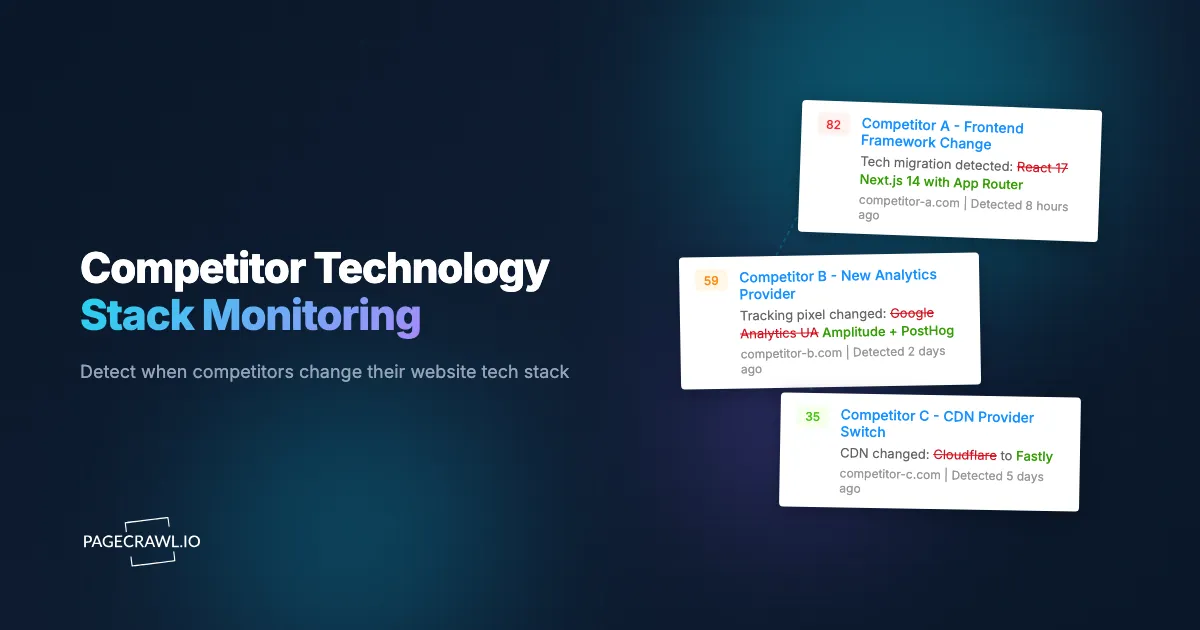
When a major competitor quietly adds a live chat widget to their homepage, it tells you something. When they switch from one analytics platform to another, that tells you something different. When they add A/B testing scripts, structured data markup for a new product category, or integration code for a new payment processor, each change signals a strategic decision that you can learn from if you are paying attention.
Technology choices are some of the most revealing signals a competitor produces. Unlike press releases and marketing campaigns, which are crafted to project a specific image, technology stack changes are operational decisions. They reflect actual investment priorities, product direction, and growth strategy. A competitor adding enterprise SSO integration signals a push into larger accounts. A competitor switching to a headless CMS signals investment in content velocity. These are decisions that cost time and money, which makes them reliable indicators of where a company is heading.
This guide covers why monitoring competitor technology changes matters, what signals to look for in website source code and headers, how to set up automated monitoring for technology changes, practical intelligence examples, and the limitations of what you can and cannot learn from external observation.
Why does technology stack monitoring matter?
Competitors reveal more through their technology choices than most people realize. Every script tag, meta element, HTTP header, and third-party integration on a competitor's website is a piece of intelligence that feeds the same competitive intelligence monitoring picture you build from their pricing, product, and content changes.
Investment Priority Signals
Technology adoption requires budget approval, development time, and organizational commitment. When a competitor adds a new tool or platform to their website, it reflects a prioritized investment. Tracking these investments over time reveals patterns:
- Multiple marketing technology additions signal aggressive growth spending
- Infrastructure changes (CDN switches, performance optimization) suggest scaling
- Developer tool additions (error tracking, monitoring) indicate engineering investment
- Security additions (WAF, bot protection) suggest increasing traffic or attack concerns
These signals are more reliable than press releases or investor presentations because they represent actual spending, not aspirational plans.
Product Direction Intelligence
Technology changes often precede product announcements. A SaaS competitor adding structured data for a new product category, creating new landing pages with specific feature-related keywords, or integrating new third-party services related to capabilities they do not currently offer, these are early indicators of upcoming product direction.
By the time a competitor announces a new feature, the technology supporting it has usually been visible on their website for weeks or months. Monitoring gives you advance warning.
Vendor and Partnership Intelligence
Technology integrations reveal business relationships. When a competitor integrates a specific CRM, payment processor, logistics provider, or analytics platform, you learn about their vendor relationships and partner ecosystem. This intelligence is useful for:
- Identifying potential partnerships (if a vendor works well for your competitor, they might work for you)
- Understanding competitive positioning (which enterprise tools they invest in signals their market segment)
- Negotiating with shared vendors (knowing a competitor uses the same platform gives you pricing leverage)
Competitive Response Timing
Understanding when competitors make technology changes helps you time your own decisions. If a competitor switches to a new platform and you are considering the same move, you can learn from their experience: Did their site speed improve? Did they face downtime during migration? Did they add or remove features during the transition?
What technology signals should you look for?
Watch four surfaces: JavaScript libraries and third-party scripts, meta tags and structured data, HTTP response headers, and CMS or platform indicators. Website source code and HTTP headers contain a wealth of technology intelligence. Here are the categories of signals worth monitoring.
JavaScript Libraries and Frameworks
The <script> tags in a page's source code reveal which JavaScript libraries and third-party services are loaded. Changes to these scripts indicate technology additions or removals.
Analytics tools. Google Analytics, Adobe Analytics, Mixpanel, Amplitude, Heap, PostHog. Changes in analytics tools signal shifts in how a company measures success. Moving from basic Google Analytics to a product analytics tool like Amplitude suggests a shift toward product-led growth.
Customer support tools. Intercom, Zendesk, Drift, HubSpot chat, Freshdesk. Adding a live chat widget signals investment in real-time customer engagement. Switching providers suggests dissatisfaction with their current solution or changing requirements.
A/B testing platforms. Optimizely, VWO, LaunchDarkly, AB Tasty. The appearance of A/B testing scripts signals a commitment to experimentation and conversion optimization. The specific platform choice reveals sophistication level.
Marketing automation. HubSpot, Marketo, Pardot, ActiveCampaign. These integrations reveal how a competitor manages their marketing funnel and what level of automation they have invested in.
Payment processing. Stripe, Braintree, PayPal, Adyen. Payment processor changes are significant because they are expensive and disruptive to switch. A move to Stripe from a legacy processor signals modernization. Adding Adyen suggests international expansion.
Tag managers. Google Tag Manager, Tealium, Segment. The tag manager itself is less interesting than what is loaded through it, but changes to tag management infrastructure signal an evolving marketing technology stack.
Meta Tags and Structured Data
The <head> section of a page contains meta tags that reveal technology and strategic choices:
Open Graph and social tags. Changes in how a competitor structures their social sharing metadata indicate shifts in social media strategy.
Schema.org structured data. New structured data types appearing on a competitor's pages signal SEO strategy changes. Adding Product schema to new page types suggests they are entering e-commerce. Adding FAQ schema suggests a content marketing push.
Canonical tags and hreflang. Changes to canonical URLs or the addition of hreflang tags indicate internationalization or URL structure changes.
Content Security Policy. CSP headers reveal which third-party domains a site loads resources from, providing a comprehensive list of integrated services.
HTTP Headers
HTTP response headers contain technology fingerprints that are not visible in the page source:
Server header. Reveals the web server software (nginx, Apache, CloudFront). Changes indicate infrastructure migration.
X-Powered-By. Often reveals the backend technology (PHP, ASP.NET, Express). Removal of this header suggests security hardening.
Cache headers. Changes in caching strategy indicate performance optimization work.
Security headers. Addition of HSTS, CSP, X-Frame-Options indicates security investment.
CMS and Platform Indicators
Certain patterns in HTML structure, URL patterns, and asset paths reveal the underlying CMS or e-commerce platform:
- WordPress sites include
wp-contentandwp-includespaths - Shopify sites load from
cdn.shopify.com - Magento sites have characteristic URL patterns and meta tags
- Next.js applications include
_nextasset paths - React applications include specific bundle structures
A change in these patterns indicates a platform migration, one of the most significant technology decisions a company makes.
Detection Methods
Several approaches exist for detecting technology stack changes, from one-time snapshots to continuous monitoring.
Point-in-Time Analysis Tools
Tools like BuiltWith and Wappalyzer analyze a website at a specific moment and produce a report of detected technologies. These are useful for initial analysis but do not track changes over time. You get a snapshot but miss the evolution.
BuiltWith's historical data can show past changes, but the resolution is monthly at best, and it does not alert you to changes as they happen.
Source Code Monitoring
The most reliable method for ongoing technology tracking is monitoring the actual source code of competitor pages. By tracking the HTML source code over time, you detect every addition, removal, or modification of scripts, meta tags, and other technology indicators.
This is where web monitoring tools excel. Rather than checking manually or relying on periodic snapshots, continuous monitoring captures changes and alerts you as soon as the next scheduled check detects them.
Header Monitoring
HTTP response headers change less frequently than page content but carry significant technology intelligence. Monitoring headers requires a tool that captures and compares response metadata, not just rendered page content.
For API-based monitoring of competitor technology through headers, see our guide on monitoring REST APIs.
Setting Up Technology Monitoring with PageCrawl
Here is how to configure ongoing competitor technology stack monitoring.

Step 1: Identify Key Pages to Monitor
Not every page on a competitor's site needs monitoring. Focus on pages most likely to reveal technology changes:
Homepage. Loads the most third-party scripts and represents the broadest technology footprint. Changes here affect the entire site.
Product or pricing pages. Contain payment, analytics, and conversion-related scripts. Changes here signal e-commerce or monetization shifts.
Blog or content pages. Reveal content management and marketing technology. Different CMS, different commenting systems, or new content delivery approaches show up here.
Login/signup pages. Contain authentication, analytics, and onboarding technology. Changes signal investment in user acquisition and retention.
Documentation pages. Reveal documentation platforms, search tools, and developer-focused technology. Changes here signal developer experience investment.
For most competitors, monitoring 3-5 key pages provides comprehensive technology visibility.
Step 2: Configure HTML Source Monitoring
For technology stack detection, you want to monitor the underlying HTML, not just the visual appearance, which is what the HTML and full page tracked element types capture. Set up monitors using "Full Page" mode, which captures the complete page content including HTML structure. PageCrawl's reader mode is particularly useful here. Reader mode strips away navigation, ads, and other visual clutter, focusing on the core content of the page. For technology monitoring, this means changes to scripts, meta tags, and structural elements stand out more clearly in the change diff, rather than being buried in noise from rotating banners or dynamic content sections that change on every visit.
To specifically track script tags and technology indicators, you can use element-specific monitoring with XPath or CSS selectors. For example:
- Monitor all
<script>tags to detect new JavaScript libraries - Monitor the
<head>section to detect new meta tags and structured data - Monitor specific
<div>elements where third-party widgets render
Element-specific monitoring reduces noise by focusing only on technology-related parts of the page, ignoring content changes that are not relevant to technology intelligence.
Step 3: Set Check Frequency
Technology changes happen infrequently compared to content changes. Weekly monitoring is sufficient for most competitor technology tracking. This frequency catches changes within a reasonable timeframe without consuming unnecessary resources.
For competitors you watch more closely (direct competitors in a fast-moving market), twice-weekly or daily monitoring provides faster detection.
During periods when you expect changes (after a competitor announces a major update, during a known migration, or after a funding round that enables technology investment), temporarily increase frequency to daily.
Step 4: Organize and Tag Monitors
With multiple competitors, each monitored on multiple pages, organizing monitored pages with labels, folders, and workspaces becomes important. Use a consistent tagging structure:
- Tag by competitor name
- Tag by page type (homepage, pricing, blog)
- Tag by technology category if monitoring specific elements (analytics, payments, CMS)
This organization lets you quickly review changes by competitor or by technology category, making analysis more efficient.
Step 5: Route Alerts to the Right Team
Technology intelligence is relevant to different teams:
- Product team: Competitor feature-related technology changes
- Engineering team: Infrastructure and platform changes
- Marketing team: Marketing technology and analytics changes
- Security team: Security-related header and tool changes
Configure alert routing so each team receives the intelligence relevant to their function without being overwhelmed by irrelevant notifications.
Practical Intelligence Examples
Abstract technology monitoring becomes concrete through examples. Here are scenarios showing how technology changes translate to actionable intelligence.
Competitor Adds AI Chatbot
You notice a competitor's homepage now loads scripts from an AI chatbot provider. This signals several things:
- They are investing in AI-powered customer service (budget allocation)
- They may be trying to reduce support headcount or improve response times (operational strategy)
- They have identified customer support as a competitive differentiator or pain point (market insight)
- The specific provider they chose indicates their requirements (enterprise vs. startup tool, multilingual support, integration depth)
Your response might include: evaluating similar tools, monitoring their customer satisfaction metrics, or differentiating on human support quality.
Competitor Switches Payment Processor
A competitor's checkout page starts loading scripts from a new payment processor. This could indicate:
- International expansion (adding a global processor like Adyen or Stripe)
- Cost reduction (switching to a cheaper processor)
- Feature requirements (needing subscription billing, marketplace payouts, or specific payment methods)
- PCI compliance changes (moving to a hosted payment solution)
Understanding why they switched helps you evaluate your own payment infrastructure and anticipate their next moves.
Competitor Adds Product Schema to New Pages
You notice a competitor's blog posts are now tagged with Product structured data where they previously only had Article schema. This signals:
- They are monetizing content (adding product listings to editorial content)
- They are expanding into e-commerce from a content-first position
- Their SEO strategy is shifting to capture product-related search queries
This intelligence helps your SEO and content teams anticipate new competition in product search results, which is exactly what ongoing SEO monitoring of meta tags, structured data, and content changes is built to surface.
Competitor Removes A/B Testing Scripts
A competitor that previously ran A/B testing stops loading the testing platform's scripts. This could mean:
- They completed their testing program and implemented winning variants
- Budget cuts eliminated the testing budget (negative signal for their growth)
- They switched to a different, possibly server-side testing approach (sophistication increase)
The context of other changes helps interpret the signal. If they simultaneously add new marketing tools, it is probably a provider switch. If they remove multiple tools, it might be cost-cutting.
Competitor Migrates CMS
You detect that a competitor's website structure fundamentally changes: new URL patterns, new asset paths, new HTML structure. This indicates a CMS or platform migration, one of the most significant technology decisions a company makes.
CMS migrations are disruptive and expensive. They signal long-term commitment to a new platform and often coincide with broader strategic shifts (rebranding, new market positioning, improved content velocity). The specific platform they migrate to reveals their priorities.
Building a Competitive Technology Dashboard
Over time, your monitoring data builds into a comprehensive view of competitor technology evolution. Here is how to make it actionable.
Tracking Changes Over Time
Maintain a log of detected technology changes for each competitor. Over months and years, this log reveals patterns:
- Which competitors invest most aggressively in technology
- Which technology categories see the most activity (marketing, analytics, infrastructure)
- How quickly competitors adopt new tools after they become available
- Whether competitors tend to be early adopters or late followers
These patterns inform your own technology strategy by showing what the market considers important.
Cross-Competitor Comparison
When multiple competitors adopt the same technology within a short period, it signals a market-wide trend. If three of your five competitors add the same analytics tool within six months, that tool is probably addressing a real need in your market.
Conversely, if you adopt a technology that none of your competitors use, you either have a unique insight or you are solving the wrong problem. Competitive technology data provides a reality check.
Quarterly Technology Review
Schedule regular reviews of competitor technology changes. A quarterly cadence balances thoroughness with practical time investment. During each review:
- Summarize all detected technology changes per competitor
- Identify common patterns across competitors
- Evaluate whether any changes suggest opportunities or threats
- Decide whether to adjust your own technology roadmap in response
- Update monitoring targets based on new intelligence needs
For guidance on building monitoring dashboards that aggregate this data, see our custom dashboard guide.
What can you not see from external technology monitoring?
External monitoring cannot see backend technology, internal tools, or the reasoning behind a change; it observes only the public-facing stack. Technology monitoring from outside has real limits. Understanding these limits prevents overconfidence in your intelligence.
Backend Technology is Mostly Invisible
You can see frontend technologies (JavaScript, CSS, HTML), but backend technology (databases, server-side languages, microservices architecture) is largely invisible from the outside. HTTP headers may leak some backend information, but most modern security practices minimize this exposure.
You might infer backend changes from behavior (faster response times suggest infrastructure investment), but you cannot confirm specific backend technologies through external monitoring.
Internal Tools are Hidden
Competitors use many tools that never appear on their public website: internal analytics, project management, CI/CD platforms, customer data platforms. Technology monitoring covers only the public-facing portion of their stack.
Cause and Effect are Uncertain
Detecting that a competitor added a tool tells you what changed but not why. The same change can have multiple explanations. A new analytics script could signal growth investment or could be a free trial that gets abandoned in a month. Additional context (press releases, job postings, product updates) helps you interpret signals accurately.
Staging and Testing Artifacts
Occasionally, monitoring captures technology additions that are not yet permanent. A competitor might test a new chat widget for a day and then remove it. Not every detected change represents a final decision. Look for changes that persist across multiple monitoring cycles before treating them as confirmed strategic signals.
Attribution and Accuracy
Technology detection based on source code analysis is not perfectly accurate. Minified or obfuscated scripts may not be identifiable. Server-side rendered content may not include client-side scripts in the initial HTML. Some technologies are designed to be invisible in the page source.
Use technology monitoring as one input among many, not as your sole source of competitive intelligence. Combine it with broader competitive intelligence methods for a complete picture.
Choosing your PageCrawl plan
PageCrawl's Free plan lets you monitor 6 pages with 220 checks per month, which is enough to validate the approach on your most critical pages. Most teams graduate to a paid plan once they see the value.
| Plan | Price | Pages | Checks / month | Frequency |
|---|---|---|---|---|
| Free | $0 | 6 | 220 | every 60 min |
| Standard | $8/mo or $80/yr | 100 | 15,000 | every 15 min |
| Enterprise | $30/mo or $300/yr | 500 | 100,000 | every 5 min |
| Ultimate | $99/mo or $999/yr | 1,000 | 100,000 | every 2 min |
Annual billing saves two months across every paid tier. Enterprise and Ultimate scale up to 100x if you need thousands of pages or multi-team access.
Technology changes are infrequent but high-signal, which means even weekly monitoring at Standard's $80/year delivers meaningful intelligence without burning through check capacity. 100 pages is enough to cover homepages, product pages, and one or two additional pages per competitor for a solid competitive set - the pages most likely to surface new JavaScript integrations, schema additions, or platform migrations. Enterprise at $300/year adds 500 pages, 5-minute checks, and SSO for larger teams.
All plans include the PageCrawl MCP Server, so AI tools like Claude can query your technology change history directly. Your product or engineering team can ask "what new tools has Competitor X added to their stack over the past six months?" and get an answer pulled from your own monitoring archive rather than a one-off manual audit. AI assistants can create monitors through conversation on every plan, including Free.
Getting Started
Choose your two or three most important competitors. For each, identify their homepage and one other key page (pricing page or product page). Add these pages to PageCrawl with full-page monitoring and weekly check frequency. Tag each monitor with the competitor name for easy filtering.
PageCrawl's free tier gives you 6 monitors, enough to track two to three competitors on two pages each. The Standard plan ($80/year for 100 monitors) supports monitoring a larger competitive set across multiple page types. For competitive intelligence teams tracking dozens of competitors systematically, the Enterprise plan ($300/year for 500 monitors) provides comprehensive coverage.
As you collect data, you will develop an intuition for which changes matter and which are noise. The first few weeks establish a baseline. After that, every alert represents a potential competitive signal worth investigating.
For a broader approach to competitor website tracking beyond just technology, including content changes, pricing shifts, and product updates, explore our complete competitive monitoring guides.
Technology decisions are among the most honest signals a company produces. Unlike marketing messages, technology changes cost real money and reflect real priorities. Monitoring those changes gives you a window into competitor strategy that few other intelligence sources can match.