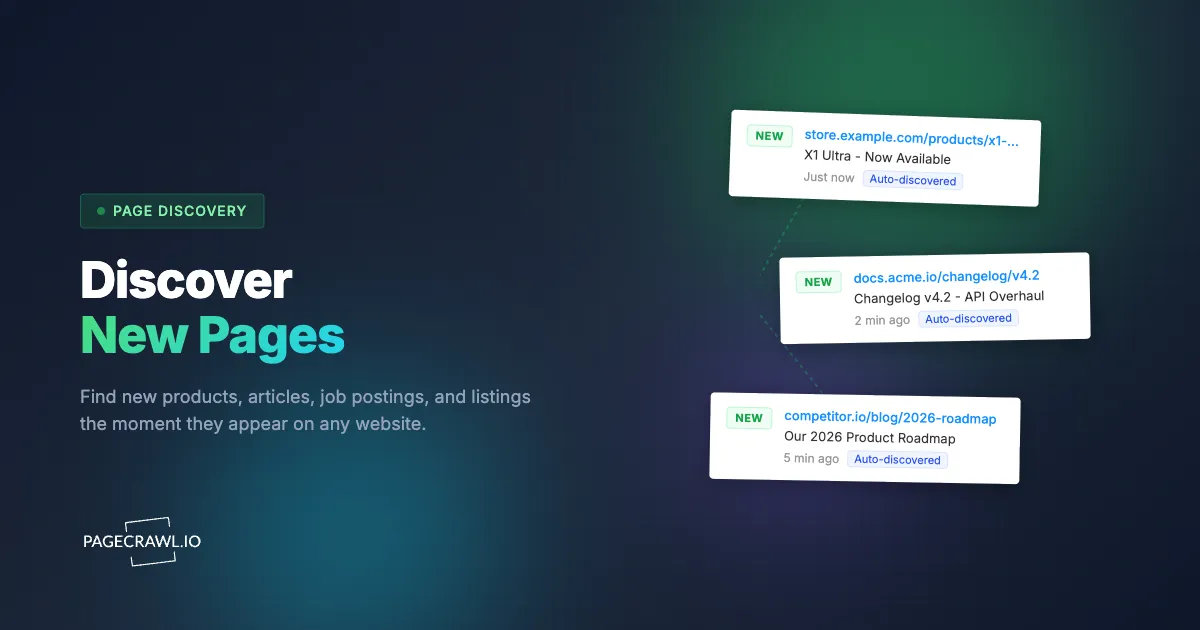
Most monitoring tools tell you when a page changes. But what about pages that didn't exist yesterday?
A competitor launches a new product. A job board posts a role you've been waiting for. A government agency publishes a new filing. A news site drops a story in your niche. You can't monitor what you don't know exists yet.
PageCrawl.io's Page Discovery automatically scans websites on a daily or weekly schedule, finds new pages, filters them by your criteria, and sends you a notification. No coding, no manual checking.
What is the difference between change monitoring and page discovery?
Change monitoring and page discovery solve different problems. Change monitoring watches pages you already know about and tells you when something on them changes. Page discovery watches an entire website and tells you when a completely new page appears.
Think of it this way: if a competitor updates their pricing page, change monitoring catches that. If they launch an entirely new product line with its own page, page discovery catches that. You often need both, but most tools only offer change monitoring.
How does page discovery work?
You give PageCrawl a website URL, and it regularly scans the site to find new pages, filters them by your criteria, and notifies you about the ones that match. PageCrawl automatically picks the best discovery method for the site, but you can customize it if needed:

- Sitemap reads the site's XML sitemap to find new URLs. Fastest and most efficient, and covered in depth in sitemap monitoring for new and removed pages. Works great for large sites that maintain sitemaps.
- URL Scanning loads the page in a real browser and extracts all links. Catches dynamically loaded content that sitemaps might miss.
- Deep Crawl follows links multiple levels deep to find pages buried in nested navigation.
- Automatic runs all methods together for maximum coverage. Best for high-priority targets.
Filter What Matters
A large site might add hundreds of pages, but you probably only care about a subset. Filters let you define exactly what counts as relevant.
URL filters are the most common. Use simple text matching (/products/), wildcards (/blog/*), or regular expressions for complex patterns. For example, to only discover new products on a competitor's site, add a URL filter with /products/*.
Title and text filters match against the page title or body content. A job board might put all listings under /jobs/, but a title filter for "Software Engineer" narrows job listing and career page monitoring to relevant roles only.
Exclude filters remove noise. Exclude /admin/*, /login, /search* to keep your results clean. Exclude filters always take priority over include filters.
Use Cases
New product alerts. Discover when competitors add products to their catalog or post new rebate offers. Set up discovery on their product pages and get notified the same day a new product drop goes live.
Documentation and changelog tracking. Keep up with software tools and platforms you rely on. Discover new help articles, API docs, or changelog entries as they're published.
News and media. Monitor specific sections of news outlets and academic journals for articles mentioning your company, industry, or competitors. Catch coverage the same day it publishes, which is the core of news and media monitoring.
Regulatory and government. Track agency websites for new filings, guidance documents, or regulations. The Federal Register alone publishes new US rules and notices every business day, and finding a new regulation on day one versus day seven makes a real difference for compliance teams.
Real estate. Watch listing sites for new properties in specific areas. URL filters target neighborhoods while text filters catch price ranges or features.
Competitor content. Track when competitors publish new blog posts or documentation. Over time, you'll see their publishing patterns and content strategy.
How do you get notified about new pages?
When a discovery scan finds new pages, you get a notification via Email, Slack, Discord, Microsoft Teams, or Telegram as soon as the scan completes. If you'd rather not be interrupted, switch to a daily or weekly summary instead.
Auto-Import: Discover and Monitor
The real power is combining discovery with monitoring. When a new page matches your filters, PageCrawl can automatically start monitoring it for changes, which is how you end up tracking every page within a website without adding any of them by hand. A competitor's new product page gets discovered on day one, then tracked for price and stock changes from day two onward.
Choosing your PageCrawl plan
PageCrawl's Free plan lets you monitor 6 pages with 220 checks per month, which is enough to validate the approach on your most critical pages. Most teams graduate to a paid plan once they see the value.
| Plan | Price | Pages | Checks / month | Frequency |
|---|---|---|---|---|
| Free | $0 | 6 | 220 | every 60 min |
| Standard | $8/mo or $80/yr | 100 | 15,000 | every 15 min |
| Enterprise | $30/mo or $300/yr | 500 | 100,000 | every 5 min |
| Ultimate | $99/mo or $999/yr | 1,000 | 100,000 | every 2 min |
Annual billing saves two months across every paid tier. Enterprise and Ultimate scale up to 100x if you need thousands of pages or multi-team access.
Page discovery pays for itself the first time it surfaces a competitor product launch, a newly posted job opening, or a regulatory filing before you would have found it manually. Standard at $80/year discovers up to 20,000 pages per site and monitors 100 of them for changes, which covers most competitive tracking or job-alert programs entirely. Enterprise at $300/year scales to 500 monitored pages with 5-minute checks.
All plans include the PageCrawl MCP Server, letting you ask Claude things like "what new pages did my competitor add this week?" and pull answers directly from your discovery history without leaving your workflow. AI assistants can create monitors through conversation on every plan, including Free.
Getting Started
- Click Track New Page and select Scan a Website
- Enter the website URL you want to discover pages on
- Pick your check frequency and monitoring mode (Content Only works for most sites)
- PageCrawl automatically chooses the best discovery mode based on your URL, or you can pick one manually
- For smaller websites, enable auto-monitor to automatically track all discovered pages for changes
- Once pages start appearing, add filters to narrow results and set up notifications
Set up your first page discovery in under five minutes. Get started free.
Pricing and Limits
Page discovery is available on all plans, including free. Free accounts can discover up to 2,000 pages per website. Standard plans increase that to 20,000, and Enterprise plans support up to 100,000 discovered pages. Deep crawling with JavaScript rendering is available on Enterprise plans.
Whether you're tracking product launches, job postings, regulatory updates, or competitor content, page discovery runs continuously in the background so you don't have to. Start discovering new pages today.