It was 9:14 on a Tuesday morning when a customer forwarded your support inbox a photo of your flagship product looking wrong. The logo was slightly off-center, the stitching frayed, the box printed on the wrong cardstock. She had bought it on Amazon, from a seller called "GlobalDeals_Mart," trusting the brand name on the listing. By the time your team pulled up the ASIN, that third-party seller had already shipped hundreds of units, sat in the Buy Box for nine days, and undercut your authorized resellers by roughly a fifth. The listing had been live since the previous Wednesday. Nobody noticed because nobody was watching the offer-listing page.
That nine-day gap is the entire problem. Counterfeit and unauthorized-seller damage compounds quietly: every day a fake listing stays up, it absorbs sales you would have made, generates one-star reviews against your name, and trains the marketplace algorithm to treat the cheaper offer as the default. Brand owners almost never find these listings on day one, because checking every SKU across every marketplace by hand is impossible at scale. By the time a customer complaint surfaces the problem, the seller already has momentum.
This guide shows how to monitor marketplace search results and listing pages for new unauthorized sellers, sudden jumps in seller count, and suspected counterfeit or knockoff listings, and how to capture timestamped screenshot evidence as soon as a check detects one, so you can file an Amazon Brand Registry or eBay VeRO takedown with proof attached.
What counts as an unauthorized seller or a counterfeit listing?
An unauthorized seller is any merchant offering your branded products without a current reseller agreement or distribution authorization. A counterfeit listing is a product page that copies your brand name, images, or trademarks to sell fake or knockoff goods. Both dilute pricing, void warranty coverage, and erode the buyer trust your brand depends on every single day.
The two problems overlap but are not identical. An unauthorized seller may sell genuine product diverted through grey-market channels, undercutting your authorized network and your minimum advertised price. A counterfeiter sells outright fakes, often with stolen product photography and your registered trademark (as filed with an office such as the USPTO) in the title. From a monitoring standpoint, the trigger is the same: a new third-party offer attaches itself to your brand or to a specific SKU, and you want to hear about it on the next check rather than weeks later.
This is a distinct brand-protection problem from price enforcement. If your concern is authorized resellers breaking pricing floors, that is the domain of MAP violation detection. The trigger covered here is different: a seller who should not be on the listing at all, or a listing that should not exist.
Which marketplace signals reveal a new unauthorized seller?
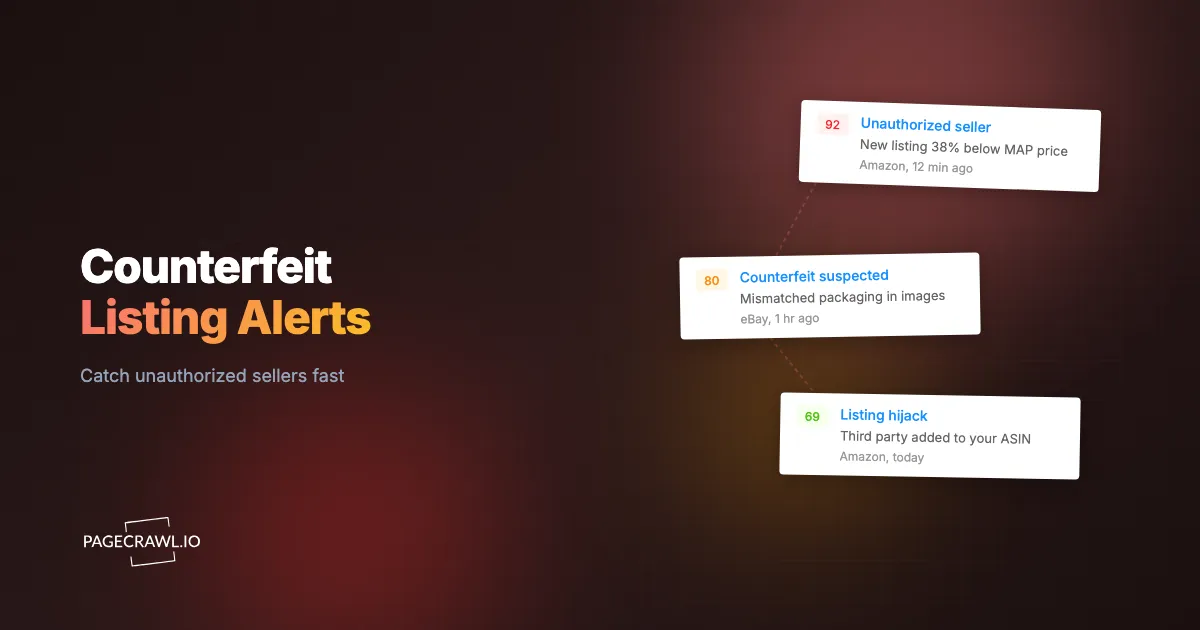
The clearest signal is the seller count on a product's offer-listing page rising when you have not added any authorized resellers. On Amazon, the "Other Sellers on Amazon" panel and the dedicated offer-listing page (the URL pattern /gp/offer-listing/ASIN) enumerate every merchant attached to a single ASIN. A jump from 3 sellers to 5 overnight is a near-certain unauthorized-seller event.
Several concrete page elements give you reliable triggers to monitor:
- Seller count on the offer-listing page. A numeric value that should only change when you onboard a reseller. Any unexplained increase is worth an alert.
- The "Sold by" and "Ships from" fields in the Buy Box. When "Sold by" changes from your brand store to an unfamiliar merchant name, the Buy Box has been taken by a third party.
- New seller names appearing in the offer list. A merchant called something generic like "PrimeDeals_USA" attaching to a premium SKU is a textbook grey-market pattern.
- Search-result counts for your exact brand name on eBay, Walmart Marketplace, and AliExpress. A spike in the number of results for "yourbrand" often means a wave of new listings, some legitimate resale and some counterfeit.
- Listing titles that combine your trademark with telltale words like "replica," "style," "inspired," "OEM," or a price that is 70 percent below MSRP.
Each of these is a discrete, machine-readable change on a public page, which is exactly what a conditional alert rule built on a threshold or keyword is designed to catch. You are not asking software to judge authenticity; you are asking it to flag the structural change (a count went up, a name appeared, a banned keyword showed up) and let a human review the screenshot.
Why does a timestamped screenshot matter for a takedown?
A timestamped screenshot is the evidence that turns a complaint into a takedown. Amazon Brand Registry, eBay's VeRO program, and Walmart's Brand Portal require you to document the infringing listing as it appeared at a specific moment. Sellers edit or delete listings as soon as they sense enforcement, so a capture taken at detection time is what your claim relies on.
When PageCrawl detects a qualifying change, it stores a full-page screenshot of the listing or search-result page at that exact check, with the timestamp recorded. That capture shows the ASIN or item number, the seller name, the price, the trademark usage, and the page URL together in one frame. New monitors have screenshots enabled by default precisely because this court-ready evidence layer matters for every brand-protection use case.
That capture feeds directly into the formal takedown channels:
- Amazon Brand Registry "Report a Violation" and Project Zero, where you submit the ASIN, the offending seller, and supporting evidence of trademark or counterfeit infringement.
- eBay VeRO, where a rights owner files a Notice of Claimed Infringement (a NOCI) citing the specific item numbers and the intellectual property being infringed.
- Walmart Marketplace Brand Portal and AliExpress IPP (Intellectual Property Protection) platform, both of which want a clear screenshot and proof of ownership.
Treating the screenshot as legal-grade documentation is the same discipline behind eDiscovery web evidence capture. A counterfeit takedown is, in practice, a small evidentiary case, and the party with the cleaner timestamped record wins faster. If you need a stronger record than a screenshot, web archiving with WACZ preserves the full page snapshot so it can be replayed and verified later. This article is informational and not legal advice: confirm the current filing requirements on each marketplace's own rights-owner pages, and take trademark questions to counsel.
How do you monitor Amazon, eBay, Walmart, and AliExpress at once?
You monitor all four by creating one tracked page per high-value target and letting PageCrawl render each marketplace page, including the JavaScript-driven seller panels and search grids that simpler tools miss. Marketplaces load critical content dynamically and limit automated access, so the monitor has to render the page like a real browser to see the seller count and listing data.
The practical structure is a small portfolio of monitors per brand:
Per-ASIN seller-count monitors
For each of your top SKUs on Amazon, monitor the offer-listing page and track the seller count as a number. This is your earliest and cleanest signal, because it changes only when a new merchant attaches to your exact product. Pair it with monitoring the Buy Box "Sold by" field as keyword text so you also catch a takeover even when the total count stays flat.
Brand-name search monitors
On eBay, Walmart, and AliExpress, monitor the search-results page for your exact brand name. Track both the result count (a number) and the visible listing titles (keyword text), so a flood of new "replica" or "OEM" titles triggers an alert. Watching the result count is conceptually close to Amazon Buy Box and seller change monitoring, where the structural fact of who controls the offer is the thing you track.
Cross-marketplace coverage at scale
If you sell hundreds of SKUs, you do not create monitors one at a time. Bulk URL monitoring lets you upload a spreadsheet of offer-listing URLs and search-result URLs and apply the same tracking mode, frequency, and alert rules across all of them in one pass. For resale-heavy categories like sneakers or collectibles, the same bulk approach scales to hundreds of search and listing URLs at once without rebuilding each monitor by hand.
How do you set up unauthorized seller and counterfeit monitoring with PageCrawl?
Setting up a brand-protection monitor takes about five minutes per target, and the same six steps apply whether you are watching an Amazon ASIN, an eBay search, or a Walmart listing. Below is the configuration that catches new sellers fast while keeping false alarms low.

Step 1: Add the page and choose the tracking mode. Paste the offer-listing URL or the brand search URL. For a seller-count target, choose number tracking and point it at the count element (for example, the "N new" or "N used" offers value). For a brand search page, use keyword/text tracking on the listing titles plus number tracking on the result count. For the Buy Box, use keyword/text tracking on the "Sold by" field. If a marketplace exposes a structured data endpoint, JSON/API field tracking lets you watch a specific field like seller name or offer count directly.
Step 2: Set the check frequency. Unauthorized sellers and counterfeit listings appear without warning, so check high-value ASINs every 15 minutes on the Standard plan, or every 5 to 2 minutes on Enterprise and Ultimate during a known infringement wave or a product launch. Lower-risk long-tail SKUs can run hourly. The tighter the frequency, the smaller your detection-to-takedown gap.
Step 3: Define the threshold and direction. For seller count, set the rule to alert only when the value increases (direction up) and crosses your baseline, so you are notified when sellers go from 3 to 4 but not when the panel briefly re-renders. For brand-search result counts, set a threshold like "alert if results increase by 5 or more." Thresholds and direction together are what separate a real new-seller event from page noise.
Step 4: Add keyword rules for counterfeit hallmarks. Layer a keyword/text rule that fires when a listing title or page contains terms such as "replica," "inspired by," "OEM," "compatible," or a price far below MSRP. Combine this with the seller-count rule using conditional logic so a single alert tells you both that the listing is new and why it looks suspicious.
Step 5: Confirm screenshots are on. New monitors capture a full-page screenshot by default, and you should keep it on for every brand-protection monitor. This is the timestamped evidence you attach to a Brand Registry, VeRO, or Brand Portal filing. Visual change capture can also flag when a seller swaps in stolen product photography on an existing listing.
Step 6: Route the alert to the right channel. Send brand-protection alerts to a dedicated channel your enforcement team watches. PageCrawl pushes to Slack, Telegram, Discord, email, or a webhook that automates the next action, so a new-seller alert can open a takedown ticket, post to your legal channel, and attach the screenshot URL automatically. Fast routing is what turns a nine-day gap into a same-day takedown.
What thresholds and alert rules keep the noise down?
The rules that keep noise down combine a numeric threshold, a direction filter, and a keyword condition so that only meaningful seller events reach a human. Marketplace pages re-render constantly, rotate sponsored placements, and shuffle review counts, so a naive "any change" monitor would bury infringement under hundreds of cosmetic diffs. The goal is precision on the event that matters.
A few rule patterns that work well in practice:
- Seller count, direction up, baseline-aware. Alert only when the offer count rises above the highest count you have authorized. This ignores a seller dropping off (good news) and ignores temporary panel glitches.
- New "Sold by" value not on an allowlist. Maintain a list of your authorized seller names. Fire an alert when the Buy Box "Sold by" field shows anything outside that list. This catches a quiet Buy Box takeover even when total seller count is unchanged.
- Brand search count plus banned keyword. Require both a jump in result count and the presence of a counterfeit-hallmark keyword before alerting, so ordinary new resale listings stay quiet while suspicious knockoffs surface quickly.
- Price floor breach as a secondary signal. A listing priced 60 to 80 percent below MSRP is a strong counterfeit or grey-market signal. Pair this with the new-seller trigger.
The help centre covers how to express these rules in notification conditions and filters. These are the same false-positive-reduction principles that apply to any serious monitoring program. If you are tuning a noisy setup, the techniques in reducing website-monitoring false positives translate directly: track the smallest specific element, threshold the value, and let the AI importance filter suppress cosmetic churn.
Note: the INFORM Consumers Act, enforced by the Federal Trade Commission and effective June 27, 2023, requires US online marketplaces to collect and verify identity, bank, tax, and contact information for high-volume third-party sellers (those with 200 or more transactions and at least $5,000 in gross revenue in a year). That law gives you a second lever once monitoring surfaces a bad actor: you can demand the marketplace disclose the verified seller information behind a counterfeit listing.
How is this different from MAP price monitoring?
This is different because the trigger is the existence of a seller or listing, not the price they advertise. MAP monitoring assumes a known, authorized reseller and watches whether their advertised price drops below your floor. Unauthorized-seller and counterfeit monitoring watches for sellers and listings that should not be there at all, regardless of price.
The two programs are complementary and often run side by side. A MAP program polices your authorized network's behavior. A brand-protection program polices the boundary of that network: it answers "who is selling my brand who has no right to" rather than "is my authorized partner pricing correctly." The page elements differ too. MAP cares about the price field; brand protection cares about the seller identity, the seller count, the listing title, and the product imagery.
There is also an evidence dimension unique to brand protection. A MAP violation usually ends in a stern email or a cut-off shipment. A counterfeit case can escalate to a formal IP takedown, a domain or brand-fraud complaint, or even litigation, which is why the timestamped screenshot and clean audit trail matter so much more here. The damage is also reputational, so most brands pair listing monitoring with brand and reputation monitoring to catch the one-star reviews and complaint threads that fakes generate.
How quickly should you act on a counterfeit alert?
You should act the same day, ideally within hours, because marketplace ranking and Buy Box momentum compound fast. A counterfeit listing left up for nine days, like the one in the opening story, accumulates sales rank, reviews, and algorithmic trust that make it harder to dislodge while it siphons revenue the entire time.
The first 24 hours are when a takedown is cheapest and most effective. A tight response loop looks like this: PageCrawl detects the new seller or suspicious listing on its next scheduled check, captures the timestamped screenshot, and routes the alert to your enforcement channel. A team member reviews the capture, confirms it is unauthorized or counterfeit, and files the takedown through Brand Registry, VeRO, or the relevant Brand Portal with the screenshot attached as evidence. Because the capture already documents the listing as it appeared at detection, you are not scrambling to reproduce evidence that the seller may have already altered.
The difference between a monitored brand and an unmonitored one is not whether counterfeits appear (they will), but how long they survive. Continuous monitoring turns brand protection from a reactive, complaint-driven scramble into a routine, evidence-backed enforcement workflow.
Can you line up one SKU's price across every marketplace seller at once?
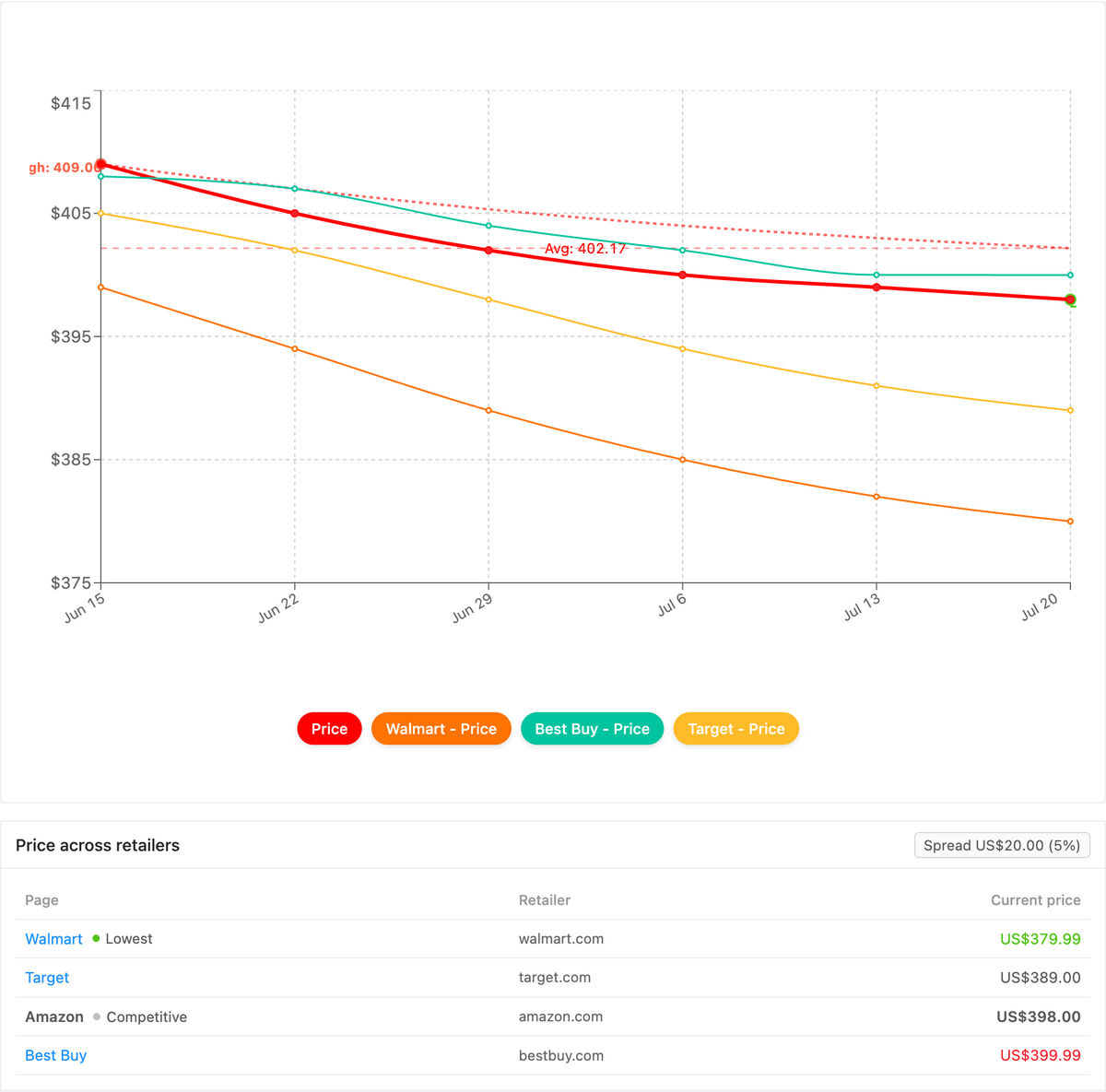
Yes. PageCrawl's Product Comparison capability groups the monitors for one product across every marketplace and seller into a single view, highlights the cheapest advertised price, and tracks the spread between the lowest and highest offer. For brand protection, that turns a suspiciously cheap counterfeit or grey-market listing into an obvious low outlier instead of a number buried on one of dozens of pages.
Once your per-ASIN and brand-search price monitors are running across Amazon, eBay, Walmart, and AliExpress, Product Comparison stitches together the ones that share a product (by GTIN, UPC, SKU, or your own reference tag) into one grouped comparison. Every seller attached to that SKU lines up side by side, the lowest advertised price is flagged, and the spread between cheapest and most expensive is a live figure, so a fake priced 70 percent below MSRP stands out at a glance. A spread-threshold or cheapest-price alert fires on the next check and routes to email, Slack, or a webhook, and you can export the whole grid as a spreadsheet for your enforcement file. The full walkthrough lives in the cross-retailer price comparison guide, and Product Comparison is a custom capability we enable on request.
Choosing your PageCrawl plan
PageCrawl's Free plan lets you monitor 6 pages with 220 checks per month, which is enough to validate the approach on your most critical pages. Most teams graduate to a paid plan once they see the value.
| Plan | Price | Pages | Checks / month | Frequency |
|---|---|---|---|---|
| Free | $0 | 6 | 220 | every 60 min |
| Standard | $8/mo or $80/yr | 100 | 15,000 | every 15 min |
| Enterprise | $30/mo or $300/yr | 500 | 100,000 | every 5 min |
| Ultimate | $99/mo or $999/yr | 1,000 | 100,000 | every 2 min |
Annual billing saves two months across every paid tier.
Enterprise and Ultimate scale up to 100x if you need thousands of pages or multi-team access.
How should you get started today?
Start with your five highest-revenue SKUs. Monitor each Amazon offer-listing page for seller count, add a brand-name search monitor on eBay and Walmart, set the threshold to alert on any increase, keep screenshots on, and route every alert to your enforcement channel. You can have this running in ten minutes.
Run it on the Free plan to validate the approach, then move to Standard or Enterprise as you add SKUs and tighten the check frequency. The first time a new unauthorized seller attaches to your listing, you will know before your customers do, and you will already have the timestamped screenshot the takedown needs.