A partner publishes the product description your team approved. Three weeks later, someone shortens a qualification, replaces a cautious headline, and moves the disclosure below a long comparison table. Your approval record still contains the original page. Customers are reading something else.
Partner website monitoring helps you find that gap. PageCrawl's compliance monitoring watches selected pages for changes and gives your reviewer the before-and-after evidence. The reviewer decides whether the new wording needs correction, approval, or further investigation.
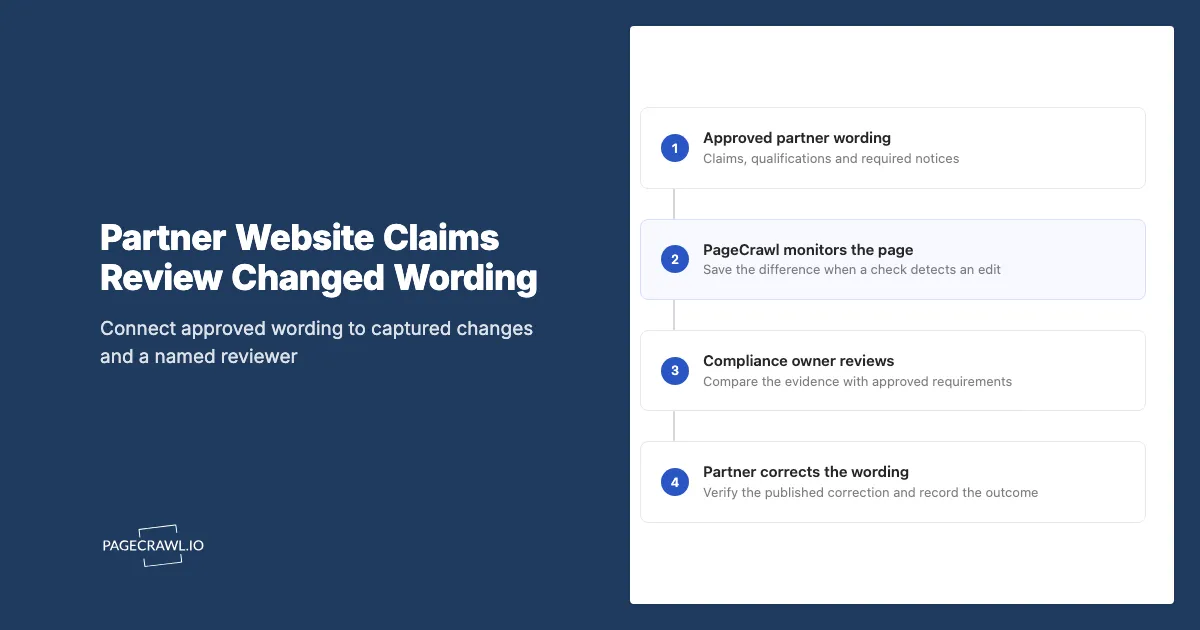
The useful unit is a published claim with an owner and a source. Start with the pages your team has already reviewed, preserve what was approved, and connect later changes to that record. This guide covers that workflow for partner marketers, compliance teams, and businesses whose products appear on client or affiliate websites.
What does marketing compliance monitoring actually cover?
Marketing compliance monitoring checks whether published claims, disclosures, and qualifications change after review. It can cover partner product pages, affiliate articles, client landing pages, and reseller descriptions. Website alerts provide evidence for investigation; your designated reviewer applies the relevant policy, contract, and legal requirements to decide what action is appropriate.
There are two separate questions to answer. First, does the page as published meet your team's requirements? Second, does it continue to match what was approved? Review the first version yourself. Change monitoring then helps with the second question, including edits made long after the original campaign launched.
The distinction matters in regulated markets. The FCA's financial promotions data for 2024 describes website-change monitoring as a good-practice example for section 21 approvers checking whether client promotions remain consistent with approved versions. That is a specific regulatory context, not a universal rule that every partner page must follow.
For US endorsements, the FTC's Endorsement Guides FAQ discusses advertiser training, monitoring, and follow-up, and says there is no single monitoring frequency suitable for every situation. Let the responsible specialist define your requirements before translating them into alerts.
Which partner pages should you put on the watchlist?
Start with pages where a small edit could change a customer's understanding of your product or relationship. Prioritize approved promotions, product comparisons, pricing claims, and disclosures attached to endorsements. Record the exact page and relevant region, because a partner's homepage may say something different from the campaign page people actually visit.
A small inventory is more useful than a spreadsheet containing every page on every partner domain:
| Page or section | Change worth reviewing | Owner to involve |
|---|---|---|
| Partner product landing page | Qualifications removed or capabilities overstated | Product marketing and compliance |
| Affiliate review | Relationship disclosure removed or moved | Affiliate programme owner |
| Client financial promotion | Approved wording, risks, or audience restrictions changed | Qualified promotion reviewer |
| Reseller offer | Price, eligibility, or contractual qualification altered | Channel manager |
| Franchise location page | Unsupported service or certification claim added | Brand or operations lead |
Keep pricing-policy enforcement connected to the same inventory when relevant, but give it its own criteria. MAP monitoring asks whether an advertised price follows a policy. Marketing review also asks what the surrounding words imply and whether their qualifications remain visible.
Ask partners to supply campaign URLs before launch. Page Discovery can help locate additional pages on a known site, but it does not replace a partner's inventory of private campaigns, unlinked landing pages, or placements elsewhere.
How do you record what the team approved?
Keep the approved wording, source URL, capture date, reviewer, and applicable market together in your existing approval system. Link that record to the PageCrawl monitor. Later alerts compare captured versions; the separate approval record tells the reviewer which version was authorized and which conditions accompanied that authorization.
For a fictional example, Northstar Payments has approved this description on a partner's business account page:
International transfers for eligible businesses. Fees and supported destinations vary.
The partner later changes it to:
Free international transfers for every business.
These fictional statements illustrate a review trigger, not a conclusion about any real provider or legal requirement. The reviewer needs the original approval, the revised sentence, and the relevant offer terms before deciding what should happen.
Use a compact record:
| Field | Fictional example |
|---|---|
| Partner and page | Northstar partner, business account landing page |
| Approved content | Product description and adjacent qualification |
| Scope | UK English page, business audience |
| Approval reference | Marketing review record MKT-024 |
| Responsible reviewer | Partner marketing compliance owner |
| Monitoring link | PageCrawl monitor for the published page |
| Last review outcome | Approved with the qualification retained |
Do not treat the most recent capture as automatically approved. Several small edits can accumulate between reviews. Check the current page against the approval record as well as reading the latest difference.
How do you set up the partner page in PageCrawl?
Add the published URL, select the claim and its surrounding qualification, and inspect the first capture before relying on notifications. Give the monitor a recognizable partner name and route changes to a shared review channel. Start with broad change alerts on a small set so you can assess what needs filtering.
- Create a folder for the programme. Use labels for partners, markets, or product families. Keep the approval reference in your working inventory so a reviewer can find it from the monitor's name or URL.
- Add the exact published URL. Use the same region and language that your approval covers. If the site switches versions, follow the guide to keeping a monitored page's language consistent.
- Select enough context. A headline by itself may omit the qualifying sentence beneath it. Choose Specific Area for a stable section, or Full Page Text when claims and disclosures are spread around the page.
- Separate important sections when useful. Multiple tracked elements can keep a headline, offer terms, and disclosure distinct within one monitor.
- Read the first captured value. Confirm that the relevant words appear. Review that initial content against the approval record; an unchanged but already unsuitable page will not become acceptable because monitoring is running.
- Choose a check interval and delivery channel. Base the interval on campaign exposure and how soon the team can respond, within your plan's limits. Email, Slack, or Teams can bring changes to the people maintaining the programme.
Alerts follow scheduled checks. A page can change between visits, and a reviewer still needs time to investigate. Plan the check interval and the response process together rather than equating a frequent schedule with completed oversight.
Should you use keyword rules or AI instructions?
Use keyword rules for specific wording changes your team can describe precisely, and AI instructions to help prioritize broader changes in meaning. Begin with a reviewed baseline and inspect the results. Neither a matched phrase nor an AI summary establishes that a promotion is compliant or that a violation occurred.
A Keyword appeared or disappeared condition is useful when a known disclosure phrase changes. PageCrawl also supports separate Keyword appeared and Keyword disappeared conditions. These operate on changes, so a phrase missing from the first capture still needs your initial review.
Enable Always record change detections when using these conditions for an ongoing review trail. Otherwise, unmatched changes are not recorded by default, and subsequent checks compare against the last version that met the conditions. The notification conditions guide explains this behavior and the available matching options.
For broader prioritization, a fictional monitoring instruction might be:
Focus on changes to claims about fees, eligibility, supported destinations, and the qualification beside the offer. Highlight removed qualifications and stronger promises. Ignore navigation and unrelated news. Describe the changed wording without deciding whether it complies with law.
Review results before allowing low-importance filtering to hide routine alerts from your main channel. A short phrase can matter more than a whole new paragraph. For sensitive approved text, keeping every wording change in the review queue may be appropriate even when AI considers the edit minor.
Text presence also has limits. A disclosure can remain in the captured text while becoming difficult to notice on the page. Review the rendered page and use screenshots or visual monitoring when placement matters. Automated detection does not decide whether a particular presentation is sufficiently prominent.
What should happen after an alert arrives?
Open the difference, check the current page, and compare the changed content with the approval record. Assign the issue to a reviewer who can decide whether to accept it, request a correction, or escalate it. Keep the evidence and decision together, then verify the published correction before closing the review.
For the Northstar example, the reviewer first establishes that the new “free” claim is actually on the partner page and not a failed capture. They then check which fees and eligibility restrictions apply. The partner receives a precise correction request, with the URL and the sentence that needs attention.
A practical sequence is:
- Confirm the source, market, and capture quality.
- Record the observed change without labeling it a proven breach.
- Compare it with approved wording and applicable requirements.
- Assign a reviewer and an action deadline in your task or approval system.
- Send the approved correction through your normal partner process.
- Verify the corrected live page and retain the review outcome.
PageCrawl's Review Board can organize detected changes into lanes such as To Review, Flagged, and Reviewed. A card's lane helps the team coordinate; it is not a substitute for your formal approval record. If your organization uses a separate case system, webhooks can send detected change data into that workflow.
How do you keep evidence useful without overstating it?
Save the source address, capture time, changed wording, approval reference, and review decision. Include relevant screenshots when placement affects interpretation. Describe the capture time as when your system observed the content, since it does not establish exactly when the publisher changed the page or who made the edit.
An evidence note should let a colleague reconstruct the decision. “Partner page changed” is too vague. “The qualification beside the transfer claim was removed; the reviewer requested its restoration under approval MKT-024” identifies the observation and the action without claiming more than the record supports.
If you need a fuller historical page record, web archiving is available on Ultimate. Check that the archive was created and contains the content you need. Retention, permissions, and any evidentiary requirements belong in your organization's policy; a saved page alone does not establish legal sufficiency.
Preserve corrections as well as problematic versions. The corrected capture helps show that the partner responded, and it prevents the team from reopening an issue based only on an older screenshot.
How do you expand the programme without losing control?
Expand after the team can review a small set reliably. Add partners by exposure and the importance of their claims, then assign ownership before increasing page counts. Periodically check that monitors still capture the intended content and that new campaigns have entered the inventory with the correct approval references.
Review three measures together: pages with an owner and approval record, detected changes awaiting review, and monitors that are failing or capturing the wrong content. A falling alert count is not evidence of improvement if a partner moved its landing pages and the monitors stopped working.
Use site health reporting to find monitoring problems and keep unresolved review items visible. Retire campaign monitors according to your retention and oversight policy, rather than deleting their history as soon as the campaign ends.
Begin with five approved partner pages. Capture the exact wording, connect each page to its reviewer, and confirm the first version. The next change then arrives with a clear question for the team: does this published page still match what we approved?