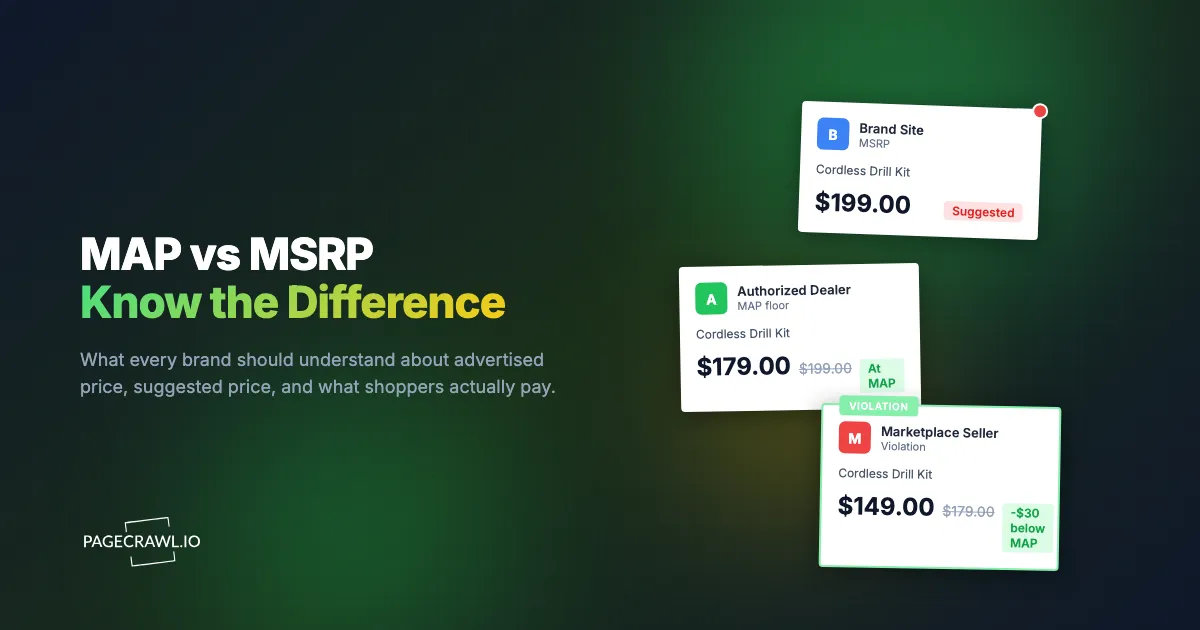
A power-tool brand sets the MSRP of its flagship cordless drill at $199 and a MAP of $179. The two numbers do completely different jobs. MSRP tells a shopper what the product is "worth." MAP tells every retailer the lowest price they are allowed to put in an advertisement. One Tuesday morning a marketplace seller lists the drill at $149 in a sponsored search slot. By the weekend three authorized dealers have quietly matched it, and the $199 anchor the brand spent two years building no longer means anything.
This is the practical reason the difference between MAP and MSRP matters. The two terms get used interchangeably in catalogs, dealer emails, and pricing meetings, but they are not the same thing, they carry different legal weight, and confusing them costs brands margin and channel trust. MSRP is a suggestion about the selling price. MAP is a rule about the advertised price. One is a recommendation you cannot legally compel. The other is a policy you can actually enforce.
This explainer breaks down MAP, MSRP, UMAP, and the actual selling price, the legal line that separates them, where MAP applies (advertised versus in-cart), why it matters for brand equity and channel health, and how to monitor compliance across every retailer that sells your products.
What is the difference between MAP and MSRP?
MSRP (Manufacturer Suggested Retail Price) is the price a manufacturer recommends retailers charge the end customer. MAP (Minimum Advertised Price) is the lowest price a retailer is permitted to advertise publicly. MSRP governs the selling price as a suggestion you cannot force. MAP governs the advertised price as an enforceable policy. They are usually different numbers.
MSRP: the suggested selling price
MSRP, sometimes called the "list price" or "RRP" (recommended retail price) outside the US, is the manufacturer's recommendation for what a product should sell for at retail. It serves as a reference point. Shoppers see "$199 MSRP" and understand it as the full, undiscounted value of the item, which is why "$50 off MSRP" reads as a deal.
Two things are true about MSRP that surprise people. First, it is only a suggestion. A manufacturer cannot legally force an independent retailer to charge MSRP, and most retailers sell below it constantly. Second, MSRP is fundamentally a marketing and anchoring tool. It sets shopper expectations and frames discounts, but it has no enforcement teeth on its own.
MAP: the minimum advertised price
MAP is the lowest price a retailer may display in any public advertisement: a product page, a marketplace listing, a paid search ad, an email campaign, a comparison-shopping engine. MAP does not dictate the final transaction price. It controls what the public sees before they decide to buy. A retailer can technically sell below MAP in private circumstances, but they cannot advertise that lower number.
In most online retail, MAP functions as an effective price floor because the advertised price and the displayed price on a product page are the same thing. A retailer cannot show $149 on the product page without that being the advertised price, even if they call it a flash sale. That is what gives MAP its enforcement power where MSRP has none.
Actual selling price: the third number
The actual selling price is what a customer pays at checkout, and it is frequently lower than both MSRP and MAP. This is the number that confuses brands the most. A retailer can be fully MAP-compliant on the product page at $179 and still get the customer to $149 through a cart discount, a coupon code, a bundle, or a gift-card offer. The advertised price stayed at MAP. The selling price did not.
Keeping these three numbers straight is the foundation of any pricing program. MSRP anchors perception, MAP protects the advertised floor, and the selling price is where the real transaction happens. A coherent strategy uses all three deliberately, and a competitive pricing analysis only makes sense once you know which of the three numbers you are actually comparing across retailers.
Why is MAP legal when price-fixing is not?
MAP is legal in the US because it governs advertising, not the final transaction price, and because it is structured as a unilateral policy rather than an agreement between competitors. Price-fixing (an agreement among sellers about what price to charge) is illegal under the antitrust rules the Federal Trade Commission enforces. A manufacturer unilaterally announcing the lowest price retailers may advertise is not.
The strongest legal footing for a MAP policy is the unilateral structure, sometimes called a "Colgate policy" after United States v. Colgate & Co., the 1919 Supreme Court case that established a manufacturer's right to choose who it does business with. The manufacturer announces the MAP terms, and retailers decide whether to comply. There is no negotiation, no signed agreement to fix prices, and no coordination between competing retailers. The manufacturer simply reserves the right to stop selling to a retailer that advertises below MAP.
Two practical rules keep a MAP policy on solid legal ground. First, it must control only the advertised price, never the price the customer ultimately pays. The moment a policy dictates the actual resale price, it edges toward Resale Price Maintenance, which the Supreme Court moved to case-by-case rule-of-reason review in Leegin Creative Leather Products v. PSKS and which carries far more legal complexity. Second, enforcement has to be consistent. Penalizing a small dealer for a violation while ignoring the same behavior from a large retailer invites both legal challenges and channel resentment. This is general information, not legal advice, so confirm the specifics with an antitrust attorney for your situation.
What is UMAP and how is it different from MAP?
UMAP (Unilateral Minimum Advertised Price) is a stricter, more rigorously unilateral form of a MAP policy. The "U" emphasizes that the policy is announced and enforced entirely by the manufacturer with zero negotiation or retailer agreement, which strengthens the legal position. In practice, UMAP also tends to close the loopholes that ordinary MAP policies leave open.
A standard MAP policy often only addresses the displayed product-page price. A UMAP policy typically defines "advertised price" much more broadly and explicitly closes the indirect discounting tactics that erode the floor:
- In-cart and "see price in cart" pricing, where the real number is hidden until checkout.
- Automatic coupon codes and sitewide promo codes that drop the effective price below MAP.
- Bundles that add a low-value accessory to justify a different price point.
- Gift-card and rebate offers that reduce the net price without showing a below-MAP figure.
The takeaway is simple. MAP and UMAP describe the same core idea (a floor on advertised price), but UMAP is the tighter, better-documented version that anticipates how retailers try to advertise around the rule. If you are writing or revising a policy, the broad-definition approach is covered in depth in the complete MAP enforcement guide for brands.
Advertised price vs in-cart price: where does MAP actually apply?
MAP applies to the advertised price, which is any price shown publicly before the customer commits to buy. The in-cart price (revealed only after a shopper adds the item to their cart) sits in a gray zone. Whether a below-MAP in-cart price violates your policy depends entirely on how your policy defines "advertised."
This distinction is where most MAP disputes actually happen, because retailers know it. The product page proudly shows $179, fully compliant, and the "real" price only appears once the item is in the cart. The classic tactics:
- "Add to cart to see price" hides the number from public view, so technically nothing below MAP is advertised.
- Sitewide coupons ("10% off everything") leave the product page at MAP but quietly take the effective price under it.
- Free shipping on a MAP-priced item creates a real price advantage without touching the listed number.
- Loyalty or member pricing shown only to logged-in shoppers can dip below the public floor.
There is no universal answer to whether these count as violations. That is exactly why your policy must define "advertised price" explicitly. A strict UMAP-style policy treats the in-cart price and any automatic discount as advertising once it is broadly available to the public. A narrower policy may only govern the visible product-page number. The decision is yours, but you cannot enforce a definition you never wrote down, and you cannot enforce a definition you cannot observe, which is where monitoring comes in.
Why does the MAP vs MSRP distinction matter for brand equity?
It matters because MSRP sets the perceived value of your product and MAP protects it from erosion. MSRP is the anchor shoppers judge a deal against. MAP keeps the advertised price close enough to that anchor that the product still reads as premium. When MAP collapses, the gap between MSRP and street price widens until the MSRP stops being believable.
Price is the loudest quality signal
Consumers read price as a proxy for quality. A product consistently advertised near its $199 MSRP is perceived as premium and occasionally on sale. The same product advertised at $149 across half a dozen sellers is perceived as a $149 product that was overpriced at $199. Once shoppers re-anchor on the lower number, raising it back is slow and expensive. MAP exists to protect that anchor.
Channel health depends on the floor
Authorized dealers invest in showrooms, trained staff, inventory, and customer education. Those investments only pay off if the product carries a workable margin. When one online-only seller with minimal overhead advertises below MAP, compliant dealers either match and lose margin or hold the line and lose the sale. Both outcomes push good partners to stop stocking the brand. A defended MAP keeps the playing field level so the dealers who do the work stay profitable.
The cascade is fast and hard to reverse
The opening drill example is not unusual. One below-MAP listing forces competitors to match within days, and a week later the brand has lost both its price anchor and the trust of its best retailers. MSRP cannot stop this on its own because it is only a suggestion. MAP can, but only if violations are detected fast enough to act before the cascade spreads. For the specific mechanics of catching violations early, see the guide on detecting MAP violations across retailers.
How do you monitor MAP and MSRP compliance across retailers?
You monitor compliance by tracking the advertised price of each covered product on every retailer that sells it, then alerting whenever a price drops below your MAP threshold. Manual checking does not scale past a handful of products, because prices change at any hour, promotions launch without notice, and coupon-driven discounts never appear on a casual glance.

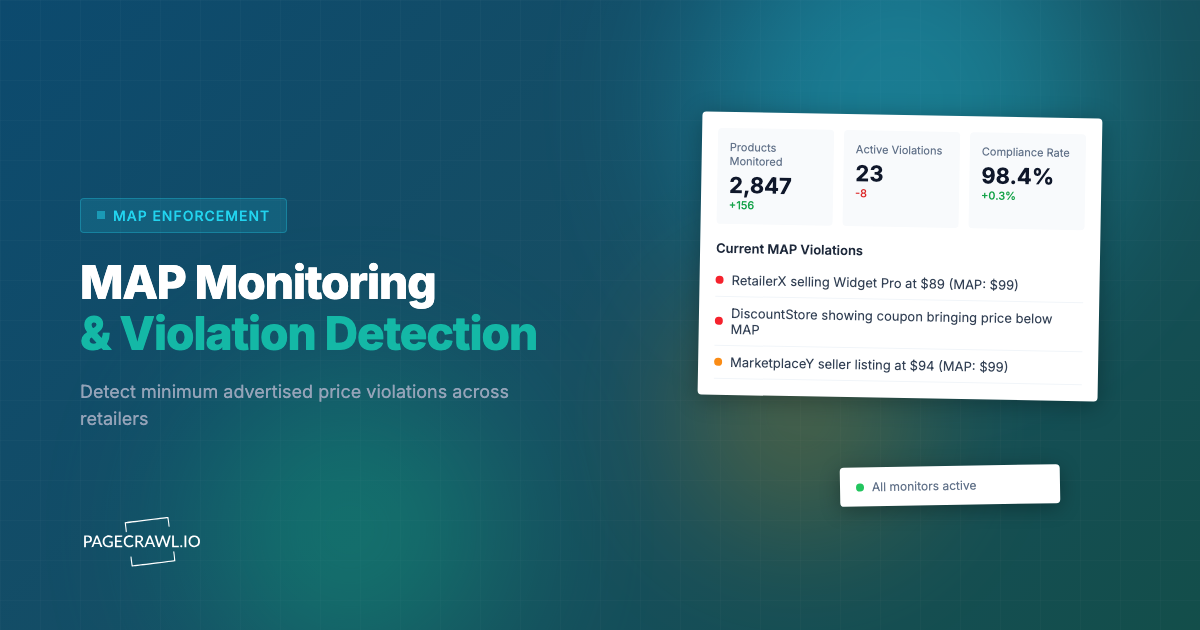
The math gets unmanageable quickly. A brand with 40 covered products across 15 retailers is already tracking 600 product-retailer combinations, and that is before unauthorized marketplace sellers enter the picture. Prices shift on weekends, flash sales run for six hours, and a seller using automated repricing can be compliant in the morning and in violation by lunch. Automated price monitoring is the only way to watch that many pages continuously and catch the short-lived violations that do the real damage. The broader landscape of tools for this is covered in our roundup of the best competitor price tracking tools.
PageCrawl is built for exactly this. It renders each retailer's product page fully, like a real browser, so it reliably reads prices even on protected or JavaScript-heavy sites, then alerts you as soon as a check finds a number below your floor. Checks run as often as every 2 minutes on paid plans and hourly on the free plan, and the help centre guide to tracking numeric values such as prices shows how the extracted figure is charted over time.
How to set up MAP monitoring with PageCrawl
PageCrawl monitors product pages across your entire retail network, detects the displayed price on each one, and alerts you when it falls below your MAP threshold. The free plan covers 6 monitors with 220 checks per month, which is enough to pilot the approach on your most important product-retailer combinations before you scale. Here is the setup.
Step 1: List your covered products and their MAP. For each product under a MAP policy, write down the MAP figure and (separately) the MSRP. You are alerting against MAP, but recording MSRP keeps the full picture in one place.
Step 2: Collect every retailer URL. For each product, gather the product-page URL on every authorized retailer, plus each unique marketplace listing. Different sellers on the same marketplace often have different listing URLs, so capture each one.
Step 3: Add each page in price mode. Add the URLs to PageCrawl using price tracking mode. PageCrawl identifies the product price on the page and tracks it over time. For a deeper walkthrough of watching the same product across many sellers, see cross-retailer price comparison monitoring.
Step 4: Set a threshold alert at your MAP. Use conditional price and threshold alerts so a notification only fires when the detected price drops below the MAP figure for that product. The help centre reference on notification conditions and filters lists the rule types available per page. You get signal on actual violations, not noise on every routine price wiggle.
Step 5: Organize by retailer and product. Use folders (a "Retailer > Product line" structure works well) and tags for priority products or repeat violators. This keeps a dashboard of hundreds of monitors navigable.
Step 6: Enable screenshots for evidence. Turn on screenshots so every detected violation is captured with a timestamp and URL. A dated image of the below-MAP price is documentation a retailer cannot dispute when you ask for a correction.
Step 7: Route alerts to where your team works. Send violation alerts to Slack so the right person sees them without watching a dashboard, and for brands with large networks, use webhook automation to open a ticket, log the violation, and trigger a templated correction notice automatically.
Step 8: Set frequency by risk. Check high-risk products and known repeat-violator retailers several times a day, and standard products at least daily. More frequent checks shrink the window a violation stays live before you act. This same automated price-tracking foundation underpins broader competitor price monitoring for ecommerce.
Can you see every retailer's price for one product in a single view?
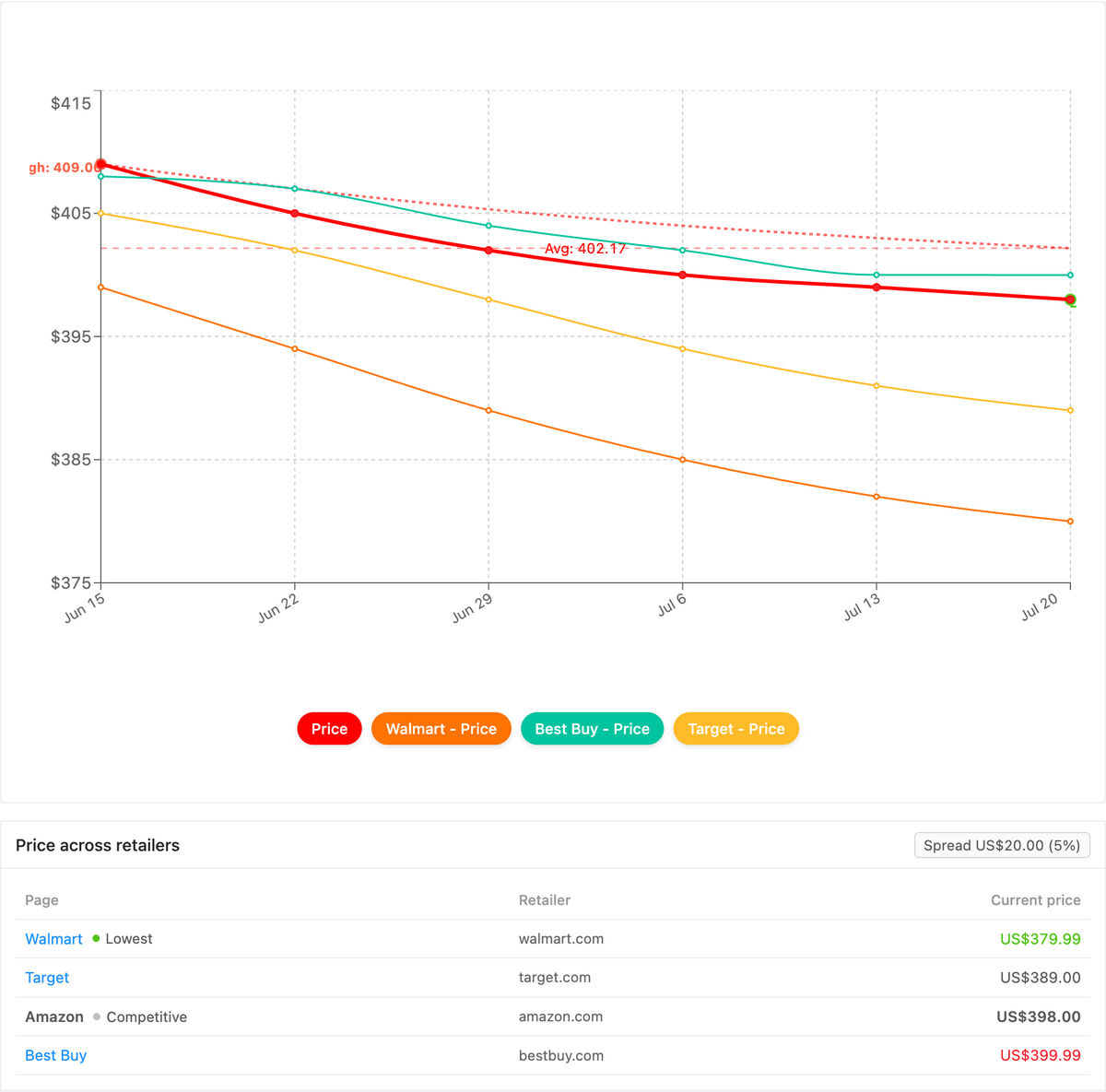
Yes. PageCrawl's Product Comparison capability groups the monitors for one product across every retailer into a single view, highlights the cheapest advertised price, and tracks the spread between the lowest and highest seller. For MAP enforcement, that turns a below-floor listing into an obvious outlier instead of a number buried on one of forty product pages.
Once your per-page price monitors are running, Product Comparison stitches together the ones that share a product (by GTIN, SKU, or your own reference tag) into one grouped comparison. Every authorized retailer for a product lines up side by side, the lowest advertised price is flagged, and the spread between cheapest and most expensive is a live figure. When one seller drops below your MAP while the others hold the line, the gap widens and a spread alert fires on the next check, routed to email, Slack, or a webhook. You can also export the whole grid as a spreadsheet, a dated record you can attach to a correction notice. The full walkthrough lives in the cross-retailer price comparison guide, and Product Comparison is a custom capability we enable on request.
Choosing your PageCrawl plan
PageCrawl's Free plan lets you monitor 6 pages with 220 checks per month, which is enough to validate the approach on your most critical pages. Most teams graduate to a paid plan once they see the value.
| Plan | Price | Pages | Checks / month | Frequency |
|---|---|---|---|---|
| Free | $0 | 6 | 220 | every 60 min |
| Standard | $8/mo or $80/yr | 100 | 15,000 | every 15 min |
| Enterprise | $30/mo or $300/yr | 500 | 100,000 | every 5 min |
| Ultimate | $99/mo or $999/yr | 1,000 | 100,000 | every 2 min |
Annual billing saves two months across every paid tier. Enterprise and Ultimate scale up to 100x if you need thousands of pages or multi-team access.
Standard at $80/year monitors 100 product-retailer combinations with daily checks and screenshots, enough to cover a small brand's full catalog with the timestamped evidence MAP enforcement requires. Enterprise at $300/year handles 500 combinations for mid-size brands with extensive retail networks. If automated monitoring catches even one violation before the cascade spreads, it pays for itself many times over.
Getting Started
MAP and MSRP are not the same number, and the difference is exactly what lets you protect your pricing. MSRP anchors perceived value, MAP defends the advertised floor, and only MAP is enforceable, but only if you can see violations soon after they appear. Start small: pick your five most important products, add their pages across your top retailers, and set threshold alerts at each MAP. Create a free account, turn on screenshots, and watch a real violation surface within days.
Set the floor once, then let the monitoring hold it for you.