Ravi runs a small event-driven book. He had been positioned in a large industrial for four months on a simple thesis: the pending spin-off of one division would be valued more generously as a standalone than it ever was inside the parent. He read the announcement press release and the first Form 10. Then he waited for the details that actually determine the trade: the distribution ratio, the record date, the ex-distribution date, and whether a reverse split would be bolted on to the separation.
Those details did not arrive as a press release. They arrived as an edit. The exchange's corporate-action notice for the deal, a page that had existed for weeks, was quietly revised with an "UPDATED" prefix once the board approved the terms and the registration statement went effective. The Form 10 picked up a third amendment on EDGAR with no announcement at all. By the time Ravi's news feed surfaced a secondhand summary, when-issued trading had opened and the spread he had been waiting to work had narrowed.
A spin-off is not one event. It is a sequence of dated milestones stretched across many months, published across an investor relations site, an exchange notice board and a regulator's filing index, and revised in place as the deal firms up. This guide covers what a corporate-action page actually publishes, which URLs are worth watching, why issuer email alerts keep missing the amendments, and how to build a monitor set that tracks a deal calendar from announcement to first day of regular-way trading.
Why do spin-off and divestiture milestones move faster than the news covers them?
Because most milestones are not announced. They are published as a filing appearing in an index, a date field filling in on an exchange notice, or a paragraph changing on an investor relations separation page. Only the bookend events (the initial announcement and the completion) reliably get a press release and news coverage. The dozen steps in between are silent.
A separation is a calendar, not a headline
When a company announces it intends to separate a business, it starts a long procedural sequence: a registration statement is filed, then amended in response to regulator comments, the board formally approves the distribution, the exchange establishes a record date and an ex-distribution date, a when-issued market opens, and finally the new shares trade regular way. FedEx publicly documented both the filing of the Form 10 registration statement for the planned separation of FedEx Freight and the later point at which the SEC declared that statement effective, two distinct milestones months apart. Each step changes what is knowable about the deal, and each one lands on a page rather than in your inbox.
The most tradeable details arrive last
The announcement tells you a separation is intended. It rarely tells you the distribution ratio, the exact record date, whether cash will be paid in lieu of fractional shares, or whether the parent will run a concurrent reverse split. Those specifics are settled late, often within weeks of completion, and they determine entitlement, index flows and the shape of the when-issued spread. A setup that only catches the announcement catches the least useful part of the deal.
Notices are revised in place, not reissued
Exchange corporate-action notices are living documents. A notice published when a deal is first flagged is edited later to add the established ex-date, to confirm trading will continue regular way, or to record that details were finalized after board approval and registration effectiveness. Nasdaq's equity corporate-action alerts carry these revisions in the headline itself, with prefixes such as "UPDATED: Ex Date Established" or "UPDATED: Details finalized." An edit to an existing page is the kind of change no email digest re-sends, and exactly the kind a page monitor catches.
Which corporate-action pages actually show the changing value?
Four page types carry the real data: the exchange's corporate-action alert index, the individual alert page for your deal, the issuer's investor-news or dedicated separation page, and the regulator's filing index for both the parent and the new entity. Each one displays a value that changes, not a summary of one.
Exchange corporate-action notices
Nasdaq publishes an equity corporate actions alert index listing each notice as it is issued, covering spin-off and distribution information, merger closings, symbol changes and reverse splits. The index changes whenever a notice is added or revised with an "UPDATED" prefix. The individual notice page for a specific deal is the higher-signal monitor: it holds the ratio, the dates and the trading treatment. Watch the index to discover deals, and the individual notice to track the one you are positioned in.
The issuer's investor news and separation pages
Every company running a separation publishes its milestones on its own investor relations site. Honeywell posted its Form 10 filing announcement for the planned aerospace spin-off to its investor news releases page, and Resideo did the same for the planned separation of ADI Global Distribution on its investor news page. Larger separations often get a dedicated microsite or a "separation" tab under investor relations, which is the single best page to watch because it is where the transaction timeline, the information statement and the investor FAQ all get updated together.
The regulator's filing index
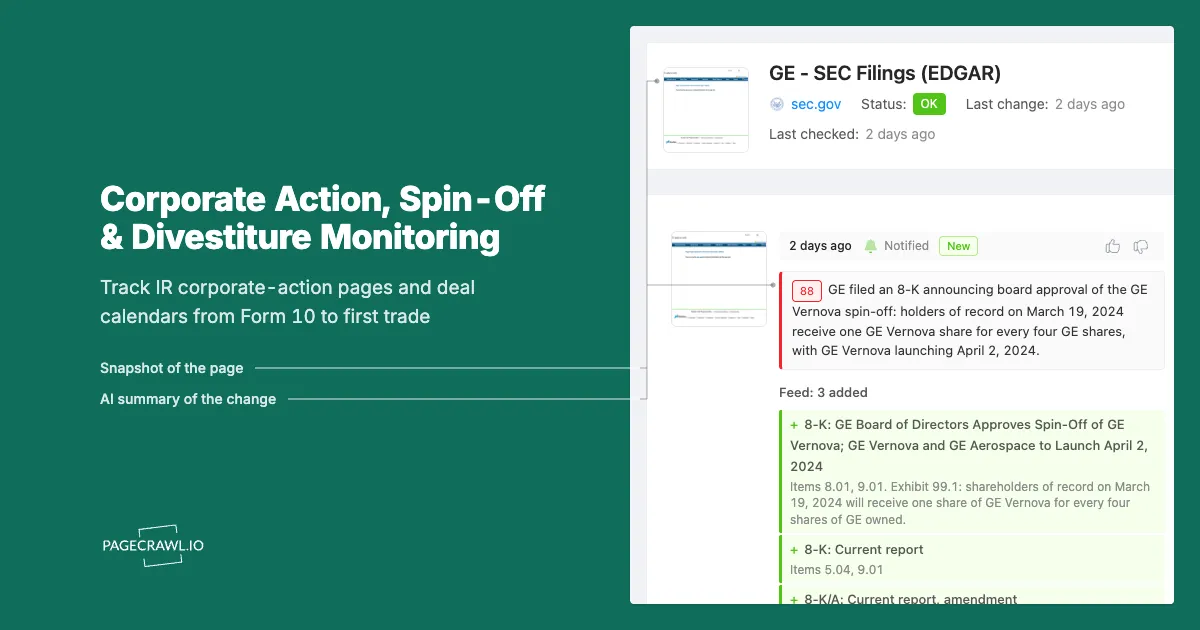
The registration statement and every amendment to it are filed publicly. For a US spin-off that means a Form 10 (filed as 10-12B when the new shares will list on an exchange) and a stream of 10-12B/A amendments, alongside 8-K filings from the parent as each material step completes. A company's filing index on EDGAR, maintained by the US Securities and Exchange Commission, gains a new row every time one of those documents is accepted, and that row is often the first public evidence a milestone occurred. Our guide to monitoring EDGAR for new filings covers watching a filing index in detail.
The spun-off company also gets its own regulator identity before it ever trades, with a filing index that starts empty and then fills with the registration statement and its amendments. That page is the cleanest monitor of the four, because every new row on it is directly about your deal.
What exactly changes on a corporate-action page, and why does it matter?
A handful of specific fields change, and each one is a decision input. The distribution ratio sets your entitlement. The record date sets who receives shares. The ex-distribution date sets when the parent trades without the stub. The when-issued window sets where you can express a view early. A reverse split changes every per-share number you modelled.
| Field that changes | Where it usually appears first | Why it matters |
|---|---|---|
| Distribution ratio | Exchange notice, information statement | Determines how many new shares you receive per parent share |
| Record date | Exchange notice, 8-K | Sets the ownership cut-off for entitlement |
| Ex-distribution date | Exchange notice (often an "UPDATED" revision) | Marks when the parent trades without the spun-off value |
| When-issued symbols | Exchange notice | Opens a separate market for parent-ex and new entity before completion |
| Registration effectiveness | Regulator filing index, issuer press release | Removes the main remaining execution risk |
| Concurrent reverse split | Exchange notice, issuer release | Rebases every per-share figure in your model |
| Cash in lieu of fractions | Information statement | Affects small holders and index replication |
| Deal termination or delay | Issuer press release, 8-K | Invalidates the thesis outright |
Divestitures and carve-outs change different fields
A straight divestiture, where a division is sold to a buyer rather than distributed to shareholders, runs a different calendar: definitive agreement, regulatory clearances, any required remedies, then closing. The milestones that matter are clearance decisions and the closing announcement, and they surface on the issuer's investor news page and in 8-K filings rather than in exchange notices, because no new listed security is created. A carve-out IPO sits between the two, with a prospectus amended repeatedly and a price range set and sometimes revised before pricing.
Silence is a signal too. If a targeted completion quarter passes with no new amendment, no established record date and no update to the separation page, the deal is slipping.
Why aren't investor relations email alerts and news feeds enough?
Issuer email alerts push press releases, and only press releases. They do not fire when a registration statement is amended, when an exchange notice is revised with a newly established ex-date, or when a paragraph on a separation page changes. They are also per-company opt-in, so covering a watchlist of deals means managing a dozen separate subscriptions and the resulting inbox.
Amendments arrive without announcements
The steps between announcement and completion are procedural, and companies do not issue a release for each one. An amended registration statement is filed because the regulator had comments. A revised information statement carries the updated financial presentation. These land on filing indexes and IR document pages with no email attached, because there is no announcement to attach one to.
Edits never re-send
An exchange notice updated in place is the clearest case. The revision that adds the ex-date is a change to a document you already received, and no distribution list re-sends an existing item because a field inside it filled in. Page monitoring inverts this: the monitor holds the previous version, compares it on the next check and tells you which line changed. Our walkthrough of press release and newsroom monitoring covers the same gap for corporate newsrooms generally.
Coverage is thinnest where the opportunity is largest
Mega-cap separations are covered exhaustively. A mid-cap carve-out, a foreign issuer's partial demerger or a small divestiture with a conditional regulatory remedy gets a single trade-press paragraph, if that. Third-party feeds also compress detail into a summary, which is fine for a headline and useless when the specific you needed was the ratio. Reading the primary page removes the intermediary and works equally well on the deals nobody covers.
How do you set up corporate-action monitoring in PageCrawl?
You add each primary page as its own monitor, choose a tracking mode that matches what the page publishes, set a check frequency proportional to how close the deal is to completion, route alerts to the channel your desk actually reads, and add keyword rules so only milestone language breaks the silence.
Collect the URLs for one deal first. That is typically four pages: the issuer's investor news or dedicated separation page, the exchange corporate-action notice, the parent's filing index at the regulator, and the new entity's filing index once it exists. Confirm the value you care about is visible on the page itself rather than behind a viewer or a download.
Add each URL as its own monitor. Resist pointing one monitor at a hub page that links to all four. You want to know which page moved, and a per-page monitor makes the alert self-explanatory.
Pick the tracking mode per page. Use content or text tracking for an investor news listing and an exchange notice, so you catch both a new item appearing and a line inside an existing item changing. For a filing index, content tracking on the table area is enough, since a new row is the event. Where a page publishes a single number, such as an offer price or a ratio, a numeric monitor with a threshold is tighter than watching the whole page.
Set the check frequency to match deal proximity. A separation targeting completion next year does not need minute-level checking; daily is proportionate. Once a record date is inside a few weeks, move the exchange notice and the issuer page to the highest frequency your plan allows, because that is the window in which the ratio, the ex-date and any reverse split get finalized. Checks run as often as every 2 minutes on the top plan, every 5 on Enterprise and every 15 on Standard.
Choose channels that reach the desk. Email suits the daily, low-urgency monitors and keeps a written record. For the high-frequency pages, push alerts into Slack, Discord, Teams or Telegram so the whole team sees the same update, and send a webhook into your own system if a change should trigger a model refresh or position review.
Add keyword and threshold rules so the noise stays quiet. Investor news pages carry earnings, conference appearances and governance items you do not need paged about. Set conditions so an alert fires on milestone vocabulary (record date, ex-distribution, distribution ratio, when-issued, effective, completion, termination, reverse split) and stays silent otherwise. Our guide to conditional alerts using price, keyword and threshold rules walks through the syntax.
Turn on screenshots and group the deal into a folder. A timestamped capture of the exchange notice before and after the ex-date was established is the evidence for why you traded when you did. Name the folder after the transaction and archive it once the new shares trade regular way.
How do you build a watchlist that covers a whole deal pipeline?
Tier the pipeline by proximity to completion, not by market cap. Deals inside their final quarter get the fastest checks and push channels. Announced deals with a distant target get daily checks and email. Discovery monitors on exchange indexes and filing searches run daily and exist to tell you a new deal has appeared at all.
| Tier | What belongs in it | Pages and cadence |
|---|---|---|
| Tier 1 | Targeted completion inside the next quarter | Exchange notice, separation page, both filing indexes, highest frequency, pushed to a shared channel |
| Tier 2 | Announced, completion two or more quarters out | Issuer page and parent filing index, daily, email digest |
| Tier 3 | Discovery of deals you do not know about yet | Exchange corporate-action index and a saved registration-statement search, daily, into a review queue |
Tier 1 is small, usually a handful of deals, and it is where every avoidable surprise happens. Tier 2 moves through amendments and timeline revisions rather than established dates, so daily is proportionate. Tier 3 exists to promote a deal into the tiers above once it is worth following. If you also track private-market activity, the same tiering logic appears in our post on monitoring private competitors for funding and acquisitions.
The failure mode of a pipeline watchlist is that everything drifts into the top tier until the alerts become background noise. Promote a deal when a record date lands inside a month, and archive it the day the new shares trade regular way.
What goes wrong when monitoring corporate-action pages?
The three recurring problems are noisy investor relations pages that change without news, documents that live in a viewer rather than in page text, and alerts that arrive correctly but with no context about which milestone just moved. All three are fixable at setup, and each one is worth ten minutes now.
Investor relations pages are noisy by design
A typical IR page carries a delayed share price widget, a rotating carousel, an events countdown and a cookie prompt, none of which relate to your deal. Left alone, they trigger alerts every check. Point the monitor at the news list region rather than the full page, and mark the widgets to be ignored after the first false positive. Our guide to reducing monitoring false positives covers training a monitor to ignore regions that change without meaning anything.
The number you want may not be on the page
Distribution ratios and record dates are frequently stated inside an information statement, which is a long document linked from the page rather than printed on it. Watching the page tells you a new version of the document was posted, which is usually the alert you actually want, but it will not extract the ratio for you. Where the document is published as a PDF, monitor the document itself so a revision to its contents registers rather than only a change to its filename.
An alert without context is only half useful
"Something changed on this page" is a weak alert for a page carrying fifty items. Name every monitor after the deal and the page role, for example "Kellogg separation, distribution notice" rather than the URL. Combine that with a keyword condition and a screenshot and the notification itself tells you whether the ex-date was established or the company merely posted a conference appearance. For a company listed outside the US, add the home-market regulatory disclosure page too, since that is where the primary announcement lands first and the terminology (a demerger rather than a spin-off) differs.
Choosing your PageCrawl plan
PageCrawl's Free plan lets you monitor 6 pages with 220 checks per month, which is enough to validate the approach on your most critical pages. Most teams graduate to a paid plan once they see the value.
| Plan | Price | Pages | Checks / month | Frequency |
|---|---|---|---|---|
| Free | $0 | 6 | 220 | every 60 min |
| Standard | $8/mo or $80/yr | 100 | 15,000 | every 15 min |
| Enterprise | $30/mo or $300/yr | 500 | 100,000 | every 5 min |
| Ultimate | $99/mo or $999/yr | 1,000 | 100,000 | every 2 min |
Annual billing saves two months across every paid tier. Enterprise and Ultimate scale up to 100x if you need thousands of pages or multi-team access.
In event-driven strategies, minutes matter. One actionable signal surfaced before the broader market reacts can return more than a year of Ultimate. Standard at $80/year covers the core IR, press, and filings pages for a handful of positions. Enterprise at $300/year scales to a full watchlist. All plans include the PageCrawl MCP Server, so you can ask Claude to summarize every material change across a company's IR, press, and filings over any period you care about and get the evidence pulled straight from your monitoring archive. AI assistants can create monitors through conversation on every plan, including Free. Ultimate at $999/year adds 2-minute frequency and web archiving, which matters if you need provable timestamps for a thesis.
Getting Started
Pick the one separation or divestiture you are actually positioned in and set up four monitors: the issuer's investor news or separation page, the exchange corporate-action notice for the deal, the parent's regulator filing index, and the new entity's filing index if it exists yet. Group them in a folder named after the transaction.
Add a keyword condition to each so only milestone language (record date, ex-distribution, ratio, when-issued, effective, completion, termination) breaks the silence, route those alerts to the channel your desk reads, and turn on screenshots so you keep a timestamped record of what each page said before it changed.
Run it through the next milestone. The first time an exchange notice is revised in place with an established ex-date and you learn it from the diff rather than a secondhand summary, the setup has earned its place. Then add your Tier 2 deals and a discovery monitor on the corporate-action index, and let the calendar come to you.