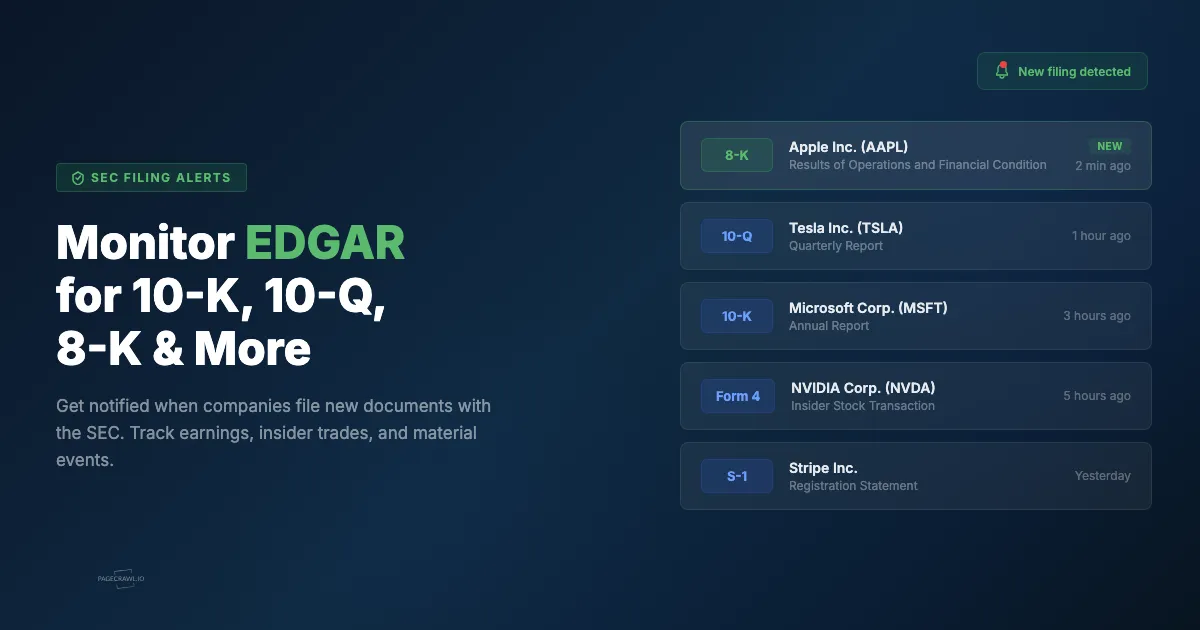
SEC filings move markets. An 8-K announcing a CEO departure, a 10-K revealing unexpected losses, or an S-1 signaling an upcoming IPO can shift a stock price in minutes. The EDGAR system run by the U.S. Securities and Exchange Commission publishes every filing as it is accepted, but checking it manually is impractical. PageCrawl monitors EDGAR filing pages and alerts you on the first check that sees a new filing on the page.
Quick Setup
Enter a ticker symbol below (or pick a popular company) and PageCrawl will set up monitoring on the company's EDGAR filings page. You'll get notified whenever a new filing appears.
Why should you monitor SEC filings?
Because filings are the primary source, and they land on EDGAR before any coverage of them does. Public companies are required to file documents with the SEC at specific intervals and whenever material events occur. These filings contain information that directly affects investment decisions, compliance obligations, and competitive strategy.
Market-moving disclosures. Earnings reports (10-Q, 10-K), material events (8-K), and insider transactions (Form 4) often trigger immediate price movements. The faster you see a filing, the more time you have to react.
Compliance obligations. If your organization has regulatory reporting requirements, monitoring competitor or counterparty filings helps you stay aware of changes that could affect your own obligations.
Competitive intelligence. Filings reveal revenue figures, strategic plans, risk factors, ESG and climate disclosures, executive compensation, and material contracts. Tracking competitors' filings gives you structured, reliable data straight from the source.
M&A activity. Merger agreements, tender offers, and proxy statements all appear on EDGAR before they make headlines. Monitoring specific companies lets you catch deal activity early.
How do EDGAR filing pages work?
The SEC maintains a public filing page for every company in the EDGAR system. Each company has a unique identifier called a CIK (Central Index Key), and you can access their filings page at a predictable URL.
The URL follows this pattern:
https://www.sec.gov/cgi-bin/browse-edgar?action=getcompany&CIK=TICKER&type=&dateb=&owner=include&count=40&search_text=&action=getcompanyReplace TICKER with the company's ticker symbol or CIK number. For example, to monitor Apple's filings, you would use AAPL as the CIK value. The page displays a table of recent filings with the filing type, description, date, and links to the full documents.
You can also filter by filing type directly in the URL by setting the type parameter. For example, adding &type=8-K shows only 8-K filings.
You can look up any company's CIK number on the SEC's EDGAR company search page.
These pages update automatically whenever a new filing is submitted. PageCrawl checks the page on your chosen schedule and alerts you when new entries appear in the table.
Setting Up SEC Filing Alerts

1. Find the EDGAR Filings URL
Go to the SEC EDGAR company search and search for the company you want to monitor. You can search by ticker symbol (e.g., AAPL, MSFT, TSLA) or by company name.
Once you find the company, copy the URL from your browser. Or use the quick setup tool above, which builds the URL for you.
2. Create a Monitor in PageCrawl
Sign up at PageCrawl.io and click Track New Page. Paste the EDGAR filings URL. PageCrawl will load the page and display the filings table.
The EDGAR filings page is a clean HTML table listing each filing's type, description, and date. PageCrawl's content monitoring detects when new rows appear in the table, which means a new filing was submitted.
3. Choose Your Check Frequency
For time-sensitive filings like 8-K reports, check as frequently as possible. Companies often file 8-Ks outside of market hours, so continuous monitoring catches filings that arrive overnight or on weekends.
For routine quarterly and annual filings (10-Q, 10-K), hourly or daily checks are usually sufficient since you know the approximate filing window. You can also confine checks to the hours you care about using check scheduling.
4. Configure Notifications
Choose how you want to be alerted:
- Web push notifications reach your phone or desktop without opening an app
- Telegram delivers the alert to a personal chat, group, or channel
- Slack and Discord webhooks integrate with your existing workflow
- Email works well for filings where minutes don't matter
- Webhooks let you trigger custom automation when a filing appears
You can enable multiple channels to make sure nothing slips through. Every channel fires off the same check, so the delivery gap is set by your check frequency, not by the channel you pick.
Which SEC filing types should you track?
Start with the four that carry the most information per page: 8-K for material events, 10-Q and 10-K for financials, and Form 4 for insider transactions. Add DEF 14A for compensation and governance, S-1 for IPOs, and SC 13D/13G when you care about who is accumulating a position.
| Filing Type | What It Contains | When It's Filed |
|---|---|---|
| 10-K | Annual report with audited financials, risk factors, business overview | Within 60 days of fiscal year end |
| 10-Q | Quarterly report with unaudited financials | Within 40 days of quarter end |
| 8-K | Material events (leadership changes, acquisitions, bankruptcy) | Within 4 business days of the event |
| S-1 | IPO registration statement | Before going public |
| DEF 14A | Proxy statement with executive compensation and board matters | Before annual shareholder meeting |
| Form 4 | Insider stock transactions (buys and sells) | Within 2 business days of the transaction |
| 13-F | Institutional investor holdings (hedge funds, mutual funds) | Within 45 days of quarter end |
| SC 13D | Beneficial ownership above 5% (activist investors) | Within 5 business days of crossing the threshold |
| SC 13G | Beneficial ownership above 5% (passive investors) | Varies by filer type (10 days to 45 days) |
Filtering by Filing Type
If you only care about specific filing types, select one from the Filing Type Filter dropdown in the quick setup tool above. This adds a type parameter to the EDGAR URL (e.g., &type=8-K), so EDGAR itself only returns matching filings.
You can also do this manually. Go to the SEC EDGAR company search, search for the company, set the filing type filter on the page, and copy the resulting URL. Then paste it into PageCrawl when creating a new monitor.
This is especially useful for companies that file frequently. Large companies may submit dozens of filings per quarter, and filtering lets you focus on the ones that matter to your specific use case.
Use Cases
Individual investors. Monitor the companies in your portfolio so you never miss an earnings report, insider transaction, or material event, the core of an investment intelligence feed built on filings and IR pages. Pair filing alerts with price alerts to build a low-cost Bloomberg Terminal alternative and get the full picture. Filing alerts are informational, not investment advice, so read the filing itself on EDGAR before acting on one.
Compliance teams. Track filings from counterparties, subsidiaries, or regulated entities, and extend the same regulatory filing monitoring to FDA, FCC, and other agency filing pages. Automated monitoring replaces manual EDGAR checks and creates a reliable audit trail.
M&A professionals. Watch for SC 13D filings (activist investor positions), S-4 filings (merger registrations), and 8-K filings announcing deal activity. Early awareness of these filings can be critical.
Competitive intelligence. Monitor competitors' 10-K and 10-Q filings to track revenue trends, strategic shifts, and risk factors. This data is public, structured, and updated on a predictable schedule.
Journalists and researchers. Get alerts for filings from companies you're covering, and apply the same court docket monitoring approach to lawsuits on your beat. EDGAR is the primary source for corporate financial data, and monitoring it directly is faster than waiting for press releases and newswire coverage.
Choosing your PageCrawl plan
PageCrawl's Free plan lets you monitor 6 pages with 220 checks per month, which is enough to validate the approach on your most critical pages. Most teams graduate to a paid plan once they see the value.
| Plan | Price | Pages | Checks / month | Frequency |
|---|---|---|---|---|
| Free | $0 | 6 | 220 | every 60 min |
| Standard | $8/mo or $80/yr | 100 | 15,000 | every 15 min |
| Enterprise | $30/mo or $300/yr | 500 | 100,000 | every 5 min |
| Ultimate | $99/mo or $999/yr | 1,000 | 100,000 | every 2 min |
Annual billing saves two months across every paid tier. Enterprise and Ultimate scale up to 100x if you need thousands of pages or multi-team access.
All plans include the PageCrawl MCP Server, so you can ask Claude to summarize material changes across your entire watchlist for any time period, drawing directly from your own monitoring history rather than third-party summaries. AI assistants can create monitors through conversation on every plan, including Free.
For active investors and analysts, Standard at $80/year covers 100 pages across IR sites, press rooms, and EDGAR filings for a focused watchlist. A single 8-K or proxy amendment caught before it surfaces in news aggregators can easily justify the full cost. Enterprise at $300/year scales to 500 pages with 5-minute checks.
Getting Started
Set up your first SEC filing alert in under two minutes. Create a free account, paste an EDGAR filings URL, and choose your notification method.
PageCrawl's free plan includes enough checks to monitor a handful of companies on a daily schedule. For more frequent checks or a larger watchlist, paid plans start at a few dollars per month.