
Camille runs digital accessibility for a state university system. In March she cleared a learning platform for a three-year contract because its Accessibility Conformance Report showed "Supports" against every WCAG success criterion the procurement office cared about, including keyboard operation and status messages. She filed the PDF in the contract folder, wrote the memo, and moved on to the next of the forty tools in her queue.
In September a blind student could not submit a graded discussion post. Camille pulled the vendor's ACR again to build her case. The document at the same URL now read version 2.5, dated July, and three criteria had quietly moved from "Supports" to "Partially Supports", with remarks noting known issues in the exact component the student was stuck on. Nobody told her. The link had not changed, the filename had not changed, and the vendor's account manager had emailed twice that quarter about an upcoming user conference.
That is the whole problem in one story. A VPAT is the single artifact that procurement, legal, and accessibility teams rely on to make a buying decision, it is published as a static-looking PDF or web page, and it is revised silently whenever the vendor retests. The claim you bought on and the claim on the website today are not always the same claim, and the gap only surfaces when a user is already blocked or a complaint is already filed.
This guide covers what actually changes inside an ACR, which vendor pages carry the signal, why nobody emails you about a downgrade, and how to monitor the documents so a weakened conformance claim reaches your team on the next check rather than at the next incident.
What is a VPAT and why does an accessibility conformance report matter?
A VPAT is a standardized template published by the Information Technology Industry Council that a vendor fills in to document how its product measures against accessibility standards. Once completed with real test results it is called an Accessibility Conformance Report. Buyers use the ACR to judge whether a product can lawfully be purchased and deployed.
The template exists because accessibility requirements are written as legal obligations, not as a product spec, and buyers needed a common way to compare claims across vendors. The VPAT translates Section 508 in the United States, EN 301 549 in Europe, and the W3C's Web Content Accessibility Guidelines into a criterion-by-criterion table the vendor answers.
The conformance vocabulary is narrow on purpose
Against each criterion the vendor picks one of a small set of terms: Supports, Partially Supports, Does Not Support, Not Applicable, or Not Evaluated. That constrained vocabulary is what makes an ACR monitorable. A single word flipping from "Supports" to "Partially Supports" against WCAG 2.1 success criterion 4.1.3 is a discrete, machine-detectable event with contractual meaning, unlike a marketing page where everything is prose.
It is a procurement gate, not a brochure
The Section508.gov guidance for sellers states that federal agencies must buy accessible information and communication technology, that they ask vendors for an ACR so accessibility can be evaluated, and that without one the government generally may not proceed with the purchase unless the agency itself claims an exception. State agencies, public universities, school districts, and large enterprises have copied that requirement into their own procurement rules.
Editions and versions drift underneath you
The template itself is revised over time, and vendors publish different editions depending on the market they are selling into: a Section 508 edition, a WCAG edition, an EU edition aligned to EN 301 549, and an international edition combining them. A vendor moving from one edition to another, or from an older template version to a newer one, changes which criteria appear at all. A criterion that simply disappears from a report is not a pass. It is an unanswered question.
What actually changes inside a VPAT between revisions?
Five things move: the conformance level against individual criteria, the remarks column that explains caveats, the product version and scope the report covers, the evaluation date and methods, and the template edition itself. Any one of these can weaken the claim you relied on without changing the document's title, URL, or file name.
Conformance level downgrades
This is the change that matters most and the one worth an alert on its own. "Supports" becoming "Partially Supports" or "Does Not Support" means the vendor has retested and found something it previously claimed worked does not fully work. In procurement terms it is a self-reported defect notice. It is also the change most likely to appear without any accompanying announcement, because the vendor is doing the honest thing quietly.
Remarks that erode a claim without changing the level
A criterion can stay at "Supports" while the remarks column gains a sentence like "with the exception of the legacy grid component" or "when used with supported browsers listed in section 3." The headline level is unchanged, so a dashboard comparing conformance counts sees nothing, but the practical coverage has shrunk. Watching the full text of the report, not just the level column, is what catches this.
Scope, version, and evaluation method
An ACR names the exact product and version it evaluated, and describes how testing was done. A report covering "Web application v12, iOS app v12, Android app v12" that reappears covering only the web application has silently dropped two platforms from its evidence, even if every remaining answer improved. A report that moves from third-party evaluation to internal self-assessment is weaker evidence for an auditor. A report date that has not moved in years against a product shipping continuously has stopped describing the software.
Template edition swaps
A vendor replacing an international edition report with a Section 508 edition removes the EN 301 549 mapping that a European buyer depended on. Nothing was downgraded, but the evidence you need for your own filing is gone. If your organization is also working through European obligations, our guide to European Accessibility Act compliance and WCAG conformance monitoring covers the statement side of the same problem.
| Change type | Visible in the level column | Typical buyer impact |
|---|---|---|
| Supports to Partially Supports | Yes | Contract remediation clause triggered, deployment risk |
| New caveat in remarks | No | Real coverage shrinks, evidence quietly weakens |
| Product or platform scope narrowed | No | Parts of your deployment lose any evidence at all |
| Third-party evaluation to self-assessment | No | Evidence quality drops for auditors and legal |
| Template edition changed | No | A standard you must report against disappears |
| Report withdrawn entirely | No | Highest severity, treat as an escalation |
Which VPAT and ACR pages should you monitor?
Monitor two layers per vendor: the accessibility conformance index page that lists which reports exist, and the individual report documents themselves, usually PDFs. The index tells you when a report is added, replaced, or withdrawn. The document tells you when a specific conformance claim moves. Watching only one of the two leaves a real gap.
Vendor conformance index pages
Large vendors publish a directory of their reports, and those directories change as products are added and reports are refreshed. Google maintains a public list of Google accessibility conformance reports covering individual products such as Chrome, Sheets, and Classroom, each linking to a dated VPAT PDF. Salesforce publishes a product accessibility status page listing products and their current report state. Microsoft runs a searchable accessibility conformance reports library, and AWS documents its VPAT approach with reports distributed through its compliance portal. Each of these index pages is a page whose contents change over time, which makes it a straightforward monitoring target.
The individual report documents
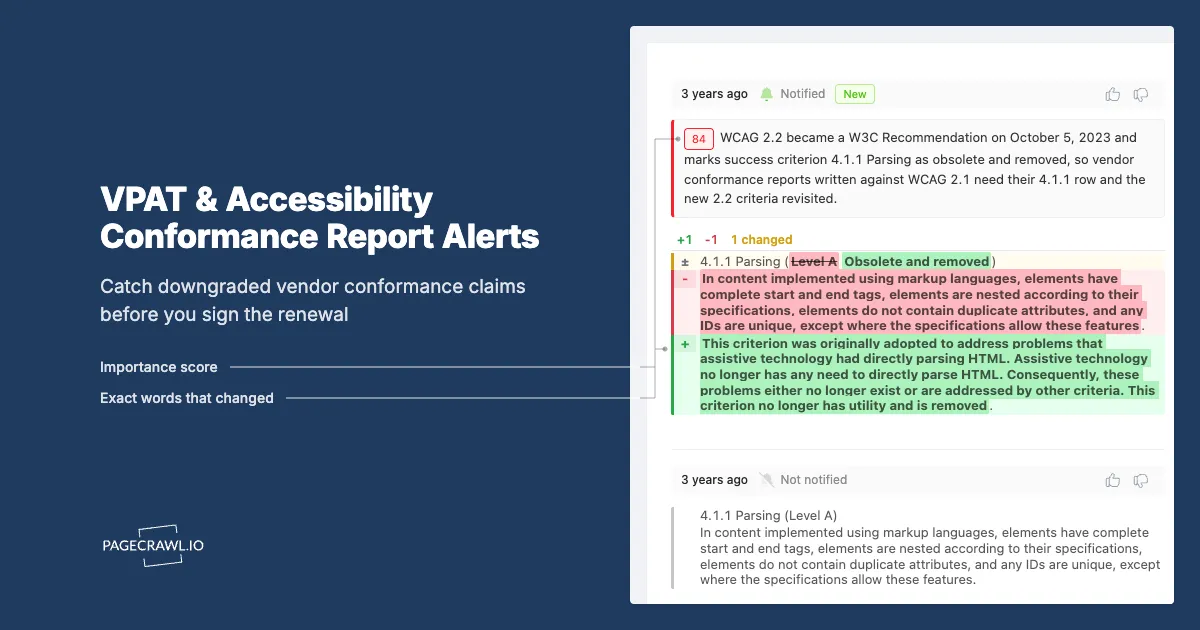
The index tells you a report exists. The report tells you what it claims. Most ACRs are published as PDFs at stable URLs, which is convenient for monitoring because the URL keeps working across revisions and the revision is exactly what you want to see. PageCrawl extracts the text of a PDF and compares it check to check, so a criterion changing from Supports to Partially Supports shows up as a text diff rather than a file you have to reread. Our walkthrough on monitoring online PDF documents for changes covers what to expect from a PDF diff.
Reports behind a portal
Not every ACR is public. Some vendors put reports behind a customer portal, a trust center, or a request form. When the report itself is gated, monitor the public page that says a report is available and its date, and set a calendar obligation in the contract requiring the vendor to notify you of material conformance changes. Gated evidence is a negotiating point, not an excuse to stop watching, and the same reasoning applies to any certification a vendor keeps behind a login.
Prioritize by exposure, not by vendor size
Rank by how many people are blocked if the claim turns out to be wrong. A learning platform, an HR system every employee must use, a public-facing payment flow, and a customer support portal all outrank an internal analytics tool used by six people. Start with the products where a failed criterion produces a complaint, then expand outward.
Why won't the vendor tell you when the ACR is downgraded?
Because nothing obliges them to. A VPAT is voluntary, the vendor publishes it on its own site on its own schedule, and no notification channel is attached to it. Release notes cover features, security bulletins cover vulnerabilities, and account managers cover renewals. A quietly revised conformance table sits outside all three.
There is no subscribe button on a PDF
Vendors have built notification infrastructure for the things customers escalate about: outages, security advisories, API deprecations, pricing. Accessibility conformance has no equivalent feed. The report is a document dropped into a content management system, and replacing it produces no event anyone downstream can subscribe to. Even vendors acting in good faith have no mechanism to tell you.
The incentive runs the wrong way
A downgrade is a self-reported weakness in a document written for buyers. Publishing it after a retest is the honest choice and many vendors make it. Emailing every customer to announce it is a much harder decision that reliably generates procurement questions and renewal friction, so the predictable outcome is publication without announcement.
Your own reviews are too far apart
Most organizations reread vendor ACRs at annual renewal or during a fresh procurement, while vendors retest on their own cadence. A report can change and change back between two of your reviews. The interval between your reviews is the size of your blind spot.
No mainstream free tool does this
Automated accessibility scanners test your own site and tell you what is broken today. They do not read a vendor's self-reported conformance document or tell you when its claims moved. Procurement platforms store the ACR you uploaded, frozen at upload time. The change detection layer between "the vendor published a new report" and "our contract file is out of date" simply is not covered by the tools most teams already own.
How do you set up VPAT monitoring in PageCrawl?
Point a monitor at each vendor conformance index page and each individual report PDF, choose text or PDF tracking so wording changes register, check daily or weekly since these documents move slowly, and route alerts to the accessibility and procurement channels that will actually act. Setup per vendor takes a couple of minutes.
Collect the URLs. For each priority vendor, open its accessibility page and copy two things: the conformance index or product accessibility status page, and the direct link to the ACR PDF for each product you actually deploy. If a vendor publishes separate reports per platform, take each one you use rather than assuming the web report covers the mobile app.
Add the index page as a monitor. Use content or text tracking so the monitor compares the list of products and report dates rather than page decoration. This monitor answers "did a report appear, get replaced, or get withdrawn?"
Add each ACR document as its own monitor. For PDF reports, choose PDF text extraction so PageCrawl compares the extracted document text between checks. That is what surfaces a conformance level moving from Supports to Partially Supports, a new caveat in a remarks cell, or a changed evaluation date. For reports published as HTML tables, use content tracking on the table region.
Set the check frequency to daily for critical vendors and weekly for the rest. Conformance reports are revised on a scale of months, so aggressive frequency buys nothing here and your check budget is better spent on faster-moving monitors elsewhere.
Choose notification channels that reach a decision maker. Email works for the archive copy, but a downgrade needs to land where procurement and accessibility people already talk. PageCrawl can send to email, Slack, Discord, Microsoft Teams, Telegram, or a webhook. Route ACR alerts into a dedicated channel, and use a webhook to open a ticket automatically if your team tracks vendor issues in Jira or ServiceNow.
Add keyword rules so the important changes stand out. Set conditional rules that flag any diff containing "Does Not Support", "Partially Supports", "Not Evaluated", or "Not Applicable" so a level downgrade is visibly different from a typo fix. Keyword and threshold conditions are covered in our guide to conditional alerts using price, keyword, and threshold rules.
Turn on screenshots and keep the history. Every check stores a dated copy of what the page said. When a student or an employee is blocked six months from now, you want to show exactly what the vendor claimed on the date you signed and exactly when that claim changed.
Group the monitors by vendor. Put the index page and every product report for one vendor in the same folder. At renewal you open one folder and read the full change history for that relationship instead of reconstructing it from your inbox.
What should trigger an alert and what should you ignore?
Alert on conformance level changes, new or removed criteria, scope and version changes, evaluation method changes, and report withdrawal. Ignore page furniture: cookie banners, navigation menus, "last updated" footers that tick without content changing, marketing carousels, and PDF metadata that shifts when a file is regenerated with identical content.
The signals worth waking someone for
Treat as high severity: any move away from "Supports", any criterion that disappears from the table, a report withdrawn from the index with no replacement, and a shift from third-party to internal evaluation. Each of these changes what your organization can defend if challenged, and each should generate a ticket, not just a notification someone skims.
The signals worth logging quietly
Treat as low severity: a report date advancing with no substantive change, a template edition upgrade that preserves every criterion you rely on, cosmetic rewording of remarks, and improvements from "Partially Supports" to "Supports". These belong in the change history for your audit trail but do not need to interrupt anyone's afternoon.
Training out the noise
Vendor accessibility pages carry the same background churn as any other corporate page. A PDF regenerated by a new export pipeline can produce dozens of whitespace differences with no semantic change. When PageCrawl surfaces a change that turns out to be noise, mark that region as ignored so future checks skip it. Two or three rounds of that tuning is what keeps people still reading the alerts in month three.
How do you use ACR changes in procurement and renewal?
Turn the monitor's history into three artifacts: a pre-signature snapshot proving what the vendor claimed on the day you bought, a running log of every change during the term, and a renewal briefing that lists downgrades since the last signature. Those three documents make accessibility a contract conversation instead of an incident postmortem.
At procurement
Before you sign, capture the ACR as it stands and attach it to the file. Then write the obligation into the contract: the vendor notifies you of any material change in conformance within an agreed window, and remediation timelines attach to criteria that move away from "Supports". Vendors rarely object to a notification clause, and your monitor is the check that tells you whether the clause is being honored.
During the term
The value of monitoring is not the alert, it is the log. When a criterion is downgraded in month four, you raise it in month four, while the relationship is healthy and the vendor has a roadmap slot available, instead of raising it in month thirty-four alongside a complaint. Vendor accessibility belongs in the same review rhythm as security and privacy, which is the argument our continuous vendor monitoring guide for third-party risk teams makes in more detail.
At renewal
Open the vendor folder and read the diff history end to end. A vendor whose reports improved, whose scope broadened, and whose evaluation stayed third-party is a different renewal conversation from one whose report narrowed to a single platform and gained four caveats. Renewal is the only moment you have real leverage, and monitoring is what gives you something specific to use it on. Schedule the accessibility briefing before the notice window closes, not after, so the findings can still change the terms.
When a complaint arrives
If a user files a complaint or a regulator asks questions, the first request is always the same: what did you know and when did you know it. A timestamped history showing the vendor's claim at signature, the date the claim changed, and the ticket you opened in response is a materially better answer than a folder containing one undated PDF.
Choosing your PageCrawl plan
PageCrawl's Free plan lets you monitor 6 pages with 220 checks per month, which is enough to validate the approach on your most critical pages. Most teams graduate to a paid plan once they see the value.
| Plan | Price | Pages | Checks / month | Frequency |
|---|---|---|---|---|
| Free | $0 | 6 | 220 | every 60 min |
| Standard | $8/mo or $80/yr | 100 | 15,000 | every 15 min |
| Enterprise | $30/mo or $300/yr | 500 | 100,000 | every 5 min |
| Ultimate | $99/mo or $999/yr | 1,000 | 100,000 | every 2 min |
Annual billing saves two months across every paid tier. Enterprise and Ultimate scale up to 100x if you need thousands of pages or multi-team access.
Compliance monitoring is the cheapest insurance you can buy. A single missed regulatory change can trigger fines in the tens or hundreds of thousands, not to mention the audit overhead of proving you did not see it coming. Enterprise at $300/year covers 500 regulatory pages with unlimited history and timestamped screenshots, which is usually exactly what an assessor wants to see. All plans include the PageCrawl MCP Server, so your compliance team can ask Claude to summarize every change to a specific regulation over the last quarter and pull the exact diff, turning your monitoring history into a queryable audit trail. AI assistants can create monitors through conversation on every plan, including Free. Standard at $80/year is enough to cover 100 pages across your primary regulatory bodies if your program is smaller.
Getting Started
Pick the three vendors whose products would generate a complaint tomorrow if a conformance claim turned out to be wrong: the platform everyone must log into, the public-facing service, and the tool your accessibility team already has doubts about. For each one, add two monitors, the vendor conformance index page and the ACR document for the product you actually deploy.
Set those monitors to a daily check, add keyword rules for "Partially Supports" and "Does Not Support", and route the alerts into the channel where procurement and accessibility people already talk. Six monitors fits inside the free tier, which is enough to prove the approach before you ask anyone for budget.
Then expand outward by exposure. Add the rest of your Tier 1 vendors, group each vendor's monitors in a folder, and make "read the ACR change log" a standing item in every renewal review. Within a quarter you will have something almost no procurement function has: a dated record of what every vendor claimed, and exactly when they stopped claiming it.
Stop rereading PDFs at renewal. Let the downgrade come to you.


