A pharmaceutical company updated their clinical trial protocol document, a PDF hosted on their regulatory submissions page. The change was subtle: one dosage figure adjusted in a table buried on page 47. No announcement. No changelog. No notification. An analyst at a competing firm discovered the change three weeks later by manually re-downloading and comparing a 200-page document. By then, the implications for their own trial design had already cost weeks of misdirected work.
PDFs are the silent infrastructure of business, government, and academia. Regulatory guidance documents, product specifications, financial reports, legal contracts, academic papers, government data releases, and compliance manuals are all published and updated as PDFs. Unlike web pages, PDFs have no built-in mechanism for notifying interested parties when content changes. They get quietly replaced on a server, and unless someone happens to download and compare the new version against the old one, the change goes unnoticed.
This guide covers why PDF monitoring matters, the technical challenges involved, practical methods for tracking PDF changes, and how to set up automated monitoring that alerts you when online PDFs are updated.
Why does PDF monitoring matter?
PDF monitoring matters because PDFs are the canonical format for authoritative documents (regulations, contracts, financial reports, specifications) and they carry no built-in change notification. A PDF is simply replaced on a server, so unless something compares versions for you, the change is invisible. The consequences are real.
Regulatory Documents
Government agencies publish regulations, guidance documents, and compliance requirements as PDFs. The FDA, OSHA, EPA, SEC, FCC, and their international counterparts all release critical documents in PDF format.
When a regulatory body updates a guidance document, companies in that industry need to know quickly. A change to an FDA guidance on drug manufacturing, an OSHA workplace safety standard, or an EPA emissions threshold can trigger mandatory operational changes, compliance audits, and strategic planning. Always confirm the current version on the issuing agency's own page before acting on a detected change; this article is informational, not legal or regulatory advice.
The challenge is that regulatory bodies do not always announce every update. Minor revisions, clarifications, and corrections may be published by simply replacing the PDF on the agency website. Without regulatory filing and guidance document monitoring, these changes can go unnoticed until a compliance audit or, worse, an enforcement action.
For dedicated regulatory monitoring approaches, see our regulatory compliance monitoring guide.
Legal and Contract Documents
Contracts, terms of service, privacy policies, and legal agreements published as PDFs require tracking for several reasons:
- Vendor contracts: When a vendor updates their standard terms (published as a PDF), those changes may affect your rights and obligations.
- Insurance policies: Policy documents updated mid-term require review against the original terms.
- Terms of service: SaaS companies sometimes update terms in PDF format rather than on web pages.
- Legal filings: Court documents and legal filings published as PDFs may be amended or supplemented.
Financial Reports
Public companies publish quarterly and annual financial reports as PDFs. While SEC filing monitoring covers official filings, many companies also publish investor presentations, earnings supplements, and financial fact sheets as PDFs on their investor relations pages.
Private companies, non-profits, and government entities also publish financial data as PDFs, often as the only format available.
Academic and Research Papers
Research papers on preprint servers such as arXiv, bioRxiv, and SSRN are frequently updated after initial publication. A paper you cited in your own research might have significant revisions. Monitoring the PDF URL catches these updates.
Product Specifications and Datasheets
Manufacturers publish product specifications, safety datasheets (SDS), and technical documentation as PDFs. Changes to specifications can affect product design, procurement decisions, and compliance requirements. A revised material safety datasheet might change handling procedures for chemicals your facility uses.
Government Data and Statistics
Government agencies publish statistical reports, census data, economic indicators, and policy analyses as PDFs. Researchers, journalists, policy analysts, and green card applicants tracking the monthly visa bulletin need to know when these documents are updated or revised.
Why are PDFs harder to monitor than web pages?
PDFs are harder to monitor because they are laid out for print, not for parsing. Text can be stored as positioned characters with no reading order, scanned documents contain no text at all, files are replaced wholesale rather than edited in place, and a regenerated file can differ internally while saying exactly the same thing.
PDFs Are Not Web Pages
Web pages are designed to be rendered in browsers, with structured HTML that monitoring tools can parse and compare. PDFs are designed for print-quality document rendering. Their internal structure prioritizes visual layout over semantic meaning, making text extraction and comparison more complex.
A web page's text is organized in a logical reading order in the HTML. A PDF's text might be stored as individual character positions on a coordinate grid, with no explicit paragraph or reading order structure. Extracting readable, comparable text from a PDF requires intelligent reconstruction of the document's logical flow.
Text Extraction Challenges
Not all PDFs contain extractable text. Documents fall into several categories:
Text-based PDFs: Created from word processors or digital typesetting. Text is embedded and extractable. These are the most straightforward to monitor.
Scanned PDFs (image-based): Created by scanning physical documents. The PDF contains images of pages, not text. Extracting text requires OCR (optical character recognition), which introduces potential errors and inconsistencies.
Mixed PDFs: Contain both embedded text and scanned images. Some pages are text-based, others are images. Monitoring needs to handle both types within the same document.
Secured PDFs: Password-protected or restricted PDFs may prevent text extraction even when text is embedded. Monitoring capabilities depend on the security settings.
Version Tracking
Unlike web pages that exist as a single living document, PDFs can be completely replaced without any indication that a change occurred. There is no "last modified" indicator visible to end users (the file's HTTP headers may include a modification date, but this is not always accurate or meaningful). Web pages can be compared visit to visit because they are always "live." PDFs must be downloaded and compared as complete files.
Layout Sensitivity
PDF changes can be visual without being textual. A table reformatted, an image replaced, or a page reordered might represent significant changes that pure text comparison would miss. Conversely, a PDF regenerated from the same source content might have different internal structure (different font encoding, different text positioning) without any meaningful content change, creating false positives.
What are the practical methods for tracking PDF changes?
There are three: download and compare the file yourself on a schedule, put the document into a version-controlled document management system, or point a web monitoring tool at the PDF URL so it downloads, extracts, and diffs each version automatically. Only the third works for PDFs hosted by someone else.
Method 1: Manual Download and Compare
The simplest approach: periodically download the PDF and compare it against your saved copy.
How it works: Download the PDF on a schedule. Use a diff tool or manual review to identify changes. Save the new version for future comparison.
Strengths: No tools required, full accuracy with manual review, handles all PDF types.
Limitations: Time-intensive and error-prone. Impractical for more than a handful of documents. Changes in long documents are easy to miss. No alerting, only discovery when you remember to check.
For documents that change infrequently (quarterly reports, annual policy documents), manual comparison might be acceptable. For anything that changes more often or where timeliness matters, it is not.
Method 2: Document Management Systems
Enterprise document management systems (SharePoint, Confluence, specialized regulatory tracking tools) can version-control documents and notify users of changes, and any file reachable at a direct URL can also be watched from the outside, as the walkthrough on monitoring changes in SharePoint documents shows.
How it works: Upload documents to the system. When new versions are uploaded, the system tracks changes and notifies stakeholders.
Strengths: Built-in version control, notification workflows, audit trails.
Limitations: Only works for documents within your system. Does not monitor external PDFs hosted on third-party websites. Requires someone to download and upload new versions, which defeats the automation purpose.
Document management systems are excellent for internal documents but do not solve the problem of monitoring external PDFs hosted by regulators, competitors, vendors, or partners.
Method 3: Web Monitoring with PageCrawl
Web monitoring tools bridge the gap by automatically checking online PDFs and detecting when they change.
How it works: Point PageCrawl at the URL of an online PDF. PageCrawl automatically downloads the PDF, extracts text content, and compares it against the previous version. When changes are detected, you receive an alert with a summary of what changed.
Strengths: Fully automated, monitors any publicly accessible PDF URL, extracts and compares text content, multiple notification channels, AI-powered change summaries, works alongside regular web page monitoring.
Limitations: Scanned/image-based PDFs have limited text extraction without OCR. Highly formatted documents (complex tables, multi-column layouts) may have imperfect text reconstruction. Encrypted PDFs may not be extractable.
Setting Up PDF Monitoring with PageCrawl
PageCrawl handles PDF monitoring as a natural extension of web page monitoring. You point it at a PDF URL, and it handles the rest.

Step 1: Find the PDF URL
The PDF you want to monitor must be accessible via a direct URL. This is typically the link you would right-click and "Copy link address" on a webpage, ending in .pdf. Examples:
https://www.irs.gov/pub/irs-pdf/fw9.pdf(a government form)https://www.berkshirehathaway.com/2024ar/2024ar.pdf(an annual report)https://arxiv.org/pdf/1706.03762(a research paper)
If the PDF is behind a login, PageCrawl can sign in first (a saved one-configuration login, HTTP Basic Authentication, or a multi-step login flow) and monitor the document behind it. PDFs that require clicking through a download process can still be reached by running page actions, such as clicking the download link, before capture.
Step 2: Create the Monitor
In PageCrawl, create a new monitor and paste the PDF URL. PageCrawl automatically detects that the URL points to a PDF file and adjusts its processing accordingly. There is no need to select a special mode for PDFs. The help center walkthrough on monitoring changes in PDF files covers the same steps with screenshots.
Step 3: Configure Check Frequency
Choose a check frequency based on how often you expect the document to change and how quickly you need to know about changes:
- Regulatory guidance documents: Daily checks are usually sufficient. Most regulatory updates happen on business days during business hours.
- Financial reports: Check after expected publication dates (quarterly earnings cycles, annual report deadlines).
- Product specifications: Weekly checks for stable documents, daily for documents under active revision.
- Academic papers on preprint servers: Daily checks during the peer review period when revisions are common.
Step 4: Configure Notifications
Set up alerts through your preferred channels:
- Email: Good for non-urgent monitoring where daily awareness is sufficient.
- Slack/Discord: Ideal for team-wide awareness of regulatory or compliance document changes. Create a dedicated channel for document change alerts.
- Telegram: Push notifications for time-sensitive regulatory or financial documents.
- Webhook: Feed document change data into compliance tracking systems, regulatory databases, or automation workflows.
Step 5: Review AI Summaries
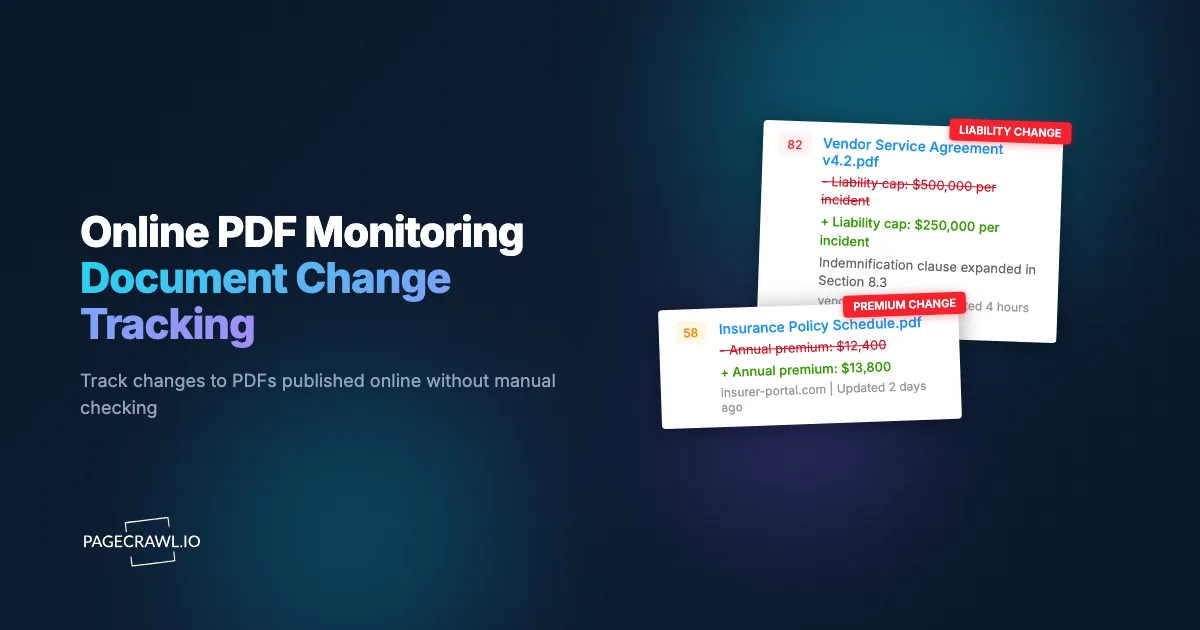
When PageCrawl detects a change in a monitored PDF, the AI summary describes what changed in natural language. Instead of receiving a raw text diff that is hard to interpret, you see something like: "Section 4.2 updated: dosage recommendation changed from 200mg to 150mg. New paragraph added to Section 7 regarding reporting requirements."
This makes it clear at a glance whether the change is significant and requires action, or is a minor correction that can be reviewed later.
Handling Different PDF Types
Text-Based PDFs
These are the most straightforward to monitor. Created from digital sources (Microsoft Word, Google Docs, InDesign, LaTeX), they contain embedded text that PageCrawl extracts directly. Comparison is reliable and accurate.
Most regulatory documents, financial reports, academic papers, and corporate publications are text-based PDFs. If you can select and copy text from the PDF in a standard PDF reader, it is text-based.
Scanned PDFs
Scanned documents (physical papers photographed or scanned) contain images rather than text. Monitoring scanned PDFs is inherently more limited because text extraction depends on OCR accuracy.
For scanned PDFs, consider monitoring the web page that links to the PDF rather than the PDF itself. When the organization updates the document, they often update the surrounding web page (changing the publication date, updating a description, or replacing the download link). Detecting the web page change alerts you that the PDF may have been updated, even if the PDF itself is difficult to extract text from.
Large PDFs (50+ Pages)
Long documents present a practical challenge: text extraction and comparison across hundreds of pages generates large diffs. PageCrawl's AI summaries help by highlighting the most significant changes rather than presenting every line that differs.
For very large documents, focus monitoring on specific sections if possible. If the document has a table of contents or summary page that references section revision dates, monitoring that page alone may catch updates.
PDF Portfolios and Packages
Some organizations publish PDF portfolios (collections of PDFs bundled together) or regularly update a set of related PDFs. Monitor each individual PDF URL rather than a container page when possible. This provides granular change detection per document.
Practical Use Cases
FDA Guidance Documents
The FDA publishes guidance documents that affect pharmaceutical and medical device companies. These documents establish expectations for regulatory submissions, manufacturing processes, and clinical trial design.
What to monitor: FDA guidance document PDFs from the FDA website. Key documents include guidance on specific drug categories, manufacturing standards (cGMP), and clinical trial design requirements.
Why it matters: Changes to FDA guidance can require modifications to regulatory submissions, manufacturing processes, or clinical trial protocols. Early awareness allows proactive compliance adjustment.
Monitoring approach: Monitor the PDF URLs of guidance documents relevant to your product category. Set daily check frequency. Route alerts to your regulatory affairs team via Slack or email.
OSHA Regulations
Workplace safety standards published by OSHA as PDFs govern employer obligations for worker safety.
What to monitor: OSHA standard PDFs, especially those relevant to your industry (construction, manufacturing, healthcare, etc.).
Why it matters: Updated safety standards may require immediate changes to workplace procedures, training programs, and safety equipment.
Monitoring approach: Monitor relevant OSHA standard PDFs. Set weekly check frequency for stable standards, daily for standards under active revision.
Financial Reports and Investor Presentations
Companies publish earnings reports, investor presentations, financial supplements, and sustainability and ESG reports as PDFs.
What to monitor: Investor relations and earnings PDFs for companies you invest in, analyze, or compete with.
Why it matters: Restated financials, updated guidance, and revised investor presentations contain material information. Changes to published reports may indicate corrections or updates that affect investment analysis.
For public company monitoring that extends beyond PDFs to official filings, see the SEC filings monitoring guide.
Academic Papers (arXiv, bioRxiv, SSRN)
Preprint servers host papers that are frequently revised before and during peer review.
What to monitor: PDF URLs of papers relevant to your research.
Why it matters: A paper you cited or based research on might have significant revisions. Changed methodologies, corrected results, or updated conclusions could affect your own work.
Monitoring approach: Monitor specific paper PDF URLs. Check daily during active research periods. Use email notifications for non-urgent awareness.
Product Specifications and Datasheets
Manufacturers publish product specifications, technical datasheets, and safety datasheets (SDS) as PDFs.
What to monitor: Specification PDFs for products you use, purchase, or compete with.
Why it matters: Changed specifications can affect product compatibility, procurement decisions, compliance requirements, and manufacturing processes. Updated safety datasheets may require changes to material handling procedures.
Government Policy Documents
Government agencies at all levels publish policy documents, regulatory analyses, and data reports as PDFs.
What to monitor: Policy document PDFs relevant to your industry, advocacy, or research.
Why it matters: Policy changes affect businesses, non-profits, and individuals. Early awareness of policy document updates enables faster response and planning.
Combining PDF Monitoring with Page Monitoring
The most effective monitoring strategy combines direct PDF monitoring with monitoring of the web pages that link to PDFs.
Monitor Document Listing Pages
Many organizations maintain a web page that lists their published documents with download links. Monitor this listing page to catch when new documents are added. For example:
- A regulatory body's "Guidance Documents" page lists all current guidance with PDF links
- A company's investor relations page lists quarterly reports
- An academic department's publications page lists recent papers
When a new document appears on the listing page, you learn about it on the next check, even before you have a monitor set up for the specific PDF.
PageCrawl's automatic page discovery can help find these listing pages on websites you are monitoring.
Monitor "Last Updated" Indicators
Some organizations display a "Last Updated" or "Revision Date" on web pages alongside PDF links. Monitoring the web page catches these date changes, which indicate the linked PDF has been updated. This approach works even for PDFs that are difficult to extract text from.
Set Up Cascading Monitors
A comprehensive monitoring strategy uses layers:
- Listing page monitor: Catches new documents and removed documents
- Individual PDF monitors: Catches content changes within specific documents
- Related web page monitors: Catches metadata changes (dates, descriptions, version numbers) surrounding the PDF
This layered approach ensures comprehensive coverage. A document might be updated without changing the listing page, or a new document might be added to the listing page before the PDF is finalized.
Archiving and Version History
PDF monitoring is more valuable when combined with archiving.
Building a Document Version History
Each time PageCrawl detects a change in a monitored PDF, it records the change. Over time, this builds a version history showing when changes occurred and what changed. This history is valuable for:
- Regulatory audits: Demonstrating when you became aware of regulatory changes
- Legal documentation: Establishing timelines for contract and policy changes
- Research records: Tracking how papers evolved through revisions
PageCrawl's website archiving capabilities complement PDF monitoring by preserving web page context around document changes. PageCrawl can enable audit-ready WACZ (Web Archive Collection Zipped) archiving for your account on request, capturing a complete, standards-based archive of the page and its linked documents at each check. WACZ files can be replayed in any compatible web archive viewer, giving you a forensic-quality record of exactly what the page looked like when a change was detected. For regulatory documents where you need to prove what version was published on a specific date, sealed WACZ web archives provide stronger evidence than screenshots alone.
Compliance Documentation
For regulated industries, documenting awareness of regulatory changes is itself a compliance requirement. Automated monitoring with timestamped alerts creates an auditable trail showing when your organization detected each regulatory update.
Common Challenges and Solutions
PDF URL Changes
Organizations sometimes change the URL structure of their document repositories, breaking existing monitors. If a monitored PDF URL returns a 404 error, PageCrawl alerts you that the page is not loading. Investigate whether the document moved to a new URL and update the monitor accordingly.
Monitoring the parent web page (the page that links to the PDF) alongside the PDF itself provides resilience against URL changes. If the link on the parent page changes, you will know.
Regenerated PDFs Without Content Changes
Some systems regenerate PDFs periodically from the same source content. The regenerated PDF might have different internal metadata (creation date, PDF producer version) without any content changes. This can create false-positive change alerts.
PageCrawl's text-based comparison focuses on the extracted text content rather than PDF metadata, which reduces false positives from regeneration. However, if the regeneration process changes text positioning or formatting slightly, minor diff noise may occur.
Password-Protected PDFs
PDFs protected with passwords cannot be accessed or extracted without the password. PageCrawl can store a document password for you, as described in the article on tracking text changes in PDF files. Where the password is not available to you, monitor the web page surrounding the document for change indicators instead.
Very Frequent Updates
Some PDFs (live dashboards exported as PDFs, frequently updated datasets) change multiple times per day. For these documents, configure alert thresholds or use webhook automation to filter significant changes from routine updates.
Integration with Compliance Workflows
For organizations with formal compliance programs, PDF monitoring feeds into existing workflows.
Regulatory Change Management
When a monitored regulatory PDF changes, the webhook notification can trigger a compliance workflow:
- Alert arrives via webhook
- Automation creates a ticket in the compliance tracking system
- Compliance team reviews the change
- Impact assessment is performed
- Necessary operational changes are implemented
- Documentation is updated
This automated trigger narrows the gap between regulatory publication and organizational awareness to a single check interval.
For a broader look at compliance monitoring automation, see our compliance monitoring guide.
Audit Trail Generation
Automated monitoring creates timestamped records of when documents changed and when your organization was notified. This audit trail is valuable during regulatory inspections and compliance audits, demonstrating proactive monitoring rather than reactive discovery.
Monitoring Documentation Sites
Beyond individual PDFs, some organizations publish entire documentation libraries that combine web pages and PDFs. For monitoring technical documentation, API references, and knowledge bases that mix formats, see our guide on monitoring documentation sites.
Choosing your PageCrawl plan
PageCrawl's Free plan lets you monitor 6 pages with 220 checks per month, which is enough to validate the approach on your most critical pages. Most teams graduate to a paid plan once they see the value.
| Plan | Price | Pages | Checks / month | Frequency |
|---|---|---|---|---|
| Free | $0 | 6 | 220 | every 60 min |
| Standard | $8/mo or $80/yr | 100 | 15,000 | every 15 min |
| Enterprise | $30/mo or $300/yr | 500 | 100,000 | every 5 min |
| Ultimate | $99/mo or $999/yr | 1,000 | 100,000 | every 2 min |
Annual billing saves two months across every paid tier. Enterprise and Ultimate scale up to 100x if you need thousands of pages or multi-team access.
Standard at $80/year pays for itself the first time it catches a regulatory guidance change before your team discovers it through a compliance audit. Regulatory consultants and compliance analysts bill at professional-services hourly rates, so even a single hour saved reviewing documents manually offsets the annual cost. 100 monitored pages covers the core documents for most compliance programs: FDA guidance, OSHA standards, SEC filings, vendor contracts, and product specification sheets. Checking daily means you are notified within 24 hours of any update rather than weeks later. Enterprise at $300/year scales to 500 documents with 5-minute checks, SSO, and multi-team access. All plans include the PageCrawl MCP Server, so your team can ask an AI assistant for a plain-language summary of every regulatory PDF that changed this month, without manually opening a single alert. AI assistants can create monitors through conversation on every plan, including Free.
Getting Started
Identify the 3-5 most important PDFs you need to track. These are likely regulatory documents, financial reports, or product specifications that directly affect your work. Copy the direct PDF URLs.
Create monitors in PageCrawl for each PDF. Set check frequencies based on expected update patterns, daily for regulatory documents, weekly for stable specifications, aligned with publication cycles for financial reports. Configure Slack or email notifications so your team hears about a change on the first check that detects it.
Over the first month, review how the monitoring performs. Adjust check frequencies based on actual change patterns. Expand to additional documents and add web page monitors for document listing pages to catch new publications.
PageCrawl's free tier includes 6 monitors, enough to track your most critical documents and establish an automated monitoring workflow. For organizations with extensive document monitoring needs, paid plans at $80/year for 100 monitors (Standard) and $300/year for 500 monitors (Enterprise) provide capacity for comprehensive document tracking across regulatory bodies, competitors, and industry sources.