Web pages change constantly. Prices update, terms of service get rewritten, product descriptions shift, and entire pages disappear without warning. If you need to prove what a page said last Tuesday, or track how a competitor's messaging has evolved over the past six months, you need website archiving.
Website archiving means capturing and storing snapshots of web pages at regular intervals so you can review, compare, and reference historical versions. It serves legal teams gathering evidence, compliance officers documenting regulatory adherence, marketing teams tracking competitors, and anyone who needs a reliable record of what was on a web page at a specific point in time.
This guide covers the methods, tools, and strategies for building a practical website archiving workflow.
Why should you archive websites?
Archiving gives you a timestamped record you can point to later. Courts and regulators accept archived pages as evidence, historical captures reveal competitor patterns a live page cannot, and your own archive answers "what was published, and when?" without guesswork. Three drivers dominate: legal, competitive, and operational.
Legal Evidence and Compliance
Courts increasingly accept web page screenshots and archived content as evidence. Whether you are documenting trademark infringement, preserving evidence of defamatory content, tracking regulatory compliance, or recording terms of service at the time of a transaction, having timestamped archives of web content can be critical. Archives support a legal argument, they do not make one: confirm evidentiary requirements with your own counsel, since this article is informational and not legal advice.
Common legal scenarios that require web archives:
Intellectual property disputes: Proving that a competitor copied your content, design, or product descriptions requires showing what both pages looked like at a specific time.
Contract disputes: Terms of service, privacy policies, and pricing pages are effectively contracts, which is why legal and policy change tracking is worth setting up before a dispute starts. When these change, parties may disagree about which version was in effect when a transaction occurred.
Regulatory compliance: Industries like finance, healthcare, and pharmaceuticals must document that their web content meets regulatory requirements at all times, not just during audits.
Defamation and takedown: Preserving content that may be removed is essential before sending cease-and-desist letters or filing legal claims.
Business Intelligence
Historical web data reveals patterns that real-time monitoring cannot:
Pricing trends: Tracking a competitor's pricing page over months shows their pricing strategy, when they raise or lower prices, and how they respond to market changes.
Content evolution: Seeing how a competitor's messaging changes over time reveals their strategic priorities and market positioning.
Product roadmap clues: Changes to feature pages, documentation, and product descriptions often telegraph upcoming launches or deprecations.
Market analysis: Archiving multiple competitors' pages creates a historical record of an entire market's evolution.
Operational Continuity
Disaster recovery: If your own website suffers data loss, cached archives provide a reference for restoration.
Knowledge preservation: When third-party documentation, guides, or references change or disappear, your archives ensure continued access to the version you relied on.
Audit trails: Maintaining a record of your own website changes provides accountability and makes it easy to answer questions about what was published and when.
What are the main ways to archive a web page?
Four methods cover almost every workflow: manual screenshots, browser extensions that save a full page, the Internet Archive's Wayback Machine, and automated web monitoring. They differ mainly in whether capture happens on a schedule and whether you are told that something changed.
Manual Screenshots
The simplest archiving method is taking screenshots manually. This works for one-off preservation needs but fails at scale.
When manual works: Capturing evidence of a specific incident, preserving a single page for a legal matter, or documenting a bug report.
When manual fails: Tracking changes across dozens of pages, maintaining regular archives, or building a historical record over months.
Manual screenshots also lack metadata. A screenshot does not inherently prove when it was taken unless you use a tool that embeds timestamps and URL information.
Browser Extensions
Browser extensions like SingleFile or Wayback Machine's Save Page Now can capture web pages on demand. These are a step up from manual screenshots because they preserve the full HTML, CSS, and sometimes JavaScript state of a page.
Advantages: Easy to use, captures full page content including styles, and some extensions save directly to cloud storage.
Limitations: Requires someone to manually trigger each capture, does not run on a schedule, and different extensions produce different output formats.
The Wayback Machine
The Internet Archive's Wayback Machine is the largest public web archive, capturing billions of pages. You can submit URLs for archiving or rely on their crawlers to capture your pages of interest.
What the Wayback Machine does well: Free, public, long-term preservation with no storage limits. Captures are timestamped and independently verifiable.
What it does not do: You cannot control capture frequency, many pages are captured infrequently or not at all, password-protected content is excluded, and there is no notification when pages change. It is a passive archive, not an active monitoring tool.
Automated Web Monitoring
Web monitoring tools combine archiving with change detection. Instead of just capturing snapshots, they compare each capture to the previous version and alert you when something changes.
Advantages: Runs on a schedule with no manual intervention, detects changes automatically, preserves historical versions for comparison, and sends alerts through email, Slack, Discord, or webhooks.
Limitations: Requires configuration for each page you want to archive, and storage depends on the service's retention policy.
This approach is ideal for most business archiving needs because it answers two questions at once: what does the page look like now, and what changed since last time? PageCrawl can also store each captured change as a self-contained replayable snapshot, described in web archiving with WACZ. Pages with archiving enabled get the best of both worlds: PageCrawl's Internet Archive integration submits each detected change to the Wayback Machine, so the public archive above keeps its own independent snapshot next to the private capture. For a broader introduction to setting up change detection, see our guide to monitoring website changes.
Setting Up a Website Archiving Workflow
Step 1: Identify Pages to Archive
Start by categorizing the pages you need to archive:
Your own critical pages: Terms of service, privacy policy, pricing page, product pages, legal notices. These are the pages that create contractual or regulatory obligations.
Competitor pages: Pricing pages, feature comparison pages, product announcements, careers pages (which reveal hiring priorities and growth areas).
Third-party dependencies: Documentation for tools you rely on, API reference pages, partner terms and conditions.
Evidence preservation: Any page where content might be removed or changed, and you need a record of the original.
Step 2: Choose Your Capture Method
Different pages need different approaches:
Full page text: Best for terms of service, privacy policies, and content-heavy pages where the text is what matters. Changes to any text on the page trigger alerts.
Visual screenshots: Best for pages where layout and design matter, such as competitor homepages, product pages, or any page where visual changes are as important as text changes.
Specific elements: Best for monitoring a particular section of a page, like the pricing table on a pricing page or the version number on a documentation page.
Reader mode: Best for blog posts and articles where you want to capture the main content without navigation, ads, and sidebar elements.
Step 3: Set Check Frequency
How often you archive depends on how frequently the page changes and how quickly you need to know about changes:
Every 15-30 minutes: Pages where you need to know quickly, such as competitor pricing during a sale event, or pages involved in active legal disputes.
Hourly: Active business pages like competitor product pages, your own pricing pages for verification, or documentation that your team depends on.
Daily: Terms of service, privacy policies, multiple regulatory websites, and content that changes infrequently but where changes are significant.
Weekly: Competitor about pages, career pages, annual report pages, or pages where you are tracking long-term trends rather than individual changes.
Step 4: Configure Alerts and Storage
Alert routing: Send alerts to the team responsible for acting on changes. Legal changes go to the legal team, competitor pricing changes go to the sales team, documentation changes go to the engineering team.
Historical retention: Ensure your archiving solution retains history long enough for your needs. Legal evidence may need years of retention. Competitive intelligence might only need months.
Export options: Check that you can export archived content in useful formats (screenshots, text, HTML) for inclusion in reports, legal filings, or presentations.
Archiving Strategies by Use Case
Legal and Compliance
Legal teams need archives that can serve as defensible web evidence for eDiscovery. This means:
Timestamped captures: Every archive must have a clear, reliable timestamp showing when the content was captured.
Unchanged storage: Archives must be stored in a way that prevents modification after capture. Some tools provide hash verification to prove content has not been tampered with, and PageCrawl documents the exact steps for verifying a web archive so a third party can check it independently.
Complete captures: Partial captures can be challenged in legal proceedings. Full-page captures including headers, footers, and any relevant elements are more defensible.
Regular cadence: Periodic captures show the evolution of content over time, which is more convincing than a single snapshot that could be questioned.
Practical setup: Monitor all contractually significant pages (your terms, their terms, pricing, SLAs) at daily frequency with screenshot capture enabled. Store archives for at least the duration of any contract or statute of limitations period.
Competitive Intelligence
For tracking competitors, archiving serves both reactive (what did they just change?) and analytical (how has their strategy evolved?) purposes.
Pricing pages: Archive at least daily, more frequently during known sale events. Track the actual prices, discount structures, and plan tiers.
Product and feature pages: Archive weekly. Look for new features being added, features being removed or renamed, and changes to feature descriptions that indicate shifting positioning.
Career pages: Archive weekly. Job postings reveal technology choices, team expansion plans, and new business areas.
Blog and news pages: Archive or monitor RSS feeds for new content. Competitor blog posts often telegraph product announcements and strategic direction.
Practical setup: Create a workspace dedicated to competitive intelligence. Organize monitors by competitor. Use AI-powered change summaries to quickly understand what changed without reading full page diffs.
Brand Protection
Archiving pages related to your brand helps document abuse and supports takedown requests.
Review sites: Monitor pages mentioning your brand on review platforms. Archive false or defamatory reviews before they can be edited or removed.
Social media profiles: Archive any profiles impersonating your brand or using your trademarks.
Phishing pages: When you discover phishing pages using your brand, archive them the same day and before sending takedown notices. The archive serves as evidence if legal action is needed.
Practical setup: Set up monitors for search results pages for your brand name, review site pages, and any known abuse pages. Use full-page screenshots for evidence quality.
Documentation and Knowledge Preservation
Third-party documentation changes can break your workflows and integrations, which is why content and knowledge base monitoring belongs in an archiving plan.
API documentation: Monitor API reference pages for breaking changes, deprecation notices, and new endpoints.
Platform documentation: Track documentation for platforms you build on (cloud providers, SaaS tools, framework documentation).
Standards and specifications: Archive relevant industry standards and specifications, which may change over time.
Practical setup: Monitor documentation pages at daily frequency using text-based capture. Set up alerts to your engineering team so they can assess impact of changes quickly.
Building a Historical Record

Organizing Your Archive
A useful archive needs organization. Without structure, archived pages become a pile of screenshots that nobody can navigate.
Group by purpose: Keep legal archives separate from competitive intelligence. Different stakeholders need access to different archives, and retention policies may differ.
Group by entity: Within competitive intelligence, organize by competitor. Within legal, organize by matter or contract.
Tag for searchability: Use tags or labels to categorize archives by topic, urgency, or status.
Name consistently: Use clear naming conventions for monitors so anyone can understand what a monitor tracks at a glance.
Comparing Versions Over Time
The real value of archiving comes from comparison. Seeing what a page looks like today is useful. Seeing exactly what changed between two dates is powerful.
Side-by-side comparison: View two versions of a page next to each other to quickly spot differences in layout, content, or design.
Text diff: See exactly which words were added, removed, or modified between two versions. This is essential for legal documents where a single word change can alter meaning.
Change timeline: View a timeline of all changes to a page, showing how frequently it changes and clustering changes that happen together.
AI-powered summaries: Rather than reading through diffs manually, AI can summarize what changed and why it might matter. This is particularly useful when monitoring many pages and needing to prioritize which changes deserve attention.
Common Archiving Scenarios
Tracking Terms of Service Changes
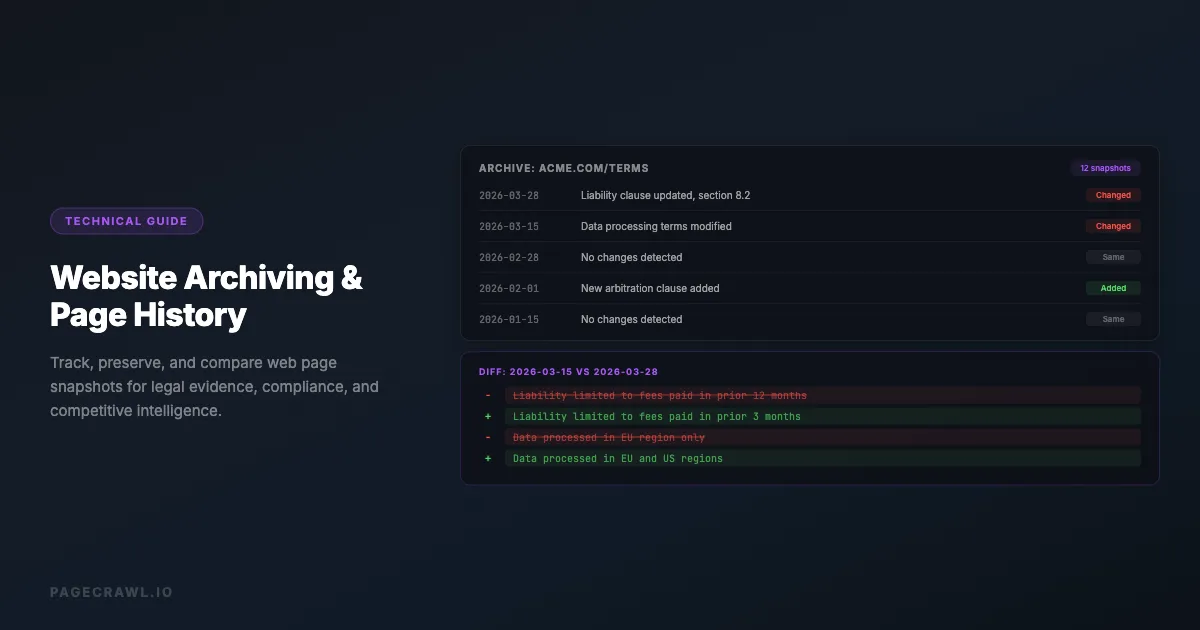
The scenario: A SaaS platform you depend on updates their terms of service. The changes include a new liability limitation clause and modified data processing terms.
With archiving: Your daily archive of their ToS page captures the change. The diff shows exactly which clauses were modified. Your legal team reviews the changes and determines whether they affect your agreement.
Without archiving: You discover the changes weeks later when a dispute arises. You have no record of the previous terms to compare against, making it difficult to identify what changed or when.
Preserving Evidence of Content Theft
The scenario: A competitor copies your product descriptions word-for-word. They later modify their page after receiving your cease-and-desist letter.
With archiving: Your archive of their page shows the copied content with a timestamp. Even after they modify the page, your archive proves what was there and when. This evidence supports your intellectual property claim.
Without archiving: By the time you involve legal counsel, the competitor has changed their page. Without a timestamped archive, proving what was there becomes much harder.
Monitoring Regulatory Compliance Pages
The scenario: Your company's website must display specific regulatory disclosures. A routine content update accidentally removes a required disclosure.
With archiving: Your daily archive detects the missing disclosure within 24 hours. The alert goes to your compliance team, who restore the content before it becomes a regulatory issue. For organizations handling payment pages, PCI DSS 11.6.1, published by the PCI Security Standards Council, specifically mandates this kind of change detection.
Without archiving: The missing disclosure goes unnoticed until the next compliance audit, potentially months later.
How long should you keep website archives?
Match retention to the reason you archived. Legal evidence should survive the relevant statute of limitations, regulated records follow whatever your industry mandates, competitive intelligence rarely needs more than 6-12 months, and general business pages are fine at around 90 days.
How Long to Keep Archives
Retention periods depend on your use case:
Legal evidence: Keep archives for the relevant statute of limitations period, which varies by jurisdiction and type of claim. Common periods are 2-6 years, but some claims have longer windows.
Regulatory compliance: Keep archives for the period required by your industry's regulations. Financial services and tax compliance often require 5-7 years. Healthcare may require longer.
Competitive intelligence: 6-12 months is typically sufficient for pricing and product tracking. Longer for strategic analysis.
General business: 90 days is a reasonable default for pages where you need recent history but not long-term archives.
Storage Formats
Screenshots (PNG/JPEG): Visual proof of what a page looked like. Most universally understood format for sharing with non-technical stakeholders.
Text captures: The actual text content of a page. Best for searchability, diff comparison, and content analysis.
Full HTML: The complete source code of a page. Most comprehensive but hardest to review and compare.
PDF exports: Good for creating self-contained documents that combine visual appearance with text content.
Automating Your Archive Workflow
Scheduled Monitoring
The most reliable archiving approach is automated monitoring that runs on a schedule without any manual intervention.
Configure monitors for each page you want to archive. Set the check frequency based on how often the page changes and how quickly you need to know. The system captures a snapshot at each check interval, stores it, compares it to the previous version, and alerts you if something changed.
This approach eliminates the human error of forgetting to check a page or missing a change that happened between manual checks.
Integrating with Existing Workflows
Archives are most useful when they flow into your existing tools:
Slack or Teams notifications: Get alerts in the channels where your team already works. A change to a competitor's pricing page can land directly in your sales team's Slack channel.
Email digests: For pages that change infrequently, email notifications work well. Your legal team does not need a Slack channel dedicated to terms of service changes.
Webhook integrations: Send archive data to your own systems for processing, storage, or analysis. This is useful for building custom dashboards or feeding archive data into business intelligence tools.
API access: Programmatically retrieve archived content for integration with custom applications, reporting tools, or data pipelines.
Challenges and Solutions
Dynamic Content
Modern websites load content dynamically with JavaScript. A simple HTTP request may not capture the full page content because much of it loads after the initial page render.
Solution: Use browser-based monitoring that renders JavaScript, waits for content to load, and captures the fully rendered page. This is more resource-intensive than simple HTTP requests but captures what users actually see.
Login-Required Pages
Many pages you need to archive sit behind a login wall.
Solution: Some monitoring tools support authenticated sessions. You provide login credentials or session cookies, and the tool authenticates before capturing the page.
Large or Complex Pages
Pages with extensive content, many images, or complex layouts can be challenging to archive completely.
Solution: For content-heavy pages, use text-based capture to focus on the content rather than the visual presentation. For visual pages, use full-page screenshot capture that scrolls through the entire page.
Frequent Changes
Some pages change so frequently that every check produces a change alert, creating noise.
Solution: Use change thresholds to ignore minor changes. For example, set a minimum change percentage so you are only alerted when significant portions of the page change, not when a single character updates.
Choosing your PageCrawl plan
PageCrawl's Free plan lets you monitor 6 pages with 220 checks per month, which is enough to validate the approach on your most critical pages. Most teams graduate to a paid plan once they see the value.
| Plan | Price | Pages | Checks / month | Frequency |
|---|---|---|---|---|
| Free | $0 | 6 | 220 | every 60 min |
| Standard | $8/mo or $80/yr | 100 | 15,000 | every 15 min |
| Enterprise | $30/mo or $300/yr | 500 | 100,000 | every 5 min |
| Ultimate | $99/mo or $999/yr | 1,000 | 100,000 | every 2 min |
Annual billing saves two months across every paid tier. Enterprise and Ultimate scale up to 100x if you need thousands of pages or multi-team access.
For legal and compliance purposes, a single timestamped archive that resolves a contract dispute or supports a takedown notice is worth more than years of subscription fees. Standard at $80/year covers 100 pages, which is enough to archive your own critical documents, the key pages of several competitors, and the third-party terms and API docs your team depends on. Daily archiving at that scale would cost several hundred dollars per year through traditional legal archiving services. Enterprise at $300/year covers 500 pages with every-5-minute checks, SSO, and multi-team access for larger organizations.
All plans include the PageCrawl MCP Server, so compliance and legal teams can ask Claude to summarize what changed across all monitored regulatory pages in the last quarter and surface only the changes that require review. AI assistants can create monitors through conversation on every plan, including Free.
Getting Started
Build your website archiving workflow in three steps:
Archive your critical pages first. Start with your own terms of service, privacy policy, and pricing page. Set daily monitoring with screenshot capture. This creates a compliance safety net with minimal effort.
Add competitor pages. Set up monitors for your top 3 competitors' pricing and product pages. Use text-based monitoring with AI-powered change summaries to quickly understand what changed.
Expand based on need. As you identify additional pages that matter to your business, add them to your monitoring workflow. Use folders and tags to keep your archive organized as it grows.
The goal is to never be caught off guard by a web page change again. Whether it is a legal term that shifted, a competitor price that dropped, or documentation that updated, your archive ensures you always know what changed, when it changed, and what it looked like before.