
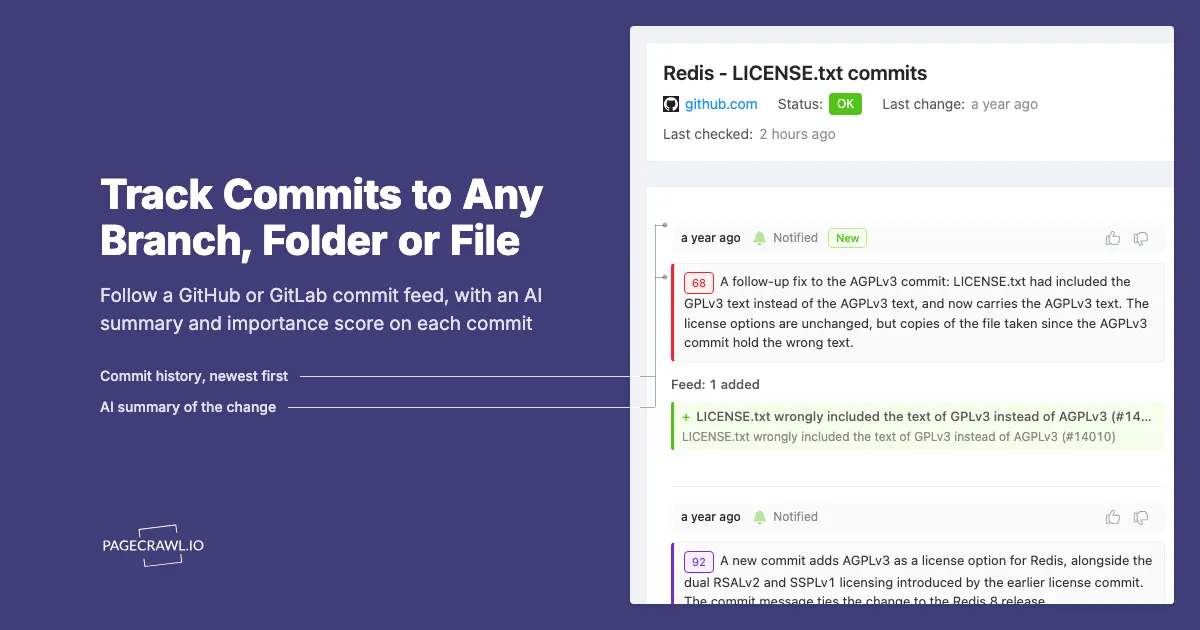
Every change to the Redis license file since 2024 fits in a feed with three entries. On March 20, 2024, a commit titled Change license from BSD-3 to dual RSALv2+SSPLv1 (#13157) deleted the old BSD COPYING file and added LICENSE.txt. On May 1, 2025, Adding AGPLv3 as a license option to Redis! (#13997) added a third license choice for Redis 8. Five days later another commit corrected that one: the new AGPLv3 section had carried the text of GPLv3.
Picture Ottilie, who approves third-party components at a company that ships Redis inside an on-premise appliance. She read the AGPLv3 announcement, saved a copy of LICENSE.txt to the compliance folder the next morning, and moved on. Her archived copy still has the GPLv3 text in it, because nothing prompted her to open the file again after the fix landed.
The repository recorded all three changes, and every repository your product depends on keeps the same kind of record. GitHub and GitLab publish those commits as Atom feeds for a whole branch, for one folder, or for a single file. Point a monitor at the right address and each new commit is picked up on the next scheduled check after it lands, with a summary of what changed, instead of reaching you secondhand.
This guide gives you the exact feed addresses for commits, tags, releases, issues and merge requests on both platforms, shows when to watch a file's raw text instead, and walks through the setup in PageCrawl. If releases are all you need, the guide to monitoring GitHub releases and changelogs covers them in depth.
Why doesn't GitHub's Watch button cover commits to a branch or file?
Because GitHub's notifications follow the activity around the code, not the code itself. The Watch menu's Custom option lets you follow issues, pull requests, releases, security alerts and discussions for a repository, but nothing in it fires when a commit lands on a branch or touches one file. For that, GitHub publishes commit feeds instead.
GitHub's notification documentation describes the menu precisely: you can watch a repository, ignore it, or pick Custom and choose event types such as issues, pull requests, releases, security alerts or discussions. Custom is the right tool for issues and pull requests on GitHub. It simply has no event for "this branch moved" or "a commit changed this file".
That leaves a few practical routes for commits:
| Approach | Covers commits to a branch or file | What you end up with | Upkeep |
|---|---|---|---|
| Watch, then Custom | No | Notifications for issues, pull requests, releases, security alerts and discussions | None |
| Commit feed in a feed reader | Yes | A list of new commits, unfiltered | Low |
| Script that polls the REST API | Yes | Whatever you build: storage, comparison, alert delivery | High |
| PageCrawl monitor on the commit feed | Yes | Alerts with an AI summary, a change history and your notification channels | Low |
The scripted route is where engineers usually start, and it works until it does not. Unauthenticated requests to the GitHub REST API are limited to 60 an hour per IP address, according to GitHub's REST API rate limit documentation, so a cron job that checks a dozen repositories every ten minutes already needs a token, plus somewhere to remember the last commit it saw, retry handling and code to deliver the alert. The Atom feeds need none of that. For public repositories they need no token, and they already list the newest commits first.
What are the GitHub feed addresses for commits, branches and files?
Every public GitHub repository publishes Atom feeds you can build by hand: commits.atom for the default branch, commits/{branch}.atom for any branch, and commits/{branch}/{path}.atom for one file or folder. Tags and releases have their own feeds, and a raw address gives you the file's current text.
| What you want to follow | Address |
|---|---|
| Commits on the default branch | https://github.com/{owner}/{repo}/commits.atom |
| Commits on one branch | https://github.com/{owner}/{repo}/commits/{branch}.atom |
| Commits that touch a file or folder | https://github.com/{owner}/{repo}/commits/{branch}/{path}.atom |
| Commits by one author | https://github.com/{owner}/{repo}/commits/{branch}.atom?author={username} |
| Tags | https://github.com/{owner}/{repo}/tags.atom |
| Releases | https://github.com/{owner}/{repo}/releases.atom |
| A file's current text | https://raw.githubusercontent.com/{owner}/{repo}/{branch}/{path} |
A few details decide whether an address works the way you expect:
- Branch names can contain dots and slashes.
https://github.com/microsoft/vscode/commits/release/1.95.atomfollows therelease/1.95branch exactly as written. - Paths can be files or folders.
https://github.com/redis/redis/commits/unstable/LICENSE.txt.atomlists every commit that touched the Redis license file, andhttps://github.com/nodejs/node/commits/main/doc/api.atomfollows the whole Node.js API documentation folder. - A typo returns a 404. A branch or path that does not exist answers "not found" rather than an empty feed, so open the address in a browser before you monitor it.
- Commit feeds hold up to about 20 entries, newest first, one per commit, with the commit message as the entry's text.
- The tags feed is thin. Each entry names a tag, sometimes with the message attached to it, and says little about what changed.
- The releases feed includes more than releases. Pre-releases such as betas and release candidates appear in it, as do tags that have no release, and a feed monitor set up in Track New Page alerts on each of them. It is also ordered by day rather than strictly by publish time, so the top entry is not always the newest stable release.
https://github.com/{owner}/{repo}/releases/latestredirects to the newest stable release, but it is a page rather than a feed. A repository with no releases or tags gives an empty feed.
Note: GitHub cuts long commit titles at about 70 characters in the feed and adds an ellipsis, as in LICENSE.txt wrongly included the text of GPLv3 instead of AGPLv3 (#14…. The entry's text still carries the commit message, so the item shows more than the shortened title.
What GitHub does not publish as a feed
There is no feed for issues, pull requests, security advisories or new branches. issues.atom and pulls.atom answer with an HTTP 406 error instead of a feed, so on GitHub the Watch menu's Custom option is the way to follow those events. Resist monitoring the repository's home page as a stand-in: its star, fork and issue counters and its relative dates ("2 hours ago") change constantly, which turns the monitor into a stream of changes that mean nothing.
What are the GitLab feed addresses for commits, tags and merge requests?
GitLab publishes more feeds than GitHub, including issues and merge requests. Releases live at /-/releases.atom, tags at /-/tags?format=atom, and commits at /-/commits/{branch}?format=atom, with a file or folder path added after the branch. Project paths can include nested groups, and issue and merge request feeds also exist for whole groups.
| What you want to follow | Address |
|---|---|
| Releases | https://gitlab.com/{group}/{project}/-/releases.atom |
| Tags | https://gitlab.com/{group}/{project}/-/tags?format=atom |
| Commits on a branch | https://gitlab.com/{group}/{project}/-/commits/{branch}?format=atom |
| Commits on the default branch | https://gitlab.com/{group}/{project}/-/commits/HEAD?format=atom |
| Commits that touch a file or folder | https://gitlab.com/{group}/{project}/-/commits/{branch}/{path}?format=atom |
| Issues | https://gitlab.com/{group}/{project}/-/issues.atom |
| Merge requests | https://gitlab.com/{group}/{project}/-/merge_requests.atom |
| Issues across a group | https://gitlab.com/groups/{group}/-/issues.atom |
| Merge requests across a group | https://gitlab.com/groups/{group}/-/merge_requests.atom |
| A file's current text | https://gitlab.com/{group}/{project}/-/raw/{branch}/{path} |
The GitLab details that trip people up:
- Tags need
?format=atom. The look-alike/-/tags.atomredirects to the sign-in page instead of returning a feed. - Nested groups are part of the path. For the
gitlab-org/ruby/gems/gitlab-exporterproject, the releases feed ishttps://gitlab.com/gitlab-org/ruby/gems/gitlab-exporter/-/releases.atom. - The releases feed includes every release, newest first, and a monitor's Track first setting keeps the newest ones and ignores the long tail. GitLab documents the feed in its guide to tracking releases with an RSS feed.
- Commit feeds hold up to about 40 entries, and many are merge commits. On a project that merges through merge requests, half the list can be entries titled
Merge branch '...' into 'main'. - Issue and merge request feeds keep list filters.
/-/issues.atom?state=opened&label_name[]=bugfollows only open issues labelled bug, and/-/merge_requests.atom?state=mergedfollows merged work only.
Tokens and self-hosted servers
The addresses in this guide are for public projects, and they need no token. Be careful with feed links copied from GitLab while you are signed in: they can carry a token tied to your account, and the GitLab feed token documentation is direct about the risk, since anyone who has your feed token can view your feed activity, including confidential issues, as if they were you. For a public project, use the plain address. Self-hosted GitLab servers publish the same addresses under their own domain. Some only answer visitors using a regular browser, and if a feed cannot be read, monitor the matching page, such as the project's Releases page, with Full Page Text instead.
Should you watch the commit feed or the file itself?
Watch the commit feed when you want to know that a file changed and why, in the author's own words. Watch the raw file when you need the exact wording that changed, line by line. For a license, a changelog or a data file your product reads, run both: the feed explains the change and the file shows it.
| Commit feed for a path | Raw file address | |
|---|---|---|
| Each alert shows | The new commit: title, message and link | The lines that were removed and added |
| Tells you | That the file changed, and the author's reason | Exactly what the text says now |
| Tracking mode | Feed | Full Page Text, with Everything selected |
| Noise | One item per commit | Low for prose, higher for minified data |
| Limits | About 20 newest commits on GitHub, 40 on GitLab | Very large files are capped, and only the beginning is kept |
Raw addresses return plain text with nothing around it, so Full Page Text compares the file itself, line by line. Very large files are capped, and only the beginning is kept. That suits a CHANGELOG.md that adds new entries at the top, and it is worth knowing before you point a monitor at a generated file that runs to megabytes.
A JSON data file works the same way. It compares cleanly when it is pretty-printed with one value per line, while a minified file is a single long line, so any edit marks the whole line as changed. When one value inside the file is all that matters, a JSON Path tracked element can watch that value alone, and the JSONPath and jq guide shows how to write the expression.
For license files across a whole dependency list, the guide to monitoring open-source license changes covers which pages to watch beyond the repository itself.
What does a license change look like in a commit feed?
A license change arrives as an ordinary commit entry: a title such as Change license from BSD-3 to dual RSALv2+SSPLv1 (#13157), the commit message and a link to the commit. Redis makes a good test case, because the history of its license file is short, public and consequential, and every step of it is in the feed.
The default branch of Redis is unstable, so the feed for its license file is:
https://github.com/redis/redis/commits/unstable/LICENSE.txt.atomThat feed holds exactly three entries:
| Commit date | Title as the feed shows it | What changed in LICENSE.txt |
|---|---|---|
| March 20, 2024 | Change license from BSD-3 to dual RSALv2+SSPLv1 (#13157) | File created: from Redis 7.4, your choice of RSALv2 or SSPLv1 |
| May 1, 2025 | Adding AGPLv3 as a license option to Redis! (#13997) | From Redis 8, a third choice: AGPLv3 |
| May 6, 2025 | LICENSE.txt wrongly included the text of GPLv3 instead of AGPLv3 (#14… | The AGPLv3 section's body replaced with the actual AGPLv3 text |
Redis announced the first two changes on its own blog the same day each commit landed, most recently in Redis is now available under the AGPLv3 open source license. The third commit is the easiest to miss: a correction to text that had already been published, five days after the announcement.
A monitor on that feed records whatever is already listed as its baseline. Each later commit appears as an added item with its title, commit message and link, and AI summarizes what happened and scores how important the change is, so the AGPLv3 commit and the correction five days later each arrive as their own alert, scored on how much they matter.
Pair the feed with a Full Page Text monitor on https://raw.githubusercontent.com/redis/redis/unstable/LICENSE.txt and the correction becomes concrete. The check after May 6, 2025 shows the preamble of the AGPLv3 section changing from the GPLv3 wording to the AGPLv3 wording, starting with:
- The GNU General Public License is a free, copyleft license for
- software and other kinds of works.
+ The GNU Affero General Public License is a free, copyleft license for
+ software and other kinds of works, specifically designed to ensure
+ cooperation with the community in the case of network server software.
There is one more lesson in this history: the license file moved. The 2024 commit deleted COPYING, so a monitor on https://github.com/redis/redis/commits/unstable/COPYING.atom shows that same commit as its newest entry, with a 2020 commit titled updated copyright year just below it. When a file you watch is deleted or renamed, its feed stops at the commit that removed it, and that final commit is your cue to add a monitor for the new path. A relicensing commit can also touch more than one file: the 2024 Redis commit added REDISCONTRIBUTIONS.txt as well, and the 2025 one edited it again.
Which repository files are worth watching?
Watch the files whose changes matter before any release ships: the license, the changelog, the security policy, the schemas and data files your code reads, and the folders that hold API documentation. Add a branch feed for each release branch you run, because fixes land there before they are tagged.
| File or folder | Why it matters | How to watch it |
|---|---|---|
LICENSE, LICENSE.txt, COPYING, NOTICE |
The terms you use and ship the code under | Path feed plus the raw file |
CHANGELOG.md |
Entries often appear before the tagged release | Raw file, newest entries at the top |
SECURITY.md |
Supported versions and how to report a vulnerability | Path feed |
An API docs folder such as doc/api |
Behavior changes documented ahead of a release | Folder path feed |
Schemas and data files (.json, .yaml) |
Formats your integration parses | Raw file, or a JSON Path element for one value |
A release branch such as release/1.95 |
Fixes heading for the version you run | Branch feed |
.github/workflows |
How the project builds and publishes what you install | Folder path feed |
Two rows deserve a closer look. Many projects keep an "Unreleased" heading at the top of CHANGELOG.md and add to it as changes merge, so the raw file gives you an early read on the next release, and because the newest entries sit at the top, the cap on very large files works in your favor. A folder feed on .github/workflows covers the supply-chain side: it shows when a project changes how it builds, signs or publishes its packages, which pairs well with monitoring package registry releases for the packages themselves.
How do you set up commit tracking in PageCrawl?
Copy the feed address for the branch, folder or file, paste it into Track New Page and select Load Page. PageCrawl recognizes the Atom feed and selects Feed, so you choose how many items to track and what to be alerted about, set a check frequency and notification channels, then select Start Tracking.
Step 1: Build and test the address
Pick the narrowest address that covers what you care about. A file's path feed beats a folder's, and a folder's beats the whole branch. Open it in a browser first: you should see XML with one <entry> per commit. On GitHub, a 404 means a typo in the branch or the path. On GitLab, a wrong branch returns a 404 but a wrong path returns an empty feed instead, so check that commits are listed.
Step 2: Paste it into Track New Page
Paste the address into Track New Page and select Load Page. PageCrawl shows Atom feed detected with the number of items found and selects Feed under What to Track. You can also paste a GitHub or GitLab.com repository's Releases, Tags or Commits page, or a file's own page, into Track New Page or the mobile app: PageCrawl follows the same feed or raw file.
Step 3: Choose how many items to keep and what alerts you
Track first sets how many of the newest items the monitor keeps, and the default of 10 suits a file or folder feed. On a busy branch, more than 10 new commits between two checks means the older ones are never reported, so raise Track first where your plan allows (GitHub's commit feed lists about 20 entries, GitLab's about 40) or check more often. Under Alert me about:, Items added is always on, and that is the alert you want for new commits. Leave Items removed off on commit feeds, because older commits leave the list as new ones arrive. Content changes earns its place on GitLab issue and merge request feeds, where titles get edited after they are posted.
Step 4: Shape the summary with What matters
On a feed monitor set up in Track New Page, every new commit sends an alert, because Items added is always on, so What matters: when to notify me does not hold a commit back. A sentence there, such as "Flag changes to license terms, supported versions or public APIs," still shapes the AI summary and importance score of each change. To filter by importance, use a Full Page Text monitor, such as one on the file's raw address, where changes that score below the minimum importance do not notify you.
Step 5: Set the check frequency and channels
Under Check Frequency, daily is enough for a license or changelog file, while a release branch you deploy from may justify hourly checks or faster, depending on your plan. Under Notify me via, choose email or a connected Slack, Discord, Telegram or Teams channel. Feed checks use a lightweight fetch rather than a full browser, so they are quick and there is no screenshot to review: the alert carries the commit itself.
Step 6: Start Tracking
Select Start Tracking. The first check is a silent baseline that records the commits already in the feed, so none of them triggers an alert. From then on, each new commit arrives as an added item on the next scheduled check after it lands.
For a raw file, Steps 2 and 3 differ: there is no feed to detect, so keep Full Page Text with Everything selected under What to Track. The whole file is then compared, and there is no Track first or Alert me about: to set. The tutorial for monitoring GitHub and GitLab repositories walks through each address type, and the Feed tracking mode reference covers every feed option.
How do you stop a busy branch from flooding you with alerts?
Narrow the feed address first, then filter by author or by merged work, and move what is left into a digest. A license file's path feed changes a few times a year, but the default branch of an active project can gain dozens of commits a day, and an alert for each one quickly trains you to ignore alerts.
Four habits keep a busy feed useful:
- Narrow the address before anything else.
commits/main/docs.atominstead ofcommits/main.atomdrops every commit that does not touch the docs folder. A filter in the address beats a filter applied after the fact. - Filter by author on GitHub. Adding
?author={username}keeps one person's commits, which helps when a single maintainer owns the area you depend on. - Follow merged work on GitLab.
merge_requests.atom?state=mergedgives you one entry per merged change, instead of each change's commits plus a merge commit. - Bundle the rest into a digest. A scheduled report groups monitors into one daily, weekly or monthly summary, so a high-volume feed can live in a digest while your license and security monitors keep sending individual alerts.
Can you create these monitors through the API or an AI assistant?
Yes. Through the REST API or the MCP server, give PageCrawl the feed address and set the tracking mode to feed, or use the raw address with Full Page Text for a file. In the app, Bulk Add on Track New Page takes many addresses at once, one per line, with the same settings for each.
The quick-track endpoint takes the address, the mode, a frequency in minutes and an optional plain-English focus:
curl -X POST "https://pagecrawl.io/api/track-simple" \
  -H "Authorization: Bearer YOUR_API_TOKEN" \
  -H "Content-Type: application/json" \
  -d '{
    "url": "https://github.com/redis/redis/commits/unstable/LICENSE.txt.atom",
    "tracking_mode": "feed",
    "frequency": 1440,
    "ai_page_focus": "Notify me when the license options or terms change."
  }'
For a raw file, send the raw address with "tracking_mode": "fullpage". To load a long list from a script, keep one feed address per line in feeds.txt:
while read -r feed; do
  curl -s -X POST "https://pagecrawl.io/api/track-simple" \
    -H "Authorization: Bearer $PAGECRAWL_TOKEN" \
    -H "Content-Type: application/json" \
    -d "{\"url\": \"$feed\", \"tracking_mode\": \"feed\", \"frequency\": 1440}"
done < feeds.txt
Bulk Add and the loop both apply one set of settings to every address, so add feeds and raw files in separate batches. Your API token is under Settings > API access. The developer guide to the PageCrawl API covers the rest of the endpoints, and a webhook can post each detected change to your own endpoint as JSON. With the PageCrawl MCP server connected, you can ask an assistant such as Claude to "monitor https://github.com/redis/redis/commits/unstable/LICENSE.txt.atom as a feed and tell me when the license changes", and it creates the monitor for you.
Choosing your PageCrawl plan
PageCrawl's Free plan is enough to validate the approach on your most critical pages. Most teams graduate to a paid plan once they see the value.
| Plan | Price | Pages | Checks / month | Frequency |
|---|---|---|---|---|
| Standard | $8/mo or $80/yr | 100 | 15,000 | every 15 min |
| Enterprise | $30/mo or $300/yr | 500 | 100,000 | every 5 min |
| Ultimate | $99/mo or $999/yr | 1,000 | 100,000 | every 2 min |
Annual billing saves two months across every paid tier. Enterprise scales up to 100x and Ultimate up to 10x if you need thousands of pages or multi-team access.
At an engineering hourly rate, Standard at $80/year pays for itself the first time you catch a breaking API change, a deprecated endpoint, or a silent config change before it takes down production. 100 monitored pages is enough to cover the changelogs and docs of every third-party API your stack depends on. Enterprise at $300/year adds 5-minute checks and 500 pages. All plans include the PageCrawl MCP Server, which plugs directly into Claude, Cursor, and other MCP-compatible tools. Developers can ask "what changed in the Stripe API docs this month?" and get a summary pulled from your own monitoring history. AI assistants can create monitors through conversation on every plan, including Free, turning your tracked pages into a living knowledge base instead of a pile of alert emails.
Getting Started
Pick the one file whose change would cost you the most to discover late. For most teams that is the license of a core dependency or the changelog of the library they upgrade most often.
- Build its path feed,
https://github.com/{owner}/{repo}/commits/{branch}/{path}.atomor the GitLab equivalent, and open it in a browser to confirm it lists commits. - Paste it into Track New Page, keep Feed selected and set a daily Check Frequency. A feed monitor set up there sends an alert for every new commit to the file.
- Add the same file's raw address as a Full Page Text monitor, so every commit alert has the changed lines beside it.
Run that pair for a couple of weeks. Once you trust it, add the release branches you deploy from, the documentation folders of the APIs you call, and the merge request feeds of the GitLab projects you contribute to. Feed monitors are available on every PageCrawl plan, including Free, so the first one costs nothing to try.


