Ines plans the shutdown calendar for two packaging lines. In March she priced the spare gearbox seal kit and the VFD that drives the main conveyor, wrote both into the October outage plan, and moved on. The distributor page said the seal kit was in stock and the drive carried a six-week factory lead time. Comfortable. Nothing to chase.
In August the buyer went to raise the purchase order and the drive page read twenty-six weeks. Nobody had emailed her. The part had never gone out of stock, so no back-in-stock alert fired. The number in the lead-time field had simply crept upward across five months while the page kept saying "available to order," and the only thing that changed was the outage she could no longer complete. The line ran on a borrowed drive from a decommissioned machine until February.
That is the shape of almost every MRO parts surprise. The part did not vanish. A field on a public distributor page changed value quietly, no notification exists for that kind of change, and nobody was looking at the page on the day it moved. This guide covers which fields predict a shortage, which distributor pages carry them in public, why vendor notifications miss the case that hurts you, and how to monitor the handful of spares where a lead-time slip costs production hours.
Why do MRO lead times move without anyone telling you?
Lead times are estimates the distributor inherits from the manufacturer and republishes on the product page. They drift as factory backlogs, allocation decisions, and component shortages work their way downstream. No distributor emails you when an estimate on a part you looked at once quietly doubles, because you never bought it and you are not on any list for it.
The Institute for Supply Management tracks this at the industry level. In its Manufacturing Report On Business, ISM publishes the average commitment lead time reported by purchasing managers for maintenance, repair and operating supplies, alongside production materials and capital expenditures. Those averages move month to month, a useful reminder that the number on a part page is a living value, not a fact about the part.
The estimate is upstream of the distributor
A distributor holding no stock is quoting you the manufacturer's build cycle plus transit. When the manufacturer reallocates capacity or pushes a product family down its priority list, the published figure updates on the distributor's page without ceremony. Same part number, same page, different integer.
"Available to order" hides the whole problem
Stock status and lead time are separate signals, and only one of them triggers any alert anywhere. An item can sit at zero on-hand for two years and be fine to plan around if the lead time is two weeks. An item can be orderable, non-stocked, and carry a thirty-week factory lead time, which makes it unobtainable inside your planning horizon. Watching "in stock or not" tells you almost nothing about whether your October outage survives.
Drift is slow, so nobody catches it by eye
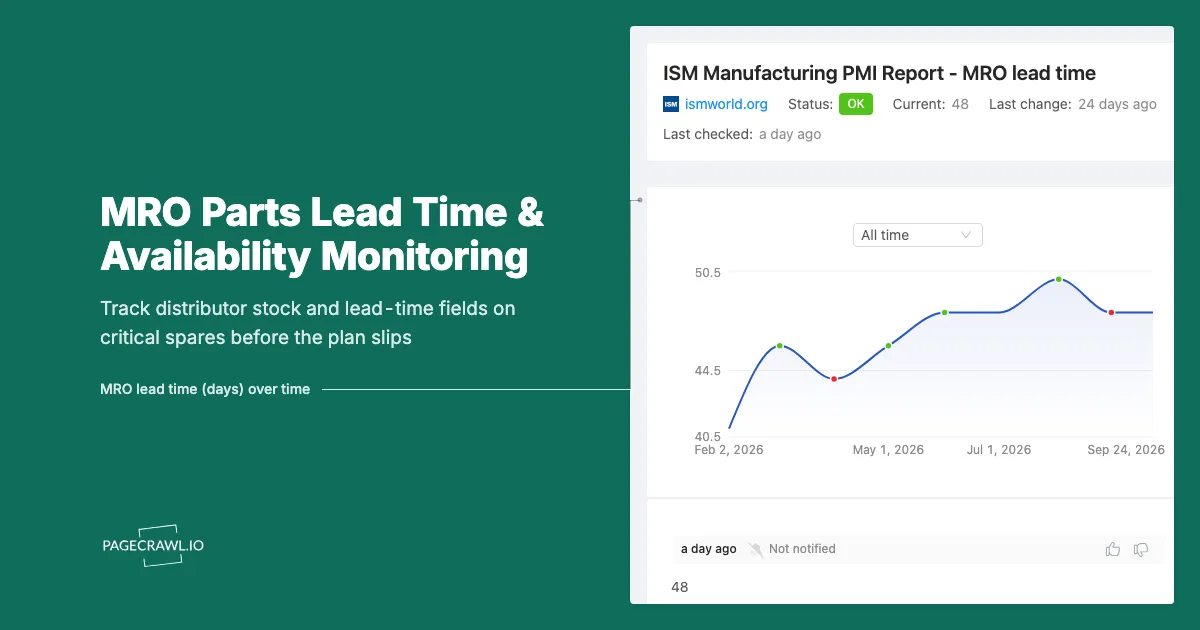
A part going from six to twenty-six weeks rarely jumps in one step. It goes to eight, then twelve, then eighteen. Each move is small enough to look like noise, and the gaps between moves are long enough that no human rechecks the page. One check is a value, a hundred checks are a curve, and only the curve shows you the drift while there is still time to reorder.
Which fields on a distributor page actually predict a stockout?
Four fields carry nearly all the signal: on-hand stock quantity, the published lead time in weeks or days, the stocking status (stocked, non-stocked, special order, discontinued), and the estimated ship or availability date. Stock quantity trending down and lead time trending up in the same month is the strongest early warning you will get.
On-hand quantity, not just in-stock
A binary "in stock" badge is far weaker than the actual number. A distributor showing 412 units of a bearing is a different world from one showing 6, even though both render as green. Watching the integer lets you set a threshold that fires while there is still time to place an order, rather than after the badge finally flips.
The lead-time field in weeks or days
This is the field Ines needed and nobody watched. Electronics distributors label it explicitly. Product pages on Mouser Electronics show a factory lead time in weeks for backordered items, and DigiKey distinguishes warehouse stock from factory stock and publishes manufacturer standard lead times. Industrial and MEP distributors are less uniform in wording but carry the same idea as a dispatch estimate or an expected availability date.
Stocking status and lifecycle wording
Watch for the words that change the category of the part, not its quantity. "Non-stocked item," "special order," "no longer available," "last time buy," and "replaced by" all mean the part has moved to a different procurement path and probably a different plan. A lifecycle change on a critical spare is more consequential than any single lead-time move, because it usually means requalifying a substitute.
| Field on the page | What a change means | How urgent |
|---|---|---|
| Lead time in weeks | Manufacturer backlog moved, planning horizon shifted | High if the part sits on a dated plan |
| On-hand quantity | Buffer eroding, next buyer may find zero | High below your threshold |
| Stocking status | Procurement path changed, substitute may be needed | Highest, often irreversible |
| Estimated ship date | Slipping delivery on an item you already plan to buy | High near an outage date |
| Minimum order quantity | Holding cost and order economics changed | Medium, budget impact |
| Price | Contract and budget variance | Medium, rarely a downtime risk |
Which distributor pages are worth monitoring?
Monitor the public product pages of the distributors you actually buy the part from, one page per critical part number. Electronics and automation distributors publish stock quantity and factory lead time openly. General industrial and MRO distributors publish availability and dispatch estimates, sometimes behind a location or account selection you set once.
Electronics and automation distributors
DigiKey, Mouser Electronics, and RS publish per-part pages with a stock number and a lead-time or back-order dispatch estimate visible without an account. These are the cleanest pages to monitor: the fields are labelled, numeric, and sit in a stable position. If your critical spares include drives, PLC modules, HMI panels, or sensors, this is where the early warning lives.
General industrial and MRO catalogues
Mechanical spares (bearings, seals, couplings, motors, filters, belts) usually come from a broadline MRO distributor or a manufacturer-authorised specialist. Availability wording varies more, and some catalogues require you to pick a branch or sign in before the real number appears. Where the page needs a session, set it up as an authenticated monitor so checks see your buyer's view rather than a public shell.
Manufacturer product and lifecycle pages
The distributor page tells you what is available now. The manufacturer's product page tells you whether the part has a future. Product change notices, "last time buy" announcements, and successor part numbers are published by the OEM first and reach distributor pages later, so an OEM lifecycle page for a critical drive family deserves a monitor of its own. Our guide to supply chain monitoring through vendor website tracking applies the same logic to your wider vendor footprint.
If a primary channel goes long, the practical answer is often an authorised alternate. Monitoring a second listing for the same part number turns a panic search into a standing feed, because you will already know which alternate had inventory last week.
Why isn't the distributor's own back-in-stock notification enough?
Distributor notifications solve exactly one case: an out-of-stock item returning to stock. They do not tell you when a lead time doubles, when quantity falls from 400 to 9, when an item is flagged non-stocked, or when a minimum order quantity appears. Those are the changes that break a maintenance plan, and no vendor sends an email about them.
It only fires on zero
The back-in-stock alert requires the part to hit zero first, by which point your options have narrowed to waiting or paying for expedite. Every useful warning happens before zero, in the quantity trend and the lead-time field. It is also opt-in per part, per account. Staff change, accounts change, and the subscriptions survive neither, so six months later nobody can say which of the 40 critical spares still has anyone watching it.
No thresholds, no history, no evidence
Vendor notifications are binary and leave nothing behind. You cannot ask one "when did this part go from eight weeks to twenty-six?" and you cannot show a plant manager the trace. Independent monitoring keeps a dated record of the value on each check, which turns a lead-time argument into a lead-time fact. To keep alerts quiet until a number crosses a line you set, see our walkthrough of conditional alerts using price, keyword, and threshold rules.
Your ERP does not fill the gap either. It knows your on-hand, your reorder point, and your open orders, and nothing about the supplier's on-hand or the manufacturer's backlog until a purchase order is placed and a promised date comes back.
How do you set up MRO lead-time monitoring in PageCrawl?
Point PageCrawl at the distributor page for one critical part, tell it to watch the stock and lead-time area rather than the whole page, check daily, and route alerts to the channel your maintenance planners actually read. Setup for the first part takes a few minutes, and the next thirty are copies with a different URL.
Pick the parts first, not the pages. Start with spares that are single-sourced, sit on a dated outage plan, or would stop a line if they failed. Ten well-chosen part numbers beat two hundred consumables. Write the list before you open PageCrawl.
Add the distributor product URL. Use the exact per-part page your buyer would order from, including any variant or pack-size selection in the URL. A category or search-results page changes constantly for reasons that have nothing to do with your part.
Choose the tracking mode. For a page with a clearly labelled quantity or lead-time value, a specific-text or specific-number monitor on that field gives you the cleanest signal and lets you set numeric thresholds. If the page layout is inconsistent, use a content monitor scoped to the availability block so the checks ignore recommendations, reviews, and banner carousels.
Set the check frequency to match the decision. Lead times move on a scale of weeks, so a daily check suits most spares and keeps alert volume sane. Reserve faster checks for parts you are actively chasing during an allocation squeeze, where returning stock is claimed by whoever orders first. The free tier checks every 60 minutes, Standard every 15, Enterprise every 5, and Ultimate every 2.
Add thresholds and keyword rules. Fire when the lead time exceeds the number of weeks that would break your plan, or when on-hand quantity falls below a buffer you choose. Add keyword conditions for lifecycle wording such as "non-stocked," "special order," "last time buy," "discontinued," and "no longer available" so a category change escalates louder than a numeric wobble.
Choose notification channels. Route critical-spare alerts to a shared channel rather than one person's inbox. PageCrawl sends to email, Slack, Discord, Microsoft Teams, Telegram, and webhooks. A maintenance planning channel puts the alert in front of the planner and the buyer together, and a webhook can open a task in your CMMS.
Group monitors by criticality and by line. Folders and tags keep "Line 2 critical spares" separate from "consumables" so a weekly digest does not drown an escalation path.
Turn on screenshots and review after two weeks. A dated screenshot showing twenty-six weeks is the artefact that ends the argument about whether the plan was realistic when it was written, and it is useful evidence in a supplier performance review. After a fortnight, exclude anything that fired on a promo block and tighten any threshold that never fired at all.
How do you decide which spares deserve a monitor?
Score each part on three questions: what does the line lose per hour if this part fails and you have none, is there a second source you could qualify quickly, and how long is the current lead time relative to your planning horizon. Parts that are expensive to be without, single-sourced, and long-lead go on the list first.
Tier 1: single-sourced and line-stopping
Custom drives, OEM-specific control modules, proprietary gearboxes, and any part with one authorised source. These are the parts where a lifecycle change means a redesign, not a reorder. Monitor the distributor page and the OEM product page, check daily, escalate to a shared channel, and set a low threshold for both quantity and lead time.
Tier 2: long-lead but substitutable
Motors, larger bearings, specialty seals, and instrumentation with a real alternate. Monitor the primary distributor page and one alternate, daily, with a threshold on lead time. A change here means "start the substitution conversation," not "stop the plant."
Tier 3: commodity consumables
Filters, belts, standard fasteners, lubricants. Do not monitor these individually. Watch a few representative items as a barometer for the category and let a weekly digest carry them. Monitoring everything is how a team learns to ignore alerts, so read our guide to reducing website monitoring false positives before scaling past a few dozen parts.
Tie the list to a real plan
The clearest filter is your outage calendar. Every part written into a dated shutdown plan gets a monitor from the day it enters the plan until the day it is on site. That one rule catches most of the damage, because a lead-time slip only matters when there is a date it can miss.
What problems come up when monitoring distributor pages?
The recurring issues are region and account variation in what a page displays, layout noise that generates false alerts, and pages that need a session before showing real numbers. All three are solvable with setup choices, and none of them is a reason to keep planning outages against a number somebody read in March.
Region, currency, and branch selection
Many distributor sites show different stock and dispatch estimates by country or branch. Set the monitor up against the regional site you buy from, with the branch or delivery location already chosen, so the value you watch is the value your buyer will see.
Layout noise and sessions
Product pages carry recently viewed items, promotional strips, and recommendation blocks that change constantly, so scope the monitor to the availability and lead-time area rather than the whole page and exclude any noisy region that does fire. Separately, some catalogues only reveal contract pricing and true availability once you are signed in. Configure those as authenticated monitors so each check sees the account view instead of the public shell, and refresh the session if the site eventually expires it.
Alerting is not procurement
A monitor tells you a number changed. It does not raise a purchase order, negotiate an expedite, or qualify a substitute. Decide in advance who owns the response for each tier, because an alert nobody owns is a slower version of finding out too late. Pair part monitoring with broader supplier and distributor price list monitoring, since the same page usually carries the commercial change too.
Choosing your PageCrawl plan
PageCrawl's Free plan lets you monitor 6 pages with 220 checks per month, which is enough to validate the approach on your most critical pages. Most teams graduate to a paid plan once they see the value.
| Plan | Price | Pages | Checks / month | Frequency |
|---|---|---|---|---|
| Free | $0 | 6 | 220 | every 60 min |
| Standard | $8/mo or $80/yr | 100 | 15,000 | every 15 min |
| Enterprise | $30/mo or $300/yr | 500 | 100,000 | every 5 min |
| Ultimate | $99/mo or $999/yr | 1,000 | 100,000 | every 2 min |
Annual billing saves two months across every paid tier. Enterprise and Ultimate scale up to 100x if you need thousands of pages or multi-team access.
In event-driven strategies, minutes matter. One actionable signal surfaced before the broader market reacts can return more than a year of Ultimate. Standard at $80/year covers the core IR, press, and filings pages for a handful of positions. Enterprise at $300/year scales to a full watchlist. All plans include the PageCrawl MCP Server, so you can ask Claude to summarize every material change across a company's IR, press, and filings over any period you care about and get the evidence pulled straight from your monitoring archive. AI assistants can create monitors through conversation on every plan, including Free. Ultimate at $999/year adds 2-minute frequency and web archiving, which matters if you need provable timestamps for a thesis.
Getting Started
Open your next shutdown plan and pull out the five parts you would least like to be waiting for. For each one, copy the distributor product URL your buyer would order from, add it to PageCrawl scoped to the availability and lead-time area of the page, and set a daily check.
Then set two rules per part: alert when the lead time exceeds the number of weeks that would miss your outage date, and alert on lifecycle wording such as "non-stocked," "special order," or "no longer available." Send both to a shared maintenance planning channel so the planner and the buyer see them together, and turn on screenshots so every alert carries dated evidence.
Run it for a month. The first time a monitor catches a part slipping from eight weeks to sixteen while there is still time to reorder, expand to the rest of your Tier 1 spares and add a second source for each.
Stop discovering lead times at the purchase order. Start watching the field that moves.