Malik runs labor relations for a company with eleven distribution centers across five states. He found out about the petition at his Reno site the way he always finds out: a plant manager forwarded a photo of a notice taped to the break room wall, three days after it was filed. By then the pre-election conversation had been going on inside the building for weeks, the hearing date was already set, and Malik had a fraction of the runway he thought he had.
The information was never hidden. The National Labor Relations Board publishes recent petition filings on its own website, updated as regional offices intake them, alongside election tallies for cases that have already gone to a vote. The petition at the Reno site appeared in that public list before the notice went up on the wall. Nobody on Malik's team was watching the page, because watching it means loading the same table every morning and comparing it against yesterday in your head.
NLRB representation cases move on a compressed calendar, the public data is genuinely public, and the difference between finding out on day one and day four is the difference between a plan and a scramble. It cuts the other way too: union organizers, labor journalists, and analysts tracking a sector all want to know which employers were petitioned this week, without refreshing a government table by hand.
This guide covers which NLRB pages carry the signal, how fast a representation case moves once a petition lands, why the agency's own case-follow email does not solve the discovery problem, and how to set up monitoring that tells you about a filing on the next check rather than the next rumour.
Why do NLRB election petitions matter enough to monitor?
A representation petition starts a clock that you cannot pause. It triggers posting obligations, a pre-election hearing, a voter list deadline, and eventually a vote whose result binds the employer for years. Finding out days late does not extend any of those deadlines. It only shortens your side of them.
The filing starts a compressed sequence
An RC petition (filed by employees or a union) requires a showing of interest from at least 30 percent of the employees in the proposed bargaining unit, according to the NLRB's own representation case procedures fact sheet. Once docketed, the region moves quickly: the employer posts and distributes a Notice of Petition for Election, a pre-election hearing is scheduled, and the employer must produce a voter list with names and contact information within two business days of the direction of election or approval of an election agreement. These are business-day deadlines, not month-long comment periods, so a three-day delay in learning the petition exists eats most of the preparation window.
The stakes are legal and durable
A certified union becomes the exclusive bargaining representative of the unit, and the obligations that follow (bargaining in good faith, information requests, unfair labor practice exposure for unilateral changes) persist for years. Missteps in the pre-election window, made under time pressure by managers who were briefed late, are what generate objections and charges. Monitoring buys your labor counsel more hours for the price of a browser check.
A recognition demand carries its own deadline
Separately from petitions, the Board's 2023 Cemex Construction Materials Pacific decision means an employer who receives a demand for recognition and neither recognizes the union nor promptly files its own RM petition can end up under a bargaining order without an election at all. The Board described "promptly" as normally meaning within two weeks of the demand, and later guidance has softened how rigidly that line is applied, but no version of it rewards an employer who was slow to notice.
Industry-level signal, not just your own sites
Organizing spreads by sector and geography, not alphabetically. A petition at a competitor's warehouse in the same metro is a leading indicator for your own facility: the same local is active, the same organizers are on the ground, the same grievances are landing. The NLRB reported that union election petitions filed at its field offices rose 35 percent in the first half of fiscal year 2024 over the same period a year earlier, with 1,618 petitions filed in that window, in an agency news release on first-half FY2024 filings. At that volume a sector-wide watch is a real workload, and a real workload is what should be automated.
Which NLRB pages actually show new petitions and election results?
Three public pages carry the live signal: the Recent Filings table of newly docketed charges and petitions, the Recent Election Results table of tallies, and the individual case page for any docket you already care about. All three are open, all three change on the agency's own schedule, and all three are static enough to monitor reliably.
Recent charges and petitions filings
The NLRB Recent Filings report is the discovery page, and the only one that surfaces a case you did not already know existed. It lists newly docketed cases with case number, case name (the employer), city and state, region, and date filed. Because case numbers carry a type prefix, you can tell an RC petition from an RD decertification petition, an RM employer petition, or a CA unfair labor practice charge from the list itself. The table accepts region filters in the URL, so you can monitor a view narrowed to the regions covering your facilities rather than the national firehose.
Recent election results
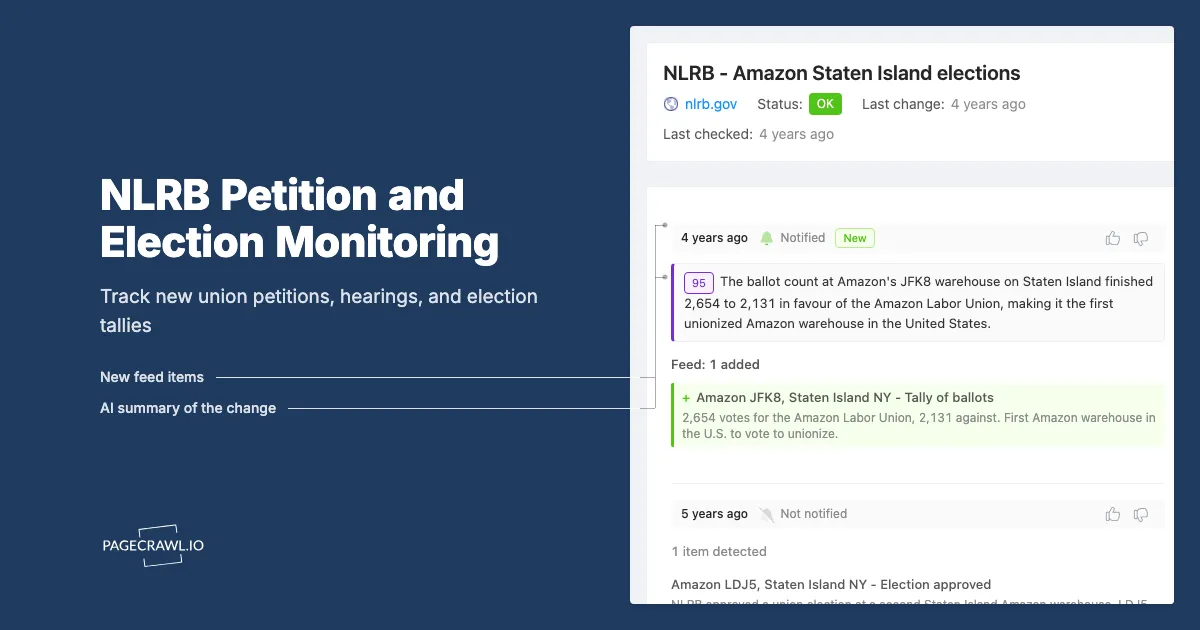
The NLRB Recent Election Results report lists tallies as they issue: case number, date the tally was issued, number of eligible voters, votes for and against representation, and the unit location. For an employer this is the outcome page for your own case and for every peer case in your sector. For an analyst or organizer it is the win-rate dataset, updated case by case rather than waiting for a fiscal-year report. It supports the same region filtering, so a regional watch is a single monitored URL.
An individual case docket
Every docketed case has a public page reachable from NLRB case search, showing current status, docket activity, and the documents the region has posted. Once you know a case number, this is where the substance lands: hearing notices, election agreements, tallies, objections, and decisions. Monitoring a specific case page is how you follow a proceeding you are a party to or already tracking.
How the three pages fit together
| Page | What it answers | Best for | Sensible check frequency |
|---|---|---|---|
| Recent Filings | Who was petitioned or charged this week | Discovery across your sites and sector | Hourly to every 15 minutes |
| Recent Election Results | How did the vote go | Outcome tracking, sector win rates | Daily to hourly |
| Individual case page | What happened in this proceeding | Cases you are a party to or tracking | Hourly to every 15 minutes |
The pattern matches federal litigation: a broad intake feed for discovery, then a narrow docket monitor per case that matters. Our guide to monitoring court dockets for new filings covers that two-layer approach, and it transfers directly to NLRB case pages.
Why isn't the NLRB's own case notification enough?
The NLRB does let you follow a specific case and receive docket updates by email, and it runs a general email subscription service for agency news and decisions. Neither one tells you that a petition has just been filed against a facility you did not know was at risk. Following requires a case number you already have.
Following solves the wrong half of the problem
Case follow is a per-case subscription: you find the case, open it, and follow it. If you are a party, use it. But the expensive failure in labor relations is not missing a docket entry on a case you know about, it is learning three days late that a case exists at all. There is no subscription for "any RC petition filed in Region 20 naming a logistics employer," because the design assumes you arrive already knowing the case.
General email subscriptions are the wrong altitude
The agency's broader email lists cover news, decisions, and weekly summaries. A weekly case summary reaching you on Friday about a petition docketed on Monday is a record, not an alert, when the voter list deadline is measured in business days. You need the filing table itself, filtered to what you care about, watched continuously.
No filtering by employer, sector, or threshold
Even where notifications exist, they are on or off. They cannot express "tell me only when a new row names one of these fourteen employers" or "only when a tally shows more than 200 eligible voters." That filtering turns a busy government table into a short list you will actually read. PageCrawl attaches conditions to a monitor so a change only alerts when it matches your rule, which our walkthrough on conditional alerts using keyword and threshold rules covers step by step. Law firm client alerts and trade press fill some of this gap, but they cover recognizable brands, days later. Your regional distribution center is not a notable petition to anyone except you.
How do you set up NLRB petition monitoring in PageCrawl?
Point PageCrawl at the Recent Filings table narrowed to your regions, track the content of the table, check at the highest frequency your plan allows, route alerts to the channel your labor team actually reads, and add keyword rules so only relevant employers or case types break the silence. Setup takes about ten minutes.
Open the Recent Filings report and narrow it. Go to the NLRB Recent Filings report, apply the region filter for the regions covering your facilities, and sort by date filed so the newest rows sit at the top. Copy the resulting URL, filters included. That exact URL is what you monitor, not the unfiltered national page.
Add the URL to PageCrawl and choose content tracking. Use content or text tracking aimed at the results table rather than full-page tracking. The page carries navigation, agency banners, and footer links that change on their own schedule, and you want alerts driven by new rows in the table, not by a redesigned menu.
Set your check frequency by how much runway you need. Hourly checks on the free tier already beat the break-room-notice route by days. For many sites or a sector with heavy filing volume, the 15-minute frequency on Standard is the practical setting, and 5-minute checks on Enterprise fit a team that treats petition response as a same-day exercise.
Choose notification channels your team reads during the workday. Labor response is a group activity, so route the alert into a shared channel rather than one inbox. PageCrawl pushes to email, Slack, Discord, Microsoft Teams, Telegram, and outbound webhooks. A private channel shared by HR leadership and outside counsel is the usual choice, because the first thing that happens after a filing is a conversation.
Add keyword rules for the names and case types that matter. Set a keyword condition on your own legal entity names and DBAs so an alert naming one of your sites is unmistakable. Case-number prefixes work as keywords too, so a rule on RC and RM filings filters out unfair labor practice charges when you only care about representation activity.
Add a threshold rule where size matters. On the Recent Election Results report, a numeric condition on eligible voters keeps small units quiet while a several-hundred-person unit lights up. Thresholds stop a sector watch from becoming background noise.
Add a per-case monitor once a case number exists. When a filing names one of your sites, open that case page from NLRB case search and add it as its own monitor at a higher frequency. From then on the hearing notice, election agreement, tally, and objections each reach you on the next check.
Turn on screenshot capture and keep the history. A timestamped capture of the filing table on the day a petition appeared records when your organization first had notice, the same evidence pattern compliance teams already keep for regulatory pages across multiple agencies.
Organizing monitors so the alerts stay readable
Group them in a folder named for the function, for example "Labor Relations." A typical employer setup is one filtered Recent Filings monitor per NLRB region you operate in, one Recent Election Results monitor, and a per-case monitor opened when a case appears and archived when it closes. Three or four regions plus a results page fits inside the free tier's six monitors, which is enough to prove the approach before anyone signs off on a budget.
How fast does an NLRB representation case actually move?
Faster than most employers plan for. Once a petition is docketed the region schedules a pre-election hearing within days, the employer must post the Notice of Petition for Election, and a voter list with employee contact information is due within two business days of the direction of election or approval of an election agreement. Elections commonly follow weeks, not months, after filing.
The deadlines that hurt are business-day deadlines
The two-business-day voter list requirement is the classic one. It obliges the employer to hand over names, job classifications, shifts, work locations, and available personal contact information for every unit employee. Producing that from multiple HR systems, checking it, and delivering it correctly is not a two-hour job for a multi-site employer. Every day you spend not knowing about the petition is a day subtracted from that task, and errors or lateness here are a recurring source of objections.
Hearings open on the region's calendar, not yours
The pre-election hearing resolves unit scope, eligibility, and voter questions. Positions have to be prepared, supervisors identified, unit boundaries argued. That work is done well with a fortnight and badly with a weekend. Discovery lag is the only part of the sequence you can recover, and you recover it by watching the filing table. After the vote, objections and challenges have their own short windows measured in business days from the tally.
Who else should be monitoring NLRB filings?
Not only employers. Union organizers use the filing table to see what rival locals and their own counterparts are doing, labor journalists use it to find stories before press releases, and researchers and service providers use it as a running dataset of which employers just entered a representation proceeding.
Unions and organizers
For an organizing department, Recent Filings is coordination intelligence: which employers are being petitioned in your jurisdiction, which units, and by whom. Recent Election Results is the scoreboard, and it arrives case by case rather than in an annual summary. A monitor on the region you organize in replaces the habit of checking a government table when someone remembers to.
Journalists, researchers, and service providers
A table naming employers, cities, and case types is a story generator, and reporters want the petition on the day it docketed, not when the union announces it. Researchers get continuous coverage without building scraping infrastructure. For law firms and HR consultancies, a new representation case is an early demand signal that pairs with the hiring signals in our guide to monitoring competitor job postings.
What goes wrong when monitoring NLRB pages?
Three things: table noise from pagination and sorting that is not a new filing, region filters that get lost when a URL is copied carelessly, and alert fatigue from watching the whole country when you only operate in four regions. All three are configuration problems with straightforward fixes.
Table noise and false positives
Government report tables often carry a row count, a generated timestamp, or paging controls that shift without any new case appearing. Left alone these produce alerts that say nothing. In PageCrawl you can select the region of the page that matters and tell the monitor to ignore the rest, so it settles into alerting only on genuine row changes. Our guide to reducing monitoring false positives covers the tuning pattern.
Filters that do not survive a copy-paste
The value of these reports comes from filtering to your regions before you monitor them. If you copy the base URL rather than the filtered one, you will monitor the national list and drown. After adding the monitor, open the first captured version and confirm it shows the same narrowed rows you saw in your browser. If it shows the unfiltered table, re-copy the URL from the address bar after applying filters.
The data is a record, not a warning system
One honest caveat. The public filing table reflects cases the regional office has docketed. It tells you a petition exists, not that organizing is under way at a site where nothing has been filed. Monitoring compresses your response window from days to hours, which is the largest improvement available from public data, but it is not an early-warning system for activity that has not reached the agency. Start with the regions where you have facilities and the case types you actually respond to, so the alerts stay few enough to be read.
Choosing your PageCrawl plan
PageCrawl's Free plan lets you monitor 6 pages with 220 checks per month, which is enough to validate the approach on your most critical pages. Most teams graduate to a paid plan once they see the value.
| Plan | Price | Pages | Checks / month | Frequency |
|---|---|---|---|---|
| Free | $0 | 6 | 220 | every 60 min |
| Standard | $8/mo or $80/yr | 100 | 15,000 | every 15 min |
| Enterprise | $30/mo or $300/yr | 500 | 100,000 | every 5 min |
| Ultimate | $99/mo or $999/yr | 1,000 | 100,000 | every 2 min |
Annual billing saves two months across every paid tier. Enterprise and Ultimate scale up to 100x if you need thousands of pages or multi-team access.
Compliance monitoring is the cheapest insurance you can buy. A single missed regulatory change can trigger fines in the tens or hundreds of thousands, not to mention the audit overhead of proving you did not see it coming. Enterprise at $300/year covers 500 regulatory pages with unlimited history and timestamped screenshots, which is usually exactly what an assessor wants to see. All plans include the PageCrawl MCP Server, so your compliance team can ask Claude to summarize every change to a specific regulation over the last quarter and pull the exact diff, turning your monitoring history into a queryable audit trail. AI assistants can create monitors through conversation on every plan, including Free. Standard at $80/year is enough to cover 100 pages across your primary regulatory bodies if your program is smaller.
Getting Started
Open the NLRB Recent Filings report, filter it to the region covering your largest facility, and copy that filtered URL. Add it to PageCrawl as a content monitor, set the frequency as high as your plan allows, and route the alert into the channel where your HR leadership and outside counsel already talk.
Add a keyword rule on your own legal entity names so a filing naming one of your sites stands out in a busy list, then add a second monitor on the Recent Election Results report for the same regions. When a case number appears that concerns you, add its case page as its own monitor so hearing notices and the tally reach you on the next check.
Run it for a month. The first time a filing reaches your team before a photograph of a break room notice does, you will have bought back the days that decide how the rest of the case goes.
Stop finding out third-hand. Let the docket tell you first.