The quality manager at a mid-sized valve manufacturer found out about a revision to a test method the way most people do: from a customer. The buyer's incoming inspection had been updated to the new edition, the acceptance criteria had shifted, and three shipments were rejected before anyone on the supplier side understood why. The revision had been balloted, commented on, approved and published over roughly eighteen months. Nobody at the plant had looked at the standards body's page in that entire window.
That is the ordinary shape of the problem. Standards do not change without warning. They change with an enormous amount of warning, published openly, on schedule, on pages anyone can read. Draft documents get posted. Public comment periods open and close. Ballot results appear. Committee rosters and meeting minutes go up. The gap is not secrecy, it is attention. Nobody has the job of opening forty association pages every week, so the announcement sits there unread until it arrives as a rejected shipment, a failed audit finding, or a bid you no longer qualify for.
The cost of finding out late runs in two directions. Downstream, you rework product, requalify a process, or retrain inspectors on a compressed schedule. Upstream, you lose the chance to influence the standard at all. A public comment period is the one window where a manufacturer, specifier or contractor can push back on a clause that would be expensive to meet, and it closes on a published date whether or not you noticed it opened.
This guide covers which standards body and association pages are worth watching, how revision cycles at ISO, ANSI and NFPA style organizations generate the signals you want, how to set up monitoring that survives the noise on those sites, and how to turn the result into an evidence trail an auditor will accept.
Why do standards revisions catch companies by surprise?
Standards revisions surprise companies because the announcement and the consequence are separated by a year or more, and they arrive on different channels. The draft ballot appears on a committee page almost nobody reads. The consequence shows up later as a customer specification, a regulatory citation or an audit finding, long after the response window shut.
The signal is public but unaddressed
Every major standards developer publishes its pipeline. Drafts, ballot notices, comment closing dates, committee agendas and published-edition announcements all sit on public web pages. What does not exist is a push. Nobody emails you to say the test method your product qualifies against entered revision. Standards bodies assume interested parties are members who attend meetings, and most companies affected by a standard are not on the committee.
Publication dates float
A committee slips a meeting, a ballot fails and recirculates, an appeal delays approval. The date you wrote in a spreadsheet last year is wrong by the time it matters, in either direction. Calendar reminders built from an expected publication date fail because the schedule is a forecast, not a commitment. Watching the page itself is the only way to see the actual state.
Two different clocks are running
There is the clock on your ability to influence the standard, which ends when the comment period closes, and the clock on your obligation to comply, which starts when a customer, insurer or regulator adopts the new edition. Companies that only track that later clock permanently lose access to the earlier one. Monitoring the development pages, not just the catalog page for the published standard, is what puts the earlier clock back in reach.
Adoption multiplies the blast radius
A voluntary consensus standard becomes mandatory the day someone with authority points at it. In the United States, federal agencies routinely incorporate private standards into regulation by reference, a practice documented in the Office of the Federal Register's Incorporation by Reference Handbook. Once a standard is incorporated, a revision to that document is effectively a regulatory change even though no legislature voted on it. That is why standards monitoring belongs beside your regulatory horizon scanning program rather than in a separate silo.
Which standards body pages should you actually monitor?
Monitor four page types per organization that matters to you: the development or draft-documents page where ballots and comment periods appear, the individual standard's own page where edition and status change, the news or press page where adoptions are announced, and any errata or amendment listing. Those four cover almost every actionable signal.
Development and comment-period pages
This is the highest-value monitor in the set, because it is the only one that fires while you can still do something about the content. NFPA publishes its standards development process as public input and public comment stages, with revision cycles that begin twice each year and documents revised every three to five years. Its new projects and draft documents listing changes as drafts post and as comment stages open. Watching that listing gives you a running feed of which documents are in play.
ANSI's Standards Action is the equivalent hub for American National Standards. ANSI describes it as a free weekly publication carrying public review announcements for proposed new, revised, reaffirmed and withdrawn standards, plus notices tied to ISO and IEC work. A new weekly issue is itself a detectable change, and the listing page is a clean thing to monitor.
The individual standard's page
For the handful of documents you actually build, test or certify against, watch the specific page. ISO's catalog entry for a standard carries its current status, and ISO's international harmonized stage codes are the vocabulary those statuses use, moving a project through committee draft, enquiry draft and approval stages before publication. When the status text on a standard's page changes from one stage to the next, that is a concrete, dated event you can act on.
News, press and adoption pages
Associations announce adoptions, jurisdictional approvals and partnership agreements on their news pages before those facts reach any catalog. This is where you learn that a state has adopted a new edition of a code, or that two bodies have harmonized a pair of overlapping documents. It is also the fastest way to discover that a standard you rely on has been withdrawn in favour of another.
Errata, amendments and interpretations
A published standard is not frozen. Errata correct printing mistakes that sometimes change a number. Amendments add requirements between full revisions. Formal interpretations tell you how the committee reads an ambiguous clause, which is often what an auditor quotes at you. These listings are plain, rarely-changing pages, which makes them ideal monitoring targets: when they change, it matters.
| Page type | What a change usually means | Suggested check frequency |
|---|---|---|
| Development / draft documents | A ballot opened or a comment period is running | Daily or faster |
| Public comment listing | Your response window is open and dated | Daily or faster |
| Individual standard page | Stage advanced, edition published, document withdrawn | Daily |
| News / press releases | An adoption, harmonization or withdrawal announcement | Daily |
| Errata and amendments | A published requirement just changed in place | Weekly |
| Committee roster / meeting minutes | Scope shift or leadership change worth watching | Weekly |
How does a standards revision cycle create monitorable events?
A revision cycle turns into monitorable events at four points: when a project enters revision, when a draft is circulated for ballot or comment, when a comment period opens with a closing date, and when the final edition publishes. Each of those changes visible text on a public page, which is exactly what change detection catches.
Fixed review intervals give you a rough forecast
ISO's guidance on systematic review sets a five-year review period for an International Standard, meaning every published document is reassessed on a predictable cadence rather than only when someone complains. NFPA states that its standards are revised and updated every three to five years, in cycles opening twice a year. Those intervals will not tell you the exact date anything happens, but they tell you which of your documents are due, so you know where to point monitors first.
Draft circulation is the first hard signal
Once a draft is circulated, the content is visible and the timetable becomes real. ISO's stage codes describe a project moving through committee, enquiry and approval stages, with each transition recorded against the project. A stage change on a document you depend on is worth an alert to a named person, not a digest line.
The comment period is the only leverage point
Comment periods are dated and short. ANSI's public review announcements exist precisely so interested parties can object or propose changes to a draft before approval. If you find out about a proposed clause after the closing date, your only remaining options are to comply or to argue about it in the next cycle, which may be years away. This is the single strongest argument for daily checks on development pages.
Publication starts the compliance clock
When the new edition posts, the questions change: which of our procedures cite the old edition, which customer specifications will update, what is the transition period. Having a timestamped record of when the page changed is what lets you show a certification body that you started the transition promptly rather than months late.
How do you set up standards monitoring in PageCrawl?
Point PageCrawl at each standards page, choose a tracking mode that ignores the site's decorative churn, set a check frequency matched to how time-critical that page is, route alerts to the channels your team already reads, and add keyword rules so only relevant document numbers reach people.
Add the URL. Start with the development or draft-documents page of the body that matters most to you, for example a standards development listing or a public review index. Paste the exact URL you would open yourself, not the organization's homepage.
Pick the tracking mode. For long text pages such as a standard's status page or a process description, reader mode extracts the main body and skips navigation. For listings of drafts and comment periods, content tracking on the listing region works better because you care about rows appearing and disappearing. If the announcement lives in a PDF, use PDF extraction so the text inside the document is compared rather than the file name.
Set the check frequency. Comment periods and ballot notices deserve the fastest cadence your plan allows, because the value of the alert decays as the closing date approaches. Errata pages and committee rosters are fine on a daily or weekly rhythm. The free tier checks every 60 minutes, which is already far better than the quarterly manual review most teams do today.
Choose notification channels. Route alerts where the responsible person actually looks: email for the compliance inbox and the audit record, plus Slack, Microsoft Teams, Discord or Telegram for the working channel where your standards owner lives. Webhooks let you push the change into a GRC tool, a ticketing system or a spreadsheet so a revision becomes a tracked task rather than a read message.
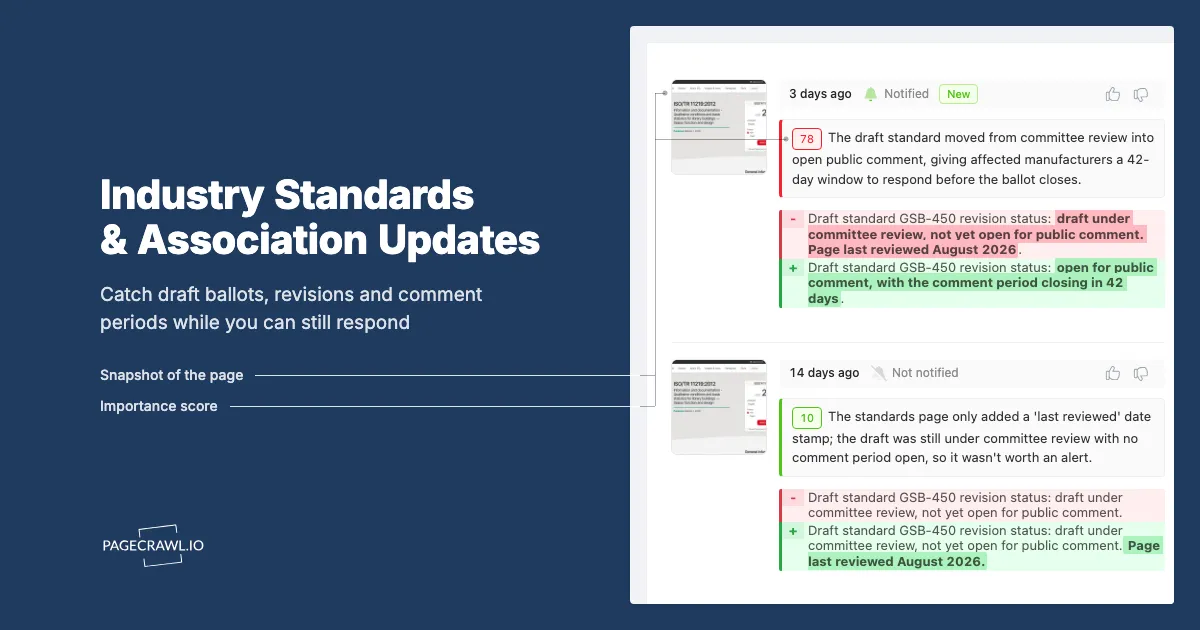
Add keyword and threshold rules. A large listing page changes constantly for reasons you do not care about. Attach conditions so an alert only fires when the change text contains your document numbers or subject keywords, using conditional alerts built from price, keyword and threshold rules. A rule matching your specific standard designations turns a noisy feed into a short list.
Turn on screenshots and history. A dated screenshot of the page as it read on the day of the change is the artifact an assessor wants when they ask how you knew. Keep it, because reconstructing it later from a live site is impossible once the page has moved on.
Group monitors by organization. Put every page from one body into a folder named for that body. When a cycle opens you can see all related monitors together, and when a document is withdrawn you can retire the whole group cleanly.
Assign an owner per document, not per site
The most common failure of a standards monitoring program is that alerts arrive addressed to nobody. Pick a named owner for each standard family, materials, electrical, fire, quality management, and route that folder's alerts to their channel. A change with an owner becomes a decision. A change without one becomes an unread email.
How do you keep standards alerts from becoming noise?
Keep alerts useful by monitoring the narrow region of the page that carries substance, excluding rotating banners, event promotions and login widgets, filtering on your own document numbers, and splitting fast pages from slow ones so a high-churn listing never buries a quiet errata page.
Exclude the decorative parts of association sites
Trade association sites are marketing sites. They carry conference countdowns, rotating member spotlights, webinar carousels and "last updated" timestamps that tick with no content change. Left unfiltered, these produce alerts every day and train your team to ignore the feed. PageCrawl lets you click a detected change and mark that region as ignored so future checks skip it, and our guide to reducing website monitoring false positives walks through how to tune a page down to its meaningful area.
Filter on document designations
You do not care that a body published forty public review notices this week. You care whether any of them names a document you use. Keyword conditions on the designations you build against are the highest-leverage filter available, because standard numbers are unambiguous strings that appear in every notice. Add the plain-language subject too, so a renumbered document still trips the rule.
Separate fast pages from slow pages
A public review listing may change several times a week. An errata page may not change for a year. If both feed the same channel, the errata alert, which is the more consequential one, gets lost. Give high-churn listings a digest and give rarely-changing pages an alert on the next check that finds a difference. This split is the same discipline described in our guide to tracking multiple regulatory websites at scale.
Watch public metadata, not paywalled text
Much standards content sits behind purchase or membership. Status, stage, edition and comment-period metadata is usually public even when the full text is not, so monitor the public metadata and treat it as the trigger to go open the document. Do not build a program that depends on content you are not licensed to read.
How is this different from monitoring security frameworks or regulations?
Industry standards monitoring targets private consensus bodies whose documents become binding only through adoption, so the pages, cadence and stakeholders differ from government regulation tracking. The audience is engineering, quality and product compliance rather than legal, and the actionable window is the comment period rather than an effective date.
Different publishers, different page shapes
Government sites publish notices in structured registers with consistent formats. Standards bodies publish in whatever shape their content management system produces, often a mix of listing pages, PDFs and per-document status pages, so your monitors need a wider mix of tracking modes and a bit more tuning per site.
Different trigger for obligation
A regulation binds you on its effective date. A consensus standard binds you when a contract, insurer, certifier or agency adopts it, which can happen years after publication and at different times in different jurisdictions. So you monitor the standard for content and separately monitor the adopters for uptake.
Related but distinct from security framework tracking
If your concern is information security, our post on monitoring security framework revisions across NIST, ISO and CIS covers that specific corner in depth, and the two programs share tooling. This guide is aimed at the physical and industrial side: materials, testing, electrical, fire, mechanical and safety documents, plus the trade associations that shape and adopt them. Similarly, workplace safety teams should pair this with OSHA safety regulation monitoring, because OSHA's rules lean heavily on incorporated consensus standards.
| Aspect | Industry standards bodies | Government regulators |
|---|---|---|
| Publisher | Private consensus organizations | Agencies and legislatures |
| Access | Often paywalled full text, public metadata | Usually fully public |
| Cadence | Fixed review intervals, typically multi-year | Rulemaking driven, irregular |
| Influence window | Public comment or review period | Notice and comment docket |
| Binding when | Adopted by contract, certifier or regulator | On the stated effective date |
| Primary internal owner | Quality, engineering, product compliance | Legal and regulatory affairs |
What does a working standards monitoring program look like?
A working program covers a ranked list of documents, watches four page types per body, routes alerts to named owners, and produces a timestamped archive of every change. It usually starts with fewer than a dozen monitors and grows as the team sees which pages actually produce decisions.
Start from your own document register
Before adding any monitor, list the standards your procedures, drawings, test reports and certificates actually cite. Most organizations discover the real list is shorter than they feared and different from what they assumed. Rank it by consequence: a document embedded in a product certification outranks one referenced in a general policy.
Build in three tiers
Tier 1 is the small set of documents your product or service is certified against, monitored at your fastest cadence with alerts to a named engineer. Tier 2 is the development and public review listings of the bodies that publish those documents, monitored daily to catch cycles opening. Tier 3 is context, association news, adoption announcements and neighbouring documents, delivered as a weekly digest to whoever runs the compliance calendar.
Turn every alert into a decision record
An alert that nobody dispositions is worse than no alert, because it creates the appearance of a program without the substance. Give each change one of three outcomes: no impact and why, action required with an owner and a date, or comment to be submitted before the closing date. Attach the screenshot. That record is what makes an audit conversation short.
Review the monitor set every cycle
Standards get withdrawn, replaced, renumbered and merged. Once a cycle, walk the list, confirm each monitor is still returning content, and retire the ones whose documents no longer exist.
Choosing your PageCrawl plan
PageCrawl's Free plan lets you monitor 6 pages with 220 checks per month, which is enough to validate the approach on your most critical pages. Most teams graduate to a paid plan once they see the value.
| Plan | Price | Pages | Checks / month | Frequency |
|---|---|---|---|---|
| Free | $0 | 6 | 220 | every 60 min |
| Standard | $8/mo or $80/yr | 100 | 15,000 | every 15 min |
| Enterprise | $30/mo or $300/yr | 500 | 100,000 | every 5 min |
| Ultimate | $99/mo or $999/yr | 1,000 | 100,000 | every 2 min |
Annual billing saves two months across every paid tier. Enterprise and Ultimate scale up to 100x if you need thousands of pages or multi-team access.
Compliance monitoring is the cheapest insurance you can buy. A single missed regulatory change can trigger fines in the tens or hundreds of thousands, not to mention the audit overhead of proving you did not see it coming. Enterprise at $300/year covers 500 regulatory pages with unlimited history and timestamped screenshots, which is usually exactly what an assessor wants to see. All plans include the PageCrawl MCP Server, so your compliance team can ask Claude to summarize every change to a specific regulation over the last quarter and pull the exact diff, turning your monitoring history into a queryable audit trail. AI assistants can create monitors through conversation on every plan, including Free. Standard at $80/year is enough to cover 100 pages across your primary regulatory bodies if your program is smaller.
Getting Started
Pick the one standard your business is most exposed to, the document named in your certification or in your largest customer's specification, and set up two monitors: the page for that document and the development or public review listing of the body that publishes it. Route both to the engineer who owns the requirement, not to a shared inbox.
Add a keyword rule for that document's designation so the listing page only speaks when it concerns you, and turn on screenshots so every alert carries its own evidence. Give it one revision cycle. The first time a comment period reaches your team while it is still open, the value of the setup stops being theoretical.
Then widen it: add the other bodies on your register, add their news pages, and hand the weekly digest to whoever keeps the compliance calendar.
Stop finding out about revisions from your customers. Watch the pages that announce them.