The channel manager at a mid-size audio brand has a MAP policy. Eleven pages, reviewed by outside counsel, acknowledged in writing by all 63 authorized dealers. It is also, functionally, a PDF in a shared drive. When a regional dealer quietly advertised the flagship headphone at 18% under the floor on its own site, nobody at the brand noticed for nineteen days. The finding arrived as a complaint from a different dealer, who had already matched the price to stay competitive and wanted to know why he was being punished for it.
That is the whole failure mode. The policy was not weak and the dealers were not hostile. The brand simply had no way to see what its own channel was advertising. Enforcement is not a document problem, it is a detection problem, and a policy you cannot observe compliance against is one your best-behaved dealers pay for while everyone else ignores it.
A working MAP program has three parts: a policy that is legally clean and unilateral, continuous observation of every place your products are advertised, and an evidence trail solid enough to attach to an enforcement notice. Most brands have the first and neither of the others. This guide covers those missing two: what to watch across your reseller roster, how to capture violations with dates and screenshots that survive a dealer disputing them, and how to run the escalation ladder without burning the relationships that sell your product.
What does a MAP policy actually control, and what can it not?
A MAP policy governs the price a reseller may advertise, not the price it may sell at. That distinction is the legal spine of the whole program. A brand may unilaterally set an advertised-price floor and decline to keep supplying resellers who ignore it. What it must avoid is negotiating, agreeing, or bargaining with resellers over their actual resale prices.
The US Federal Trade Commission's guidance on manufacturer-imposed requirements sets out the general position: a manufacturer may adopt a policy about the price level it wants, may deal only with retailers who honour it, and may terminate a dealer who does not. Since the Supreme Court's 2007 Leegin decision, vertical minimum-price programs are assessed federally under the rule of reason rather than being automatically unlawful. Several US states apply stricter standards to minimum resale price arrangements under their own antitrust statutes, so a policy that reads fine nationally can still create exposure in one state. Get the document reviewed by counsel who works in this area before you send the first enforcement letter, not after.
Outside the US the line is drawn harder. Under the EU's Vertical Block Exemption Regulation, Commission Regulation (EU) 2022/720, restricting a buyer's ability to determine its own sale price is a hardcore restriction falling outside the block exemption's safe harbour. Advertised-price rules and actual-price rules are treated very differently across jurisdictions, which is another reason your monitoring should record what was advertised, on what page, on what date.
For the difference between the advertised floor and the suggested selling price, our explainer on MAP versus MSRP covers where each number applies. What follows assumes the policy exists and is sound. The problem now is seeing through the channel.
The unilateral posture and why monitoring supports it
A unilateral policy works because the brand states terms and then acts on its own observations. It stops being unilateral once it becomes a negotiation, which is what happens when a brand has no independent view of dealer pricing and has to ask dealers to self-report or to tell on each other. Brand-owned monitoring keeps the posture clean: you observed a public advertisement, recorded it, and applied your stated consequence. No side agreement, no reciprocal promise.
Which reseller pages should you monitor for MAP violations?
Monitor four surfaces: the product detail page on each authorized reseller's own site, marketplace listings including the third-party offer stack, the reseller's promotional and category pages where a discount often appears first, and your own published policy and dealer price sheets. Violations frequently show up in a promo module days before the product page changes.
Authorized dealer product pages
This is the baseline layer, one monitor per SKU per dealer for your priority products. A dealer's own product detail page is where the advertised price usually lives, and it is the cleanest evidence artifact because it is unambiguously the dealer's own advertisement on the dealer's own domain. A brand with 400 SKUs and 60 dealers cannot monitor 24,000 pages on day one and does not need to. Twenty top-margin SKUs across your thirty most active dealers surfaces the large majority of real violations.
Marketplace listings and the third-party offer stack
Marketplace listings are where MAP erodes fastest, because the offer stack changes constantly and the seller behind a low price is often not a dealer you have any contract with. Watch both the buy-box price and the other-sellers list on the listings that matter. Amazon's own Marketplace Fair Pricing Policy, published in Seller Central, is a separate constraint on sellers and worth reading, because it shapes how they behave around price floors even where your policy has no reach.
Promotional pages, category pages, and sale events
The advertised price that breaks your floor is often not on the product page at all. It appears in a "Deals" hub, a category grid, a seasonal sale landing page, or a coupon code that takes the effective advertised price below MAP. Coupon-driven violations are especially common because dealers treat the stacked discount as a promotion rather than an advertised price. Monitor the dealer's promotions hub alongside the product pages, hardest around retail calendar peaks when discounting decisions get made fast and reviewed slowly.
Your own policy page and dealer portal
One monitor most brands forget: the page where your own MAP policy is published, plus the dealer portal where pricing sheets are posted. Version drift here is an enforcement risk. If a dealer claims they were working from an older version, you want a timestamped record of exactly what was published and when, and you want to know when someone internally changes a floor without telling the channel team.
How do you build the SKU-by-reseller matrix without drowning?
Build it in tiers. Tier 1 is your highest-margin, highest-violation SKUs at every significant reseller, checked at the fastest frequency you have. Tier 2 is the broader catalog at your largest resellers. Tier 3 is periodic sweeps of marketplaces and long-tail sellers. Expand tiers only when the tier above is genuinely quiet.
The instinct is to treat MAP monitoring as a completeness problem: every SKU, every seller, total coverage. That produces a matrix nobody maintains and an alert stream nobody reads. Violation risk is concentrated, not uniform. A handful of products draw almost all the discounting because they are the ones shoppers comparison-search.
| Tier | Coverage | Frequency | Alert routing |
|---|---|---|---|
| Tier 1 | Top 20 SKUs at your 20-30 most active resellers | Fastest your plan allows | Slack channel plus email to channel manager |
| Tier 2 | Broader catalog at your largest 5-10 resellers | Every few hours to daily | Daily digest to the channel team |
| Tier 3 | Marketplace sweeps and long-tail or suspected sellers | Daily | Weekly review, escalate by exception |
Two practical rules keep the matrix honest. First, a SKU that has never had a violation at a given dealer in six months should drop a tier and free up capacity for one that has. Second, every monitor needs an owner. A matrix with no named owner per tier turns into a folder of stale monitors within a quarter.
Regional and currency variations
If you sell across countries, the same SKU carries a different floor per market, and a violation is only a violation against the local floor. Keep monitors separated by market and store the applicable floor with the monitor, not in someone's spreadsheet. Cross-market price gaps also drive grey-market flow, where product bought cheaply in one market is advertised into another, which shows up first as an unfamiliar seller at an unusually low price.
How do you set up MAP violation monitoring in PageCrawl?
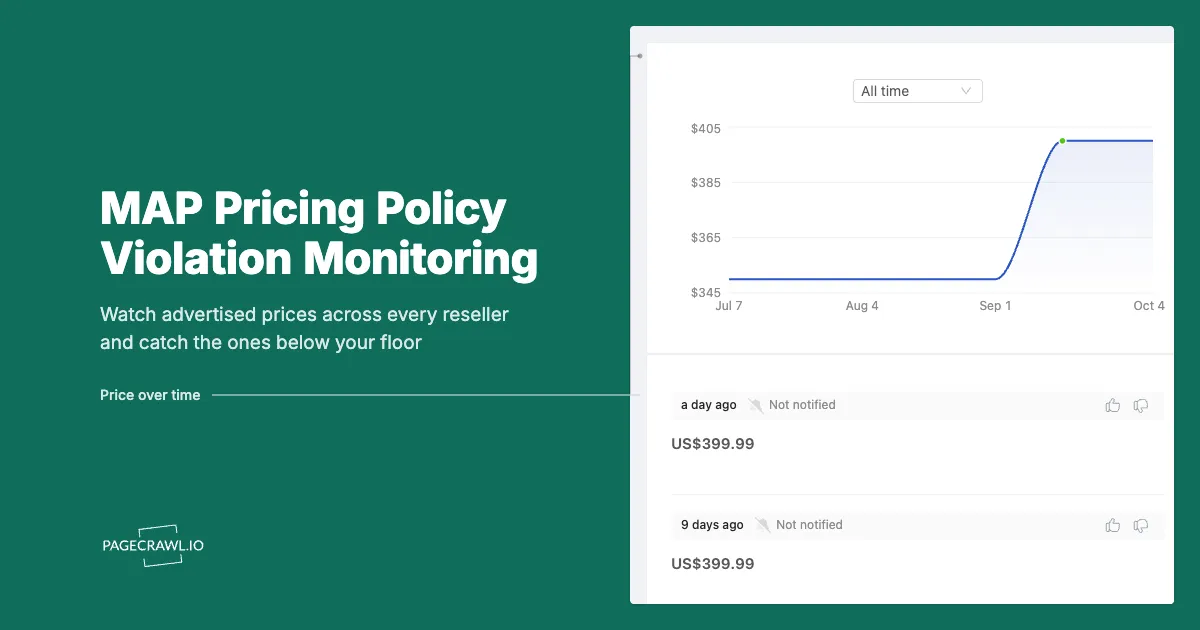
Add each reseller product URL, choose price tracking so the advertised figure is extracted as a number, set a threshold rule at your MAP floor for that SKU and market, pick the check frequency your tier calls for, and route alerts to the channel that your enforcement workflow actually runs in. Screenshots on every check give you the evidence trail.
- Add the reseller URL. Paste the dealer's product page, the marketplace listing, or the promotions hub. Name the monitor with a convention you can filter on later, something like
SKU-4410 / DealerName / US, so a hundred monitors stay navigable. - Pick the tracking mode. Price tracking captures the advertised figure as a number rather than a blob of text, which is what makes threshold rules possible. For a promotions hub or a category grid, content tracking on the relevant region works better, and for a dealer price sheet, use document extraction.
- Set the check frequency for the tier. Tier 1 SKUs justify the fastest frequency on your plan, down to every 2 minutes on Ultimate and every 5 on Enterprise. Alerts arrive when the next check detects the change, so frequency is simply how long a violation can sit unseen.
- Add the threshold rule. Set it to fire when the advertised price drops below your MAP floor for that SKU and market, so ordinary movement above the floor stays silent. Our walkthrough on conditional alerts using price, keyword, and threshold rules covers the syntax and the common traps.
- Add keyword rules for the sneaky cases. Coupon codes, "extra 15% off at checkout", bundle language, and rebate wording push the effective advertised price below the floor without changing the displayed number. A keyword condition catches what a numeric threshold cannot.
- Choose notification channels. Route Tier 1 violations to email plus the Slack or Microsoft Teams channel the team already works in. Discord and Telegram suit smaller teams. Webhooks push the violation into whatever system holds your enforcement workflow, so a case record opens without anyone retyping it.
- Turn on screenshot capture. Every check stores a dated image of the page as it appeared. This is the highest-value setting in the whole setup, because it converts "we think you were under MAP last Tuesday" into an attachment.
- Group monitors into folders by tier and region. Folders plus a naming convention are what make the program survivable at 300 monitors. Put Tier 2 and Tier 3 on a digest so low-urgency findings arrive as one daily summary.
Note: set the threshold against the floor for the specific market and SKU, never a global number. A single global threshold is the most common reason a MAP alert stream gets ignored, because it fires constantly in whichever market has the lowest floor.
What evidence does a MAP enforcement notice actually need?
A defensible violation record needs five things: the exact URL, a timestamp for when the advertised price was observed, the observed price, the applicable MAP floor for that SKU and market, and a screenshot showing the price in context on the page. Without the screenshot and the timestamp, a dealer can simply change the price and deny it happened.
This is where most enforcement programs quietly fall apart. Someone spots a violation and sends an email, the dealer fixes the price within the hour and replies that they see no problem on their site. The brand has no record, the incident closes as a misunderstanding, and the dealer learns the policy has no teeth as long as they are quick.
Building the violation record
Continuous monitoring with screenshots solves this because the record is created at observation time, not at complaint time. A useful record for each incident contains:
- The reseller name and the exact URL of the advertisement.
- The date and time the price was observed, from the check history rather than from memory.
- The advertised price observed, and the applicable MAP floor.
- A screenshot of the page showing the price as a shopper saw it.
- The duration, meaning first and last check at which the violating price was present, which distinguishes a pricing-engine glitch from a deliberate weeklong promotion.
That last field matters more than brands expect. Repricing tools genuinely do misfire, and a dealer below floor for twenty minutes at 3am deserves a different conversation than one who ran a below-floor promotion through a whole weekend. Monitoring history gives you the duration for free, and using it makes enforcement look proportionate rather than punitive.
The escalation ladder
Most brands run something close to a four-step ladder, and the value of monitoring is that each step is triggered by evidence rather than by whoever complained loudest:
| Step | Trigger | Action |
|---|---|---|
| 1 | First violation, short duration | Courtesy notice with the screenshot and URL, correction requested |
| 2 | Repeat within a defined window | Formal notice referencing the policy, correction deadline |
| 3 | Continued or wide violations | Suspension of promotional support, co-op funds, or new-product allocation |
| 4 | Persistent violation | Suspension or termination of supply per the stated policy |
Keep the ladder in the policy document and follow it mechanically. A ladder applied inconsistently across dealers is worse than no ladder, because the dealers who comply work out fast that compliance is optional for someone else.
How do you handle unauthorized sellers and marketplace offers?
Unauthorized sellers are not bound by your MAP policy because they never agreed to it, so the response is different: identify the listing, trace the supply leak feeding it, and use marketplace channels and intellectual property rights rather than a policy notice. Monitoring the offer stack is how you find them at all.
An unauthorized listing does real damage regardless of contract status, because your authorized dealers see it, ask why they are held to a floor nobody else respects, and start matching. The practical sequence:
- Detect the listing. Monitor marketplace listings for your key SKUs, including the other-sellers list, so a new low-priced offer surfaces on the next check rather than via a dealer complaint weeks later.
- Identify and record. Capture the seller name, the offer price, and a screenshot. Sellers rotate names and listings, so the dated record is what connects the same operator across several appearances.
- Trace the leak. Product reaching an unauthorized seller came from somewhere. Lot codes, serial numbers, and purchase volumes across your authorized channel usually narrow it to one or two accounts. That is a supply-chain investigation, not a pricing conversation.
- Use the right lever. Marketplace enforcement programs, trademark and copyright rights over your listing content and images, and an authorized-seller list on your own site are the tools that apply. A policy notice to someone who never signed the policy achieves nothing.
For watching your products across sellers you do not control, our guide on cross-retailer price comparison monitoring covers running one SKU across many storefronts.
How often should you check reseller prices?
Match frequency to how fast the damage compounds. Tier 1 SKUs at active resellers justify the fastest checks your plan offers, because a below-floor advertisement that sits visible for a day is a day of dealers seeing it and matching. Tier 2 and Tier 3 run fine on hourly or daily checks reviewed as a digest.
Speed matters in MAP specifically because of contagion. A single dealer under the floor is a contained problem. The same violation left visible for three days is a category-wide reset: competing dealers see the price, match it defensively, and now you have twelve incidents instead of one and no credible way to enforce against all of them at once. Alerts arrive when the next check detects the change, so the check interval is your maximum blast radius.
Frequency should also flex with the calendar. Discounting clusters around major retail events, quarter ends, and product transitions when dealers clear inventory ahead of a new model. Raising Tier 2 SKUs to Tier 1 frequency for the two weeks around a peak, then dropping them back, buys coverage where it matters without permanently inflating your monitor count.
Reducing false alarms so the alerts get read
The fastest way to kill a MAP program is an alert stream full of noise. Product pages change constantly for reasons unrelated to your floor: stock badges, delivery estimates, review counts, recommendation carousels, rotating banners. Point the monitor at the price region rather than the whole page, and mark churning regions as ignored. Our guide on reducing monitoring false positives covers the technique. A channel that fires four times a month and is right every time gets acted on. One that fires forty times a week gets muted, and then the real violation arrives into silence.
Beyond individual incidents, the accumulated history is a channel-health dataset: which dealers drift below floor repeatedly, which SKUs attract the most discounting, whether violations cluster in a region or around one promotion. That turns a reactive enforcement queue into an argument you can take into a quarterly business review, backed by dates.
Choosing your PageCrawl plan
PageCrawl's Free plan lets you monitor 6 pages with 220 checks per month, which is enough to validate the approach on your most critical pages. Most teams graduate to a paid plan once they see the value.
| Plan | Price | Pages | Checks / month | Frequency |
|---|---|---|---|---|
| Free | $0 | 6 | 220 | every 60 min |
| Standard | $8/mo or $80/yr | 100 | 15,000 | every 15 min |
| Enterprise | $30/mo or $300/yr | 500 | 100,000 | every 5 min |
| Ultimate | $99/mo or $999/yr | 1,000 | 100,000 | every 2 min |
Annual billing saves two months across every paid tier. Enterprise and Ultimate scale up to 100x if you need thousands of pages or multi-team access.
The math is straightforward. Standard at $80/year covers 100 product pages. If monitoring catches one $20 price drop, one mispriced competitor SKU, or one restock you would otherwise miss each month, the plan has paid for itself roughly four times over in the first year. For teams running real competitive pricing programs, Enterprise at $300/year tracks 500 SKUs, which is usually enough to cover a full category across every major competitor.
Getting Started
Pick the single SKU that generates the most dealer complaints and the five resellers that sell the most of it. Add six monitors, one per reseller page plus the dealer promotions hub, set price tracking with a threshold at your MAP floor for that market, and turn on screenshots. That fits inside the free tier and takes about ten minutes.
Run it for two weeks. You will either find a violation you did not know about, which tells you the detection gap is real, or you will get silence on that SKU, which tells you to point the same six monitors at a riskier one.
Then build outward: add Tier 1 SKUs across your active dealers, wire alerts into the Slack or Teams channel where enforcement actually gets discussed, and start attaching dated screenshots to your notices. Your policy starts meaning something with the first dealer who receives evidence instead of an accusation.
Write the policy once. Watch the channel every day.