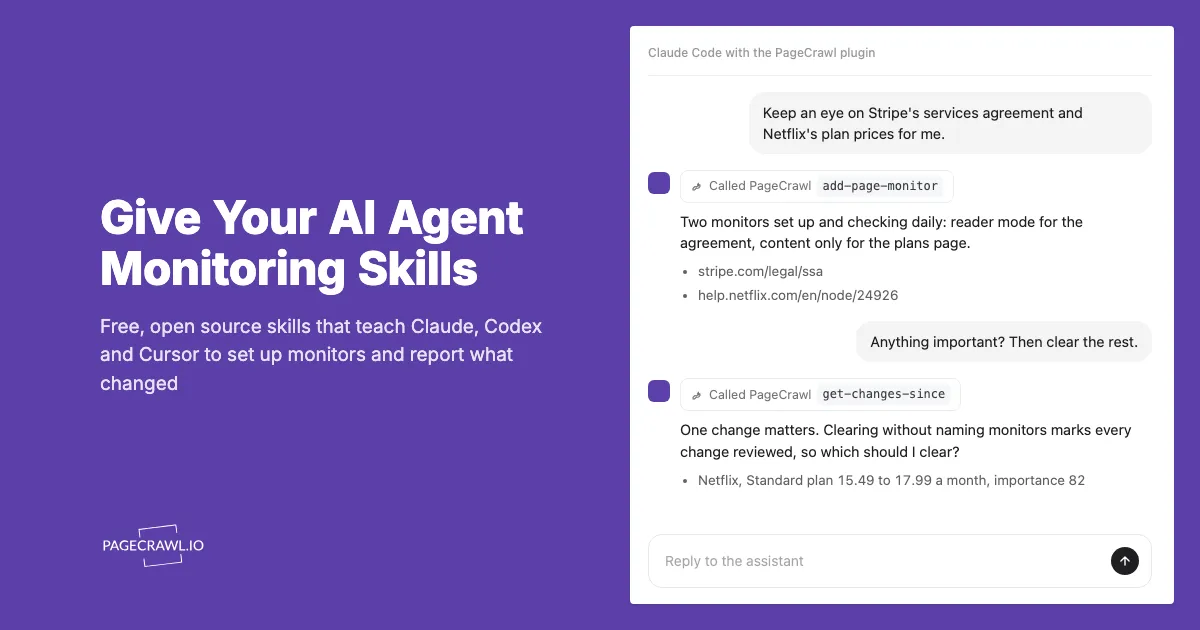
Connecting an AI agent to PageCrawl's MCP server gives it the tools to create monitors and read changes. It does not tell the agent how to use them well: which tracking mode suits a terms page, how to summarise a week of changes in one call, or when to stop and ask before deleting something. PageCrawl now publishes Agent Skills that carry exactly that know-how, as a free, open source plugin that works in Claude, Codex, Cursor and dozens of other agents.
What are Agent Skills?
Agent Skills are folders of instructions that an AI agent loads only when a task needs them. Each skill is a SKILL.md file with a name, a description of when to use it, and step-by-step guidance, optionally with reference files. Anthropic introduced the format and published it as an open standard at agentskills.io, and it is now read by Claude, OpenAI's Codex and ChatGPT, Cursor, GitHub Copilot, Gemini CLI and many more agents.
Because only a short description sits in the agent's context until the skill is needed, an agent can carry many skills without slowing down. When you ask something the description matches, such as "watch this page for price drops", the agent reads the full instructions and follows them.
How is a skill different from an MCP server?
An MCP server gives an agent tools; a skill teaches it how to use them. PageCrawl's MCP server exposes actions such as creating a monitor or reading a diff. The skill adds the judgement around those actions: the sequence of calls, sensible defaults, and what a good answer looks like.
Anthropic's own guidance for plugin builders puts it this way: "A connector alone leaves Claude to work out your workflow from tool names. The skill is where you put the sequence, the defaults, and what good output looks like" (Claude plugin documentation). OpenAI's plugins for ChatGPT and Codex follow the same model, combining skills with MCP connections (OpenAI plugin documentation).
There is a practical reason too. Some agents shorten the instructions an MCP server sends, so long guidance can be cut off before the agent reads it. A skill is loaded in full when it is relevant.
What does the PageCrawl skill teach an agent?
The pagecrawl skill teaches an agent to set up monitors that watch the right thing and to report changes the way a careful analyst would:
- Choosing a tracking mode. Price mode for product pages, reader mode for terms and policies, feed mode for job boards and listings, a single element or a plain-language extraction when only one value matters.
- Reading changes efficiently. One cross-monitor call for "what changed this week", batch reads for current prices, and the diff before describing any change.
- Leading with what matters. Changes are ranked by importance, so a price rise comes before a footer edit, and a quiet week is reported in one line.
- Triage and health checks. Going through your unseen changes with you, and finding monitors that fail, never change, or change on every check.
- Automation. Webhooks, scheduled reports, polling with a cursor, and data sources for values you push in yourself.
A second skill, pagecrawl-api, covers writing code against PageCrawl: creating monitors over the REST API, reading history and diffs, verifying webhook signatures, and pushing values into data sources.
How do I install the PageCrawl skills?
Install the plugin in your agent, connect PageCrawl once, and start asking. The steps depend on the agent:
- Claude Code: run
/plugin install pagecrawl --marketplace pagecrawl/skillsin a session. The plugin includes the MCP connection, so you sign in once: run/mcp, choose PageCrawl and approve access in your browser. Plugins from this marketplace do not update on their own, so runclaude plugin update pagecrawl@pagecrawlfor a new version, or turn on auto-update for thepagecrawlmarketplace under/plugin> Marketplaces. - Claude on the web or desktop, and Cowork: in Customize > Plugins, choose Add > Add marketplace, enter
pagecrawl/skillsand add PageCrawl, then connect it from the plugin's Connectors tab. Turn on Sync automatically for the marketplace to get new versions. Uploading the plugin zip from the latest release also works, but an uploaded copy never updates. - Codex: copy the skill folders into
~/.agents/skills/, then connect the server withcodex mcp add pagecrawl --url https://mcp.pagecrawl.io/mcp, which opens the PageCrawl sign-in (runcodex mcp login pagecrawlif it does not). - VS Code and GitHub Copilot: install the repository as a plugin, which brings the connection too: run Chat: Install Plugin From Source in VS Code, or
copilot plugin install pagecrawl/skillsin GitHub Copilot CLI. - Cursor, Gemini CLI and other agents: run
npx skills add pagecrawl/skills -g, then add the MCP server in the agent's settings.
The PageCrawl skills guide in the help centre keeps the current steps for each agent. Everything works on every plan, including Free.
What can I ask my agent once the skill is installed?
Ask in plain language; you never need to name the skill. Some requests that work well:
| Request | What the agent does |
|---|---|
| "Watch this product page and tell me when the price changes." | Creates a price monitor and confirms how often it checks and where alerts go |
| "Monitor these five competitor pricing pages weekly." | Creates all five in one call, tagged and on a weekly schedule |
| "What changed on my monitored pages this week?" | Summarises the week, leading with the most important changes, with links |
| "Go through my unseen changes with me." | Gives a verdict on each and marks as seen only what you confirm |
| "Which of my monitors are failing or never change?" | Lists the problems worst first, each with a fix |
Is it safe to let an AI agent manage my monitors?
The skills are written to keep you in control. The agent asks before deleting monitors, clearing history or marking every change as seen, and it says exactly what will happen. It never asks for site passwords: logins are set up in PageCrawl and referenced by ID. And it treats text captured from monitored pages as data, never as instructions.
That last rule matters because monitored pages are written by third parties. Prompt injection, where text in content tries to steer an AI system, is listed first, as LLM01, in the OWASP Top 10 for LLM applications. The skills tell the agent to report such text as part of the page, not to act on it.
The skills themselves are plain Markdown with no scripts, so there is nothing to run on your machine. Every action goes through PageCrawl's MCP server with the access you approved, and you can revoke it at any time.
Do the skills change how fast alerts arrive?
No. Alerts still come from PageCrawl's scheduled checks, which run as often as every 2 minutes depending on your plan, and an alert is sent after the next check detects a change. The skills change how your agent sets up and reads monitoring, not how often pages are checked. They also stop the agent from forcing checks in a loop, which would waste your check allowance without making alerts arrive sooner.
Can I use the skills when writing my own integration?
Yes. The pagecrawl-api skill helps coding agents build integrations that follow PageCrawl's documented API. It shows how to verify the X-PageCrawl-Signature header on webhooks, which endpoints to poll and how to handle rate limits, and how to push your own values into a data source. The same patterns, with working code in Python, Node.js and PHP, are in the help centre's reference implementations.
To get started, connect PageCrawl to your agent with the MCP server guide, install the plugin from github.com/pagecrawl/skills, and ask your agent to watch the first page you care about.