At 4:50 PM on a Friday, a security analyst at a mid-sized health-tech company pasted a link into the team channel: "Did anyone know CSF added a whole new function?" NIST had published Cybersecurity Framework 2.0 on February 26, 2024, complete with a sixth core function, Govern, sitting alongside Identify, Protect, Detect, Respond, and Recover. The company's entire control matrix, its policies, its board-level reporting, and the maturity scorecard the CISO had presented two weeks earlier were all mapped to the five-function model. Nobody had been watching the standard's landing page. The re-baselining work that should have started in February did not start until a customer's vendor questionnaire flagged it in June, four months of drift later.
That story is common because security and GRC frameworks do not announce themselves. NIST quietly updates a publication page, ISO releases a new edition through its catalogue, and the Center for Internet Security ships a fresh benchmark revision into a workbench, all without an email to your inbox. Your control library, your evidence collection, and your audit readiness all assume a specific version of a specific framework. When that version moves underneath you, every downstream artifact is silently out of date until someone happens to notice.
The fix is boring and reliable: watch the small set of pages where these standards actually publish, and get a message as soon as a check detects a change to the version string, the changelog, or the document itself. This guide explains which framework pages to monitor, what signals matter, how to keep the noise low, and exactly how to set up framework revision alerts in PageCrawl so your audit team re-baselines on day one instead of month four.
Why do security framework revisions slip past GRC teams?
Framework revisions slip past GRC teams because the trigger is a standards body re-baselining controls, not a regulator changing a law, so there is no mandatory comment period, no Federal Register notice, and no enforcement clock forcing the news to your desk. The publisher updates a page, and unless you are looking, you miss it.
Laws and rules have machinery built around them. A new regulation goes through public consultation, gets a docket number, and lands on a government site that your regulatory change management process already watches. Security frameworks behave differently. NIST releases a Special Publication revision on its Computer Security Resource Center. ISO publishes a new edition through the ISO catalogue that you typically have to purchase, with only an abstract and a publication date exposed publicly. CIS ships benchmark updates on a rolling schedule, sometimes several per month across its hundreds of platform benchmarks. None of these events come with a statutory deadline, so they are easy to deprioritize until an auditor asks why your SOC 2 control narrative still references the superseded edition.
The cost of the gap is concrete. If your ISO 27001 certificate is built on the 2013 edition and you have not transitioned to ISO/IEC 27001:2022 (published October 25, 2022, with the certification transition window closing October 31, 2025), your certificate is at risk. If your control set maps to NIST SP 800-53 Rev 5 and a revision drops, every mapped control needs review. Framework drift is not a theoretical problem, it is the difference between a clean audit and a finding.

Which framework pages should you actually monitor?
Monitor the canonical publication page for each framework you map controls to, plus its changelog or revision-history page where one exists. The highest-value targets are the NIST CSRC pages for the Special Publications you rely on, the ISO catalogue pages for your certified standards, and the CIS Benchmarks and Critical Security Controls release pages.
A practical starter list for most security programs:
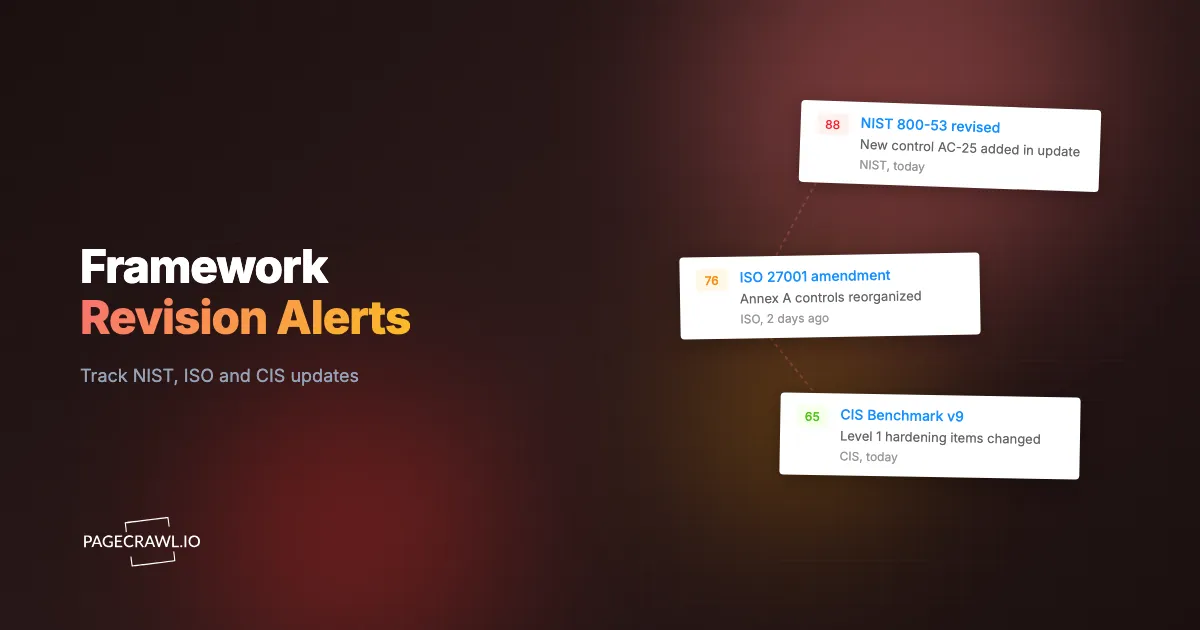
- NIST Cybersecurity Framework (CSF) landing page, where version 2.0 superseded 1.1 in February 2024.
- NIST SP 800-53 (Security and Privacy Controls) publication page, currently at Revision 5, where any errata or a future revision will surface.
- NIST SP 800-171 (Controlling Unclassified Information) page, which moved to Revision 3 in May 2024 and feeds directly into CMMC and DFARS obligations for defense contractors.
- ISO/IEC 27001 and ISO/IEC 27002 catalogue pages, where the 2022 editions cut Annex A controls from 114 to 93 and reorganized them into four themes (Organizational, People, Physical, Technological).
- CIS Benchmarks pages for the platforms you harden, plus the CIS Critical Security Controls page (v8.1 shipped in 2024).
- PCI DSS document library, if you process card data, where 4.0 moved to 4.0.1.
If you maintain compliance across more than a handful of standards, treat this like any other multi-website regulatory monitoring program: one monitor per authoritative page, named clearly, grouped together, so the whole framework landscape is visible in one view. This is the same discipline behind any serious regulatory compliance monitoring effort, just pointed at standards bodies instead of legislatures.
What signals tell you a framework has been re-baselined?
The clearest signals are a version-number change (1.1 to 2.0, Rev 5 to Rev 6, :2013 to :2022), a new publication or "last updated" date, a fresh PDF or workbook download replacing the prior file, and changelog text describing added, withdrawn, or merged controls. Any one of these means your control mapping needs review.
Each signal lives in a specific spot on the page, which is what makes monitoring precise rather than noisy:
Version strings and edition numbers
A framework re-baselining almost always changes a visible identifier. "CSF 1.1" becomes "CSF 2.0." "ISO/IEC 27001:2013" becomes "ISO/IEC 27001:2022." "800-171 Rev 2" becomes "Rev 3." Watching the heading or metadata block where that string lives gives you a near-zero-noise trigger, because the version text does not change for cosmetic edits.
Publication and revision dates
NIST publication pages expose a "Date Published" and often a "Date Updated" field. CIS benchmarks carry a release date and version on the cover page. A date change is a strong signal that the document behind the page moved, even when the version number scheme stays the same (for example, an 800-53 patch release or errata update).
The document file itself
Standards bodies frequently ship the substance as a PDF, an Excel control workbook, or an OSCAL data file. When the linked file is replaced, the page text might barely change while the actual content shifts entirely. Watching the download itself, not just the surrounding HTML, catches revisions that a text-only watcher would miss.
Changelog and "what changed" sections
CSF 2.0, the 800-53 revisions, and the ISO editions all ship with summaries of added, withdrawn, and merged controls. Capturing the changelog text gives your team the actual delta to work from, not just the fact that something changed. That delta is what feeds your re-baselining tickets.
How do you keep framework monitoring low-noise and high-signal?
Keep it low-noise by tracking the specific element that signals a real revision (the version string, the changelog block, or the linked document) rather than the entire page, and by setting alert rules so cosmetic edits like reworded navigation or a new banner do not fire. The goal is one alert per genuine re-baseline, not one per cosmetic tweak.
Standards-body pages are surprisingly busy. They carry event promotions, related-publication carousels, "recently viewed" widgets, and footer updates that have nothing to do with the control set. If you watch the whole page as raw text, you will get pinged every time the marketing team rotates a banner, and within a month your team will mute the alerts. That defeats the purpose.
Three techniques keep the signal clean. First, scope the monitor to a region of the page (the publication metadata block, the changelog heading, the download link) so unrelated edits are invisible to it. Second, use keyword or text rules so an alert only fires when meaningful words appear or change, the same logic behind well-designed conditional alerts and threshold rules. Third, lean on automatic importance scoring to suppress trivial whitespace and formatting diffs while still surfacing a genuine control change. The combination is what separates a monitoring program your auditors trust from a folder of ignored notifications. Anyone who has tuned a noisy watcher knows the discipline of reducing false positives is what makes the whole thing sustainable.
Which PageCrawl tracking mode fits each framework page?
Match the mode to where the signal lives: use keyword or text tracking for version strings and changelog text, fullpage content tracking for whole-page diffs on simple pages, PDF monitoring when the standard ships as a downloadable document, and JSON or API field tracking if a body exposes a machine-readable index. Each framework page tends to favor one mode.
A quick mapping you can reuse:
- Version strings and edition numbers map to keyword and text tracking, watching the exact heading or metadata text. A change from "Revision 5" to "Revision 6" is an unambiguous alert with almost no false-positive risk.
- Changelog and "what changed" sections map to fullpage or scoped text tracking on that region, so you capture the actual added and withdrawn controls.
- Downloadable standards map to PDF monitoring, which reads the text inside the document, so a replaced file triggers an alert even when the surrounding page is unchanged.
- Catalogue index pages (a list of published standards or benchmarks) map well to sitemap-style new-page detection when you want to catch a brand-new benchmark appearing, not just an edit to an existing one.
- Machine-readable feeds, where a body publishes an OSCAL or JSON index, map to JSON and API field tracking, letting you watch a single field like a version or release-date attribute with surgical precision.
- Member-gated or login-required content, such as a benchmark workbench behind authentication, maps to login-gated monitoring so you can watch pages your team can only reach signed in.
Because PageCrawl renders each page fully before comparing, the version block, the dynamically loaded download link, and the changelog all resolve the way a human sees them, which matters on modern standards-body sites that build content with client-side scripts. New monitors capture a screenshot on every check by default, so you also get visual proof of the page on the day the revision landed, which is useful evidence for an audit trail.
How does framework monitoring fit into your broader GRC program?
Framework revision monitoring is one layer of continuous compliance and regulatory monitoring: standards bodies re-baseline controls, regulators change laws, and vendors change the security commitments published on their trust centers, and a mature program watches all three. Framework monitoring specifically protects the foundation your control library is built on, so the rest of your evidence stays anchored to the current version.
Think of it as the upstream signal. When NIST CSF moves to 2.0, that single event cascades into policy updates, control re-mapping, evidence re-collection, and revised board reporting. Catching it on publication day means the cascade starts on your schedule. Catching it through a customer questionnaire means it starts on theirs, usually with a deadline attached.
The same monitoring backbone extends naturally to adjacent compliance signals. Teams running this for frameworks usually also watch regulation-driven obligations like the NIS2 directive and operational-resilience rules under DORA, and they pair it with continuous vendor monitoring so a subprocessor's posture change does not blindside them either. Framework, regulation, and vendor monitoring together form the practical, tool-agnostic version of a compliance monitoring software stack, without paying for an enterprise GRC platform you do not need yet. For card-handling environments, the same approach underpins PCI DSS change detection, where the standard itself and your in-scope pages both warrant watching.
How do you set up framework revision alerts with PageCrawl?
Setting up framework alerts takes about ten minutes per standard: add the authoritative page as a monitor, scope it to the version or changelog element, pick a check frequency that matches the framework's cadence, route alerts to where your GRC team already works, and tune thresholds so only real revisions fire. Here is the full sequence.

Step 1: Add the authoritative page and choose a tracking mode. Create a monitor on the canonical publication page (the NIST CSRC page, the ISO catalogue entry, or the CIS benchmark page). For a version string or changelog, choose keyword or text tracking and scope it to that element. For a standard that ships as a downloadable PDF or workbook, choose PDF monitoring so PageCrawl reads the document itself. For a simple page, fullpage content tracking captures the whole diff.
Step 2: Scope the monitor to the signal, not the whole page. Narrow the watched region to the publication metadata block, the version heading, or the "what's new" section. This is the single most important step for keeping noise out, because it makes banners, carousels, and footer edits invisible to the alert. If the framework exposes a machine-readable index, point JSON field tracking at the specific version or date attribute instead.
Step 3: Set a check frequency that matches the framework's cadence. Standards do not change hourly, so daily checks are appropriate for most NIST and ISO pages. For CIS benchmarks, which update more frequently across many platforms, a daily or twice-daily cadence catches releases promptly without wasting checks. Reserve faster frequencies for the rare page where lead time genuinely matters.
Step 4: Route alerts to where your GRC team already works. Connect the notification channel your team lives in, whether that is Slack, Microsoft Teams, Discord, Telegram, email, or a webhook into your ticketing or automation system. A webhook is especially useful here, because it can auto-open a re-baselining ticket in Jira or ServiceNow as soon as a check detects the revision, so the work is queued before anyone reads the message.
Step 5: Confirm screenshots are on for audit evidence. New monitors capture a screenshot on every check by default, and you should keep it enabled. The dated image of the publication page on the day the version changed is contemporaneous evidence you can attach to your change record, which auditors appreciate far more than a verbal "we saw it that week."
Step 6: Tune thresholds and importance rules so only real revisions fire. Add keyword rules so an alert triggers on terms like "Revision," "Version," "withdrawn," or "superseded," and let automatic importance scoring suppress cosmetic diffs. The help centre guide to notification conditions and keyword filters walks through the per-page rules that control this. Test the monitor once against the live page, confirm the baseline looks right, then leave it running. The result is a monitor that stays quiet for months and speaks up only when a framework actually re-baselines.
If you are monitoring a dozen framework pages at once, set them up as a batch using bulk URL monitoring rather than one at a time, then group and tag them so your whole standards landscape sits in a single dashboard view. The general mechanics here are the same ones that apply to monitoring any website change, applied to standards bodies.
Choosing your PageCrawl plan
PageCrawl's Free plan lets you monitor 6 pages with 220 checks per month, which is enough to validate the approach on your most critical pages. Most teams graduate to a paid plan once they see the value.
| Plan | Price | Pages | Checks / month | Frequency |
|---|---|---|---|---|
| Free | $0 | 6 | 220 | every 60 min |
| Standard | $8/mo or $80/yr | 100 | 15,000 | every 15 min |
| Enterprise | $30/mo or $300/yr | 500 | 100,000 | every 5 min |
| Ultimate | $99/mo or $999/yr | 1,000 | 100,000 | every 2 min |
Annual billing saves two months across every paid tier. Enterprise and Ultimate scale up to 100x if you need thousands of pages or multi-team access.
Getting started with framework revision monitoring today
You can have NIST CSF, your 800-53 revision, ISO 27001, and your top CIS benchmarks under watch before your next stand-up. Start free, add the canonical publication page for each framework you map controls to, scope each monitor to the version string or changelog, and route the alerts into the channel your GRC team already reads. The first time a standard re-baselines and your re-baselining ticket opens itself on day one instead of month four, the whole effort pays for itself. Set it up once, then let the standards bodies come to you.