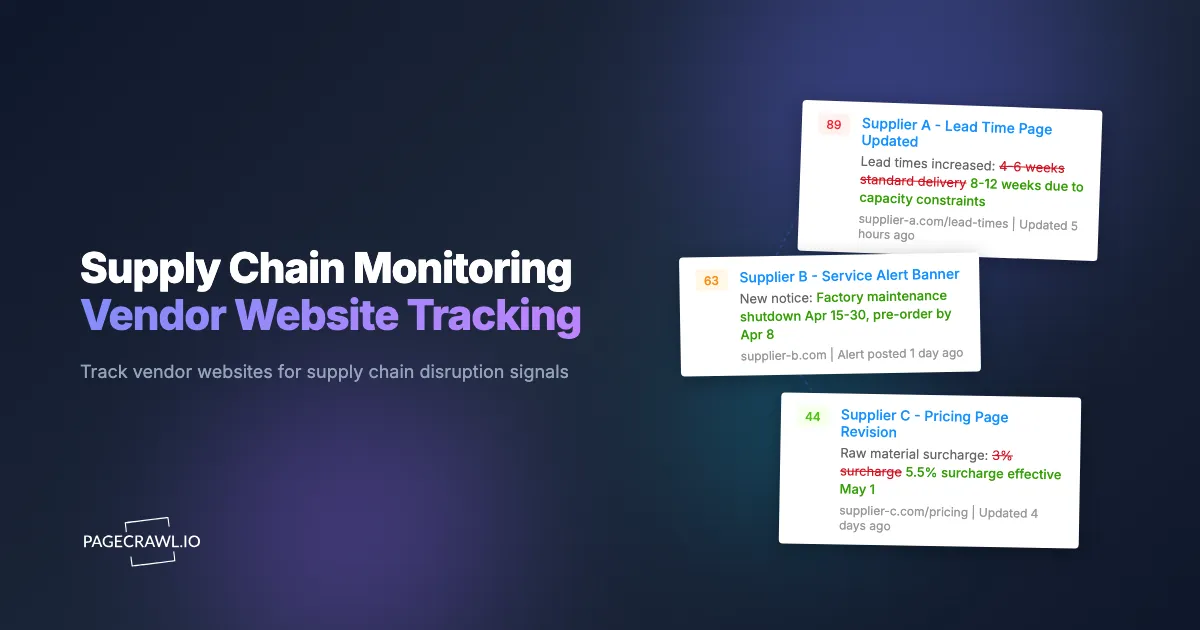
A mid-sized electronics manufacturer learned that their primary capacitor supplier had discontinued a critical component. They found out from a customer complaint, not from the supplier. The discontinuation notice had been posted on the supplier's product page three weeks earlier, buried in a spec sheet update. By the time the manufacturer started looking for alternatives, lead times on comparable parts had already stretched to 16 weeks, and the only available stock was priced at a 40% premium.
This scenario plays out constantly across industries. Suppliers change prices, discontinue products, update lead times, restructure operations, and shift strategic direction. They publish this information on their websites, sometimes prominently and sometimes quietly. The companies that catch these changes early have weeks or months to respond. The companies that find out late pay more, scramble harder, and occasionally face production stoppages.
This guide covers why monitoring vendor websites is becoming essential for supply chain resilience and third-party risk management, what signals to watch for on supplier sites, how to set up automated tracking with PageCrawl, and how procurement teams can build early warning systems across their entire supplier base.
Why does supply chain monitoring matter?
Supply chain monitoring matters because your supplier knows about a price rise, a discontinuation, or a capacity problem long before you do, and the cost of finding out late is measured in expedited freight and stalled production. Research from McKinsey puts the cost of disruptions at roughly 45% of one year's profits over a decade. While catastrophic events like pandemics and port closures dominate headlines, the most common supply chain problems are mundane: a price increase you did not anticipate, a product discontinuation you discovered too late, or a lead time extension that threw off your production schedule.
The Information Asymmetry Problem
Suppliers know about changes to their own business long before their customers do. A supplier planning a price increase has weeks of internal discussion, approval, and preparation before the new pricing takes effect. That information gradually surfaces on their website: updated price lists, revised catalogs, new terms and conditions pages. If you are monitoring those pages, you see the signals early. If you are waiting for a formal notification, you are always reacting instead of preparing.
Many suppliers are contractually required to provide advance notice of price changes, but the reality is messier. Notices get sent to outdated email addresses, buried in routine correspondence, or delivered with minimal lead time. Website monitoring serves as an independent verification channel that does not rely on your supplier's communication discipline.
The Scope of What Changes
Vendor websites contain a surprising density of supply-chain-relevant information:
- Product pricing and availability: The most direct signal. Price increases, out-of-stock notices, and minimum order quantity changes all appear on product pages.
- Product lifecycle notices: End-of-life announcements, last-time-buy dates, and replacement product recommendations.
- Lead time and shipping information: Delivery timeframe updates, shipping policy changes, and regional availability shifts.
- Company news and press releases: Mergers, acquisitions, facility closures, expansions, and leadership changes.
- Terms and conditions: Payment term changes, warranty modifications, return policy updates.
- Career pages: Hiring freezes or aggressive hiring signal company health and strategic direction.
Each of these data points, taken individually, might seem minor. Together, they paint a picture of vendor health and direction that procurement teams rarely have access to through formal channels alone.
What should you monitor on vendor websites?
Monitor five page types on a vendor site: product and pricing pages, product lifecycle or end-of-life notices, company news and press releases, career pages, and terms and conditions. Together they carry almost all of the supply-chain signal a supplier publishes, and each one changes independently of the others.
Product and Pricing Pages
Product pages are the most actionable monitoring targets. Price changes on these pages directly affect your cost of goods sold.
What to watch for:
- Price increases or decreases on specific SKUs you purchase
- New surcharges or fees (shipping, handling, hazardous materials, small order fees)
- Minimum order quantity changes
- Volume discount threshold adjustments
- Currency or regional pricing modifications
For suppliers with online catalogs, monitor the specific product pages for items you purchase regularly. Use price tracking mode in PageCrawl to focus on the numeric values rather than the entire page content. This reduces false alerts from cosmetic page updates.
For suppliers with downloadable price lists (PDFs or spreadsheets), monitor the page where those files are hosted. PageCrawl detects when the file changes, alerting you that a new price list has been published.
Product Discontinuation and Lifecycle Pages
Discontinuation notices are among the most time-sensitive signals in supply chain management. Missing a last-time-buy date can force you into expensive spot market purchases or emergency redesigns.
What to watch for:
- End-of-life (EOL) announcements
- Last-time-buy (LTB) dates
- Product change notifications (PCNs) indicating material or specification changes
- Replacement or successor product recommendations
- "Legacy" or "mature" product designations (often precede formal EOL)
Monitor your suppliers' product lifecycle pages, end-of-life notification pages, and the specific product pages for your critical components. Some suppliers maintain dedicated pages listing all current discontinuations. These pages are high-value monitoring targets because a single monitor captures all new discontinuation announcements.
Company News and Press Releases
Vendor news pages reveal strategic shifts that affect your supply chain months before they impact your orders.
What to watch for:
- Facility closures, relocations, or capacity expansions
- Mergers and acquisitions (which often lead to product line consolidation)
- Leadership changes (new CEO or supply chain leadership often signals strategic shifts)
- Financial results or warnings (public companies)
- Regulatory actions or compliance issues
- Sustainability or environmental policy changes affecting materials
A supplier announcing a factory relocation from one country to another signals potential lead time disruptions, quality variations during transition, and possible pricing changes. Catching this announcement early gives you time to qualify alternative suppliers or build safety stock.
Career Pages as Health Indicators
A supplier's career page is an underappreciated intelligence source. Hiring patterns reveal what a company is investing in and where it sees growth, while hiring freezes or layoffs signal financial stress.
What to watch for:
- Sudden disappearance of job postings (hiring freeze, possible financial trouble)
- Aggressive hiring in manufacturing roles (capacity expansion)
- Quality engineering positions (responding to quality issues)
- Leadership positions (turnover or restructuring)
- Geographic expansion (new facility, new market entry)
Monitor your key suppliers' career pages using job listing and career page monitoring in content monitoring mode. Changes to job listings happen frequently, so set your check frequency to daily rather than hourly to avoid noise. For vendor pages that update frequently with minor formatting changes, PageCrawl's Kanban-style Review Board provides a consolidated view of all recent changes across your monitored suppliers, letting your procurement team scan updates in one place and quickly distinguish meaningful shifts from routine website maintenance.
Terms, Conditions, and Policy Pages
Changes to supplier terms often precede changes to your commercial relationship.
What to watch for:
- Payment term modifications (net-30 to net-15 signals cash flow concerns)
- Warranty changes (reducing warranty coverage suggests quality or cost pressures)
- Force majeure clause updates (preparing for potential disruptions)
- Shipping and logistics policy changes
- Return and defect resolution policy modifications
These pages change infrequently, so a weekly check frequency is usually sufficient. When they do change, the implications are often significant.
Setting Up Vendor Monitoring with PageCrawl
Here is how to build a systematic monitoring program across your supplier base.

Prioritizing Which Suppliers to Monitor
Not every supplier needs the same level of monitoring. Prioritize based on:
Critical suppliers: Single-source components, long-lead-time items, or suppliers where switching costs are high. These get comprehensive monitoring (product pages, news, careers, terms).
Important suppliers: Multi-source components where your preferred supplier has a quality or cost advantage. These get product page and news monitoring.
Commodity suppliers: Easily replaceable suppliers. These may not need individual monitoring, though monitoring a category or marketplace page can still be valuable.
Start with your top 5-10 critical suppliers. For each, identify the specific pages that carry the most relevant information.
Configuring Product Page Monitors
For each critical product you source:
Step 1: Navigate to the product page on your supplier's website and copy the URL.
Step 2: Add the URL to PageCrawl. Select price tracking mode if you want to focus on price changes, or content monitoring mode if you want to catch all textual changes (including availability, lead time, and specification updates).
Step 3: Set the check frequency based on how quickly you need to know about changes. For volatile categories (electronics components, raw materials), check every few hours. For stable categories (industrial equipment, capital goods), daily checks are sufficient.
Step 4: Configure notifications. For critical components, send alerts to both your procurement team's Slack channel and individual email. For less critical items, email notifications provide a record without creating urgency.
Step 5: Enable screenshots so your team can see exactly what changed on the page.
For a deeper walkthrough of targeting specific page elements with CSS selectors, see the CSS selector guide.
Monitoring Multiple Products from One Supplier
For suppliers where you purchase many SKUs, monitoring every individual product page may not be practical. Instead, focus on:
Catalog or category pages: Monitor the page that lists all products in your purchasing category. New products, removed products, and pricing changes all surface here.
Price list download pages: Monitor the page where the supplier publishes their latest price list or catalog. When the file is updated, you know new pricing is in effect.
News and announcement pages: A single monitor captures all new announcements, regardless of which products they affect.
Search result pages: If the supplier site has search, create a saved search for your product category and monitor the results page.
This approach covers broad changes with fewer monitors, which is important when you are managing dozens or hundreds of supplier relationships.
Organizing Monitors by Supplier Category
Use labels, folders, and workspaces in PageCrawl to organize your supplier monitors:
- Create a folder for each supplier or supplier category
- Tag monitors by criticality (critical, important, commodity)
- Tag by product category (electronics, raw materials, packaging)
- Tag by region if you work with global suppliers
This organization becomes essential as your monitoring program grows. When a disruption hits a specific region or category, you can quickly pull up all relevant monitors and assess exposure.
What are the early warning signals of a supply disruption?
The reliable early warnings are creeping surcharges before a list-price rise, availability language softening from "In Stock" to "Contact for Availability", a career page that goes quiet, and tightening payment terms. Website monitoring catches each of these patterns weeks or months before they reach your purchase orders.
The Price Creep Pattern
A supplier does not usually jump from $10 to $15 overnight. Instead, you see a sequence: a small surcharge appears, then a shipping cost increase, then a minimum order adjustment, and finally a list price increase. Each change is modest individually. Together, they represent a significant cost increase.
Monitoring catches each step in this sequence, giving you time to negotiate, seek alternatives, or adjust your own pricing before the full impact hits.
The Quiet Discontinuation
Some suppliers do not issue formal discontinuation notices. Instead, the product page changes subtly: "In Stock" becomes "Contact for Availability." Lead time estimates disappear. The product moves from the main catalog to a "legacy" section. Eventually, the page returns a 404 error.
Each of these intermediate states is detectable through monitoring. Catching the first signal (the shift to "Contact for Availability") gives you months more lead time than waiting for the page to disappear entirely.
The Financial Stress Indicators
A supplier under financial pressure exhibits multiple website-level signals:
- Career page goes quiet (hiring freeze)
- Payment terms tighten (shorter payment windows)
- Press releases shift tone (from growth to "strategic review" or "operational efficiency")
- Contact information changes (consolidating offices)
- Website maintenance declines (outdated content, broken links)
No single signal is conclusive, but multiple signals from the same supplier warrant attention.
The Acquisition Precursor
Before a merger or acquisition is announced, websites often show:
- New branding elements or "a [parent company] brand" additions
- Combined product catalogs
- Shared leadership announcements
- Cross-referenced websites between the two companies
Post-acquisition, watch for product line rationalization (discontinuations), pricing harmonization, and operational consolidation. These changes affect your supply chain directly.
Building a Supply Chain Intelligence Dashboard
Monitoring generates data. The next step is turning that data into actionable intelligence.
Routing Alerts to the Right People
Not every alert needs the same audience. Configure your notifications so that:
- Price change alerts go to procurement managers responsible for that category
- Discontinuation notices go to both procurement and engineering (for redesign assessment)
- Company news goes to supply chain leadership for strategic assessment
- Terms changes go to legal and procurement
For webhook-based integrations that route alerts to different channels based on content, see the guide on webhook automation.
Tracking Changes Over Time
PageCrawl maintains a history of all detected changes. This history is valuable for:
- Negotiation preparation: Showing a supplier their own price history during contract negotiations
- Trend analysis: Identifying suppliers that consistently increase prices versus those that remain stable
- Risk scoring: Suppliers with frequent website changes in critical areas may warrant closer attention in your vendor risk assessment
- Audit trails: Documenting when you became aware of a change, for compliance and dispute resolution
For building custom dashboards that aggregate monitoring data across your supplier base, see the guide on custom monitoring dashboards with the PageCrawl API.
Integrating with Procurement Systems
For larger organizations, monitoring data should feed into procurement workflows:
- Use webhooks to push change alerts into your ERP or procurement system
- Create automated tickets when critical supplier changes are detected
- Feed price change data into your cost analysis tools
- Link monitoring alerts to your vendor risk management software
The PageCrawl API enables these integrations. Price changes on a supplier page can automatically trigger a review workflow in your procurement system.
Use Cases by Industry
Supply chain monitoring applies differently across industries.
Manufacturing
Manufacturers depend on component availability and pricing stability. Key monitoring targets:
- Raw material suppliers: metal, plastic, chemical pricing pages
- Component distributors: product and lifecycle pages at Digi-Key, Mouser, and RS Components
- Equipment suppliers: maintenance parts availability and lead times
- Packaging suppliers: material costs and availability
For manufacturers with long product lifecycles, monitoring component end-of-life pages is especially critical. A discontinued component can require expensive board redesigns if not caught early.
Retail and E-Commerce
Retailers monitor supplier pricing to maintain margins and competitive positioning. Key targets:
- Wholesale supplier pricing pages
- Brand MAP (Minimum Advertised Price) policy pages
- Distributor inventory availability
- Import/tariff information pages
Retailer supply chain monitoring overlaps with competitive intelligence. For strategies on tracking competitor pricing alongside supplier costs, see the competitor website tracking guide.
Food and Beverage
Food supply chains face unique monitoring challenges:
- Ingredient supplier pricing (volatile commodity markets)
- Regulatory compliance changes (updates from the FDA and USDA)
- Certification status (organic, non-GMO, kosher certifications)
- Recall notices from ingredient suppliers
- Seasonal availability updates
Technology
Tech companies monitor both hardware suppliers and software/service vendors:
- Cloud service provider status and pricing pages
- API documentation for changes that affect integrations
- Hardware component availability (chip shortages demonstrated this need)
- Software license term changes
For monitoring software vendor documentation and changelogs, see the guide on monitoring release notes.
Scaling Your Monitoring Program
As your supplier monitoring program matures, consider these expansion strategies.
Tier Your Suppliers
Assign monitoring intensity based on supplier criticality:
Tier 1 (Critical): 5-10 monitors per supplier covering products, news, careers, and terms. Check frequency: every few hours for products, daily for other pages.
Tier 2 (Important): 2-3 monitors per supplier covering key products and news. Check frequency: daily.
Tier 3 (Standard): 1 monitor per supplier covering their main news or catalog page. Check frequency: weekly.
Add Secondary Sources
Beyond direct supplier websites, monitor:
- Industry news sites for sector-wide trends
- Regulatory agency pages for compliance changes
- Trade association pages for industry standards updates
- Financial news for supplier credit ratings and financial health
Build Response Playbooks
When monitoring detects a specific type of change, your team should know exactly how to respond:
- Price increase detected: Verify change, assess contract protections, evaluate alternatives, negotiate
- Discontinuation notice: Assess impact, calculate last-time-buy quantity, identify alternatives, timeline for qualification
- Acquisition announced: Map affected products, assess continuity risk, identify backup suppliers
- Financial stress signals: Increase safety stock, accelerate alternative qualification, review payment terms exposure
Choosing your PageCrawl plan
PageCrawl's Free plan lets you monitor 6 pages with 220 checks per month, which is enough to validate the approach on your most critical pages. Most teams graduate to a paid plan once they see the value.
| Plan | Price | Pages | Checks / month | Frequency |
|---|---|---|---|---|
| Free | $0 | 6 | 220 | every 60 min |
| Standard | $8/mo or $80/yr | 100 | 15,000 | every 15 min |
| Enterprise | $30/mo or $300/yr | 500 | 100,000 | every 5 min |
| Ultimate | $99/mo or $999/yr | 1,000 | 100,000 | every 2 min |
Annual billing saves two months across every paid tier. Enterprise and Ultimate scale up to 100x if you need thousands of pages or multi-team access.
A single component discontinuation caught early enough to buy last-time stock or qualify an alternative can save tens of thousands in expedited sourcing and production delays. Standard at $80/year covers 100 supplier pages, enough for comprehensive Tier 1 and Tier 2 supplier monitoring across product, news, and terms pages. Enterprise at $300/year handles 500 pages for large supply chains, 5-minute check frequency, and timestamped page snapshots.
All plans include the PageCrawl MCP Server, so your procurement team can ask Claude to summarize every pricing or availability change across a supplier's pages over the past quarter, turning your monitoring history into a searchable intelligence archive rather than just an alert feed. AI assistants can create monitors through conversation on every plan, including Free.
Getting Started
Begin with your five most critical suppliers, the ones where a surprise would cause the most pain. For each, identify their product pages for items you purchase and their news or press release page. Set up monitors on these pages in PageCrawl with daily check frequency and email notifications to your procurement team.
After two weeks, review the alerts you have received. Adjust check frequencies based on how often each supplier updates their pages. Add monitors for the next tier of suppliers. Expand to career pages and terms pages for your most critical vendors.
PageCrawl's free tier includes 6 monitors, enough to cover your most critical supplier pages. The Standard plan at $80/year provides 100 monitors, supporting comprehensive coverage across dozens of suppliers. The Enterprise plan at $300/year includes 500 monitors for organizations with large, complex supply chains.
Supply chain visibility should not depend on your suppliers remembering to call you. Monitor their websites directly, and know about changes when they happen, not when someone decides to tell you.