If you've been using Versionista for website monitoring, you've probably noticed that things have gone quiet. The tool that journalists, compliance teams, and government watchers relied on since 2007 is no longer sold to new customers. Today, versionista.com directs anyone opening a new account to Fluxguard, which is run by the same company. Existing Versionista accounts are still supported, but any new account, team, or project now starts at Fluxguard, and that comes with a steep price jump and an enterprise focus that doesn't fit most Versionista users.
The good news: PageCrawl covers everything Versionista did and a lot more, at a fraction of the cost. This guide breaks down what happened, how the alternatives compare, and how to migrate your monitoring in minutes.
What made Versionista popular?
Versionista became the default tool for accountability work because it archived every version of a page and made the differences easy to read, at a price individuals and small teams could afford. It carved out that niche when it launched in 2007. At the time, most website monitoring tools were basic uptime checkers or desktop apps you had to leave running. Versionista focused on something different: tracking what changed on a page, not just whether it was up.
A few things made it stand out:
- Visual diffs that highlighted exactly what changed between two versions of a page, making it easy to spot edits at a glance
- Web archiving that stored every version of a monitored page, building a timeline of changes over months or years. For journalists and compliance teams, this archive was proof that a page said one thing on Tuesday and something different on Wednesday.
- Link harvesting that could extract and track all links on a page, useful for SEO and research workflows
- Non-Latin text support, which mattered for international monitoring and multilingual compliance
- Journalism and government use cases, where watchdog groups and researchers used Versionista to track changes to government websites, policy documents, and public records
For years, Versionista was the go-to tool if you needed serious, archival-grade web monitoring. It wasn't flashy, but it was reliable and purpose-built for people who cared about accountability and documentation.
What happened to Versionista?
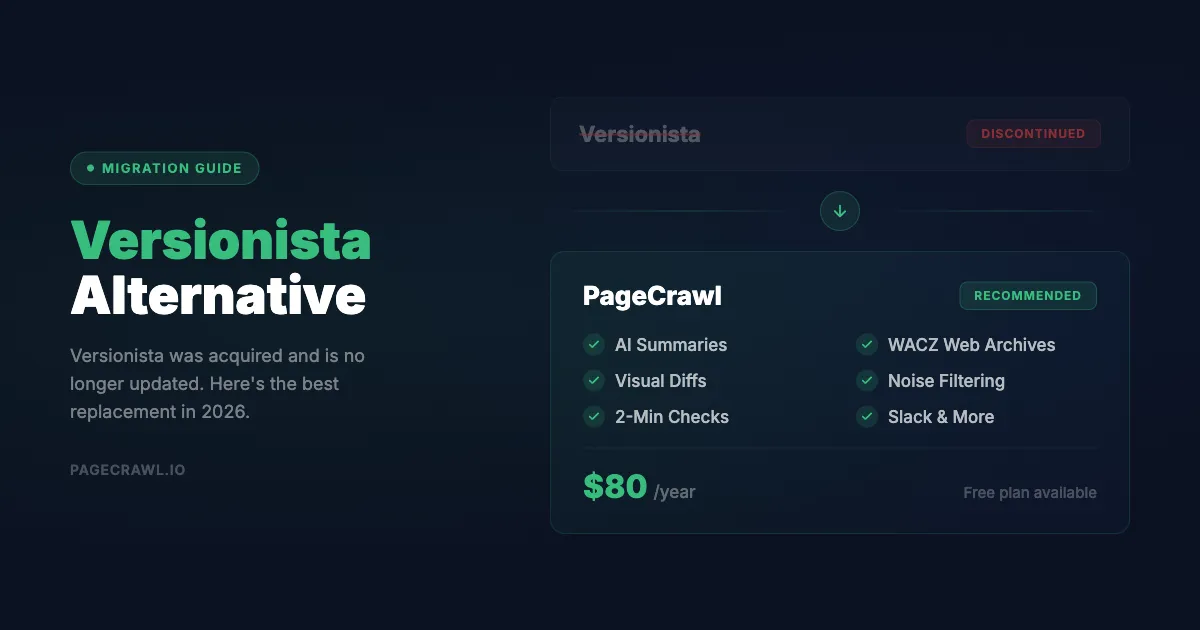
Versionista stopped selling to new customers and now sends them to Fluxguard, a more expensive, enterprise-focused sibling product. Existing accounts still work, but nothing new starts on Versionista. In July 2023, LegitScript acquired Fluxguard, which operates Versionista as a trade name alongside its own platform. Versionista kept selling on its own for a while afterwards, but that has since stopped: the pricing page now redirects to the homepage, and the sign-in page sends anyone without an account to Fluxguard. Versionista says existing accounts remain fully supported, so this is not a shutdown, but new business goes to Fluxguard.
The problem is that Fluxguard is a fundamentally different product aimed at a different market. Where Versionista had plans accessible to individuals, small teams, and nonprofits, Fluxguard starts at $110/month and goes up to $550/month. That's $1,320 to $6,600 per year, with a credit-based billing system that makes costs even harder to predict.
For the journalists, researchers, compliance analysts, and small teams who relied on Versionista, this pricing is a non-starter. Many of these users were paying under $100/month for Versionista. Being told to migrate to a tool that costs 3-5x more, with an enterprise-oriented interface they don't need, isn't a real solution, which is why many of them look for a Fluxguard alternative instead.
This is the gap PageCrawl fills.
Why is PageCrawl the best Versionista alternative?
PageCrawl covers everything Versionista did (visual diffs, historical versions, JavaScript rendering, multi-page monitoring), is still actively developed, and starts at $0 instead of Fluxguard's $110 per month. Versionista was founded in 2007. PageCrawl was founded in 2018, eleven years later. That gap matters because PageCrawl was built on modern browser engines, smarter diffing algorithms, and better notification infrastructure from day one. PageCrawl is also still actively sold and continuously updated. AI-powered change summaries, WACZ web archiving, reader mode, and smart noise filtering were all added in recent years to make content monitoring simpler and free of noise. The goal is always the same: you should only be alerted when something actually matters.
PageCrawl gives you everything Versionista offered (visual diffs, historical tracking, JavaScript rendering, multi-page monitoring) plus features Versionista never had, laid out feature by feature on the Versionista alternative comparison. And it starts at $0.
For former Versionista users, the transition is straightforward. The concepts are the same, the interface is more modern, and you'll likely end up with better monitoring than you had before.
How do Versionista, Fluxguard, and PageCrawl compare?
PageCrawl matches Versionista and Fluxguard on the shared basics and adds AI change summaries, WACZ archiving, reader mode, and six more notification channels. Here's how the three stack up across the features that matter most:
| Feature | Versionista | Fluxguard | PageCrawl |
|---|---|---|---|
| Visual diffs | Yes | Yes | Yes |
| AI change summaries | No | Basic | Yes, all plans (with importance scoring) |
| Fastest check frequency | Hourly | Varies by credits | 2 minutes (Ultimate) |
| JavaScript rendering | Limited | Yes | Yes (Chrome engine) |
| Web archiving (WACZ) | No | No | Yes, on Ultimate (full interactive archives) |
| Historical archives | Yes | Credit-dependent | Up to unlimited (Enterprise+) |
| Notification channels | Email, Slack | Email, Slack, Discord, Teams, Telegram, webhooks, web push | |
| Reader mode | No | No | Yes |
| Content-only mode | No | No | Yes |
| Smart noise filtering | No | Basic | Yes (AI + rule-based) |
| Bulk editing | No | No | Yes |
| Templates | No | No | Yes |
| Review boards (team) | No | No | Yes |
| Automatic page discovery | No | No | Yes |
| Browser extension | No | No | Yes |
| Price/availability tracking | No | No | Yes (auto-detection) |
| Non-Latin text support | Yes | Yes | Yes |
| API access | Limited | Yes | Yes, all plans |
| Free plan | No | 3 sites, 75 credits | 6 pages, AI included |
The pattern is clear: PageCrawl matches or exceeds both Versionista and Fluxguard on every feature, while adding capabilities that neither tool offers.
Pricing Comparison
This is where the difference is most dramatic. Here's what you'd pay annually:
| Plan | Fluxguard | PageCrawl |
|---|---|---|
| Free tier | 3 websites, 75 credits | 6 pages, 15 AI credits/mo, 60-minute checks |
| Entry paid plan | $110/mo ($1,320/yr) for 25 sites | $80/yr for 100 pages |
| Mid-tier | $220/mo ($2,640/yr) for 50 sites | $300/yr for 500 pages |
| Top tier | $550/mo ($6,600/yr) | $999/yr for 1,000+ pages |
To put this in perspective: PageCrawl Standard at $80/year gives you 100 pages with 15-minute checks and AI summaries. To get comparable coverage on Fluxguard, you'd pay $1,320/year or more, and you'd still be dealing with credit-based billing where costs fluctuate based on how often your pages are checked.
For teams that need 500+ pages, PageCrawl Enterprise at $300/year costs less than a single month of Fluxguard's mid-tier plan. And PageCrawl Ultimate at $999/year, which includes 1,000+ pages, 2-minute checks, Pro AI, and a dedicated account manager, still costs less than two months of Fluxguard Premium.
If you were paying Versionista $99-379/month, PageCrawl's annual pricing will feel like a significant upgrade in both features and cost.
What does PageCrawl offer beyond Versionista?
Beyond matching Versionista's core capabilities, PageCrawl adds WACZ web archiving, AI change summaries, smart noise filtering, reader and content-only modes, templates, bulk editing, review boards, and automatic page discovery. Here is what each one does:

Web archiving with WACZ. Versionista could archive page versions, but PageCrawl goes much further with full web archives in the WACZ (Web Archive Collection Zipped) format specified by Webrecorder, the same open standard used by libraries, governments, and legal teams worldwide. A WACZ archive captures the complete page: HTML, CSS, JavaScript, images, and fonts. You can replay it interactively in your browser, exactly as it appeared at that moment. Audit-ready WACZ archiving with independent timestamps is included on the Ultimate plan, switched on per monitor. Once enabled, archives are created automatically whenever a change is detected, and you can download the WACZ files for offline storage or legal use.
AI-powered change summaries. Every plan includes AI credits. When a change is detected, PageCrawl summarizes what happened in plain language and scores how important it is. Instead of reviewing every diff manually, you skim the dashboard and focus on what matters.
Smart noise filtering. Dates, ad banners, view counts, and cookie notices create noise that triggers false alerts. PageCrawl lets you apply filters globally, set thresholds for minimum change size, and click directly on a change to ignore that type of noise going forward.
Reader mode and content-only mode. Reader mode strips away navigation, ads, and sidebars. Content-only mode filters headers, footers, and menus automatically. Both dramatically reduce false positives.
Templates and bulk editing. Configure monitoring settings once and apply them across monitors. Change settings for multiple monitors at once instead of editing them one by one.
Review boards. A shared space for teams to review detected changes, mark them as seen, and collaborate on responses. Especially valuable for compliance teams.
Automatic page discovery. Use "Scan a Website" to crawl a site and discover all its pages. New pages are detected automatically going forward.
Browser extension and notifications. Set up monitoring from any page with two clicks. Get alerts via email, Slack, Discord, Teams, Telegram, webhooks, or web push, on every plan including free.
Migration Guide: Moving from Versionista to PageCrawl
Migrating your Versionista monitors to PageCrawl takes about 10 minutes. Here's the step-by-step process:
Step 1: Export Your URLs from Versionista
In Versionista, open the Site View for any site you're monitoring. Click "Download list as spreadsheet" to export your monitored URLs. Do this for each site you want to migrate. You'll end up with one or more spreadsheet files containing all the URLs you were tracking.
Step 2: Create a PageCrawl Account
Go to pagecrawl.io and create a free account. The free plan includes 6 pages with AI summaries, which is enough to test the import before committing to a paid plan.
Step 3: Import Your URLs
Go to pagecrawl.io/app/pages/create/advanced?track_type=multiple and upload the spreadsheet you exported from Versionista. PageCrawl will read the URLs and create monitors for each one. You can configure the tracking mode, check frequency, and notifications during import, or adjust them individually afterwards.
For each URL, PageCrawl will automatically detect the best tracking mode. You can also set it manually:
- Fullpage (default): Tracks all visible text on the page. Good for policy documents, terms of service, and general monitoring.
- Content only: Filters out headers, footers, and navigation. Great for articles and blog posts.
- Reader mode: Extracts just the main article content. Perfect for news monitoring.
- Price mode: Auto-detects prices and availability. Ideal for e-commerce tracking.
- Specific element: Monitor a particular section using a CSS or XPath selector. Use this when you only care about one part of a page.
Step 4: Set Up Automatic Page Discovery
To automatically discover pages on a website, click Track new page and then select Scan a Website. Enter the website's URL and PageCrawl will crawl the site, discover all pages, and let you pick which ones to monitor. Going forward, new pages will be discovered automatically, so you never miss a new policy document, blog post, or product page that gets added to a site you're watching. The help centre article on automatic page discovery explains sitemap scans, deep crawls, and base URL link discovery in detail.
Step 5: Configure Notifications
Set up where you want to receive alerts. Options include email, Slack, Discord, Microsoft Teams, Telegram, webhooks, and web push notifications. You can configure different channels for different monitors, or set workspace-level defaults that apply to everything.
Step 6: Fine-Tune Your Monitoring
If you're monitoring pages with dynamic elements (dates, counters, ads), set up noise filters. Go to your account settings and add global ignore rules for common noise like date strings, view counts, or ad content. These apply to all monitors automatically, and the complete guide to reducing false positives covers the rest of the available filters.
Note: PageCrawl's AI summaries also help here. Even without manual filters, the AI will tell you whether a change is meaningful or trivial, so you can quickly learn which monitors need additional filtering.
Common Use Cases
Journalism and Government Monitoring
This was Versionista's strongest use case, and PageCrawl handles it well. Monitor government websites, public records, official statements, and political campaign websites. Content-only mode filters navigation noise, AI summaries explain what changed in plain language, and WACZ web archives let you replay pages exactly as they appeared at any point in time. Use "Scan a Website" to discover new pages automatically.
Compliance and Regulatory Monitoring
Track privacy policies, terms of service, regulatory guidance, and vendor agreements. Route alerts to your legal team via Slack or email, and use review boards to document responses to each change. WACZ archives provide an audit trail with fully interactive page snapshots.
Competitor Intelligence and Price Tracking
Price mode auto-detects pricing and availability data across product pages. AI summaries turn raw diffs into actionable intelligence like "Competitor raised Pro plan pricing by 15%." PageCrawl builds price history charts and tracks stock status over time.
Frequently Asked Questions
Can I monitor as many pages as I was monitoring on Versionista? Yes. PageCrawl Standard supports 100 pages, Enterprise supports 500, and Ultimate supports 1,000+. If you need custom limits, contact hey@pagecrawl.io. Most former Versionista users find that Standard or Enterprise covers their needs.
Does PageCrawl support non-English pages and non-Latin text? Yes. PageCrawl monitors pages in any language and handles non-Latin scripts (Chinese, Japanese, Korean, Arabic, Cyrillic, and others) without any special configuration.
How fast are the checks? Check frequency depends on your plan: every 60 minutes on Free, every 15 minutes on Standard, every 5 minutes on Enterprise, and every 2 minutes on Ultimate. Custom 1-minute intervals are available on request.
Is there a free plan? Yes. The free plan includes 6 pages, checks every 60 minutes, 90 days of history, AI summaries (15 credits/month), and access to all notification channels including Slack, Discord, Telegram, and webhooks. No credit card required.
Can I export my data? Yes. PageCrawl supports data export and provides full API access on all plans, including free. You can programmatically access your monitoring data, change history, and download WACZ web archives for offline use.
Does PageCrawl render JavaScript? Yes. PageCrawl uses a full browser engine to render pages, so it captures content loaded by JavaScript, single-page applications, and dynamic elements.
What if I need help migrating? Reach out to hey@pagecrawl.io. We can assist with bulk imports, configuration, and optimization.
Which PageCrawl plan do you need after leaving Versionista?
Most former Versionista users land on Standard, which covers 100 pages with 15-minute checks. The Free plan monitors 6 pages with 220 checks per month, which is enough to import a sample of your exported URLs and confirm the tracking modes before you pay anything.
| Plan | Price | Pages | Checks / month | Frequency |
|---|---|---|---|---|
| Free | $0 | 6 | 220 | every 60 min |
| Standard | $8/mo or $80/yr | 100 | 15,000 | every 15 min |
| Enterprise | $30/mo or $300/yr | 500 | 100,000 | every 5 min |
| Ultimate | $99/mo or $999/yr | 1,000 | 100,000 | every 2 min |
Annual billing saves two months across every paid tier. Enterprise and Ultimate scale up to 100x if you need thousands of pages or multi-team access.
If you were paying Versionista even $99/month, switching to Standard at $80/year is a savings of over $1,100 in the first 12 months, with more features included. Standard's 100-page limit covers most journalist or compliance workflows, and AI summaries and 15-minute checks are included at that price, with audit-ready WACZ archiving available on the Ultimate plan. Enterprise at $300/year adds 500 pages, 5-minute checks, and other advanced features for high-volume teams. All plans include the PageCrawl MCP Server, which connects your monitoring history directly to Claude, Cursor, and other MCP-compatible tools. Compliance teams can ask "what changed on this vendor's privacy policy this quarter?" and get a structured answer pulled from their own archived change history, without digging through alert emails. AI assistants can create monitors through conversation on every plan, including Free.