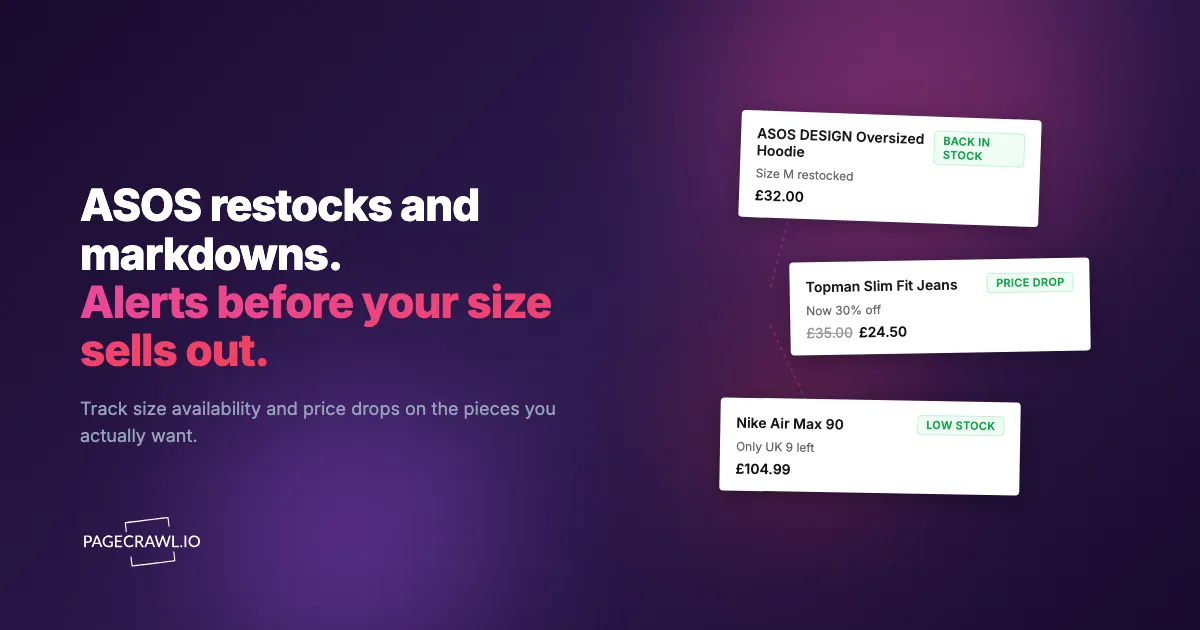
The dress you saved sold out in a UK 10 sometime overnight. You added it to your saved items the day before, opened the app at lunch, and the size dropdown showed every size except yours. ASOS does not tell you when a single size comes back. It tells you, eventually, that "an item" is available again, often hours after the size that fits has already gone.
ASOS sells thousands of styles across hundreds of brands, and its inventory moves constantly. Returns get processed, warehouse stock gets reallocated, and sale prices drop in waves rather than all at once. A jacket sitting at full price on Monday can be 40% off by Thursday, then sell through your size by the weekend. The size you want and the price you want rarely line up on the same visit, so most shoppers end up checking the same product page over and over and still missing the window.
This guide covers why ASOS items sell out and re-price the way they do, what is worth monitoring, the methods people use to catch restocks and markdowns, and a step-by-step walkthrough for setting up size-specific back-in-stock and sale alerts that reach your phone soon after a check detects the change.
Why do ASOS sizes sell out and prices keep moving?
ASOS tracks stock per size variant, restocks arrive in small return-driven batches at unpredictable hours, and markdowns roll out in waves over days and weeks. Understanding how ASOS manages inventory and pricing tells you what to watch and how often.

Size-Level Stock, Not Product-Level
The mistake most shoppers make is thinking about availability at the product level. ASOS tracks stock per size variant. A product page can read "in stock" while your specific size has been gone for days. When a size sells out, the option disappears or greys out in the dropdown while the rest of the page stays live. This is why a generic "back in stock" signal is close to useless: you need to know when a UK 10 returns, not when "the dress" returns, the same size-level precision behind Abercrombie & Fitch restock alerts for popular jeans and dresses.
Restocks at the size level come from two sources: genuine replenishment from the brand, and returns being processed back into available inventory. Return-driven restocks are small, often a single unit, and they sell through fast. They also happen at unpredictable hours, frequently overnight, because that is when warehouse systems reconcile inventory.
Markdowns Happen in Rolling Waves
ASOS rarely drops an entire category to sale price at once. Prices step down over days and weeks. A style might go from full price to 20% off, sit there, then drop to 50% off in a later wave. Outlet and clearance items get re-priced repeatedly as ASOS clears stock. The practical consequence is that the best price and your size being available are two separate events, and you usually want to wait for both.
This is the same pattern across most fashion retailers. If you also shop premium outdoor or activewear brands, the rolling-markdown behavior in our Patagonia and Arc'teryx restock and sale guide and the boutique-fashion approach in the Aritzia, Free People, and Anthropologie sale tracker will feel familiar.
Brand and Seasonal Turnover
ASOS carries its own labels alongside hundreds of third-party brands (the ASOS plc corporate site outlines the brand mix), and third-party stock is finite. When a brand sells through, ASOS may or may not reorder. Seasonal pieces disappear permanently at the end of a season, with final return-driven restocks being the last realistic chance to get them. End-of-line styles often land in the outlet at a steep discount before vanishing entirely.
High-Demand Sizes Go First
ASOS stock follows the usual bell curve. The middle of the size range (roughly UK 8 to 14 in womenswear, M to L in menswear) carries the highest demand against the largest pool of buyers, so those sizes sell out first and restock briefest. If your size sits in that range, manual checking simply will not catch the short windows when it returns.
What should you monitor on ASOS?
Monitor the canonical product page for each item you want (for size restocks and price drops), plus filtered sale, outlet, and new-in category pages for discovery. Product pages give the targeted stock availability and restock alerts for a specific size; category pages surface deals you did not know to look for.
Individual Product Pages for a Specific Size
The most precise approach watches a single product page for your size becoming selectable again. When ASOS restocks a UK 10, the page content changes: the size option that was unavailable becomes active. That content change is exactly what automated monitoring detects.
Use the canonical product URL for the item. ASOS product URLs are stable per style, and the page reflects size availability once it fully renders. For the broader mechanics of availability tracking on any retailer, our out-of-stock monitoring guide walks through the general approach, and the ASOS-adjacent activewear restock playbook in the Lululemon guide covers the same size-specific logic in detail.
Product Pages for Price Drops
The same product page can be monitored for price instead of availability. When the displayed price falls, you get an alert with the old and new value, the same price-drop signal behind Decathlon price and restock alerts for gear like bikes and hiking boots. This is the cleaner way to catch a markdown than scanning the sale section, because it tells you the exact item you care about dropped, not that "the sale got bigger."
For tracking price as a number across retailers, the patterns in our Amazon price tracker guide and the cross-retailer price comparison guide apply directly to ASOS product pages.
Sale, Outlet, and New-In Category Pages
If you want discovery rather than a specific item, monitor a filtered category or sale page. A women's dresses page filtered to your size and sorted by newest, or the ASOS outlet filtered to a brand you like, will change its content whenever new items land, much like the size, wash, and colour filters behind American Eagle and Aerie restock alerts. This is a broad signal ("something new appeared that matches my filter") rather than a targeted one, and it is how you spot deals you did not know to look for.
Note: ASOS lets you build very specific filtered URLs (size, brand, colour, price range, sale flag). Monitor the filtered URL, not the bare category, so the alerts stay relevant to what you actually buy.
Saved Items as a Watchlist
Your ASOS saved items list is effectively a wishlist. The most efficient setup is to monitor each saved item you actually want as its own monitor, so a restock or price drop on any of them reaches you directly rather than waiting for ASOS to decide whether to email you.
How reliable is ASOS's own back-in-stock email?
ASOS offers a "Back in stock reminder" on out-of-stock sizes, but it is batched, size-imprecise, email-only, and silent about price drops. You opt in, and ASOS theoretically emails you when stock returns. In practice it has the same weaknesses as most retailer-run reminders.
It Is Slow and Batched
The reminder email does not fire as soon as a size restocks. These are sent on ASOS's own schedule, and for a single returned unit that sells in minutes, an email arriving an hour later is too late. Email is also the slowest channel to act on: you have to open it, tap through, and reach checkout before someone else does.
Limited Size Precision
Depending on how you opted in, you can receive a reminder that does not match the exact size you need, sending you to the page only to find your size still gone. The reminder is tied to ASOS's notion of the item, not reliably to a single variant.
No Price-Drop Reminders
The back-in-stock reminder is about availability, not price. ASOS will not message you when a saved item drops into a sale wave. You only find markdowns by checking, or by external price monitoring that watches the price number.
Email Only, No Channel Choice
There is no push notification, no Telegram or Discord message, no webhook into your own automation. For time-sensitive restocks, the channel matters as much as the speed.
Setting Up ASOS Monitoring with PageCrawl
PageCrawl watches the actual ASOS pages and alerts you through the channel you choose as soon as a check detects that a size returned or a price dropped. New monitors come with screenshots enabled by default, so every alert includes a captured view of the page, and PageCrawl renders pages with a real browser engine so dynamically loaded availability and pricing appear before the page state is captured.
Size-Specific Back-in-Stock Setup
Step 1: Open the ASOS product page for the item you want and copy the URL from the address bar. Use the main product URL for the style; the page tracks every size variant on it.
Step 2: Add the URL to PageCrawl and choose the availability tracking mode. PageCrawl analyses the page and identifies the stock indicators, including the size options. If you only care about one size, you can target that size's element directly so the monitor ignores other sizes coming and going. Our CSS selector guide shows how to pin the alert to a single size button.
Step 3: Set the check frequency. For a sought-after style in a high-demand size, check every 1 to 2 hours, since return-driven restocks are small and brief. For less competitive items, every 4 to 6 hours is enough.
Step 4: Configure notifications. For time-sensitive restocks, use a push channel rather than email. Telegram and Discord deliver within minutes of detection; see our guides to web push notifications and Discord change alerts. Keep the default screenshot on so you can confirm the size is genuinely available before navigating over.
Price-Drop (Sale) Setup
Step 1: On the same product page, add a second monitor (or a second tracked element on the same monitor) and choose the price tracking mode so PageCrawl extracts the price as a number.
Step 2: Because PageCrawl reads the price as a value, you get alerts that show the old and new price, for example 58.00 dropping to 34.80. You can act only when the drop is meaningful instead of on every minor change.
Step 3: Set the frequency to every 2 to 4 hours. Markdown waves roll out over hours and days, not seconds, so you do not need aggressive checking to catch them. The approach mirrors the one in our competitor price monitoring guide.
Watching Filtered Sale and New-In Pages
Step 1: Build the exact ASOS filtered URL you want, for example women's dresses filtered to your size, a brand, and the sale flag, sorted by newest.
Step 2: Add that filtered URL to PageCrawl using fullpage content tracking mode so the monitor flags when new items appear that match your filter.
Step 3: Set the frequency to every 4 to 6 hours. When you get an alert, PageCrawl highlights what changed on the page so you can spot the newly added items and act before popular sizes sell through.
Filtering Out Noise
ASOS product and category pages carry elements that change constantly without meaning anything: "X people have this in their bag," recently viewed carousels, recommendation rails, and rotating promotional banners. With content monitoring, click any detected change you do not care about to ignore it in future checks, one of several ways to reduce false positive notifications. After a couple of cycles the noise is filtered out and you only hear about genuine availability or price changes. Organising related monitors in a folder, for example "ASOS Wishlist," keeps a multi-item watchlist tidy.
Building a Complete ASOS Strategy
Tier Your Monitors by Urgency
Tier 1 (must-have): Exact style, size, and ideally price combinations you want most. Availability monitors checked every 1 to 2 hours with push notifications.
Tier 2 (would-buy): Items you would take at the right price. Price monitors checked every 2 to 4 hours.
Tier 3 (discovery): Filtered sale, outlet, and new-in pages checked every 4 to 6 hours.
This keeps aggressive checking reserved for the handful of items that truly need it while still catching broader opportunities.
Combine Availability and Price
For a piece that is in stock but full price, run two monitors: an availability monitor on your size and a price monitor on the same page. The availability alert tells you your size is safe; the price alert tells you a sale wave hit. When both have fired, you buy the item you wanted at the price you wanted. The same pairing works across retailers using the method in the cross-retailer price comparison guide.
Time Your Checks to ASOS's Rhythm
Return-driven size restocks skew toward overnight and early morning, when warehouse systems reconcile inventory. New-in product lands in regular waves through the week, and sale markdowns step down over days. Automated monitoring is most valuable precisely for the overnight restocks you would otherwise sleep through.
Common Challenges with ASOS Monitoring
Dynamically Loaded Availability
ASOS loads size availability and pricing after the initial page render. PageCrawl renders the page with a full browser, so size options, stock state, and price load completely before the page is captured. You are comparing the same fully loaded state your browser would show, not a half-rendered shell.
Region and Currency Differences
ASOS shows prices and stock based on your detected region. Monitor the URL for the storefront and currency you actually buy in, so the price number and availability match what you will see at checkout.
Saved-Item URLs vs Product URLs
Always monitor the canonical product URL rather than a saved-items or search URL. The product URL uniquely identifies the style and reliably reflects per-size availability, while list and search URLs can shift their contents for reasons unrelated to the item you want.
Cart Holds and Micro-Restocks
ASOS, like most retailers, holds stock in shoppers' bags for a window after it is added. An item can read as sold out while units sit in abandoned bags, then briefly return when those holds expire. These micro-restocks are real but extremely short-lived. Hourly checking catches some of them; their timing is inherently unpredictable.
Layout Changes
ASOS updates its site design periodically, which can shift how stock indicators are identified. PageCrawl's content analysis adapts to most layout changes automatically. If a major redesign breaks a monitor, recreating it against the updated page resolves it.
Choosing your PageCrawl plan
PageCrawl's Free plan lets you monitor 6 pages with 220 checks per month, which is enough to validate the approach on your most critical pages. Most teams graduate to a paid plan once they see the value.
| Plan | Price | Pages | Checks / month | Frequency |
|---|---|---|---|---|
| Free | $0 | 6 | 220 | every 60 min |
| Standard | $8/mo or $80/yr | 100 | 15,000 | every 15 min |
| Enterprise | $30/mo or $300/yr | 500 | 100,000 | every 5 min |
| Ultimate | $99/mo or $999/yr | 1,000 | 100,000 | every 2 min |
Annual billing saves two months across every paid tier. Enterprise and Ultimate scale up to 100x if you need thousands of pages or multi-team access.
The math is straightforward. Standard at $80/year covers 100 product pages. If monitoring catches one $20 price drop, one mispriced competitor SKU, or one restock you would otherwise miss each month, the plan has paid for itself roughly four times over in the first year. For teams running real competitive pricing programs, Enterprise at $300/year tracks 500 SKUs, which is usually enough to cover a full category across every major competitor.
Getting Started
Pick the single ASOS item you want most right now. Copy its product URL, set up an availability monitor on your size in PageCrawl, and connect Telegram or Discord so restock alerts reach your phone soon after a check detects the change. If the item is in stock but full price, add a price monitor on the same page so you also hear about the next sale wave.
Run it for a week. Even for popular styles you will usually see at least one size restock or price step-down, and watching it happen makes the case for monitoring better than any pitch. Then expand: add your full saved-items wishlist, and set up a filtered sale or outlet page so new markdowns in your size find you instead of the other way around.
PageCrawl's free tier includes 6 monitors, enough for a focused ASOS wishlist. The Standard plan at $80/year provides 100 monitors for a full watchlist plus filtered sale and new-in pages. Stop refreshing the app and let the alerts come to you.